

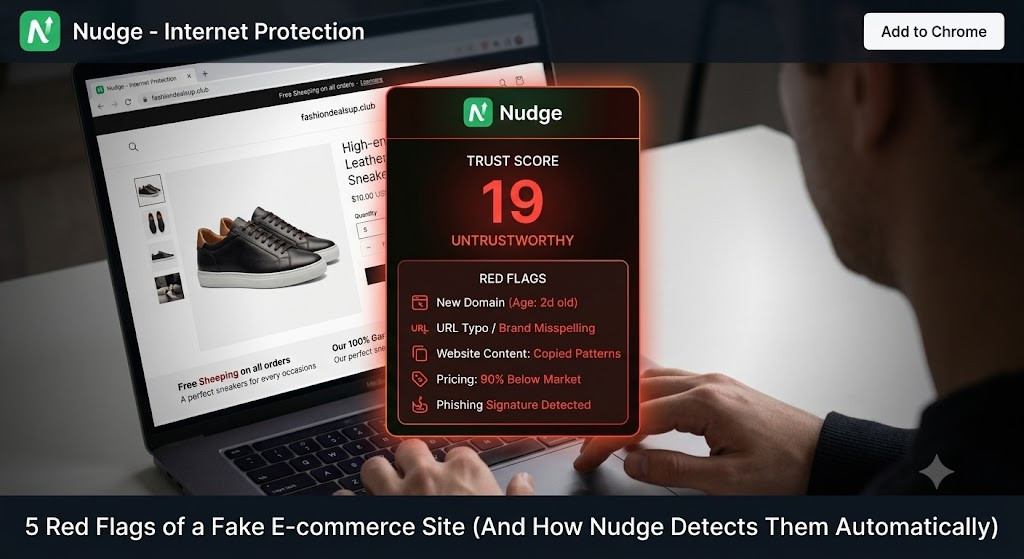
Most fake ecommerce sites now look professional on the surface, so the safest way to avoid scams is to rely on automated checks for domain age, lookalike URLs, malicious code, weak payment flows, and missing trust signals rather than gut feel alone.
Modern scam stores are not obvious anymore; they look polished, load fast, and copy real brands. The only safe response is to automate the checks our eyes and instincts can no longer handle alone.
Let’s be honest, we’ve all almost fallen for it.
You’re scrolling through your feed, and an ad pops up for that exact jacket you’ve been eyeing, but it’s miraculously 50% off. You click through. The site looks perfect. The product photos are high-quality, the reviews are glowing, and the checkout page looks totally normal.
But if you click “buy,” you aren’t getting that jacket. You’re handing your credit card details straight to a scammer.
E-commerce scams have evolved. Scammers no longer build sloppy, broken websites with bad grammar. Today, they use AI to clone legitimate stores and spin up identical-looking fakes in a matter of minutes. It’s causing what I call “Scam Fatigue.” We are constantly second-guessing whether a store is safe to buy from.
You shouldn’t have to be a cybersecurity expert just to shop online. That’s exactly why I rely on the Nudge Chrome Extension, a free, AI-powered browser bodyguard that does the heavy lifting for me.
Here are the five biggest red flags of a fake online store, and how Nudge automatically detects them so you don’t have to.
The Red Flag: You’re on a site that claims to be a massive, established brand running an “anniversary sale.” But if you were to look up the actual website address (the URL) on a domain registry, you’d find it was created just three days ago. Scammers burn through domains quickly—they spin them up, take our money, get shut down, and move to a new one.
How Nudge Fixes It: Who has the time to manually look up domain registration records before buying a pair of shoes? Nobody. Nudge cross-references the site’s domain age the millisecond the page loads in your browser. If it acts like a massive brand but was registered last Tuesday, Nudge instantly flags it for you.
The Red Flag: The store looks exactly like a famous brand, but if you look closely at the address bar, the URL has a slight twist. Instead of nike.com, it’s nike-clearance-outlet.shop or adidas-deals.cc. Scammers rely on visual trickery, banking on the fact that most of us click a social media ad and never actually look at the address bar.
How Nudge Fixes It: Nudge features built-in lookalike domain detection. Its AI recognizes variations of major brands and alerts you immediately if you’ve landed on a malicious copycat rather than the real storefront.
The Red Flag: The site is aggressively pushing you to buy. You might see forced pop-ups, fake “Only 2 items left!” warnings, or deceptive countdown timers. Worse, there might be hidden malicious scripts running in the background trying to scrape your browser data while you read the product description.
How Nudge Fixes It: Fake sites aren’t just trying to sell you a phantom product; they want your data. Nudge scans the underlying page structure and behavior in real-time. If it detects high-risk infrastructure or patterns associated with known scam templates, the extension shifts your safety badge to Red before you can even click “Add to Cart.”
The Red Flag: You make it to the checkout page, but something feels off. It doesn’t use standard encrypted processors (like Shop Pay or Apple Pay), or it redirects you to a strange, unsecure third-party page to type in your credit card information.
How Nudge Fixes It: Once a scammer has your raw card data, the headache is just beginning. Nudge includes robust phishing and deepfake alert protection. It actively monitors form fields and payment gateways to ensure you aren’t entering your financial data into a masked phishing trap.
The Red Flag: Legitimate stores have verifiable digital footprints—real contact information, physical addresses, and clear return policies. Fake stores cut corners. They often have no contact page, or worse, they display fake “Norton Secured” or “McAfee” trust badges at the bottom of the screen that are just JPEG images you can’t even click on.
How Nudge Fixes It: Nudge aggregates data from over 1,000,000 verified domains and evaluates a site’s overall trust signals instantly. It translates all of these complex technical metrics into a simple, intuitive color-coded badge right in your browser bar.
We shouldn’t have to play detective every time we want to buy something online. I don’t want to manually check SSL certificates, inspect code, or verify domain ages. I just want to know if a site is safe.
That’s why the Nudge extension is a game-changer. It runs silently in the background, giving you a simple visual cue: Green for Safe, Amber for Warning, Red for Danger. Best of all? It’s built with a privacy-first architecture, meaning it protects you without tracking your browsing history or selling your data.
Stop second-guessing your online shopping. Download the Free Nudge Chrome Extension today and secure your browser in less than two clicks.
The most important signs a site might be fake are a very new domain pretending to be an established brand, a suspicious or lookalike URL, aggressive urgency tactics and pop-ups, strange or unsecured payment pages, and a weak or obviously faked trust footprint. When several of these appear together, the safest move is to avoid entering any personal or payment information.
Nudge analyzes multiple signals in real time, including domain age, lookalike brand patterns in URLs, page structure and scripts, payment flows, and broader trust signals. It then translates these checks into a simple color-coded safety badge in your browser so you can see at a glance whether a site looks safe, questionable, or dangerous before you buy.
Basic habits like glancing at the URL and being skeptical of unbelievable deals are always helpful, but Nudge is designed so you do not have to rely on manual checks for every purchase. The extension automates deeper background checks most people would never perform, then alerts you clearly when something is wrong so you can decide whether to leave or proceed.
A well-designed security extension should not put your privacy at risk and should avoid collecting or selling your browsing history. Nudge is built on a privacy-first architecture that focuses on evaluating websites in real time rather than tracking you as a user, so it can warn you about scams without turning your behavior into another data stream to monetize.
Nudge helps with both obvious scam sites and subtler risks because it looks at technical and behavioral signals that go beyond design alone. It can catch brand-new domains, cloned storefronts, risky payment flows, and malicious code patterns, even when the site looks polished. That makes it useful in exactly the gray-area situations where it is hardest to trust your gut.





