

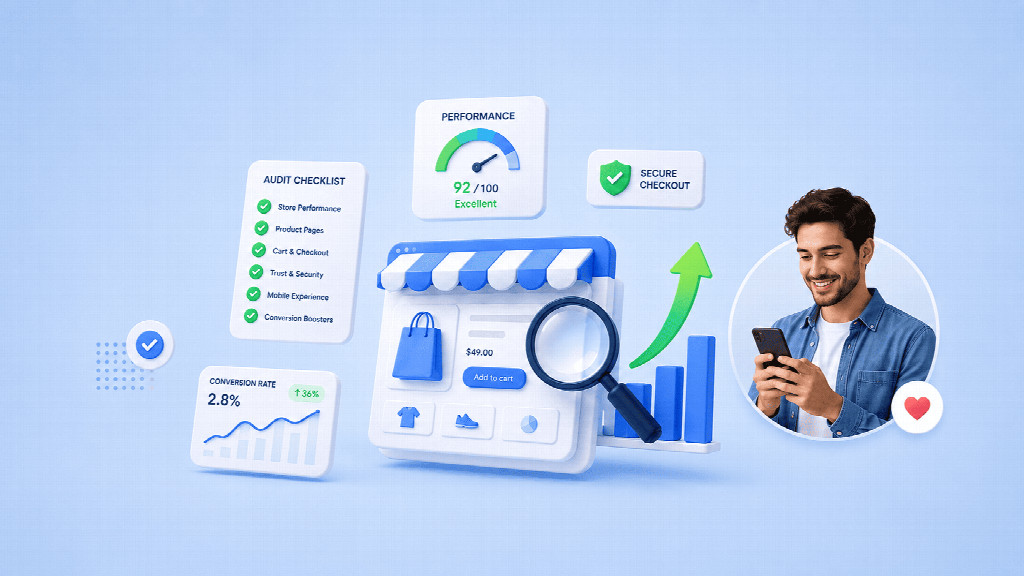
Before increasing paid traffic, Shopify merchants should verify that their offer, mobile journey, product pages, checkout, analytics, support, and unit economics can turn additional sessions into profitable orders. Fix blocking issues first, then scale through controlled budget increases that reveal the next constraint without overwhelming the operation.
Paid traffic does not fix a weak store. It gives more people a faster chance to find the weakness.
Increasing ad spend is one of the fastest ways to expose weaknesses in an ecommerce store. More traffic does not just amplify sales. It also amplifies confusing product pages, slow mobile experiences, unclear shipping terms, broken tracking, weak offers, and poor fulfillment economics.
That is why the question before scaling should not be, “Can we buy more traffic?” It should be, “Is the store ready to learn from more traffic without wasting the budget?”
A useful Shopify store audit is less about cosmetic polish and more about removing avoidable friction. The objective is to make sure the storefront can explain the offer, help customers decide, complete checkout cleanly, measure what happens, and fulfill the resulting orders without damaging margin or customer trust.
The following 12 checks are designed as a pre-scaling audit. Run them on the actual pages and devices customers use, not just inside the theme editor.
If your store is still at the pre-launch stage rather than preparing to scale traffic, start with this practical Shopify free trial launch plan for first-time founders before running the readiness checks below.
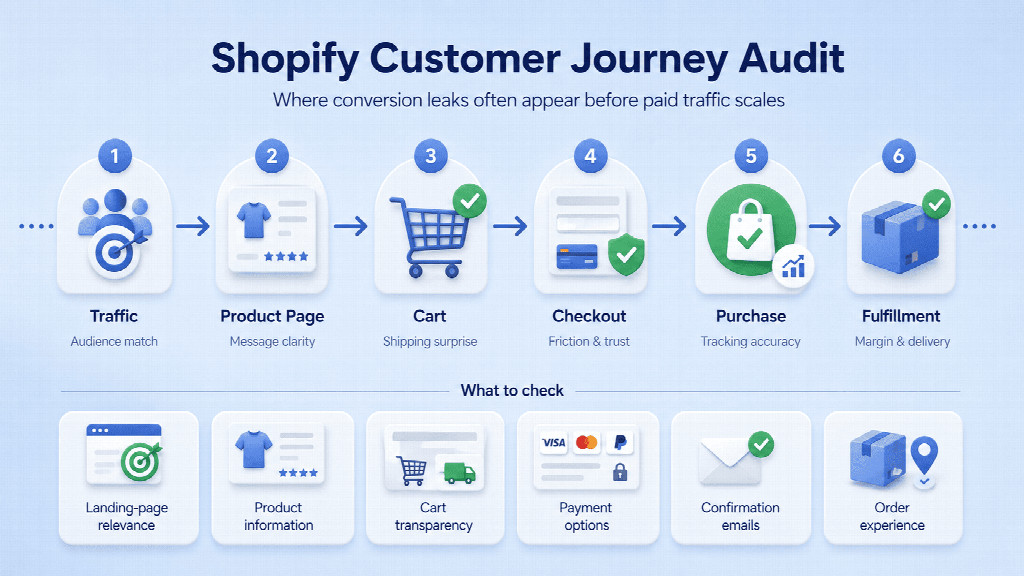
The diagram below shows the main points in the customer journey where conversion leaks often appear before traffic scales.
Start with the first screen of the homepage or campaign landing page. Without scrolling, a new visitor should be able to answer three questions: What does this store sell? Who is it for? Why should I consider buying here?
Generic brand language often fails this test. Phrases such as “Live better” or “Made for modern life” may sound polished, but they force the visitor to interpret the offer. Replace vague language with a concrete product category, customer, use case, or differentiator.
A simple test is to show the first screen to someone unfamiliar with the brand for five seconds, then hide it. Ask them to describe the product, target customer, and reason to buy. If the answers are inconsistent, fix the message before increasing acquisition spend.
A mobile storefront should be tested on a physical phone. Theme previews are useful, but they do not reproduce thumb reach, browser chrome, network conditions, or the way sticky elements compete for limited screen space.
Use one hand to find a best seller, open a collection, use filters, choose a variant, add an item to cart, review shipping information, and return to the previous page. Watch for menus that require too many taps, filters that are difficult to close, sticky widgets that cover buttons, and elements that shift while the page loads.
If mobile traffic is a large share of paid acquisition, even small usability problems can affect multiple campaigns at once. Fixing them improves the store rather than just one ad set.
Good product pages do not need to be long. They need to be complete enough for the buying decision.
For each top product, write down the questions a cautious customer would ask before purchasing. Depending on the category, that may include dimensions, compatibility, ingredients, sizing, materials, care, warranty, delivery time, subscription terms, returns, or what is included in the box.
Then compare that list with the page. If the answer exists but is buried in a separate policy page or difficult-to-find accordion, the customer may still experience uncertainty. Bring high-friction answers closer to the decision point.
This exercise also reveals another common problem: product copy that describes features but never explains why they matter. Turn specifications into decision support, not filler.
Customers compare total value, not just the product price displayed above the fold. They weigh shipping cost, delivery speed, return terms, warranty, trust, bundles, convenience, and the perceived risk of buying from an unfamiliar brand.
Choose three realistic alternatives: a direct competitor, a marketplace option, and the option of not purchasing yet. Compare the full proposition. If your product costs more, the page needs to make the reason for that premium clear. If your offer is similar, you need another reason to win the order.
This is an important audit step because conversion problems are often misdiagnosed as design problems. A cleaner theme cannot repair an offer that is structurally less attractive than the alternatives customers already know.
Shipping becomes friction when customers discover the real cost or delivery expectation too late. The basic proposition should be visible before checkout: where you ship, typical delivery timing, any free-shipping threshold, and material exclusions or conditions.
Test the store from the regions you actually target. International merchants should pay particular attention to geographic differences. A message that is accurate for the merchant’s location may be wrong for a customer elsewhere.
The goal is not to put the entire shipping policy on every product page. It is to prevent unpleasant surprises from appearing after the customer has already decided to buy.
The cart should confirm the order and make the next step obvious. It should not become a second homepage.
Test a one-item order, a multi-item order, a discounted item, a free-shipping threshold, and any subscription or bundle flow you use. Confirm that quantities, variants, discounts, taxes, shipping messages, and checkout actions behave consistently.
Be careful with aggressive upsells. A relevant recommendation can increase order value; a long block of offers that pushes the checkout button out of view can reduce completion. On mobile, every additional element competes for attention at the most commercially sensitive point in the journey.
If you are still setting up a new store, use the early evaluation period to test the full purchase path. Teams evaluating Shopify should spend less time repeatedly adjusting visual details and more time placing test orders, checking notifications, and validating what the customer sees before and after payment.
Complete orders on mobile and desktop. Try the payment methods you intend to offer. Enter an incorrect address. Apply a valid and invalid discount. Abandon checkout and return later. Review confirmation emails and the order-status experience.
Then ask one question: Did checkout reveal anything that should have been communicated earlier? If the answer is yes, the problem probably belongs upstream on the product page, cart, or shipping message.
Do not judge performance only from the homepage. Paid campaigns often land visitors directly on product pages, collections, quizzes, advertorials, or campaign-specific pages.
Test those exact URLs on a phone and a normal mobile connection. Pay attention to oversized images, autoplay media, review widgets, chat tools, pop-ups, personalization scripts, and tracking tags. Each component may be reasonable on its own while the combined page becomes heavy.
When an app or script is not clearly contributing to conversion, customer service, measurement, or operations, it should earn its place. Removing unused code can be a more effective optimization than adding another tool.
Scaling traffic without validating analytics is expensive because bad measurement can make good campaigns look weak and weak campaigns look successful.
Confirm that product views, add-to-cart events, checkout initiation, purchases, discounts, revenue, and campaign parameters are recorded consistently. Compare your ecommerce platform, analytics platform, and advertising dashboards. Perfect agreement is unrealistic, but large unexplained gaps need investigation.
Also decide which metrics will actually drive decisions. A useful pre-scaling dashboard is usually small: qualified sessions, product-view rate, add-to-cart rate, checkout initiation, purchase conversion, average order value, contribution margin, and acquisition cost are often more actionable than dozens of vanity metrics.
More traffic produces more questions even before it produces more orders. Test support as a customer with a pre-purchase question, an address change, a delayed shipment, a damaged item, and a return request.
Check response channels, automated replies, help content, escalation ownership, and whether the person answering can actually see the information needed to resolve the issue. If a simple request requires several handoffs at low volume, growth will make the weakness more visible.
Support readiness is also a conversion issue. Customers are more likely to ask before purchasing when the product is expensive, technical, personalized, unfamiliar, or time-sensitive.
Revenue is not the same as profitable growth. Build several realistic order scenarios and include product cost, packaging, payment fees, fulfillment, shipping subsidy, discounts, expected returns, and acquisition cost.
Run at least four cases: a single-item order, a typical order, a promotional order, and a returned order. If the economics only work when every customer buys a high-margin bundle and no one returns anything, the business is not ready to scale paid traffic.
The purpose is not to forecast perfectly. It is to identify which assumptions can break the model and decide what must be monitored as volume grows.
The final test is not a larger budget. It is a controlled increase.
Raise traffic enough to create a meaningful new sample, but not enough to overwhelm the operation. Watch whether add-to-cart rate changes, checkout completion drops, support tickets rise, delivery performance slips, or contribution margin deteriorates as the audience broadens.
This turns scaling into a diagnostic process. If performance weakens, you can identify the constraint while the cost of the lesson is still manageable.
After completing the audit, classify each area as one of three states: pass, needs work, or blocking issue.
A simple scorecard helps separate minor improvements from true blocking issues before you increase ad spend.
Broken checkout, inaccurate shipping information, unreliable purchase tracking, and negative unit economics are blocking issues. Minor copy refinements and non-critical design preferences are not.
The purpose of the gate is to keep teams from treating every optimization as equally important. Scale should wait for the issues that can distort the economics or the learning, not for a mythical perfect storefront.
Paid traffic is an accelerator. It makes a strong customer journey more productive, but it also makes weak fundamentals more expensive.
A disciplined Shopify store audit before scaling helps merchants find the problems that matter most: unclear offers, incomplete product information, shipping surprises, checkout friction, slow landing pages, unreliable analytics, support bottlenecks, and weak unit economics.
The best time to identify those problems is before the budget increases. Once the major risks are understood and measurement is trustworthy, scaling becomes less of a leap and more of a sequence of controlled, measurable decisions.
Before increasing paid traffic to Shopify, audit your offer clarity, mobile navigation, product-page information, shipping communication, cart, checkout, landing-page speed, analytics, customer support, fulfillment capacity, and unit economics. The highest-priority checks are the ones that can waste acquisition spend or create customer harm: broken checkout, inaccurate delivery information, unreliable purchase tracking, major mobile friction, and orders that become unprofitable after fulfillment, discounts, returns, and acquisition costs. Fix those before spending more.
Your Shopify store is ready to scale ads when the customer journey works reliably, the analytics are trustworthy, and a realistic order remains profitable after variable costs. Complete test orders on mobile and desktop, validate top paid landing pages, compare Shopify and ad-platform reporting, and calculate contribution margin for standard, discounted, and returned orders. Then run a controlled budget increase rather than a major spend jump. If checkout completion, support load, delivery performance, and margin remain stable, you have stronger evidence that the store can handle more traffic.
The biggest Shopify conversion leaks are usually unclear offers, weak mobile navigation, incomplete product information, late shipping surprises, difficult carts, checkout failures, slow landing pages, and missing trust signals. The correct priority depends on where customers drop out. Review conversion rate by device, traffic source, landing page, and funnel step before changing anything. A low add-to-cart rate often points to the offer or product page, while a high checkout drop-off can point to delivery, payment, trust, or checkout friction.
You should fix material speed and stability problems on the exact pages receiving paid traffic before scaling, especially if those pages are slow or unstable on mobile. Start with your top paid landing page, top-selling product page, and highest-traffic collection page. Measure Core Web Vitals, page load behavior, and layout shifts before and after changes. Do not delay all campaigns while pursuing a perfect performance score, but remove oversized media, unused scripts, and app features that clearly slow the experience without contributing to conversion, support, measurement, or operations.
You should increase ad spend by an amount large enough to create a meaningful new sample but small enough that a failure does not overwhelm cash flow, fulfillment, or customer support. Set the budget, time frame, success metrics, and pause thresholds before launching. Monitor qualified sessions, add-to-cart rate, checkout completion, purchase conversion, customer-support volume, fulfillment performance, refund rate, return rate, and contribution margin. A controlled increase is valuable because it shows where the next constraint appears before you commit to a much larger budget.





