
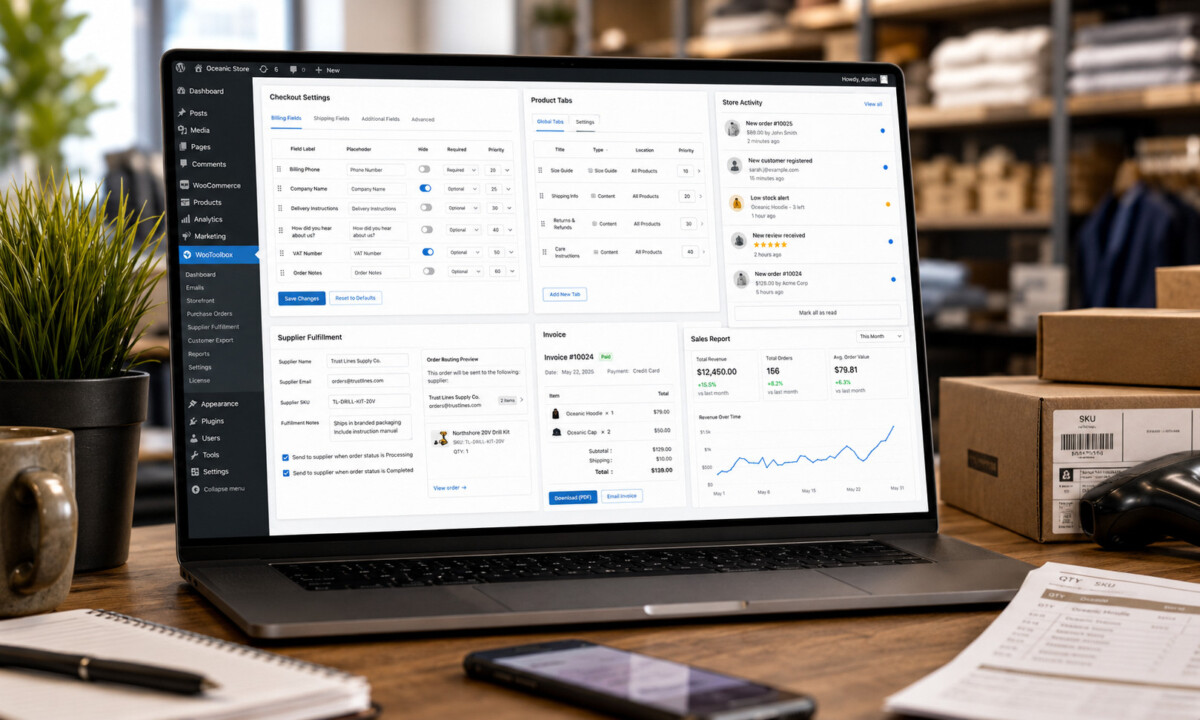
Woo Toolbox is a modular WooCommerce plugin that consolidates fourteen common store operations, including checkout field editing, product tabs, supplier fulfillment emails, browser printable invoices, customer exports, and admin notifications, into a single toolkit that can replace several small purpose built plugins for stores under roughly $2M in annual revenue.
Plugin stack decisions reveal the operator behind the store. Every plugin added solves one problem and creates three: performance overhead, security exposure, update conflict risk, and support drift. The question is rarely how many you have. It is whether each one is still earning its place.
WooCommerce specialists have long faced the same operational problem: one plugin to edit checkout fields, another to manage product tabs, another for invoices, another for customer exports, another for email follow ups, another for thank you page redirects and yet another for store activity alerts. The latest version of Woo Toolbox is designed to reduce that plugin sprawl by giving WordPress ecommerce teams a modular set of practical WooCommerce tools inside one interface.
The update arrives at a time when store owners and agencies are asking more specific operational questions: how do I customize WooCommerce checkout fields without code, how do I add product tabs or a size guide, how do I send WooCommerce orders to a dropshipping supplier, how do I change the Add to Cart button text, how do I export customers to CSV, and how do I get admin notifications when orders, refunds, reviews or low stock events happen?
For teams evaluating whether the plugin fits their store setup, Sitetrail is making Woo Toolbox available with a free trial so users can test it in their own hosting environment before committing. Get Woo Toolbox From Sitetrail
WooCommerce remains one of the most flexible ecommerce systems because it gives store owners control over checkout, data, costs, hosting and extensibility. That flexibility is also what creates complexity: many stores solve small operational needs by installing multiple narrow plugins. WooCommerce itself describes the platform as open source commerce for WordPress that gives merchants control over checkout, data and costs.
Woo Toolbox takes a different approach. Rather than trying to become a full ERP, CRM, dropshipping platform or marketing automation suite, it focuses on a practical question: what are the everyday WooCommerce adjustments that store owners repeatedly search for, buy plugins for, or ask developers to implement?
The result is a modular WooCommerce toolkit where each feature can be enabled only when needed. The latest documentation describes features for checkout customization, product tabs, size guides, Add to Cart text, trust lines, minimum order rules, supplier and dropship fulfillment emails, invoices, customer exports, live store activity notifications, post purchase emails, bulk email, thank you redirects and monthly sales reports.
One of the strongest search intents Woo Toolbox targets is simple: “How do I edit WooCommerce checkout fields?” Existing checkout field plugins have built entire products around this pain point. Flexible Checkout Fields for WooCommerce, for example, is positioned around editing default fields, changing labels, hiding or deleting fields, adding custom fields and changing field order.
Woo Toolbox now addresses that same everyday need in a broader toolkit. Store owners can customize the classic WooCommerce checkout page by hiding fields, renaming labels, changing field order, making fields required or optional, adding checkout messages above or below the form, collecting delivery instructions and asking “How did you hear about us?” for attribution.
This matters because checkout customization is not just cosmetic. A B2B seller might need a VAT or tax field. A local delivery store may need apartment access notes. A niche retailer may want to remove unnecessary fields to reduce friction. An agency may want a reusable way to configure these fields across client stores without editing theme code.
Another common WooCommerce problem is product page structure. Merchants often ask how to add a size chart, warranty tab, shipping information tab, ingredients tab or FAQ tab to product pages. Dedicated product tab plugins exist because the default product page structure is often too limited for serious ecommerce merchandising.
Addify’s Custom Product Tabs Manager, for example, is positioned around adding custom product tabs, organizing warranty information, size charts, videos, FAQs and other product content. Other product tab plugins focus on adding new tabs and assigning them to products.
Woo Toolbox adds this functionality as part of its broader store toolkit. Store owners can rename, hide or reorder the default Description, Reviews and Additional Information tabs. They can also add global custom tabs, per product tabs and size guide or size chart tabs.
This is particularly useful for fashion, footwear, furniture, tools, beauty, supplements, technical products and B2B catalogs, where the default product description area is not enough to support purchase decisions.
Woo Toolbox also moves into storefront conversion controls. Many merchants ask basic but commercially important questions: how do I change the WooCommerce Add to Cart button text, how do I add trust badges or reassurance text below the button, and how do I set a minimum order amount?
The new Storefront Settings module answers those questions directly. Woo Toolbox can change Add to Cart button text on product and shop pages, display trust or reassurance lines under the Add to Cart button, and enforce a global minimum order amount or minimum cart quantity before checkout.
These are small changes, but they affect real store behavior. “Add to Cart” may not be the right call to action for every product. A service product might need “Book Now.” A high urgency product might need “Order Today.” A B2B store or local delivery business may not want to process tiny orders below a profitable threshold. Trust lines such as secure checkout, fast delivery and easy returns can reinforce confidence close to the buying decision.
The most differentiating new feature is the supplier and dropship fulfillment module. This targets search queries such as “send WooCommerce orders to suppliers,” “WooCommerce dropship supplier email,” “email dropshipping partner when order is placed” and “send order details to warehouse automatically.”
Woo Toolbox lets the store assign suppliers, dropshippers, warehouses or fulfillment partners to products. When a paid order is ready to process, the plugin can email the correct partner with the relevant products, quantities, shipping details, supplier SKU, fulfillment notes and delivery instructions. The system groups partner emails correctly and includes duplicate send protection.
The documentation is careful not to overstate the feature. This is not a full dropshipping automation platform. It does not manage inventory sync, tracking numbers, supplier portals or API based fulfillment. Instead, it handles a very common operational gap: small WooCommerce stores often need to notify a supplier, print shop, warehouse, florist, manufacturer, custom product maker or dropshipping partner when an order requires fulfillment.
That makes the feature more broadly useful than the term “dropshipping” suggests. It is really a lightweight supplier notification layer for WooCommerce stores that still run fulfillment partly by email.
Invoices remain a core feature. Woo Toolbox allows logged in customers to download an HTML invoice from My Account or email the invoice to their billing address. The invoices include issuer details, customer billing details, order line items, tax, shipping, discounts, totals and optional header or footer text.
The distinction is important for SEO and buyer expectations. Woo Toolbox does not generate native PDF files through a heavy PDF library. Instead, it generates clean browser based invoices that customers can print or save as PDF using the browser’s built in print function. That can make the system lighter for stores that do not need full PDF automation or packing slip workflows.
For customers, the benefit is self service. For store owners, it means fewer support emails asking for invoice reissues or company detail changes.
B2B invoicing often breaks when customers forget to supply company names, VAT numbers or tax IDs. Woo Toolbox adds customer invoice details management so customers can save company name and tax ID details in My Account. Those details can then appear on future invoices.
For agencies managing WooCommerce stores in B2B, wholesale, professional services, digital products or cross border markets, that is a simple but practical feature. It reduces manual corrections and keeps invoice data closer to the customer.
Woo Toolbox also includes customer export to CSV with filters for registration date, purchase date, purchased products and purchase type. The export supports common fields such as name, email, phone, registration date, order count, total spent, last purchase date, billing address and shipping address.
The plugin also supports one time bulk email campaigns and product based post purchase email sequences. For ecommerce specialists, the key distinction is that bulk email is immediate and manual, while automated sequences are tied to product purchases and timed follow ups.
That supports common use cases such as review requests, educational onboarding, replenishment reminders, cross sells and post purchase instructions. Woo Toolbox uses normal WordPress email delivery, so SMTP is strongly recommended for reliable sending.
The Store Activity feature adds a live notification feed inside WordPress admin. It gives administrators and ecommerce administrators a bell in the admin bar, an unread badge, a dropdown feed and a Store Activity page.
The feature records real WooCommerce events such as new orders, large orders, first orders, refunds, cancellations, payment issues, low stock alerts and approved product reviews. It is not customer facing and does not send mobile push, SMS or external email. It is designed to improve operational awareness for staff already working inside wp admin.
For store managers, this answers another common question: how do I get WooCommerce admin notifications for important store events without checking every order screen manually?
Woo Toolbox also handles custom thank you page redirects. Store owners can set a global redirect or product specific redirects after checkout. That supports download pages, onboarding forms, setup instructions, welcome pages and campaign specific post purchase experiences.
The monthly sales report feature delivers store performance summaries by email. These reports can include revenue, order counts, average order value, new customers, returning customer rate, top products and top customers.
For small teams, this kind of reporting can be useful because many store owners do not log into WooCommerce analytics every day. A scheduled report reduces the chance that important trends go unnoticed.
Woo Toolbox is not a complete replacement for every specialist plugin. A store that needs advanced PDF invoice automation, packing slips, shipping labels, e invoicing, complex checkout conditional logic or enterprise level dropshipping should still evaluate dedicated specialist tools. But for stores that need practical versions of several common features in one lightweight plugin, Woo Toolbox can potentially reduce the need for a plugin stack.
For checkout fields, it overlaps with tools such as Checkout Field Editor and Manager for WooCommerce by Acowebs and Flexible Checkout Fields for WooCommerce by WP Desk, both of which target editing, hiding, deleting, adding and reordering checkout fields.
For product tabs, it overlaps with products such as Custom Product Tabs Manager by Addify, Custom Product Tabs for WooCommerce by Web Builder 143 and earlier tab focused tools associated with Code Parrots.
For invoices, it overlaps with lighter use cases served by PDF Invoices & Packing Slips for WooCommerce by WP Overnight, WooCommerce PDF Invoices, Packing Slips and Credit Notes by WebToffee and All in one PDF Invoice and Packing Slips Suite by WebToffee. Those specialist plugins go deeper into PDF, packing slip and document workflows, while Woo Toolbox is better understood as a lightweight invoice self service option inside a broader toolkit.
For thank you redirects, it overlaps with plugins such as Thank You Page for WooCommerce by Nitin Prakash and WooCommerce Redirect Thank You by Shop Plugins, which focus on redirecting or customizing the order received experience.
The strategic value is not that Woo Toolbox beats every specialist plugin feature for feature. The value is that it can replace several simple plugins where the store owner only needs the practical version of each capability.
According to Adriaan Brits, CEO of Sitetrail and a marketing technologist, the second quarter has been unusually active for the company, with updates shipped across Woo Toolbox and AI Live Chat PRO, along with preparation for the beta release of MSCP.
“WordPress store owners do not always need more complexity,” Brits said. “They often need fewer plugins, clearer workflows and tools that solve the operational questions they actually search for. Woo Toolbox is built around that reality: practical commerce controls, supplier communication, customer data and store awareness in one place.”
AI Live Chat PRO is Sitetrail’s intelligent AI chatbot product for businesses that want greater control over where chat data is hosted. That can make it relevant for organizations concerned with data protection, GDPR obligations and sensitive data workflows, including U.S. healthcare environments where HIPAA related controls may influence vendor selection.
Sitetrail is also approaching the beta release of MSCP, its Marketing Strategy Central Planner platform. MSCP is designed to help businesses and agencies plan visibility, PR, content and marketing activity around structured strategic cases rather than scattered tasks. The sellable proposition is that teams can move from isolated campaign ideas to a more centralized marketing strategy environment with budgets, channels, timelines, planning logic and stakeholder ready outputs.
For WooCommerce professionals, the latest Woo Toolbox release is less about one headline feature and more about a pattern: small operational features that usually live in separate plugins are being consolidated into one modular toolkit.
That matters because plugin sprawl is not just a technical inconvenience. It affects performance, maintenance, update risk, support burden, security exposure and client confusion. Agencies know the pattern well: a client asks for one checkout field change, one product tab, one invoice button, one supplier email and one sales report. Over time, the store becomes dependent on a pile of plugins that each solve one narrow issue.
Woo Toolbox is built for the middle of the market: stores that need more than default WooCommerce, but do not need enterprise software for every workflow. It is a modular WooCommerce plugin that helps store owners replace several small single-purpose plugins with one lightweight toolkit for checkout, product pages, supplier emails, invoices, exports, redirects, reports and admin notifications. For ecommerce specialists who work with WordPress, that makes it a credible product to evaluate, especially when the questions that lead users to it are practical, urgent and common.
Woo Toolbox is a modular WooCommerce plugin from Sitetrail that consolidates fourteen common store operations into a single toolkit, with each feature enabled only when the store needs it. The toolkit covers checkout field customization, product tabs, size guides, storefront controls like custom Add to Cart text and minimum order rules, supplier and dropship fulfillment emails, browser printable invoices, B2B invoice details, customer CSV export, bulk and post purchase email, live admin notifications, thank you page redirects, and monthly sales reports. The strategic purpose is reducing the number of small single purpose plugins a WooCommerce store runs to handle everyday operational tasks, which lowers maintenance burden, update conflict risk, and performance overhead.
Woo Toolbox covers the most common checkout field customization use cases, but dedicated checkout field editor plugins like Flexible Checkout Fields for WooCommerce by WP Desk or Checkout Field Editor and Manager by Acowebs go deeper into conditional logic and custom field types. The Woo Toolbox implementation handles hiding, renaming, reordering, and toggling required versus optional fields, adding checkout messages, and adding common fields like delivery instructions or attribution. For stores that need conditional fields that appear based on cart contents, custom field types beyond standard inputs, or per user role checkout variations, specialist tools still win. For everything else, the Woo Toolbox module is usually sufficient.
Woo Toolbox can replace a PDF invoice plugin only if your store’s actual requirement is customer self service invoice download rather than automated PDF workflows. The Woo Toolbox invoices are clean browser based HTML that customers print or save as PDF using their browser’s print function, not native PDF files generated through a PDF library. If your operational requirement is automated PDF generation at order completion, packing slip workflows, credit note workflows, e invoicing for cross border tax compliance, or document automation in any deeper sense, specialist tools like PDF Invoices and Packing Slips for WooCommerce by WP Overnight or the WebToffee PDF suite still win. For stores running a full PDF invoice plugin only to provide a customer download button, Woo Toolbox is genuinely sufficient.
The Woo Toolbox supplier email feature assigns suppliers, dropshippers, or warehouses to specific products and emails the relevant partner automatically when a paid order needs fulfillment, with shipping details, supplier SKUs, quantities, and fulfillment notes included. Multiple suppliers per store are supported, partner emails are grouped correctly when a single order touches multiple suppliers, and duplicate send protection prevents accidental re sends. This is appropriate for small dropshipping operations where the supplier handles fulfillment manually after receiving the email. It is not a full dropshipping automation platform. There is no inventory sync, no tracking number retrieval, no supplier portal API integration, and no order status reconciliation. Serious dropshipping operations at scale still need a dedicated platform.
Woo Toolbox is a reasonable fit for small to mid size B2B WooCommerce stores that need basic versions of several common B2B operational features rather than the deepest version of any single one. The relevant modules for B2B stores include checkout field customization for VAT and tax ID capture, minimum order amount enforcement to filter out unprofitable small orders, B2B invoice details so customers can save company name and tax ID for inclusion on future invoices, customer CSV export with filters by purchase history, and post purchase email sequences for onboarding or reorder nudges. Stores running full B2B implementations with complex pricing tiers, account hierarchies, or custom catalog access by customer group still need a dedicated B2B platform such as WooCommerce B2B by Code Atlantic or similar specialist tools.




