

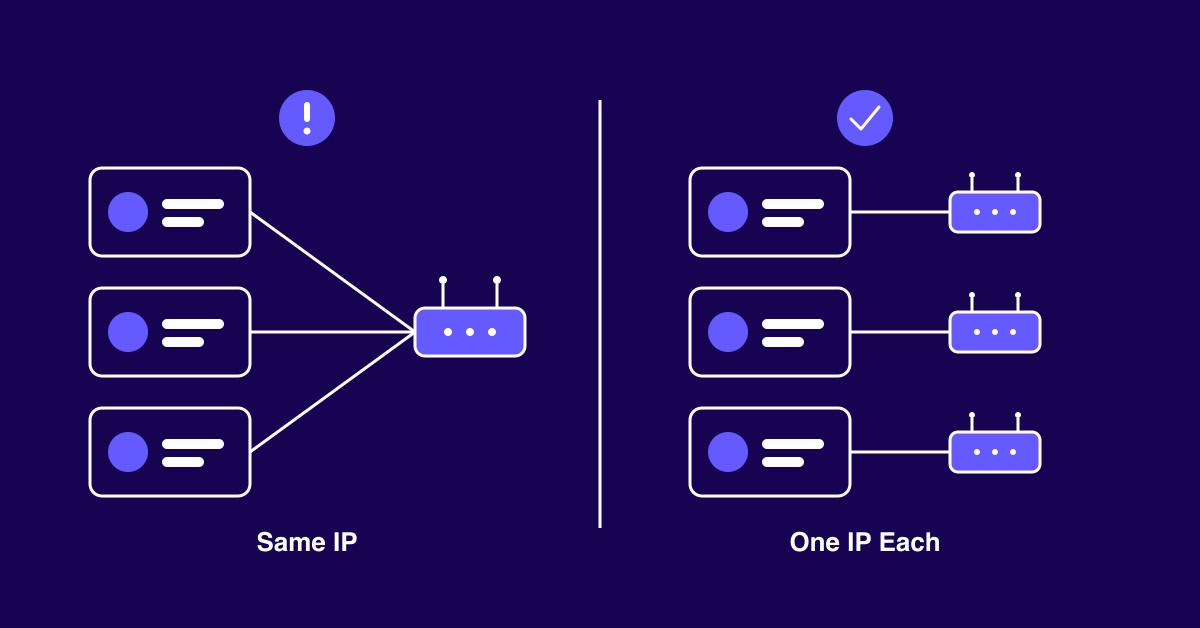
Most brands that keep getting social accounts flagged are not breaking content rules, they are reusing the same IPs and browser setups across profiles in ways that platforms are designed to detect.
Platforms are not accusing you of fraud because of what you post, they are reacting to what your accounts share in common: IP addresses, fingerprints, and patterns that do not look like normal human use.
Picture a normal week at a growing Shopify brand. Your team runs the main Instagram account, a UK account, a TikTok Shop profile, and a support account. Everyone posts from the same office. Then two accounts get hit with a phone check or a “suspicious activity” notice. Nothing you posted broke a rule. The store is real and the work is honest. At some point you type the question itself: why do my social media accounts keep getting flagged? In most cases, the content is not the problem. The connection is. Platforms link profiles by what they share, and the IP address is the loudest shared signal. This guide explains how that detection works in plain terms. It then shows the exact setup that keeps every brand account clean.
Platforms do not need your name to link two accounts. They watch a few shared signals. Then they score how likely it is that one person runs both.
The IP address comes first. Every login from 203.0.113.45 gets tied to that address. Ten brand accounts on one IP is a pattern built to be caught.
The network range sits above it. Your provider owns a block of addresses, called an ASN. Even if your exact IP changes, a known datacenter range still marks you as automated traffic.
The browser fingerprint comes next. Screen size, timezone, fonts, and graphics settings form an ID. That ID often survives a cookie wipe. Five accounts opened in one Chrome install all share it.
Behavior fills in the rest. Accounts that post at the same times and reuse the same captions look coordinated. Stack these signals together and the platform acts.
Not every IP carries the same weight. Platforms grade each address by how likely a real person sits behind it.
Shared office Wi-Fi trips up a lot of ecommerce teams. One warehouse or office network means one public IP. The platform sees six business profiles on a single connection and decides something is off.
Datacenter IPs are worse. They come from hosting companies, not homes. Platforms know these ranges well. A server address has no normal reason to run a personal profile, so the flag lands fast. Conbersa reports that residential grade proxies reach 95 to 99 percent success rates on social platforms. Datacenter IPs manage only 20 to 40 percent on the same platforms.
Here is the rough trust ladder platforms apply:
| IP type | Trust level | Typical flag speed |
|---|---|---|
| Mobile (carrier-issued) | Highest | Slowest, often days or weeks |
| Residential / ISP | High | Slow when usage stays steady |
| Datacenter | Low | Fast, sometimes on the first login |
The cleanest mental model for multi-account work is simple. One account, one IP. Each profile gets its own address that no other account touches. Every account then looks like a separate person on a separate home line.
This is where the multiple accounts flagged same IP problem dies. If your US account sits on one address and your UK account on another, there is no shared IP to link them. The loudest signal goes quiet.
Setting it up takes four steps:
The common mistake is treating IPs as a shared pool. Accounts keep crossing paths at random. That is the exact pattern detection systems hunt for.
Rotating proxies get marketed hard. For some jobs they fit. Price scraping and ad checks across regions benefit from many addresses. Managing logged-in accounts is not that job.
A logged-in session should hold steady for days. Real people do not jump from a Chicago address to a Frankfurt one between refreshes. A rotating pool does exactly that. Every hop reads as a stolen session or as someone hiding. Both get you flagged.
Static residential addresses fix this. For account management you want static IPs issued by real internet service providers that stay locked to one profile. This kind of address carries the trust of a real home connection and never changes. Providers like Anonymous Proxies sell these as dedicated ISP IPs, one per account, with no forced rotation. A static ISP proxy for account management holds up for months. A rotating pool breaks your session identity every few minutes.
A dedicated IP fixes the network signal. It does nothing for the browser fingerprint, the other half of how accounts get linked. Run every profile through one Chrome install and they all share one fingerprint.
Anti-detect browsers close that gap. Tools in this category, Multilogin and GoLogin among them, create isolated browser profiles. Each profile carries its own fingerprint: canvas rendering, timezone, user agent, fonts, and storage. Pair one profile with one dedicated IP. Each account then becomes a self-contained identity at both layers.
Want to see what your browser leaks? Run the Cover Your Tracks test from the Electronic Frontier Foundation. It shows the exact traits platforms can read.
Match the fingerprint to the IP as well. An address in Manchester behind a browser set to a Los Angeles timezone contradicts itself.
A perfect technical setup still cannot save an account you push too hard on day one. A new profile that fires off fifty follows and a dozen posts looks automated. The IP behind it does not matter at that point.
Warm up every new account slowly. Conbersa puts the typical warm-up period at 10 to 14 days. Log in, scroll, like a few posts, and follow a handful of accounts. Build activity step by step before the profile does real work. You are setting a normal human baseline the platform can measure later.
A few habits keep mature accounts clean:
The thread through all of it is ordinary human inconsistency.
They can be associated, yes. Two personal accounts on one home IP will show as sharing a connection. For normal use, that rarely causes trouble. The behavior looks like a household. Risk climbs when those accounts start acting commercial or coordinated. At that point a home network looks like an office one.
For serious brand work, yes. One dedicated IP per account is the standard that holds up. Two personal profiles at home need nothing extra. The rule matters once your store runs accounts at a scale that trips the shared-connection signal.
A consumer VPN routes you through a server thousands of people share. Platforms know the popular ranges. You land on an address that is already flagged or clearly shared. A VPN also gives every account the same exit IP. That recreates the same-IP problem. It hides your location, but it cannot give each account its own trusted identity.
Accounts get flagged because they share signals. A shared IP is the easiest signal for a platform to catch. Here is the short action list:
Do this and your accounts stop looking connected, because at every layer that matters they no longer are. Clean multi-account operation means running each profile as the distinct user it represents.





