


At Rewind, we’re constantly innovating to meet the needs of the IT, security, and cloud operations teams who trust us to protect their most critical SaaS data. We’ve collected many recent and new Rewind compliance and security features into our Spring ‘25 Compliance & Control release, designed to give your organization more control, stronger compliance support, and deeper visibility across your SaaS backup environment.
Whether you’re preparing for an audit, enforcing least-privilege access policies, or you just need better visibility into system events for support or incident response, these features deliver the enterprise-grade security and oversight you’re looking for.
Here’s what’s new:
Rewind compliance and security features continue to evolve to meet the needs of larger organizations. With that in mind, we’re happy to share Rewind role based access control (RBAC). RBAC in Rewind allows authorized org admins to set roles for invited and existing users in the Rewind app, and restrict or allow user access to functions and data based on role.
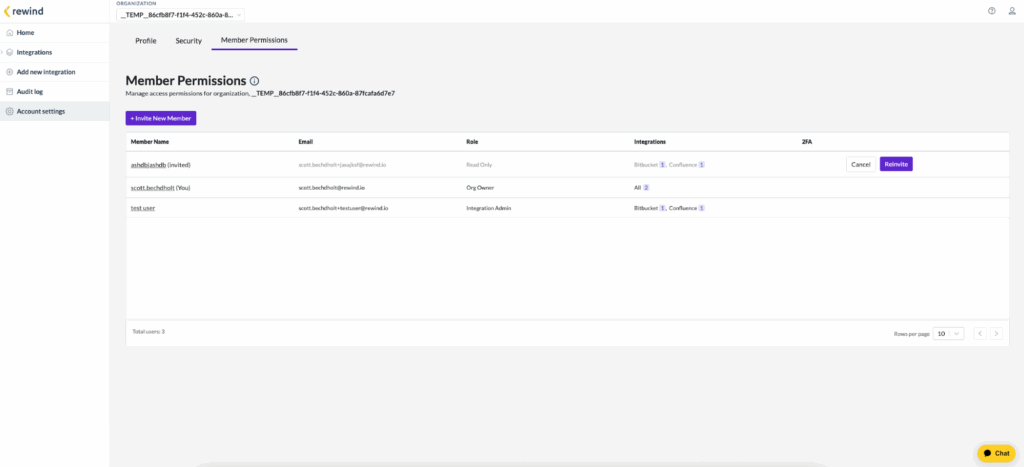
As organizations grow in size and complexity, so do their backup needs and compliance requirements.
Enterprise teams often manage backups across multiple cloud services and departments—and they need to be confident that only the right people have access to sensitive information and critical data restore functions.
With compliance standards like SOC 2, GDPR, and ISO 27001 top of mind, RBAC gives organizations the tools to manage access efficiently, minimize risk, and prove their security posture in compliance audits.
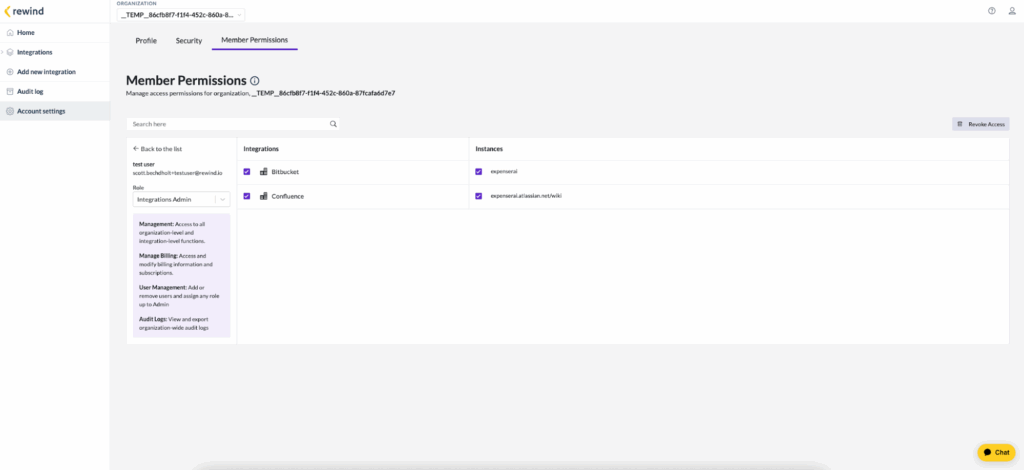
Other benefits of RBAC in Rewind include:
Role based access control in Rewind gives organizations the power and precision they need to manage access safely and efficiently. to the long list of Rewind security and compliance features is about RBAC is another entry in the long list of Rewind security and compliance features that security-conscious organizations need.
When it comes to backing up critical business data, success isn’t just about making sure data is protected—it’s about proving it. That’s why we’re excited to introduce Event History, another new Rewind security and compliance feature in the Rewind Vault and a major step forward in helping IT teams meet their security, compliance, and operational goals with confidence.
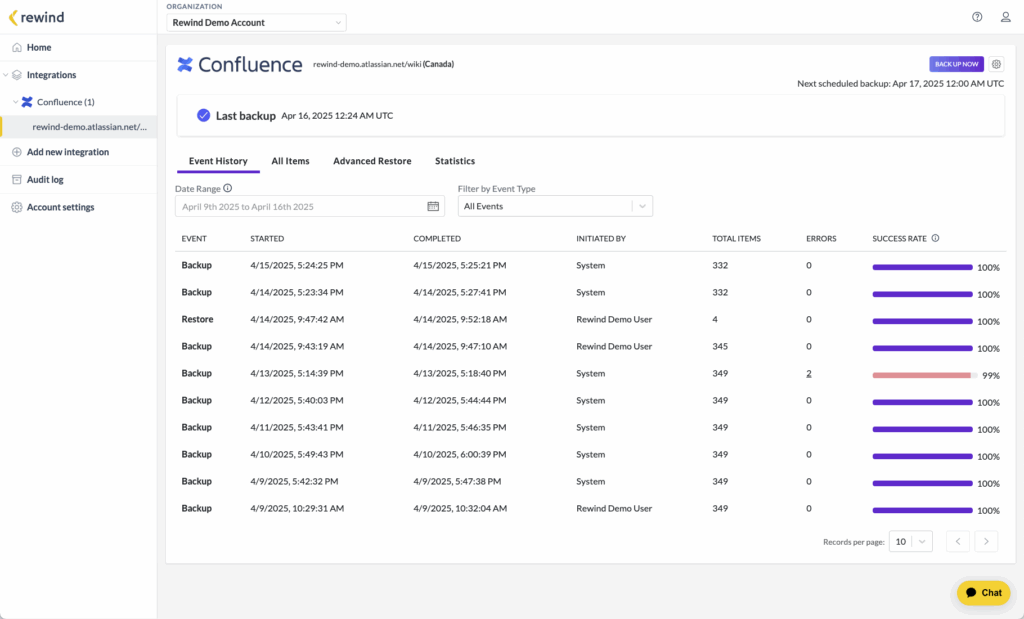
Event History offers improved visibility and traceability across your Rewind environment. Event History provides you with a detailed timeline of events, including backup status, resolutions, and other critical activities, along with contextual next steps to address any issues.
If a backup fails for any reason, you need to know about it. In enterprise environments where compliance audits, internal reviews, or unexpected data issues can strike at any time, no news isn’t good news.
We heard this loud and clear from our customers, especially enterprise IT leaders: “I need to prove that our backups were completed every day. If they don’t, I need to know what happened so it can be corrected immediately.”
With this release, we’ve improved event reporting in the Rewind Vault as part of this Rewind security and compliance feature release. The Event History tab contains detailed backup status information for faster troubleshooting, better visibility, and fewer surprises. Event History is a detailed timeline of every backup and restore operation in your environment, showing:
And if something goes wrong with a backup, Event History lets authorized users dig into what went wrong and why so teams can take the right steps to fix any issues quickly.
It’s all available in a single view that can be organized by date, event types, and initiators. We’ve also built downloadable issue logs in JSON format, so you can get answers or build audit trails without raising a support ticket.
Event History is more than a UI update—it’s a way to build trust and transparency. Whether you’re preparing for an audit, investigating an issue, or simply verifying that your backup strategy is working as intended, Event History puts you in control. It also helps prove that your data is protected—not just to yourself, but to anyone who asks.
In today’s cloud-first world, data privacy and control aren’t just security measures, they’re a strategic requirement. And for organizations operating in regulated industries, encryption and access governance are more than checkboxes on a compliance list, they’re business-critical.
That’s why we’re excited to introduce Bring Your Own Key (BYOK), a powerful new feature designed to give Rewind customers complete control over access to their backup data using Amazon Web Services’ Key Management Service (AWS KMS).
While security and data protection are fundamental at Rewind and a responsibility we take very seriously, enterprise customers require even more in-house control. Specifically, enterprise Rewind customers tell us they want to:
BYOK enables organizations to encrypt their backup data using their own encryption keys, stored and managed in AWS KMS. This means:
The feature includes a streamlined user interface for easy configuration and key management within the Rewind platform.
What’s supported:
RBAC, Event History, and BYOK features are all available now as part of our Spring ‘25 Compliance & Control release.
Join us for a live webinar on May 29, 2025 to walk through the new releases in detail. We’d love to see you there! In the meantime, check out these articles and guides from our Knowledge Base for a more detailed look at these new features:
How To Transfer Organization Ownership
How to Understand and Resolve Event Errors





