





Key takeaways 
A thank you for your purchase email confirms the order and builds the trust that drives repeat buying
Omnisend customers see $79 back for every $1 spent on email and SMS marketing, which is a leading number in the industry
Personalization, order details, and offering a next step incentive are must-haves for thank-you-for-your-purchase emails
Automating post-purchase thank you emails ensures they arrive within minutes of checkout, when engagement is highest
Every thank you for your purchase email should contain a gratitude statement, order summary, tracking or next-step link, and optional incentive
There’s a big difference between a standard automated receipt and a genuine thank-you-for-your-purchase email. Over my years in ecommerce, I’ve found that when you send a thoughtful thank-you for your order email, it does much more than just confirm a transaction.
It reassures the customer immediately, significantly reduces buyer’s remorse, and ultimately opens the door for repeat sales down the line. To help you get this exactly right and save you time, I’ve put together everything you’ll need.
In this guide, you’ll find 15 real-world examples, 7 ready-to-use templates, best practices, and a step-by-step walkthrough on how to set up your automation.
Use Omnisend to automate thank you for your purchase emails that drive repeat sales
Quick sign up | No credit card required
What is a thank you for your purchase email?
A thank you for your purchase email is an automated or manually (but mostly automatically) sent message in your email marketing strategy that confirms a customer’s order, expresses genuine gratitude, and sets clear expectations for what happens next.
It differs from a plain order confirmation, which often focuses solely on transactional details, by actively working to build a relationship. While this guide also touches on related messages, like thanking customers for subscribing or for referrals, my primary focus remains on purchase and order scenarios.
Omnisend is a great tool for sending thank you for your purchase emails. The platform seamlessly integrates with major ecommerce platforms like Shopify, WooCommerce, and BigCommerce, and the connection allows users to trigger these emails automatically every time an order is placed. What’s more, there’s no excessively technical setup needed on your side, so you can start creating your messages as soon as you sign up.
Key purposes of a thank you for your purchase email
- Reduce post-purchase anxiety and buyer’s remorse
- Encourage repeat purchases by sending messages at the right time
- Create opportunities for reviews and user-generated content
- Open the door to referral and loyalty program enrollment
- Reinforce brand trust at a high-emotion moment in the customer journey
- Set expectations for shipping, delivery, and next steps
Post-purchase automated emails consistently generate higher engagement than standard promotional campaigns. A thank you for your purchase email is something the buyer expects, so you meet them at a point where their interest is highest. It can turn a routine transaction into something that the buyer remembers and appreciates, which forms a meaningful connection.
— Agnė Ganchev, Director of Customer Success at Omnisend
What to include in every thank you for your purchase email
Before you write your next thank-you for your purchase email, make sure it includes these essential elements. Most ecommerce platforms, including Omnisend, let you auto-populate order details and tracking links, so you only need to write the human parts of the email.
- A genuine gratitude statement: Thank the customer by name and acknowledge their specific purchase
- Order summary: List items purchased, quantities, prices, and total to confirm the transaction
- Shipping and delivery expectations: Include estimated delivery date, shipping method, and tracking link (when available)
- Next-step CTA: Provide one clear action, like “track order,” “browse related products,” “join a loyalty program,” or “leave a review”
- Customer support access: Include a reply-to option, support email, or link to FAQs and return policy
- Brand personality: Let tone, design, and copy reflect the brand’s voice to make the email memorable
- Optional incentive: A discount code, loyalty points, or exclusive offer to encourage a repeat purchase
With these foundations in place, let’s look at best practices for making your email stand out.
Best practices for writing a thank you for your purchase email
When setting up my own automated flows, I rely on a few core principles to make sure every thank you for your purchase email hits the mark. Over the years, I’ve learned that strategy is just as important as the message itself. Here are the rules I always keep in mind to maximize engagement and build strong relationships with buyers:
- Send within minutes of purchase: I’ve noticed there’s no value in dwelling and waiting for the customer to settle. Timing is the most critical factor, and post-purchase excitement fades fast
- Personalize beyond the first name: Names are becoming a sign of automation, not personalization. Reference the specific product purchased, order value tier, or whether they’re a first-time or repeat buyer
- Lead with gratitude, not promotion: The thank you should come before any upsell, discount, or CTA
- Match the tone to the brand: Use the same voice the customer experienced during checkout
- Include one clear next step: I never use three or four CTAs competing for attention. One action is all you need, be it track order, leave a review, or claim a discount
- Use the subject line to set expectations: Omnisend’s A/B testing showed me that a warm “Thank you for your order” consistently outperforms a dry “Your order is confirmed.”
- A/B test subject lines and incentives: I’ve been testing most of my emails ever since I started doing email marketing. Don’t just guess what works. Even small copy changes can significantly impact open and click rates over time
- Add SMS to your post-purchase flow: I’ve added SMS automations to some of my post-purchase thank you flows and noticed higher overall engagement. A short text that says “Your order’s on its way” complements the email and catches customers who don’t check their inbox right away.
You’ll get the hang of these practices as you go, so take these recommendations for exactly what they are: recommendations. But the thing I found the most important of them all is that the best way forward is looking at your own data. That’s the beauty of it: what works for me may not necessarily do the same wonders for you.
15 thank you email examples for ecommerce
The best way to understand what makes a great post-purchase campaign is to see it in action. Let’s look at 15 real-world examples categorized by their specific use case.
Thank you for your order emails
Example 1: Postable — thank you for your order email
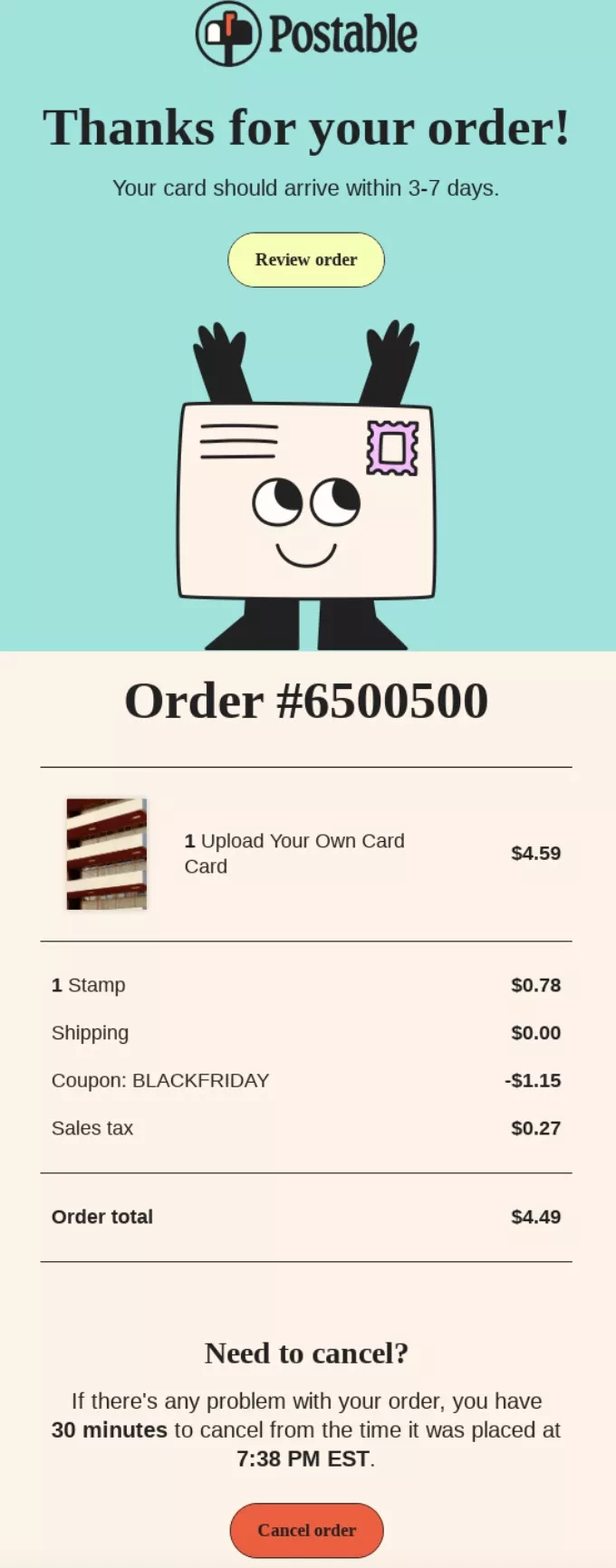
Postable keeps things simple and reassuring immediately after checkout. Notice how this email includes all the key components: gratitude, order details, and a clear next step. It tells the customer exactly when their cards will ship, which effectively reduces post-purchase anxiety.
Why I liked this email
The headline does the emotional work first by saying thank you, and before jumping into details. The delivery window is placed right at the top, which answers the biggest question without forcing me to scroll.
The order summary is clean and itemized, so it’s easy to double-check the purchase. The “Review order” button gives a clear next step without pushing another sale.
Example 2: Mattress company — thank you for your order confirmation email
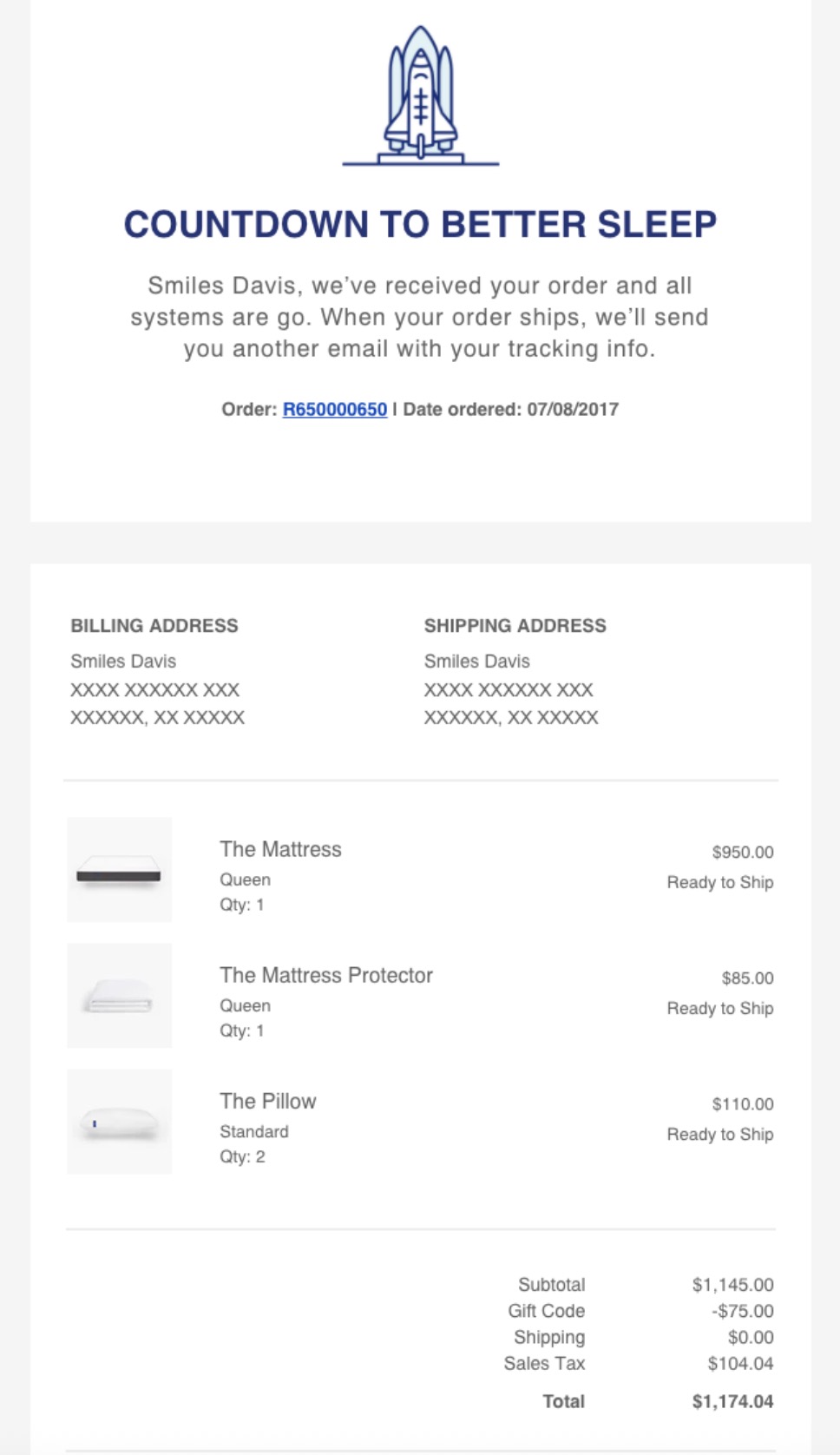
This order confirmation email balances a clean design with essential transactional details and a unique benefit-oriented thank you message that matches the tone of the brand. You can achieve the same effect with Omnisend, especially if you’re on Shopify, WooCommerce, or BigCommerce, as all the data, like product names, images, and prices, populate automatically.
Why I liked this email
The bold headline and short intro set expectations right away. Showing both billing and shipping addresses builds trust and cuts confusion. Item thumbnails, names, and quantities make it easy to scan and confirm the order.
Example 3: Geely — thank you for preordering email
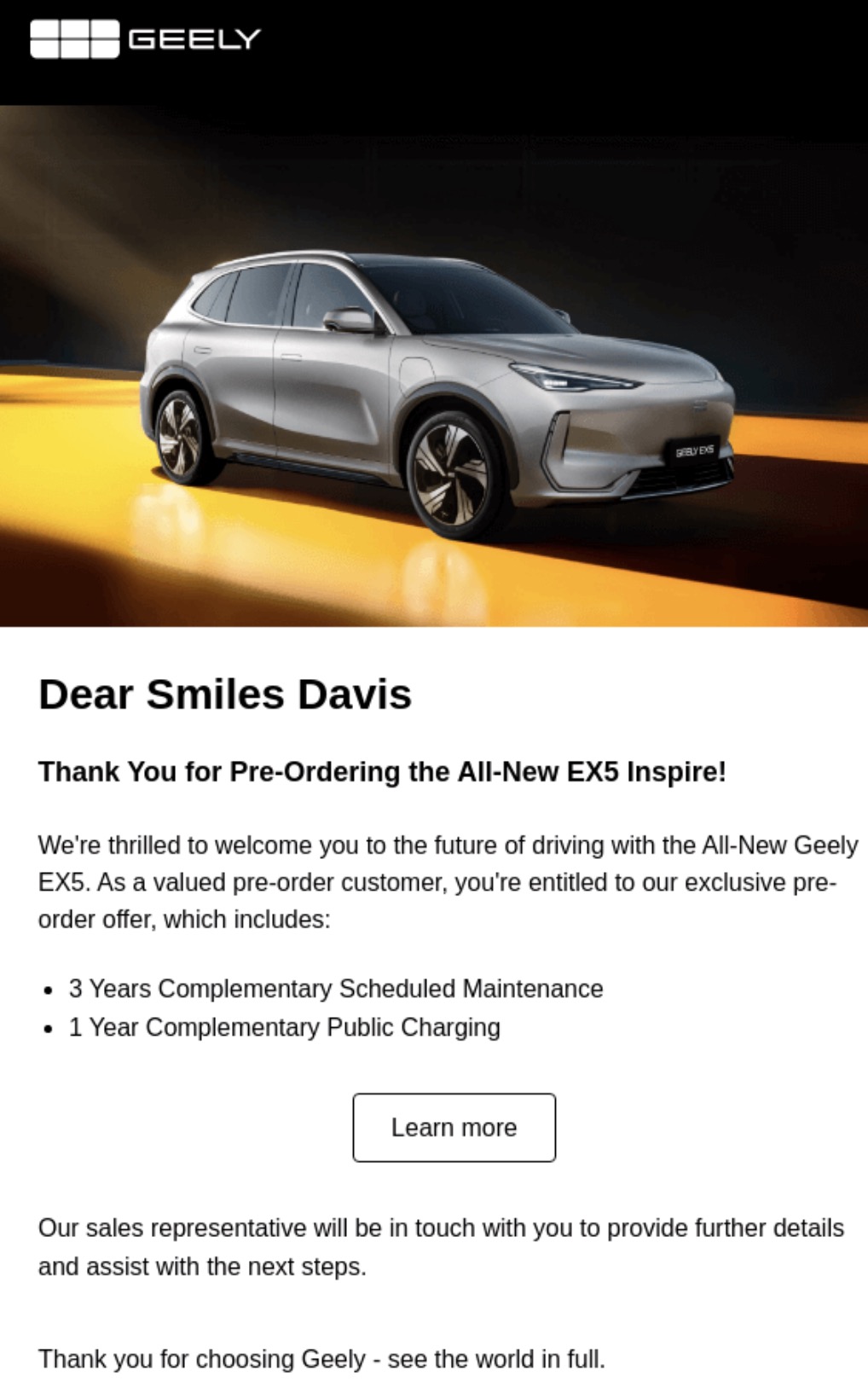
Geely uses this message to maintain excitement during the waiting period for a pre-ordered item. It’s a perfect example of making it clear of the benefits you’re receiving for making this pre-order and that you don’t need to make any first interactions, as the sales team will reach out to you.
Why I liked this email
The benefit bullets communicate tangible value and justify the preorder decision. Personal addressing adds warmth while the copy stays short and professional.
The clean layout keeps focus on the offer rather than pushing other products. This should keep preorders feeling premium and supported.
Thank you for your purchase emails
Example 4: Inaba CIAO — thank you for your purchase email
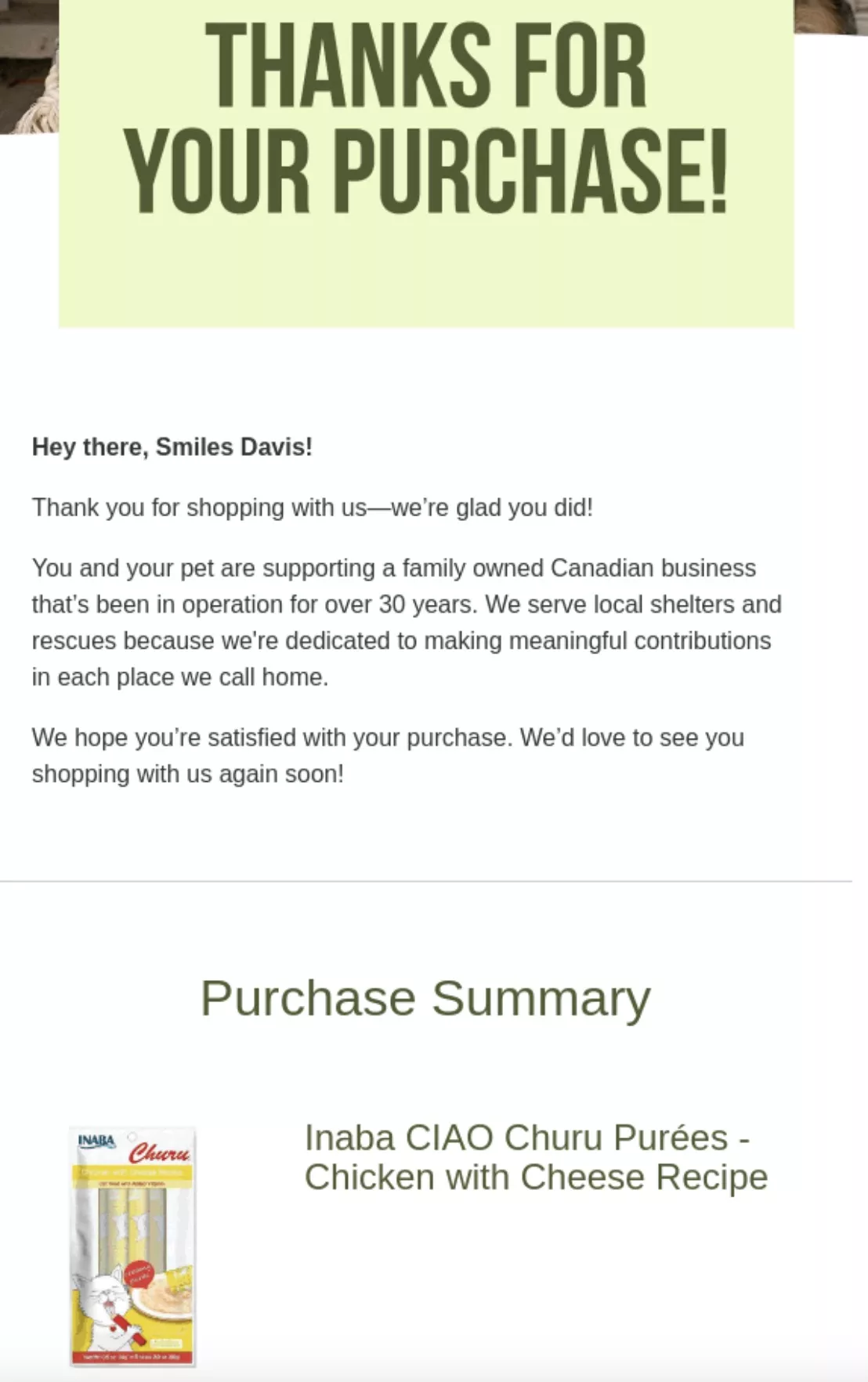
Inaba CIAO delivers a visual, but at the same time, grounded email with an engaging post-purchase message. Notice how this email includes a genuine gratitude not only in the form of direct “thank you”, but also in the body text. It confirms the transaction and keeps the customer excited about their pet’s treats.
Why I liked this email
The company mentioned helping local shelters and being family-owned, which made me feel like my purchase supports something good. The copy is simple and easy to read, which lowers post-purchase worry. It reads like a friendly note, not a long legal receipt.
Example 5: Sleep Country — thank you for your purchase email with a discount
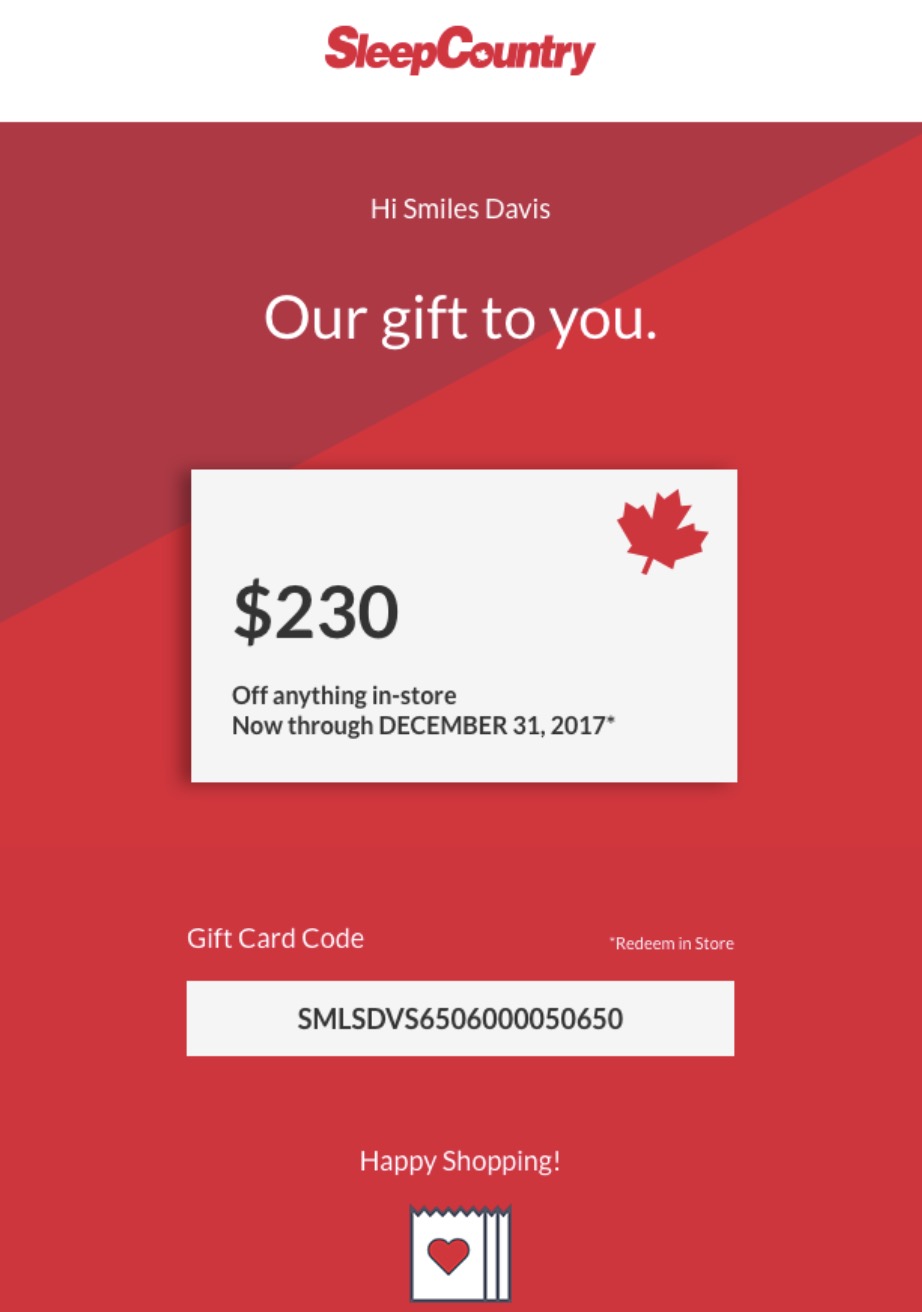
Sleep Country uses this post-purchase email to drive repeat business by offering an exclusive discount code. It provides a clear next step and adds an optional incentive to encourage another order. I like sending unique discount codes with Omnisend. There’s no need to create any manual codes in the backend, and everything happens automatically within the post-purchase email builder.
Why I liked this email
Even though this is not per my best practice advice (thank first, sell later), I do appreciate that the layout puts the value front and center, so people see the offer at a glance.
The call to action is implied by the code and the “Happy Shopping” line, keeping the email uncluttered. Overall, it feels like a neat, useful gift rather than a hard sell.
Example 6: QuietPure — post-purchase thank you email with helpful content
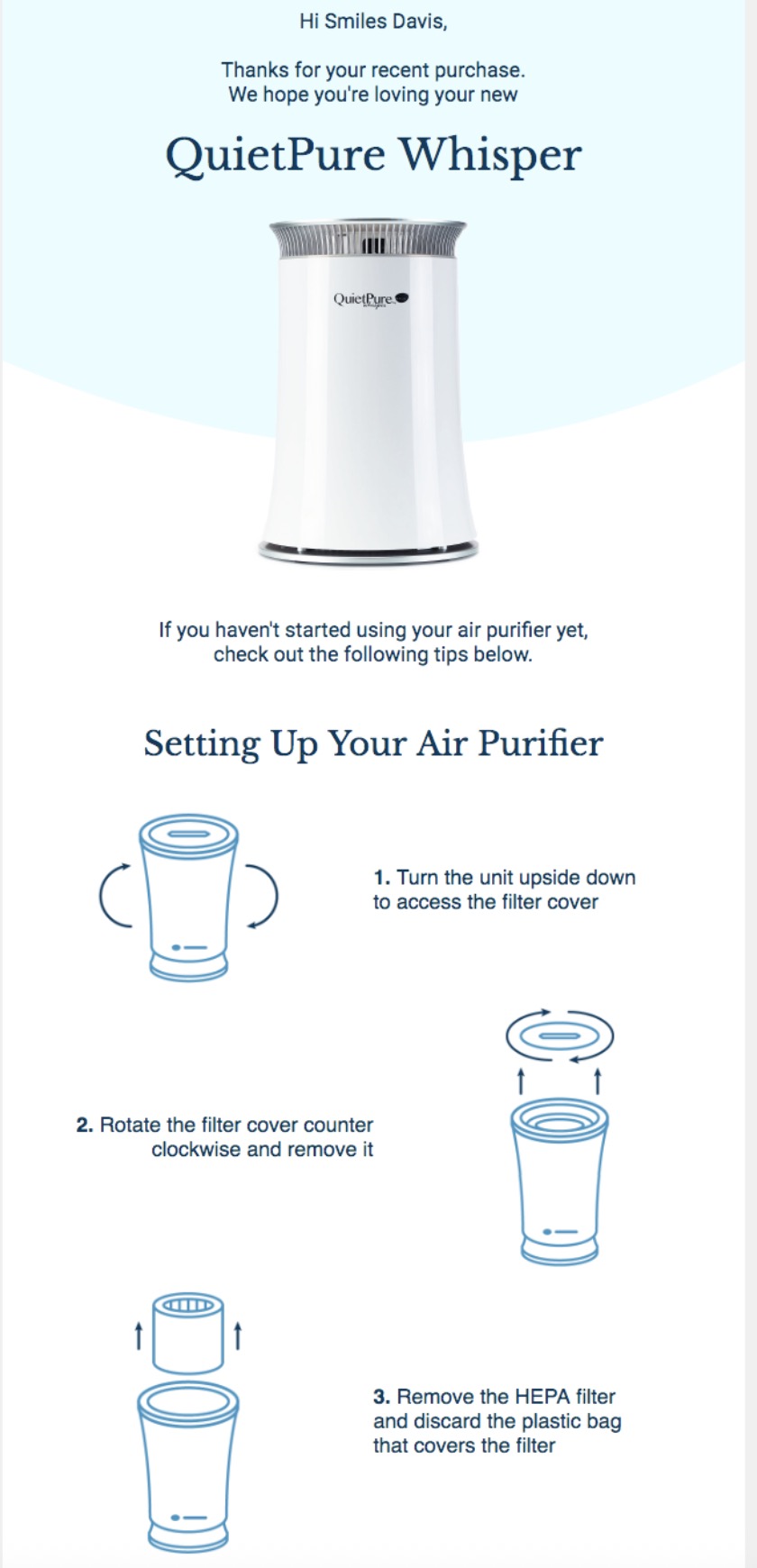
QuietPure takes an educational approach by sharing helpful setup guides and maintenance tips for their air purifiers. It’s a truly valuable asset for someone who just bought an item that requires attention before they can use it.
Why I liked this email
I appreciate that the email gives immediate value instead of pushing another sale. The hero image and product name remove any doubt about what the customer bought.
Numbered steps with matching icons lower the chance of user error. From a lifecycle view, this should add to the first-run success and cut early support needs.
Example 7: Harney and Sons — thank you email with product recommendations
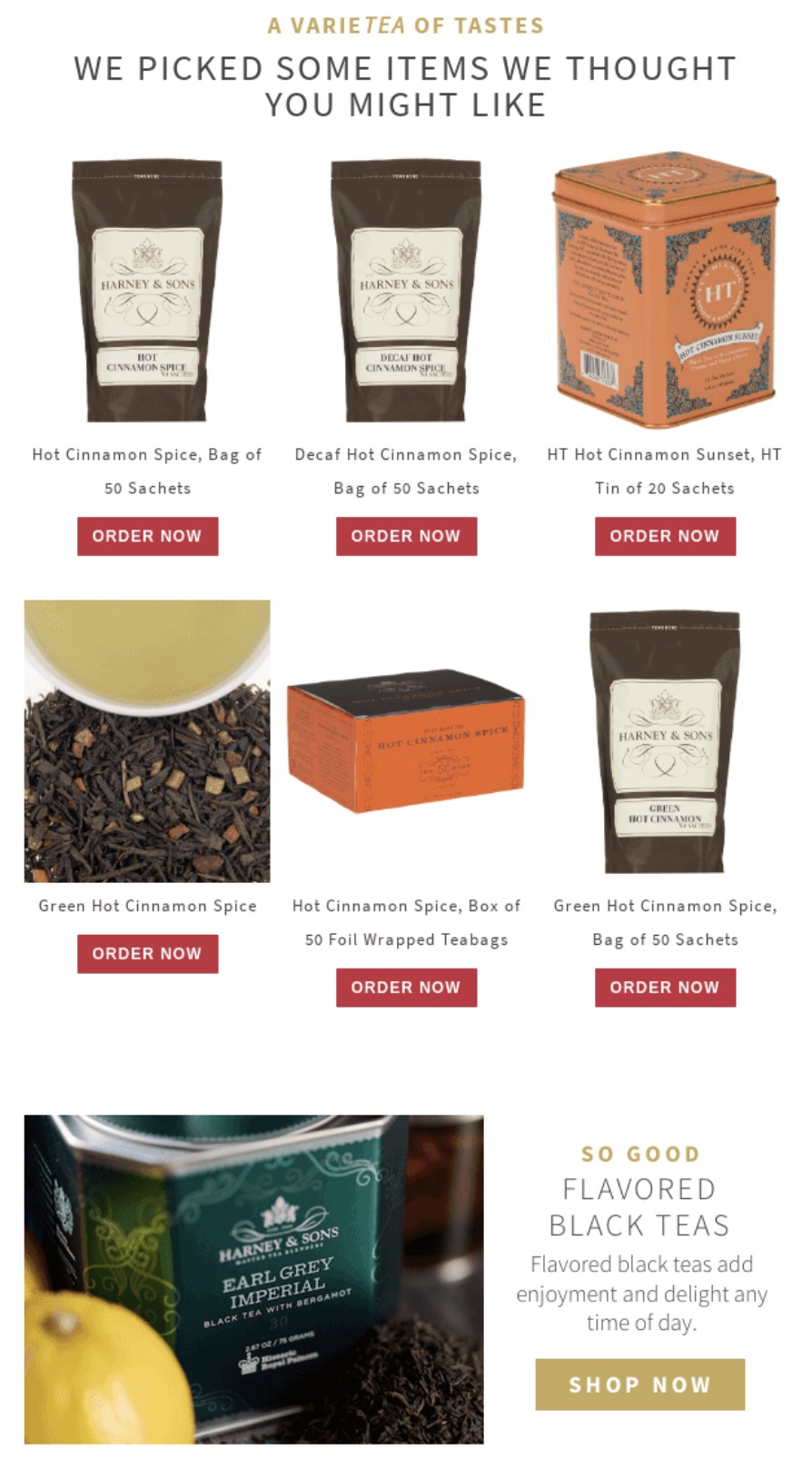
Harney and Sons includes personalized product recommendations that perfectly complement the tea the customer just bought. This email connects well to the best practice of personalizing beyond the first name to build a deeper connection.
You can also do this with Omnisend, as its dynamic product recommendation blocks pull from your store’s catalog and the customer’s purchase history, so these sections basically build themselves.
Why I liked this email
A strong visual hierarchy with thank you, offer, then product suggestions, guides attention in the right order. Showing multiple SKUs increases the chance that at least one item will appeal to the buyer. The $10 off message is clear and feels like a reward rather than a hard sell.
Example 8: Chrome Industries — thank you email with a social media call to action
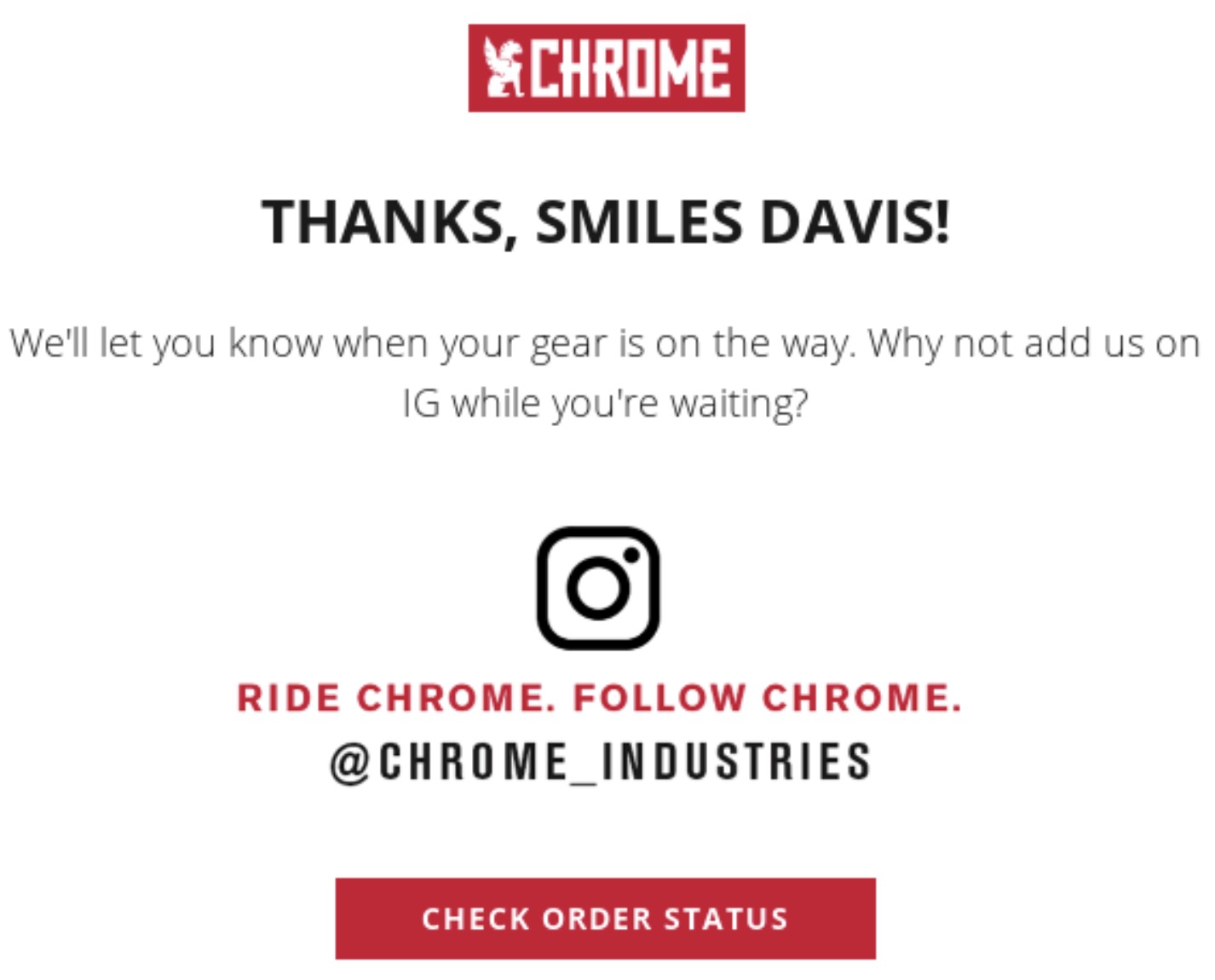
Chrome Industries invites buyers to follow them on Instagram, and it also has another CTA to check order status. This is not ideal, as I still believe you should stick to one CTA per email to avoid diluted attention.
Why I liked this email
Even though I’m not a fan of double CTAs, I do like the idea of increasing your number of followers using transactional emails. Gaining an Instagram follower increases future touchpoints, so this is great.
Example 9: Krink — thank you email with a brand story
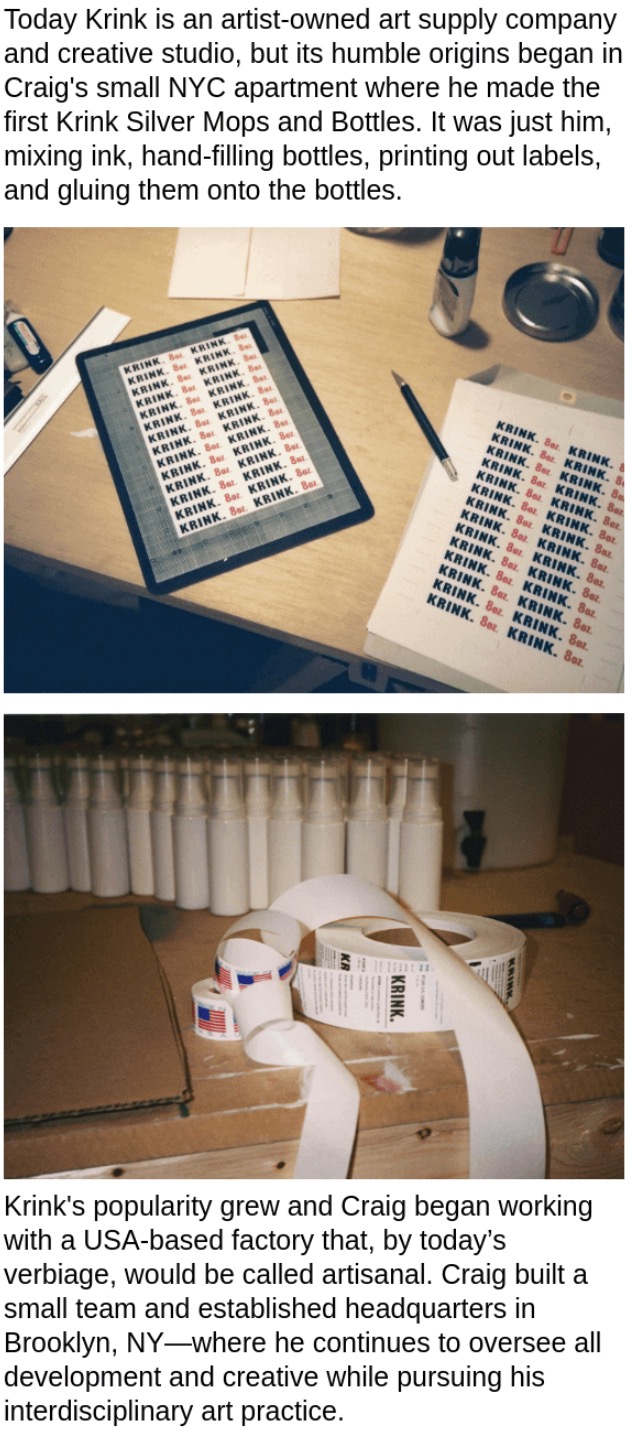
Krink uses its post-purchase message to highlight its unique roots and creative culture. It’s a great way to stay true to your brand and make the customer feel like they’re part of the community.
Why I liked this email
The transition from apartment to small factory feels earned, not hype-driven. It quietly reinforces quality and care without needing to say those words. This kind of story helps customers feel good about supporting the brand.
Overall, I feel that sharing a brand story like that is a great way to build an emotional connection with your customers. The more connected your customers feel with your brand, the more they’ll continue buying from you.
Thank you for your first purchase email
Example 10: Piecework — first purchase discount with referral
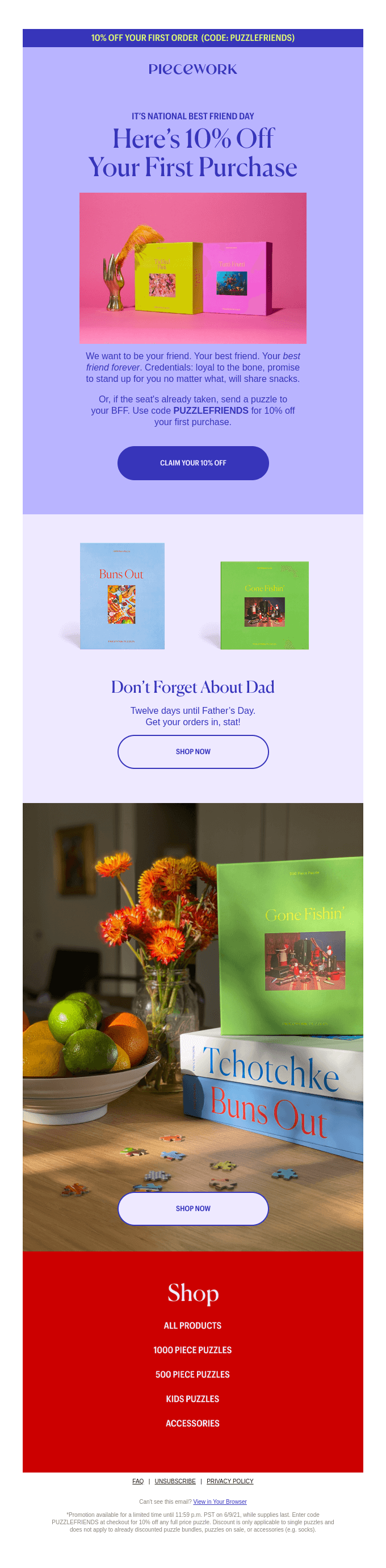
Piecework takes a unique approach and offers not only a discount, but also a referral in case the recipient is already “taken”. They incorporated two brand-relevant holidays into one email, which reads extremely well, and it’s a strong incentive to buy.
Why I liked this email
It’s super engaging, playful, and makes me want to associate with them. Their goofy brand tone matches their product, and the fact that they include you, your friend, and your dad in one email without making it too cluttered is commendable.
Thank you email with a review request
Example 11: Alpinestars — post-purchase thank you and review request
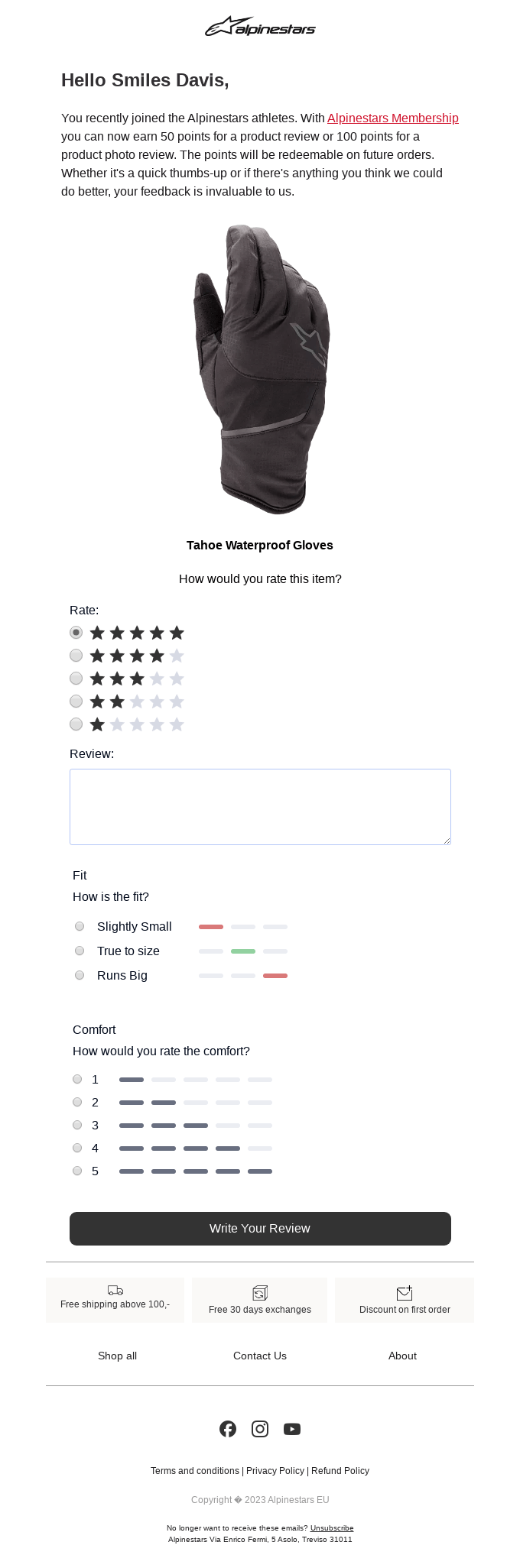
Alpinestars acknowledges that the recipient has recently become a member of this community and asks that they leave a review for their product. The incentive is simple: you get points depending on the type of review you leave, which is good for driving repeat purchases in the future.
Why I liked this email
It’s not every day that you see a built-in review form inside the email. Most of the time, you have to click a link, go to the website, find the review section, and then write it there.
This email makes everything as simple as it could be, which I appreciate, and if more emails were like this, I would probably leave reviews more often.
Other thank you email examples
Example 12: Tea company — thank you for your feedback email
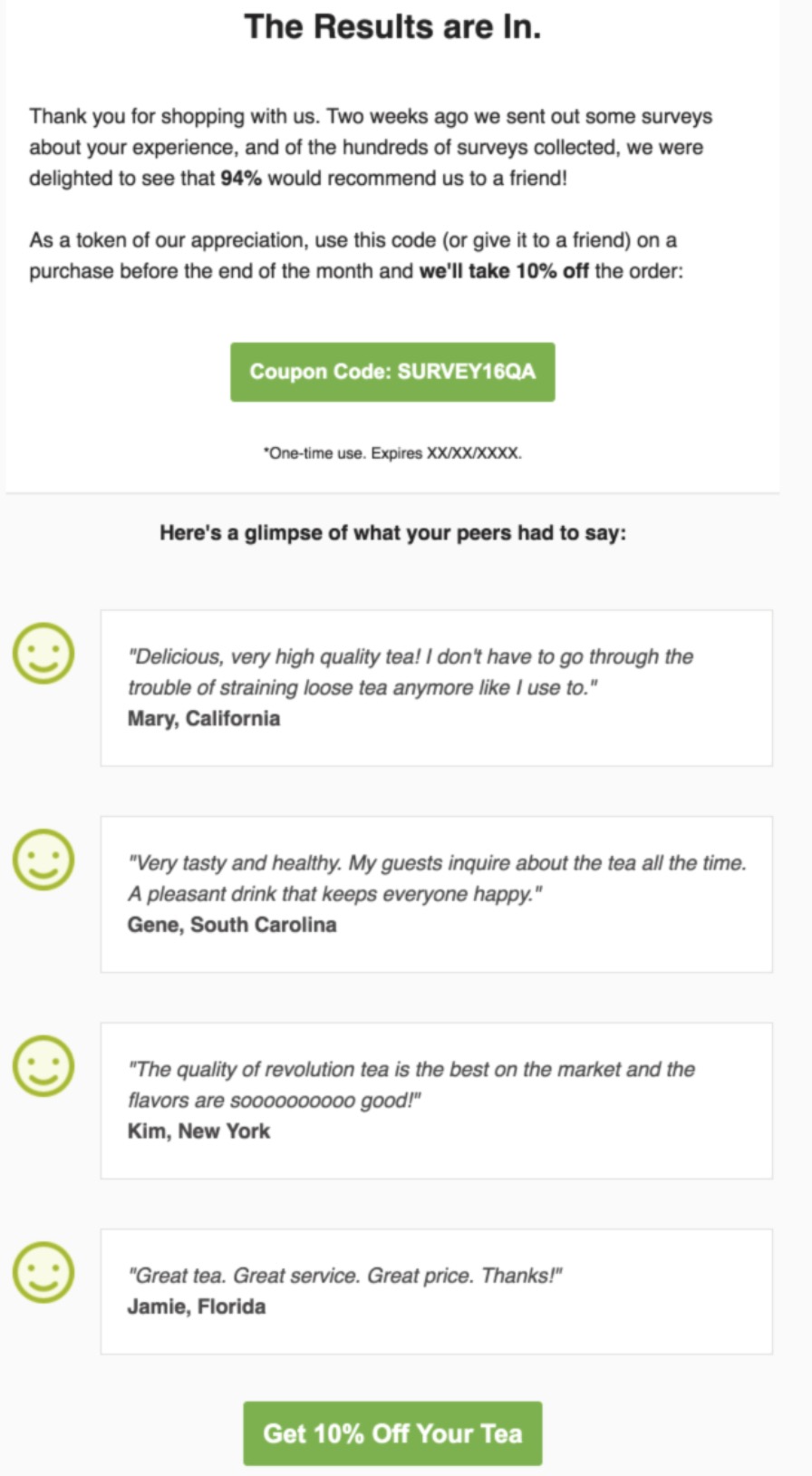
This tea company sends a thoughtful follow-up message to customers about the results of the review. It shows shoppers that the company actually reads and values the reviews that users leave.
Why I liked this email
The opening stat (94% would recommend) instantly shows the survey result and feels credible. Highlighting a coupon right after the result uses reciprocity to drive another purchase.
Customer quotes give real voice to the number and make the claim believable. From a lifecycle view, this is a strong way to turn feedback into repeat revenue.
Example 13: Attentive — thank you for subscribing email
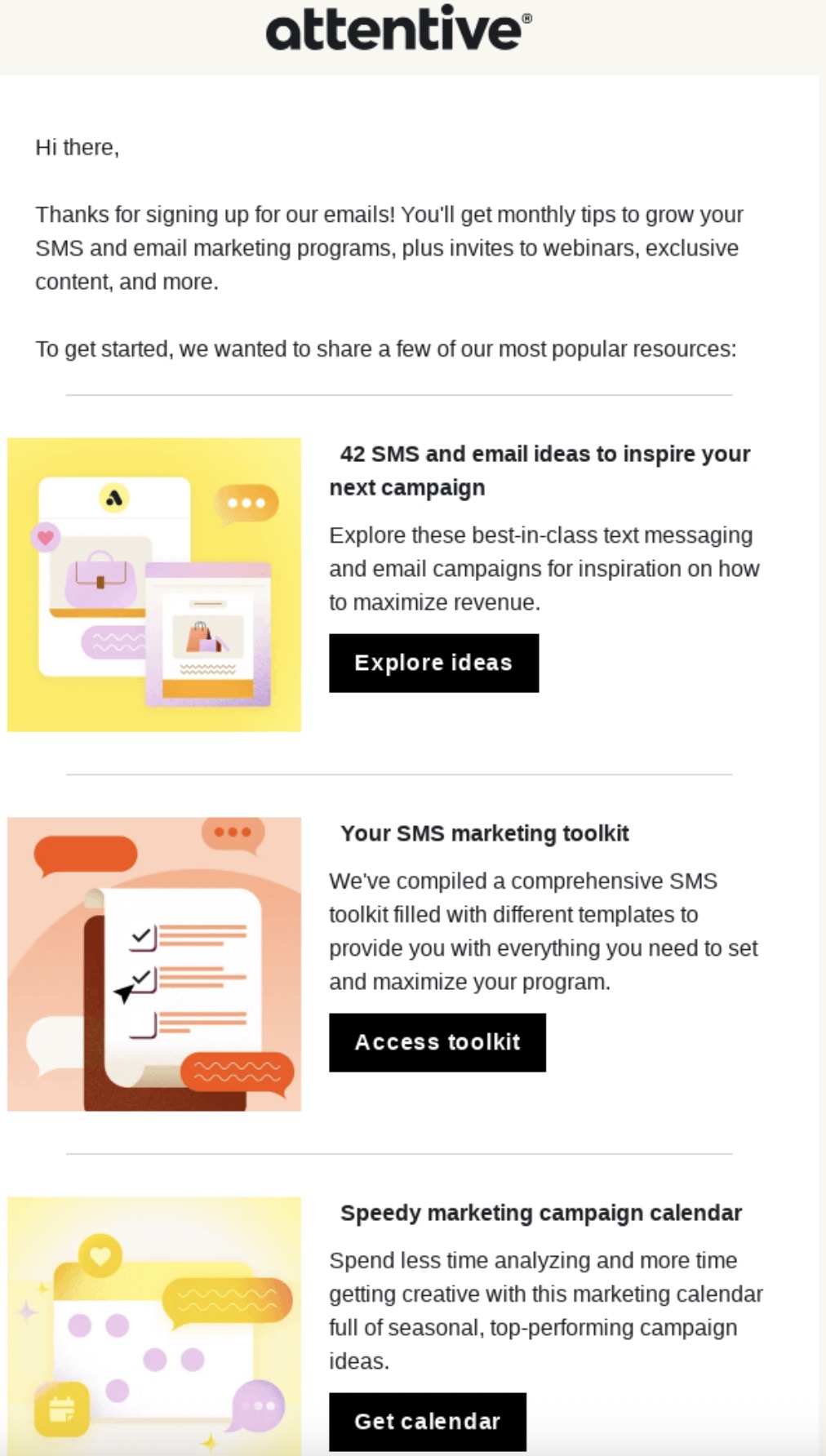
Attentive delivers a strong welcome email the moment someone joins their list. It sets expectations for future emails and clearly delivers on the promise made during the signup process.
Why I liked this email
I see this as a strong onboarding touch that shows clear value immediately. Visual tiles for each resource let readers scan and pick one thing to click. Bold, black CTAs create obvious next steps without overwhelming the page. It increases early click rates and gets more traffic to the website.
Example 14: Cirkul — thank you for your referral email
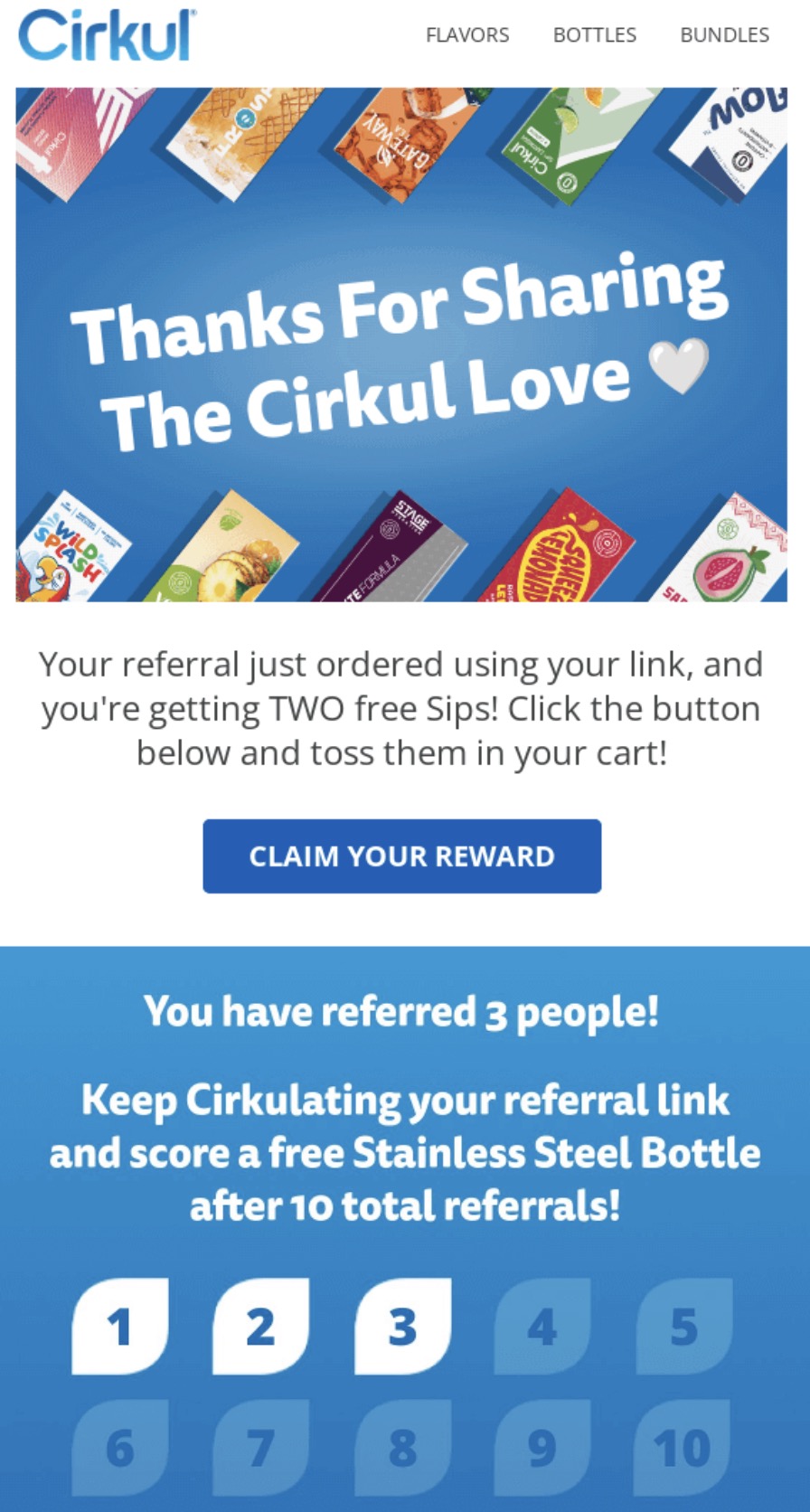
Cirkul rewards its most loyal brand ambassadors with a dedicated thank-you message each time they refer a friend. This encourages ongoing participation in their referral program, which drives new organic buyers.
Why I liked this email
The message uses positive momentum: it thanks the customer and then asks them to take one easy action. The CTA copy “claim your reward” is action-focused and low-friction.
Counting referrals visually helps people see progress and sets a clear goal to reach the bigger prize. Imagery and color make the reward feel fun rather than transactional. I would expect good click-throughs because the value is immediate and the path is obvious.
Example 15: Unsplash — thank you for being a part of our community email
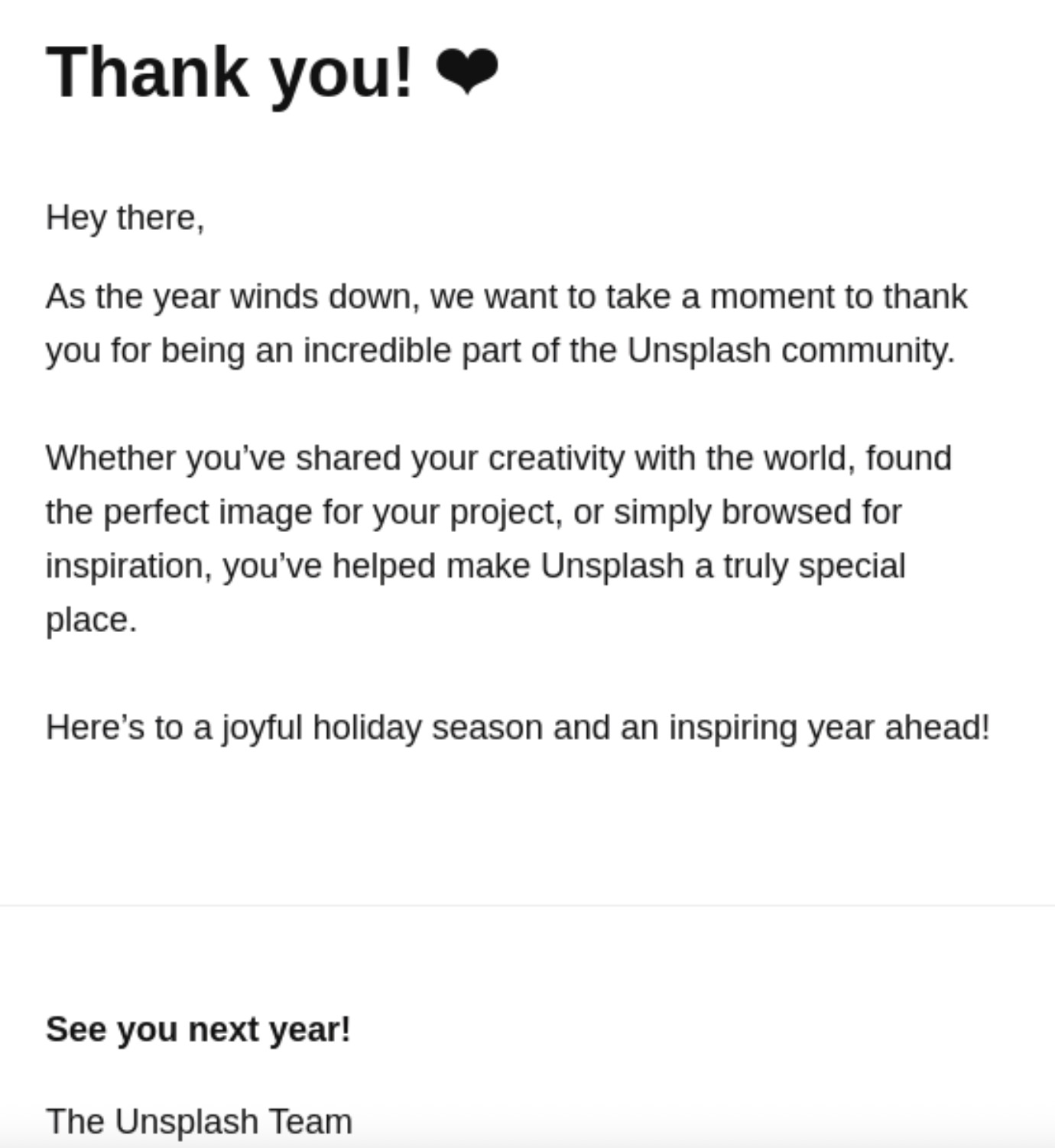
Unsplash reaches out to celebrate the end of the year and thank users for their continued engagement. While not strictly a purchase email, it highlights how expressing gratitude builds long-term loyalty. Sometimes, having no agenda can be a good thing.
Why I liked this email
The message stays focused on gratitude and never drifts into promotion. Calling out creativity and inspiration reflects how people actually use the product. The heart emoji adds warmth without feeling forced. From a brand point of view, this reinforces trust and emotional connection.
Thank you email templates
Each template below works as a starting point. In Omnisend, you can paste these into the drag-and-drop email builder, connect them to a “Placed Order” trigger, and have them running on autopilot within minutes.
To help you find exactly what you need quickly, jump directly to the template that you’re looking for:
- Thank you for your purchase email template
- Thank you for your order email template
- Post-purchase thank you email with discount template
- Thank you for your first purchase email template
- Thank you for your feedback email template
- Thank you for your referral email template
- Thank you for subscribing email template
Thank you for your purchase email template
The Classic Post-Purchase Template
This is the primary thank you for your purchase email template, which is meant to reassure your buyers that the order is in and it’s being processed.
Subject: Your (Company name) order is confirmed! #(Order number)
Hey (Customer name),
Woo-hoo! Your order is in, and we’re on it!
Order #(Order number) | (Date)
What you ordered:
(Product name) ((Size/Variant)) – (Price)
(Product name) – (Price)
Shipping ((Method)) – (Price)
Total: (Total price)
What’s happening now: → Our team is packing your items with care → We’ll email tracking info when your package ships (usually within 24 hours) → Expected delivery: (Date range)
Questions? Need changes? Just hit reply.
Thanks for shopping with us!The (Company name) Team
Copy text
When to use this template: Set up your automation so it’s sent a few minutes after a purchase has been completed to confirm the transaction and express genuine gratitude.
Thank you for your order email template
The Order Confirmation + Thank You Template
Unlike the classic version, this thank you for your order email template is slightly more promotional. It clarifies receipt details while including product recommendations and a discount to keep the shopping momentum going.
Subject: Thank you for shopping with us!
Hi (Customer name),
We appreciate your order (Order number). Thank you for choosing (Company name).
Order snapshot
What you bought: (Product details)
Total: (Total amount)
ETA: (Shipping ETA)
A little thank you — use code THANKS10 for 10% off your next order. Valid until (promo.expiry).
Want ideas while you wait? Check these picks: (Recommended products with links)
Need help? Reply to this email or visit (support.link).
Warmly,
(Founder.name) and the (Company.name) team
Copy text
When to use this template: Use this as your primary automated order confirmation when you want to cross-sell related items.
Post-purchase thank you email with discount template
The Repeat Purchase Driver Template
When looking for post-purchase thank you email examples that drive revenue, I found that adding a time-sensitive incentive can be highly effective. Just make sure you give them some breathing space before sending this.
Subject: Thank you for purchasing!
Hi (Name),
We hope you’re loving your new (Product Name). To say thanks for being a great customer, we would love to offer you something special for your next visit.
Use this discount code at checkout to get 15% off your next purchase:
(Discount Code)
Just don’t wait too long, this code expires in 48 hours!
(Shop New Arrivals)
Best,The (Brand Name) Team
Copy text
When to use this template: Send this via an automation workflow a few days/a couple of weeks after delivery to encourage a quick second purchase.
Thank you for your first purchase email template
The New Customer Welcome Template
New buyers need a warmer touch that could include a brand story, mentions of community, or anything else that your brand is proud of. I like using segmentation to filter my audience and select between new buyers and other subscribers.
Subject: Welcome to the (Brand Name) family!
Body:
Hi (Name),
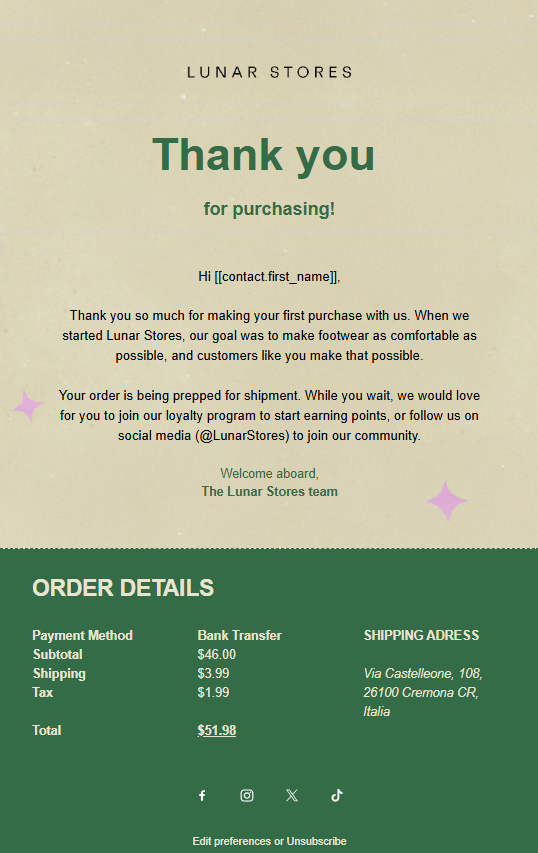
Thank you so much for making your first purchase with us. When we started (Brand Name), our goal was to (insert brief brand mission), and customers like you make that possible.
Your order is being prepped for shipment. While you wait, we would love for you to join our loyalty program to start earning points, or follow us on social media (@SocialHandle) to join our community.
Welcome aboard,
The [Brand Name] Team
Copy text
When to use this template: Set the automation up so this email triggers only for those customers who are buying for the very first time.
Thank you for your feedback email template
The Feedback Loop Template
Acknowledge customer opinions and show you’re listening with an authentic email. To encourage additional purchases, consider offering a discount, too.
Subject: Your feedback matters, (Customer name) — thank you
(Customer name),
Thanks for sharing your thoughts about your recent (Company name) (Product/service) experience. Your detailed feedback about (Specific feedback point 1) and (Specific feedback point 2) is incredibly valuable.
I’ve shared your comments with our (Relevant team), and we’re already discussing how to implement your suggestions for our (Relevant timeframe/feature). Your mention of (Positive feedback point) being a highlight has reinforced something we were considering expanding.
Feedback like yours shapes (Company name)’s future. We’ve added a (Small incentive/reward) to your account to show our gratitude.
We hope to see you (Contextual closing).
With gratitude,
(Name) (Position), (Company name)
Copy text
When to use this template: Send this automated message after a customer submits a product review or fills out a post-purchase survey.
Thank you for your referral email template
The Referral Reward Template
Show appreciation when customers spread the word about your business. Since they have shown loyalty, a small reward makes sense.
Subject: (Customer name), you made our day (and earned store credit!)
(Customer name), you made our week by referring (Referred customer) to (Company name). Nothing beats knowing our customers trust us enough to recommend us to friends.
As promised, we’ve added a (Amount) store credit to your account — no minimum purchase, valid for (Period).
(Referred customer)’s first order of (Product) just shipped, and we included a little welcome note mentioning you sent them our way.
Do you have more (Type of potential customers)? Your personal referral link is still active: (Link)
Thanks for being part of the (Company name) family.
(Contextual closing),
The (Company name) Team
Copy text
When to use this template: Automate this template to send when a customer’s unique referral link results in a new sale.
Thank you for subscribing email template
The Welcome Subscriber Template
Thank people for signing up to receive your emails or newsletter and reinforce the benefit they’ll get. Provide some resources to keep them engaged.
Subject: Welcome, (Customer name) — thanks for subscribing!
Thanks for signing up and joining our growing community.
We send short emails with ideas, updates, and helpful content. No hard sells. If you decide it’s not for you, you can opt out anytime.
To help you get started, here’s a resource many new subscribers find useful: (Featured resource link). It covers the basics and answers common questions.
If at any point you want more or less from us, just reply to this email and let us know. We’re happy to adjust.
Thanks for trusting us with your inbox.
The (Company name) Team
Copy text
When to use this template: Set up a simple welcome automation to send this immediately after someone joins your email list but hasn’t made a purchase yet.
For your convenience, I made a complete template using Omnisend to show you what one of these messages could look like:
How to write a thank you for your purchase email
Now that we’ve covered the strategy, let’s take a look at the tactical steps to build an engaging message. Here’s how I set up my post-purchase campaigns using an intuitive email builder.
Choosing a subject line
Your subject line is the first thing customers see, so you want to keep it under 50 characters to ensure it doesn’t get cut off on mobile screens. Structure it using the “thank you first” approach, which means leading with gratitude before mentioning the order status.
Here are a few strong, purchase-specific examples:
- Thank you for your order, [Name]!”
- “Your [Brand] purchase is confirmed — thank you!”
- “Thanks for your order! Here’s what’s next.”
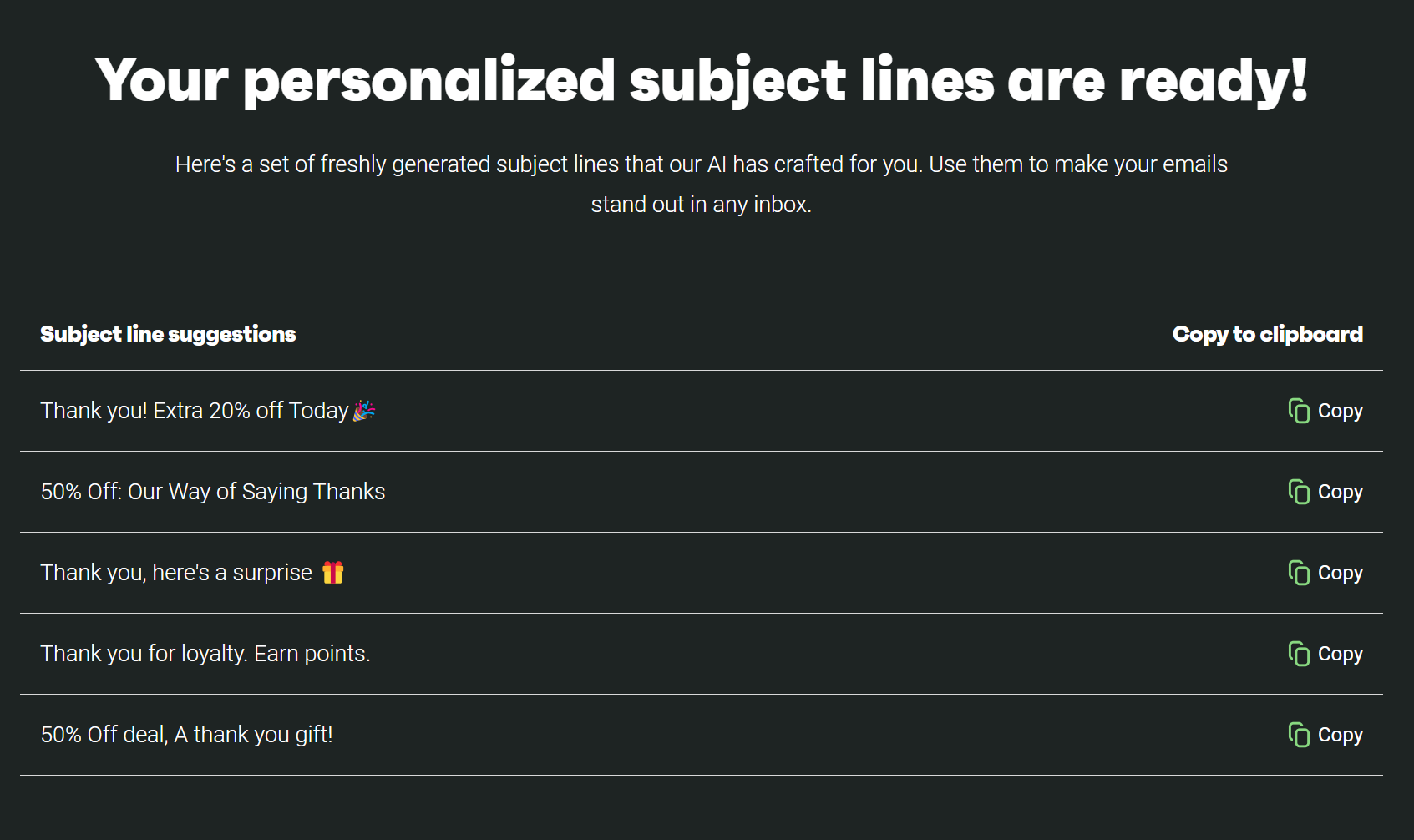
When I’m feeling stuck or I need some fresh new ideas, I use the AI subject line generator right inside the email editor to brainstorm the best email subject lines in seconds.
Personalizing your greeting
Personalization goes a long way in making the customer feel valued, rather than just another order number. There are four main personalization opportunities you should take advantage of: the customer’s first name, the exact item they bought, their order history, and their loyalty status.
Omnisend makes personalizing emails intuitive with liquid syntax with double square brackets, such as [[contact.first_name]]. I add these to my email, and they get replaced with the customer’s information during sending.
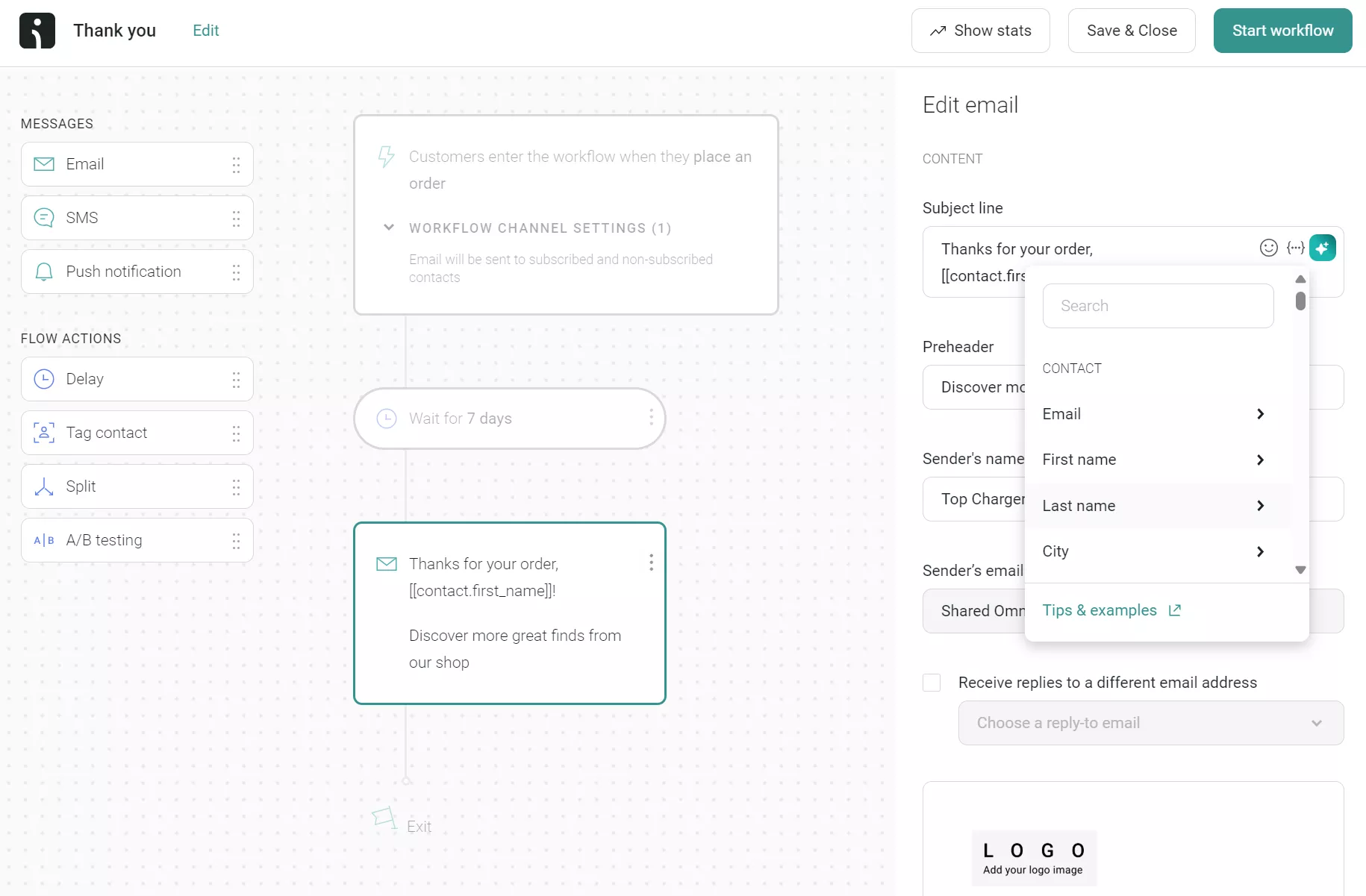
Additionally, there’s a personalized variables option in the email design editor:
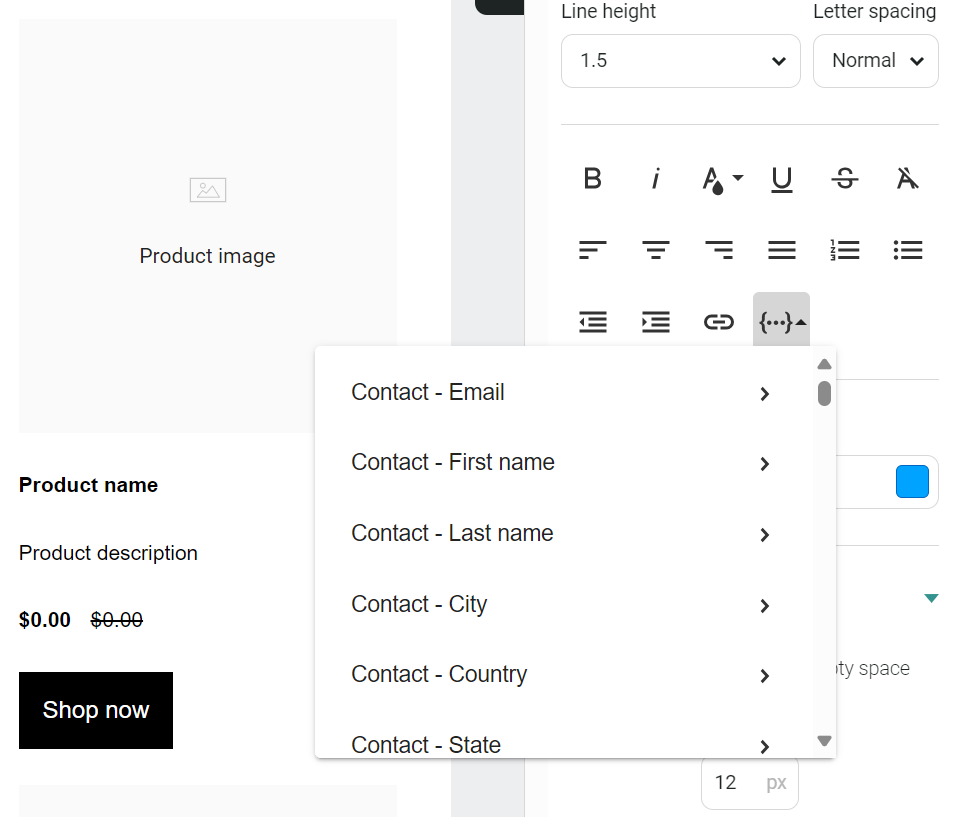
This allows you to create a highly relevant and personalized greeting, such as: “Hi [Name], thanks for ordering [Product Name]!”
Writing the main text
Right after the first heading, I go straight into the thank you message using concise content directly tied to the customer’s action.
Did they place an order? Join my list? Refer a friend? I acknowledge it and get to the point of the email campaign, be it a general thank you note or information on the next steps I want them to take, such as creating an account.
The goal here is to carefully balance transactional information, like order details, totals, and shipping dates, with emotional content that highlights your gratitude and brand voice.
Including a next step
It isn’t always the case, but when I want my customer to take another step within their thank you email, I add a CTA button like this one:

The example above thanks the customer for creating an account and provides a link to their abandoned cart. Your CTA button should be similarly relevant and tied to their actions. For instance, if they purchase, your button could say, “Track your order,” “Leave a review,” “Shop your next favorite,” or “Join our rewards program.”
Signing off with personality
My sign-offs reflect my brand’s warm, casual, and sometimes playful feel. Your closing should also match your brand without losing professionalism.
Example closing elements:
- Friendly phrase: “Thanks again”
- Name: Your team name or a personal name
- Brand name
- Optional: A support link (helps reduce inquiries)
Also, I change my email footer depending on the message’s purpose. Social media links, privacy statements, and delivery information are helpful in some emails.
How to automate thank you emails
I configured this automated sequence once, and it’s been running for months. Every customer who places an order gets a personalized thank you without me touching a thing. This kind of automation is part of why Omnisend customers see an average of $79 back for every $1 spent, as these emails run 24/7 without additional effort.
Here’s exactly how I set it up.
Setting up email automation workflows
To begin building the thank you for your purchase email automation:
1. I log into Omnisend and head to the Automations tab
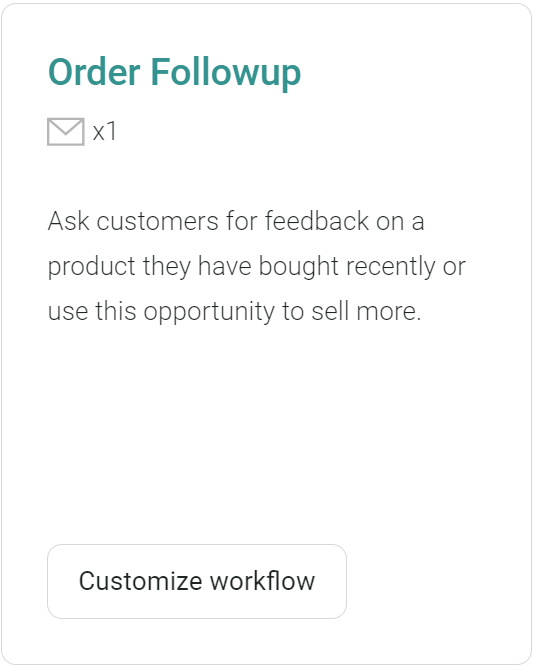
2. After clicking Create workflow, I look for the Order Follow-up option:
3. For the trigger, I stick with Placed order and make sure the filter shows Order status is paid:
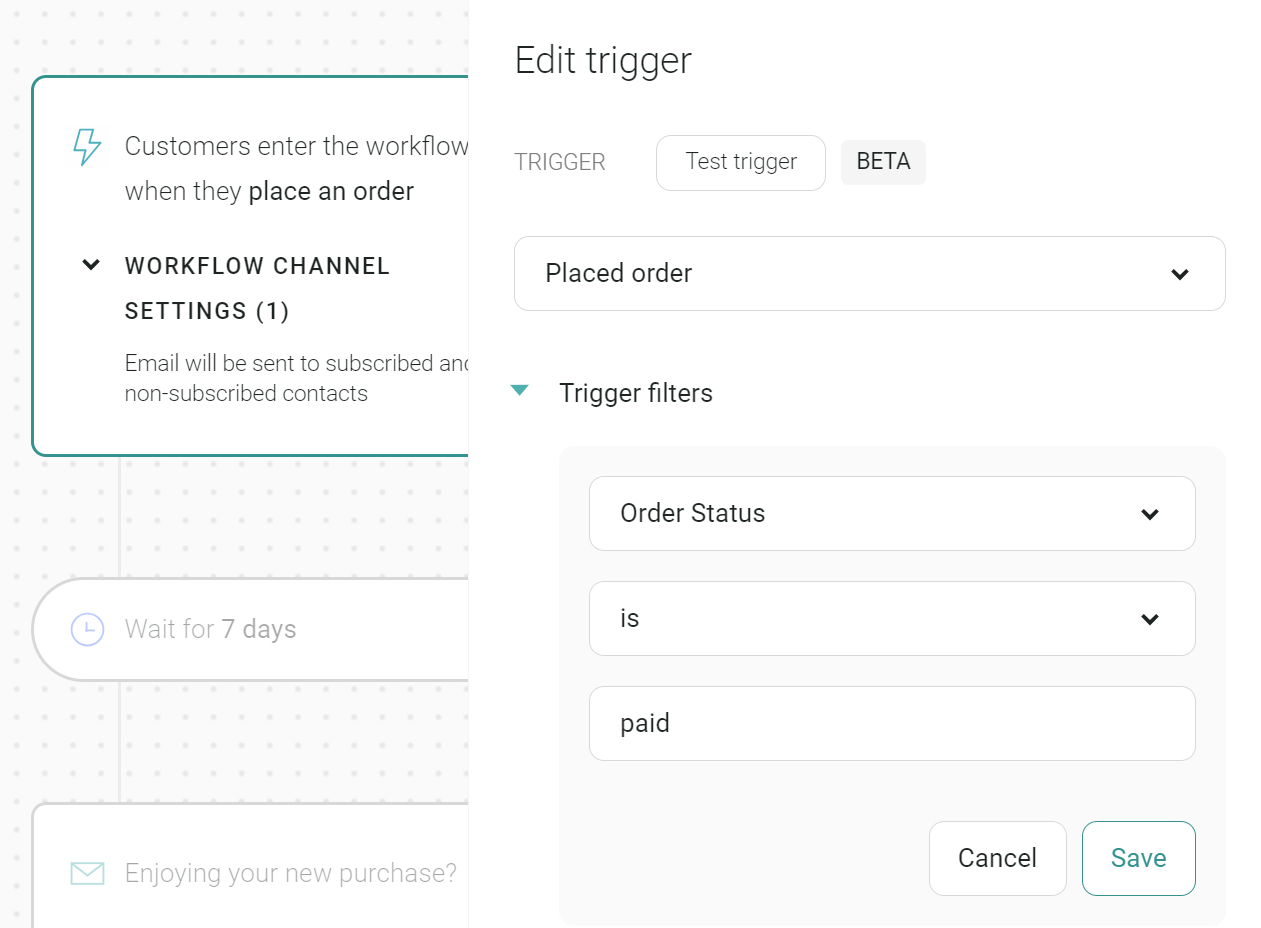
Since Omnisend connects directly with Shopify, WooCommerce, and BigCommerce, it will auto-detect the Placed Order trigger immediately. You can also use other trigger types for automation workflows, like first purchase, repeat purchase, or high-value orders.
4. I’ve learned through trial and error that timing matters: sometimes, I delay the email by 30 minutes so it doesn’t get lost in the order confirmation flurry
When setting up these workflows, I found that segmentation based on purchase value makes a difference. My higher-value customers receive a slightly different message than first-time buyers to create a more premium experience.
One trick I discovered is that exit conditions prevent email fatigue. If someone places three orders in two days, I set up conditions so they don’t get three identical messages back-to-back.
Customizing your automated thank you email
My thank-you emails evolved through many iterations. The current version includes:
- The customer’s first name (not just “Dear Customer”)
- A brief, genuine thank you that doesn’t sound like a robot wrote it
- Order details for their reference
- A single next action — usually an invitation to join our community
A/B testing different versions of my thank-you messages has been eye-opening. I tested two different subject lines and discovered that “Thanks for your order, (Name)!” significantly outperformed “Your order is confirmed.”
Omnisend supports A/B testing for entire emails, not just subject lines, which means you can test completely different layouts, incentives, and messaging styles to see what converts best.
I keep testing different approaches. Last month, I removed the promotional language and saw my reply rate increase. People responded with questions and comments, starting conversations rather than just clicking through.
I also use dynamic content blocks to make each email feel custom-made. My click-through rates jumped when I added recommended products based on my customers’ purchase history.
Segmenting by purchase type and value
To truly make the most out of automated emails, you need to apply advanced segmentation. Splitting your audience allows you to deliver a highly relevant experience for every single buyer.
By adding conditions to your automation workflows, you can send completely different thank you messages to first-time buyers versus repeat customers.
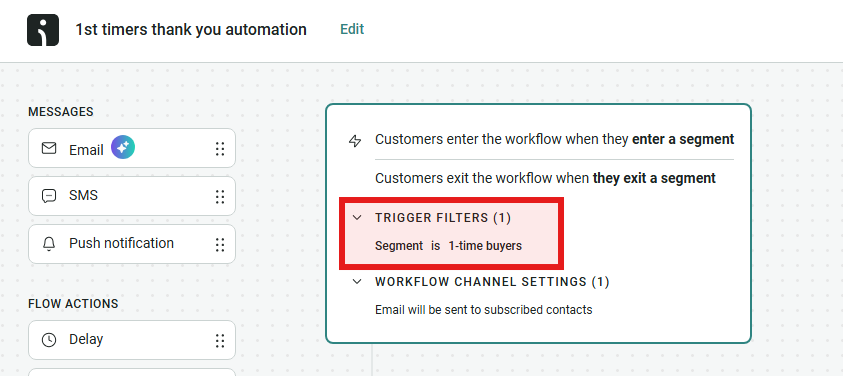
You can also create unique paths for high-value orders, which gives your VIP spenders a more premium, tailored, and personalized thank you with exclusive offers.
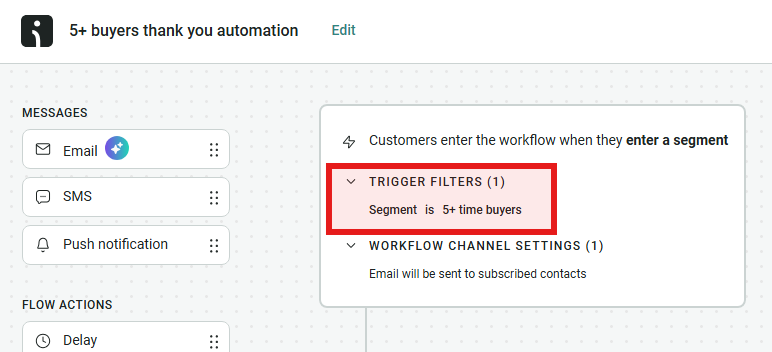
It’s even possible to use product category segmentation, which allows you to make different product recommendations based on what was purchased.
For high-value orders, I always add SMS automations to the post-purchase flow to guarantee they see the message. If you get stuck during setup, Omnisend’s support team is available 24/7 on every plan. I’ve used them myself when configuring more complex segmentation rules.
When to send a thank you email in ecommerce
The best time to send a thank-you email is when your customer expects it (immediately following a purchase) or when they perform an action requiring confirmation. Here are some of the timing practices I use for thank-you emails:
- After purchase: I send these within 30 minutes of purchase completion — after the order confirmation, but before shipping notification, when excitement is the highest
- After newsletter signup: My welcome emails go out immediately after signup, as delays here can cause confusion and lead to my customers reattempting signup
- After feedback: I automate these to send within three hours of receiving feedback to show we’re actively listening
- After a referral: I set up these emails to arrive within one hour of the referral and follow up with an additional email a few days after to incentivize additional ones
- After a milestone (loyalty tier, anniversary): Anniversary emails go out on the milestone date, and loyalty tier achievements go out within 24 hours of achievement
- After abandoned cart recovery: I send these thank you emails two hours after the recovered purchase is complete to separate the thank you from the standard order confirmation
To make it easier, here’s a quick reference table you can bookmark or screenshot for future use:
| Customer action | When to send |
|---|---|
| Purchase | 30 minutes after checkout |
| Newsletter signup | Immediately |
| Feedback submission | Within 3 hours |
| Successful referral | Within 1 hour |
| Customer milestone | On the date or within 24 hours |
| Abandoned cart recovery | 2 hours after purchase completion |
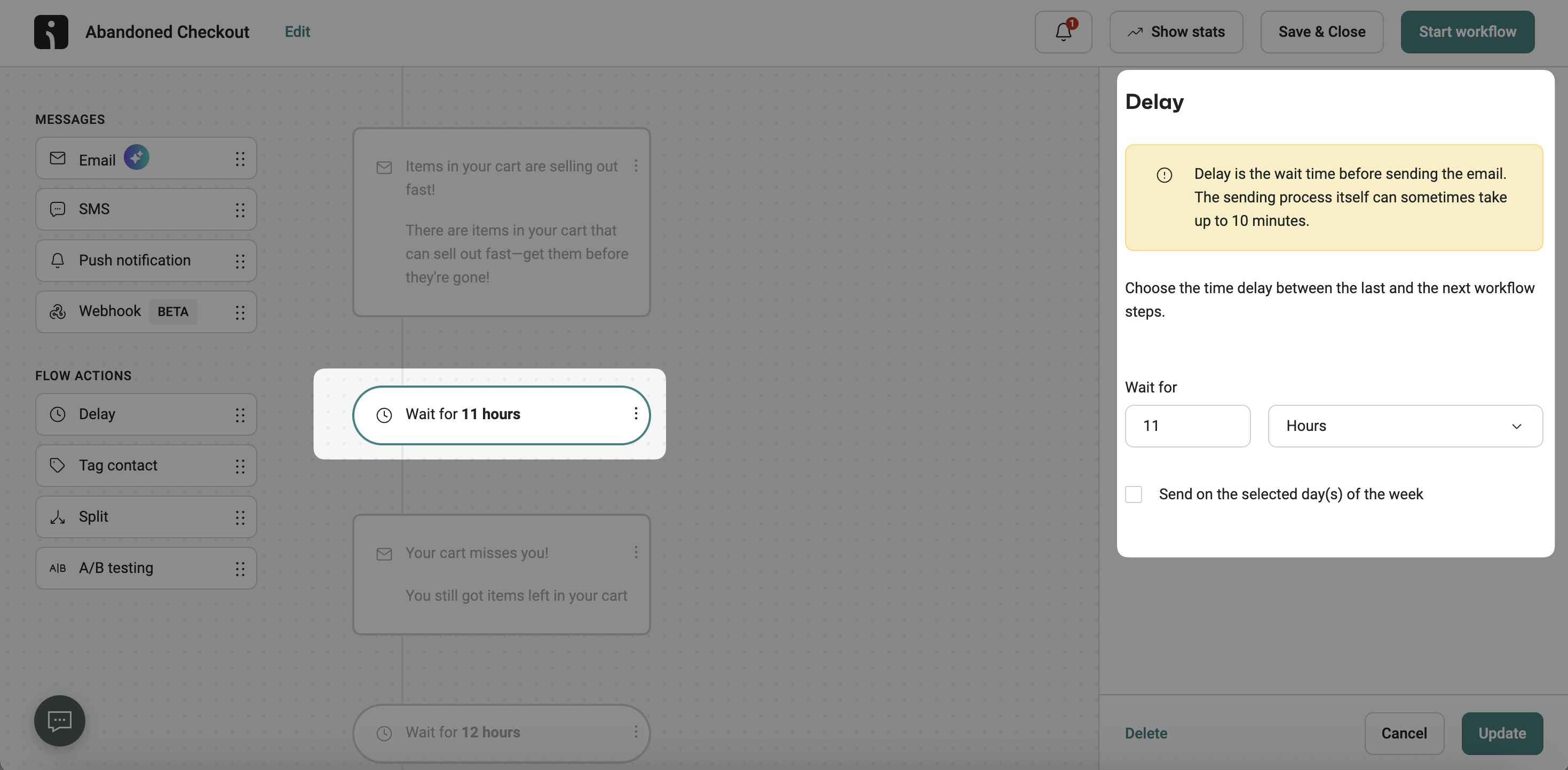
I always use the delay settings in Omnisend to configure timing. You can add these to any email automation and define the delay by entering a digit and selecting hours or days from the dropdown. Just remember to factor in time zone considerations if you’re running a global business, so the messages don’t arrive in the middle of the night.
“I automate all these emails in Omnisend, and you can, too. Each automation has unique triggers and delays, so they arrive at the right moment. I also add SMS automations into some thank you flows — customers who receive both email and SMS show higher engagement rates.”
— Agnė Ganchev, Director of Customer Success at Omnisend
Conclusion
I’ve spent many years in ecommerce by now, and I’ve seen firsthand the impact that a post-purchase strategy can have on a business. If I had to select a few most important takeaways from the entire article, I’d say you need to focus most on combining perfect timing, personalizing beyond just the name, and creating reliable automations. Another top tip is to A/B test two email versions and refine your subject lines, content, and offers to maximize results.
Ultimately, a well-crafted thank you for your purchase email does more than just confirm an order. It’s basically an organic transition to the next sale, and once you have different thank-you emails for different points in the customer journey, this becomes a revenue-generating loop.
The best part is that everything I’ve covered, the templates, the automation workflows, the A/B tests, and the SMS integrations, all of it runs on Omnisend. If you want to try it yourself, Omnisend offers a free plan with unrestricted ecommerce features, so you can already start automating your thank you for purchase emails right after you sign up.
Use Omnisend to automate thank-you-for-your-purchase emails that drive repeat sales and build customer loyalty
Quick sign up | No credit card required
FAQs
How to say thank you in an email professionally?
Express appreciation, mention the actions (e.g., leaving a review), and close with a relevant next step or offer of continued support. Authenticity beats formality every time.
For example, “Hi (Name), thank you so much for your recent order of (Product Name). We’re happy to have you as our customer.”
How long should a thank-you email be?
Brief enough to respect their time — typically three to five sentences. I’ve found shorter thank yous (75-100 words) get better engagement than lengthy ones.
Should you follow up after a thank-you for your purchase email?
Follow up only if it will add value to your customer journey or encourage them to take the next steps. For example, “Did you get my thank you?” emails don’t add value. I follow up only with relevant information or to address unanswered questions.
What is the best subject line for a thank you for your purchase email?
Here are some safe lines you can choose from:
— “Thank you for your order, [Name]!”
— “Your [Brand] order is confirmed — thanks!”
— “Thanks for your purchase! Here’s what’s next”
You can use Omnisend’s A/B testing capabilities to check these variations and discover which one your audience responds to best.
How do you automate a thank you for your order email?
Use an ecommerce email platform like Omnisend to set a “Placed Order” trigger that sends the email within minutes of purchase. Set a 30-minute delay so it arrives after the order confirmation but before the shipping notification.
What is the difference between a thank-you email and an order confirmation email?
An order confirmation is transactional. It confirms what was purchased and provides receipt details. A thank you for your purchase email goes further by expressing gratitude, building a relationship, and often including a next step, like a discount or product recommendation.
Can I send a thank-you email with a discount code?
Yes. Including a discount code in your thank you for your purchase email is one of the most effective ways to drive a repeat purchase. Keep it simple: thank the customer, confirm their order, and present the code with a clear expiration date.
