


Verified & Reviewed
Last updated on August 27, 2026 Written By Rachel Hand
Last updated on August 27, 2026 Written By Rachel Hand

Subscribe for More
Warehouse automation has become a practical necessity for brands aiming to boost throughput, protect margins, and simplify operations as order volumes rise.
For midmarket and fast-growing brands—especially those managing in-house fulfillment or evaluating a 3PL—automation can be the difference between scaling smoothly and hitting operational bottlenecks.
This guide explains what warehouse automation is, the main types available, and how to implement it step-by-step. You’ll also find a clear comparison of whether to automate your own warehouse with a WMS or outsource to a fulfillment partner.
What is warehouse automation?
Warehouse automation refers to using technology such as software, robotics, and equipment to execute warehouse tasks with minimal human intervention.
For example, instead of manually sorting orders into shipping lanes, an automated sortation system can direct each box to the right dock automatically.
It’s helpful to distinguish between mechanization (using powered tools like forklifts), digitization (software and data for tracking), and true automation (systems that perform tasks end-to-end). Automation exists on a spectrum:
- Manual: All tasks performed by people
- Assisted: People use tools (e.g., barcode scanners)
- Semi-automated: Machines handle repetitive tasks, people manage exceptions
- Highly automated: Integrated systems run most processes with oversight
Most startup brands will start with a mostly manual approach and increase levels of automation with time and growth.
Why you might need warehouse automation
When your brand does grow, warehouse automation helps manage larger SKU catalogs, promotional surges, peak season spikes, and labor shortages. Key outcomes to prioritize include:
- Higher throughput per hour
- Lower cost per order
- Improved pick accuracy
- Better use of storage space
- Resilience during demand peaks
- Faster onboarding for new staff
To avoid investing in the wrong technology, focus on 1–2 primary KPIs, such as pick rate or order accuracy, that address your biggest operational bottleneck.

What end-to-end warehouse automation flow typically looks like
Understanding the full warehouse process helps pinpoint where automation delivers the most value. The typical flow includes:
- Receiving/unloading
- Putaway and replenishment
- Storage
- Picking
- Packing and labeling
- Sortation to shipping lanes
- Shipping
- Returns
- Cycle counting
At each step, “good” looks like minimal dwell time at receiving, efficient pick paths, and no congestion at pack stations.
For example, if pickers spend too much time walking, automation can help by optimizing routes or using goods-to-person systems.
Warehouse automation technology options (and best-fit use cases)
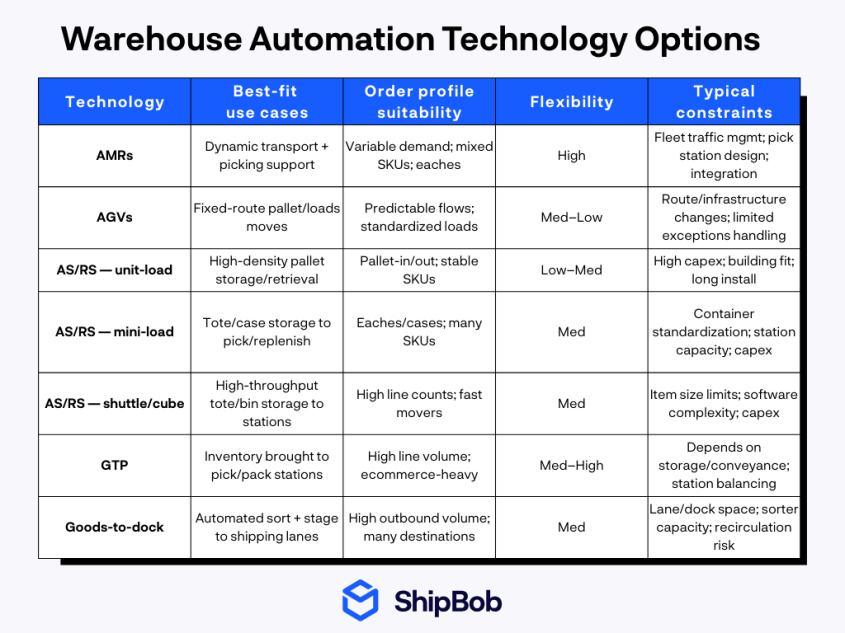
Warehouse automation technology should be matched to your workflow and order profile, not just chosen for its novelty. Below are the main categories and their ideal applications.
Movement and storage automation
Two common automated warehouse picking systems handle inventory movement within the warehouse: automated mobile robots (AMRs) and automated guided vehicles (AGVs).
- AMRs navigate dynamically using sensors and maps, making them ideal for flexible layouts and evolving workflows.
- AGVs follow fixed paths (typically magnetic strips or wires) which makes them well-suited for steady, predictable routes with consistent traffic patterns.
Another common type of inventory automation are Automated Storage and Retrieval Systems (AS/RS), which come in several forms:
- Unit-load: For pallets and large items
- Mini-load: For totes and cases
- Shuttle and cube systems: For high-density small-item storage
Goods-to-person (GTP) systems take a different approach by bringing items directly to pickers at stationary workstations, which eliminates travel time and boosts throughput. They work especially well for apparel accessories, beauty products, and home goods where order density is high and SKU variety is wide.
Goods-to-dock (or cross-docking) systems, on the other hand, are better suited for document-heavy or specialty workflows that require direct staging near shipping areas.
Picking and packing automation
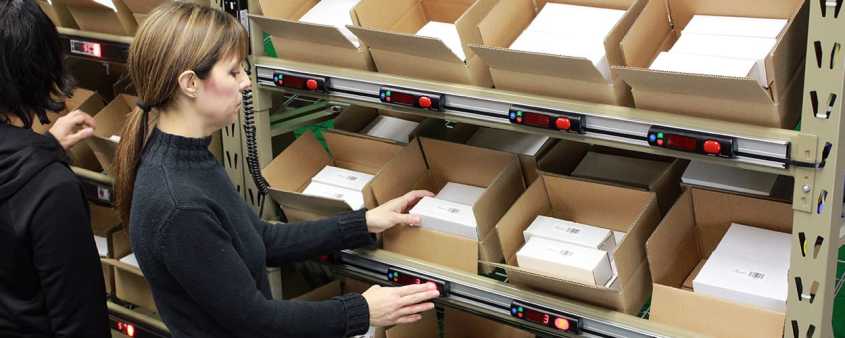
Light-directed systems can help eliminate guesswork at the pick face, for example pick-to-light and put-to-light systems use lights to guide workers to the correct items or bins, speeding up picking while reducing errors.
Voice picking and RF wearables further streamline the process, particularly for fast-moving SKUs. For repetitive tasks involving small, consistent products, robotic arms with vision systems can handle picking efficiently.
Packing automation (including dimensioning, weighing, and ShipBob’s right-sized box selection algorithm) ensures each order is packed in the most cost-effective box.
Station design also plays a critical role. Thoughtfully placed scan points and ergonomic workstations reduce travel time and speed up exception handling, keeping throughput steady even when issues arise.
Conveyance, sortation, and inbound handling
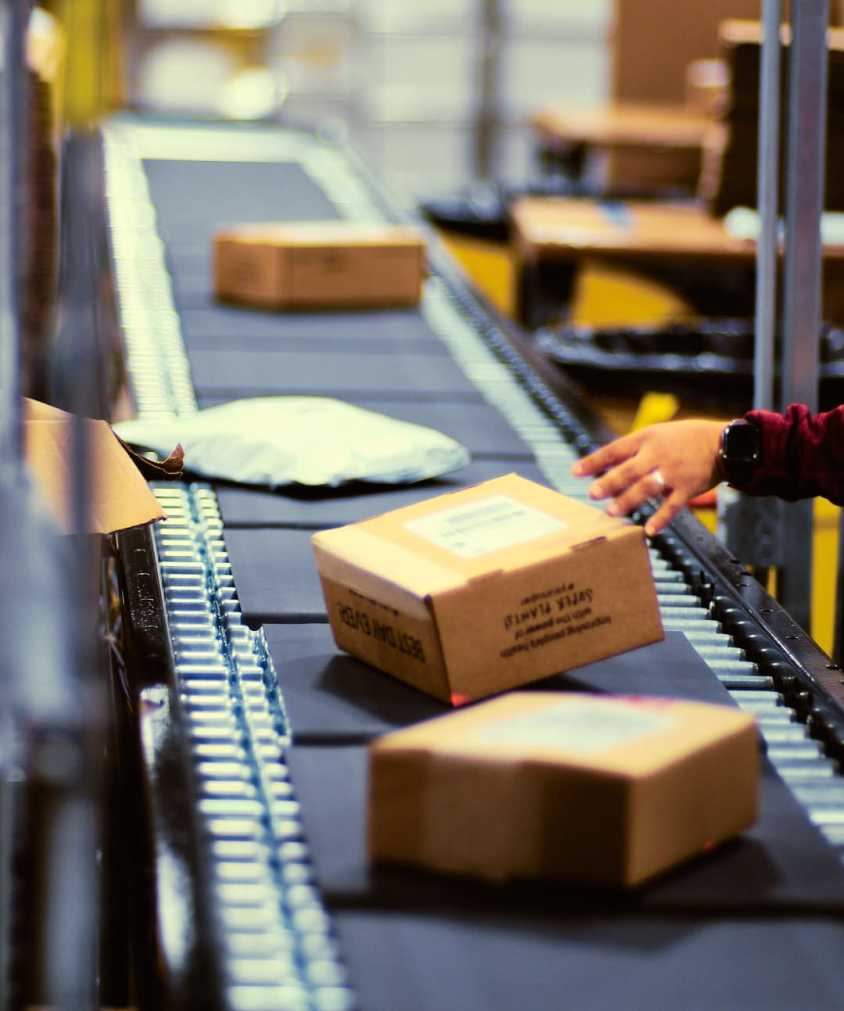
Conveyors and sortation systems (including belt, shoe, crossbelt, and tilt-tray configurations) automate the movement of orders to the right shipping lane, paying off when order volume is high and accuracy is critical.
On the inbound side, telescopic conveyors and trailer unloaders accelerate receiving, while palletizing and depalletizing robots excel in steady, repeatable flows where consistency matters most.
Inventory visibility tools
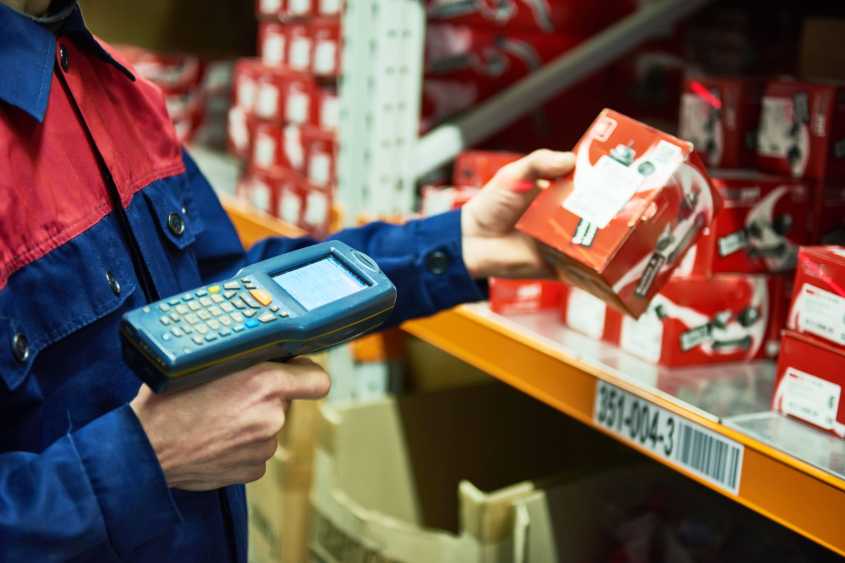
RFID tags, fixed readers, and drones can automate cycle counting and location verification, eliminating manual spot checks and reducing discrepancies. These result in higher inventory accuracy, which translates directly into faster picks and fewer exceptions at the pack station.
Additionally, automating cycle counts, for example, cuts manual counting time while enabling more frequent checks, which supports better inventory health over time.
Implement warehouse automation with a phased rollout plan
Rolling out warehouse automation in phases helps reduce risk and prove value before scaling.
Start with a controlled pilot, then expand as you see results. The approach below walks through site preparation, pilot testing, system integration, and change management to help you build automation in stages while keeping teams aligned.
Phase 1: Prepare the site and baseline performance
Begin by auditing your facility for power, network coverage, racking, and safety zones.
Define baseline KPIs—such as pick rate or order accuracy—using trusted measurement methods.
Address “no-regrets” improvements first, like labeling standards and pick face setup, to set a strong foundation.
Phase 2: Select solutions and run a pilot before scaling
Choose automation solutions based on SKU size, order profile, seasonality, and layout needs.
Run a pilot with clear success thresholds—such as uptime, throughput gain, or error reduction.
Plan for exception handling, focusing on issues like mis-scans or unlocated items.
Phase 3: Use an integration-first blueprint to connect automation
Integrate automation using APIs, middleware, or event-based updates for real-time syncing. Prevent common failures like duplicate inventory sources or delayed confirmations by ensuring all systems communicate seamlessly.
ShipBob WMS supports orchestration with an open API and integrations to major ecommerce platforms, ERPs, and order management systems.
After hitting a breaking point with their warehousing complexity, Earthley more than doubled productivity and revenue after connecting their systems to ShipBob’s WMS.
Phase 4: Manage change and train teams for adoption
A structured change management plan covering process documentation, role changes, and super-user training helps teams adapt quickly. Fast onboarding is critical when turnover or seasonal hiring is common.
ShipBob offers white-glove onboarding, on-site implementation, and dedicated support to help teams become operational quickly.
Track warehouse automation trends and plan next steps
Warehouse automation continues to evolve. Trends like AMR growth, collaborative robots (cobots), and edge computing are shaping the future.
Sustainability-focused design and modular automation are also gaining traction as brands look to balance efficiency with environmental impact.
For mid-market ecommerce brands, AMRs and modular automation are “now” trends worth piloting—especially if you’re facing labor constraints or need to scale throughput quickly. Edge computing and advanced cobots are “later” trends to watch as the technology matures and cost of entry drops.
Depending on your situation, the next step may be to audit and baseline your current processes, pilot a new workflow, or evaluate outsourcing.
When to build in-house automation, use a WMS, or outsource to a fulfillment partner
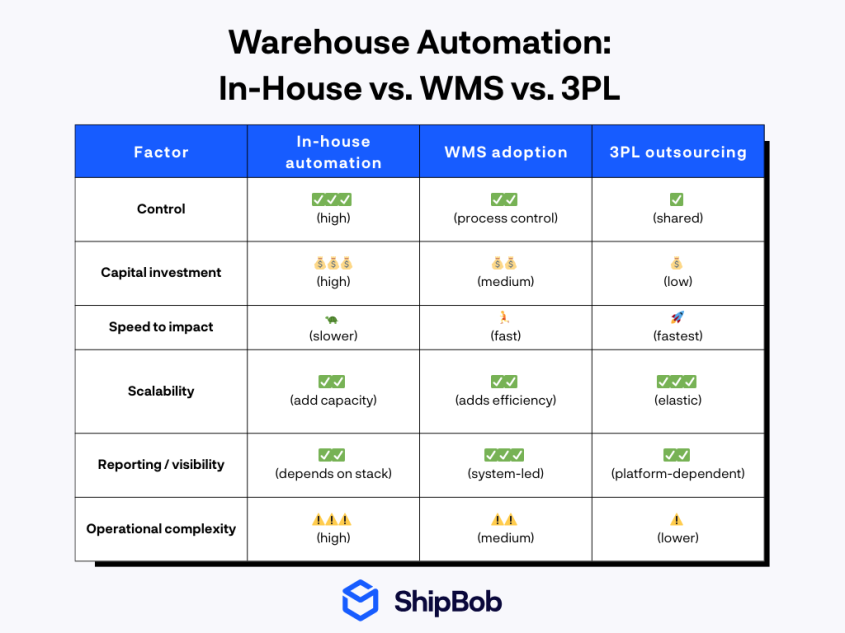
Choosing between building automation, using a WMS, or outsourcing depends on your need for control, capital investment, speed to impact, and internal expertise. Below are the three main approaches:
- Building in-house offers maximum control but requires significant investment and expertise.
- Using a WMS (like ShipBob’s) gives you advanced automation tools and analytics while keeping operations in-house.
- Outsourcing to a fulfillment provider shifts the automation burden to a partner, offering scalability and fast impact. This is especially useful for rapid growth, peak volatility, or international expansion.
Bunker Branding’s experience shows the value of this approach: after implementing ShipBob’s WMS, they saw error rates drop below 1%, improved picking and packing accuracy, and gained real-time reporting for labor and order management.
When evaluating a potential partner, ask about system integrations, visibility, exception management, and reporting. Ask about multi-site resilience and how they handle peak volume.
ShipBob supports both approaches: brands can use ShipBob WMS in their own US warehouses or outsource fulfillment to ShipBob’s network for operational scale.
“ShipBob’s hybrid fulfillment solution – which allows us to simultaneously outsource fulfillment to three of ShipBob’s fulfillment centers and use ShipBob’s warehouse management system (WMS) to power operations in our Miami warehouse – turned out to be just what we needed. This gave us the inventory storage and operational capacity we needed to keep up with our growing order volume, and since all of ShipBob’s warehouses run on the same WMS we’re using in our facility, we still achieved the unified fulfillment experience we required.”
Rachel Tannenholz, President, and Melissa Mosheim, Director of Logistics at Aroma360
For US brands, ShipBob’s Inventory Placement Program helps distribute inventory closer to customers. This reduces the average shipping zone and handles peak volume without extra headcount.
“We started using ShipBob’s Inventory Placement Program to split inventory between two fulfillment centers, and it’s been going really well. We’re saving more than $3 per shipment on average between carrier rate shopping and inventory placement, and we’re only using two locations. ShipBob has fulfillment centers all over the US, so we could easily expand into 3 or 4 warehouses to drive shipping costs down even further.”
Gregory Frye, VP of Operations at Hi-Altitude Brands
If you’re ready to automate your warehousing, click the button below to get in touch with ShipBob’s team.
Warehouse Automation FAQs
Below are answers to more questions and challenges you may encounter related to warehouse automation.
What are the main types of warehouse automation technology?

The main categories are movement (AMRs, AGVs), storage (AS/RS), picking (pick-to-light, voice), packing (dimensioning, box selection), sortation (conveyors, sorters), and inventory counting (RFID, drones). Each addresses a different warehouse workflow.
How do I know which warehouse process to automate first?
Start with the process that consumes the most labor hours, has the highest variability, or causes the most errors during peak periods. This is usually picking or packing for ecommerce brands.
What’s the difference between WMS, WES, and WCS?
A Warehouse Management System (WMS) manages inventory, orders, and workflows. A Warehouse Execution System (WES) coordinates tasks between people and machines. A Warehouse Control System (WCS) directs automation equipment like conveyors and sorters.
How does ShipBob WMS help integrate new automation systems?
ShipBob WMS uses an open API and pre-built integrations to sync inventory and order data across platforms, reducing manual reconciliation and supporting real-time operations.
Can ShipBob support warehouse automation if I don’t want to run my own warehouse?
Yes, outsourcing to ShipBob shifts the automation and operational complexity to a fulfillment partner, while you maintain visibility and control through ShipBob’s platform.
How does ShipBob ensure inventory accuracy and consistent fulfillment quality?
ShipBob’s standardized WMS enforces barcode scans at every movement, intelligent cycle counts, and algorithm-driven packing and carrier selection. You get real-time inventory and SLA performance visibility, while ShipBob monitors carrier performance and files claims on your behalf when issues arise.



