

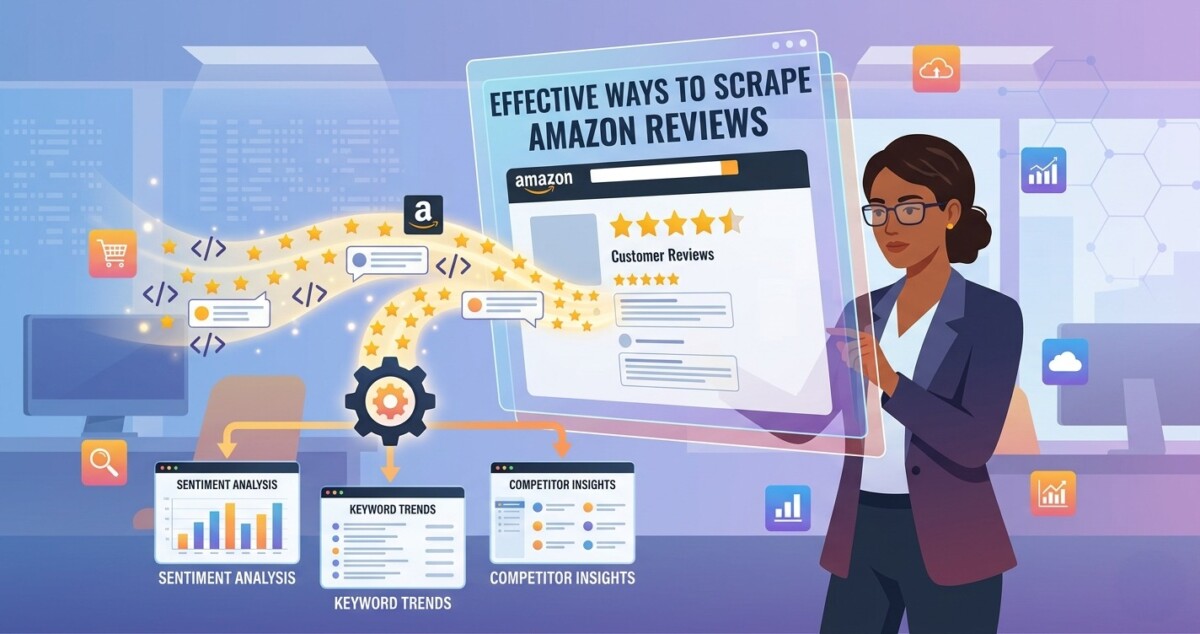
A friend of mine, who is a seller in the home goods space, spent a full weekend manually copying Amazon reviews into a spreadsheet, tabbing between browser windows, highlighting complaints, and taking notes. By Sunday night she had 120 reviews and one half-formed insight.
That same weekend, using an Amazon data extractor to scrape Amazon reviews from six competing ASINs, I had over 4,000 structured reviews, which includes titles, star ratings, verified purchase status, review text, dates, ready in a single exportable table. She launched a reformulated product based on that data three months later. It hit the top 10 in its subcategory within 60 days.
The gap between operators who manually browse Amazon reviews and those who systematically extract them is widening every quarter. Research from Frontiers in Psychology shows that 93% of consumers say online reviews directly influence their shopping choices, and when a product earns its first five reviews, the likelihood of purchase jumps 270%. That means reviews aren’t just social proof. They’re a real-time signal about what the market wants, fears, and is willing to pay for.
This guide covers seven ways to scrape Amazon reviews and put that data to work in your growth stack, with concrete workflows for each.
The core challenge: Amazon is one of the most aggressively protected sites on the web. Since late 2024, Amazon requires login sessions to access paginated reviews, making basic scrapers essentially useless. Anti-bot measures, CAPTCHAs, rotating page structures, and login walls block most DIY approaches within minutes.
This is exactly the problem Amazon data extractors were built to solve. Unlike a traditional Amazon review API, which requires developer credentials, rate-limit management, and often returns only a subset of public review data, the tool I used, Chat4data, operates directly in the browser.
As an AI-powered Amazon web scraper built as a Chrome extension, Chat4data approaches scraping the way a human would, but at machine speed. You describe what you want in plain language (“collect product title, price, and the first 50 reviews”), and it does the rest. However, if you need more Amazon reviews scraping tool selections, click here to know more.
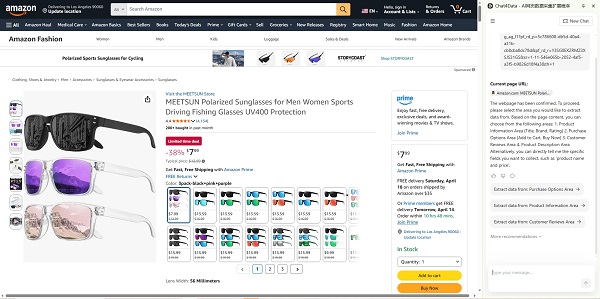
The play: Pick your top 3–5 direct competitors. Pull 500–1,000+ reviews per ASIN. Sort by “most helpful” and “most critical.” Spend 30 minutes reading the top 50 in each category. This exercise almost always surfaces at least one insight you can act on within a week.
The goal isn’t to copy what they’re doing, but to find the exact language customers use when they love or hate a product in your category. That language belongs in your listing copy, your A+ content, and your PPC ads.
How Chat4data handles it:
Chat4data’s cross-region collection means you pull product title, rating summary, and individual review text from the same Amazon page in a single run, without stitching together data from two separate scrapes. Just open the competitor’s product page in Chrome, with Chat4data opened, and type: “Collect all visible reviews including reviewer name, star rating, review title, and review text.” Or just click to follow its guidance. Chat4data’s Agent plans the extraction, handles pagination by clicking through review pages automatically, and exports a clean CSV or spreadsheet.
Workflow:
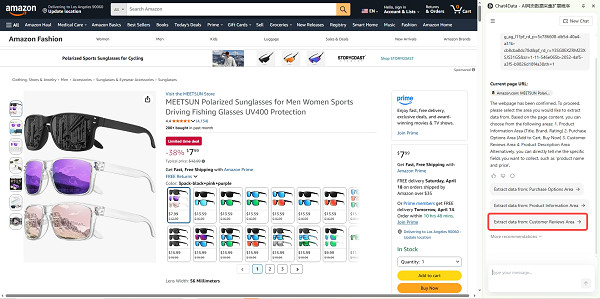
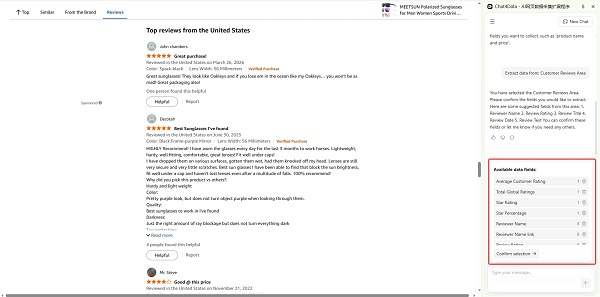
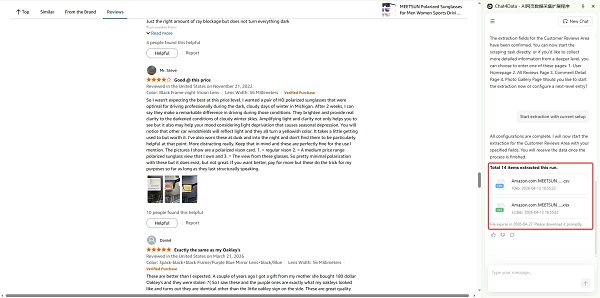
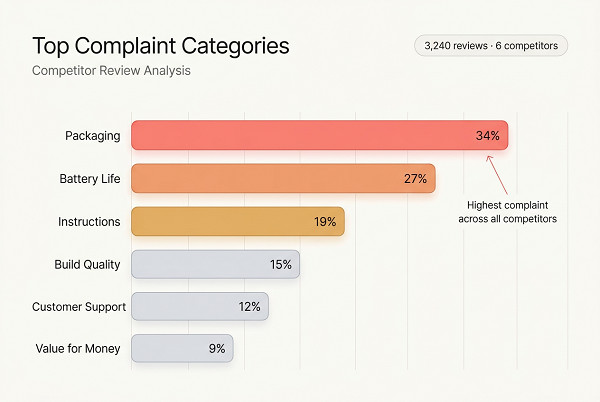
The play: Filter competitor reviews to 1-star and 2-star only. Every complaint is a product gap, and a positioning opportunity for you.
I was genuinely surprised how often this surface intelligence no focus group would give you. One seller found a recurring complaint across three competitors’ protein powders: “clumps badly in cold water.” They put “mixes clean in cold water every time” in their headline. Category bestseller within a quarter.
How Chat4data handles it:
Chat4data supports dynamic interaction, meaning its Agent can click Amazon’s native star filter buttons during extraction, no manual pre-filtering needed. Open a competitor’s page, prompt Chat4data: “Filter reviews to 1 and 2 stars only, then collect all review text and titles.” The Agent clicks the star filter, waits for the page to update, and begins collecting filtered results automatically.
Workflow:
The play: Customers describe products in natural language that Amazon’s algorithm indexes. If you extract Amazon reviews at scale and mine the text for recurring phrases, you’ll find long-tail keywords your competitors haven’t optimized for, because their tools are looking at search volume databases, not actual buyer vocabulary.
How Chat4data handles it:
Because Chat4data collects full review text (not just star ratings) in a structured table, you get a ready-to-analyze dataset immediately. Pull 500+ reviews from 3–5 top-performing ASINs in your category. Export the review text column, then feed it to your analysis tool of choice.
Good options for the analysis step:
Workflow:
The play: Review velocity, namely how fast a product accumulates new reviews, is a reliable proxy for sales velocity. When a competitor’s review count spikes, they’re likely running a promotion or catching a traffic surge. When it stalls, they may be supply-constrained. You can use this signal to time your own pricing and ad spend moves.
How Chat4data handles it:
Set up a recurring weekly scrape of your top 3–5 competitors’ ASINs using Chat4data. Each run collects review count and scrapes price from the product page. Pipe results to a Google Sheet and track changes week over week.
Because Chat4data captures cross-region data in one pass, you can collect review count (from the ratings summary section) and the most recent individual reviews (from the review list section) simultaneously.
Workflow:
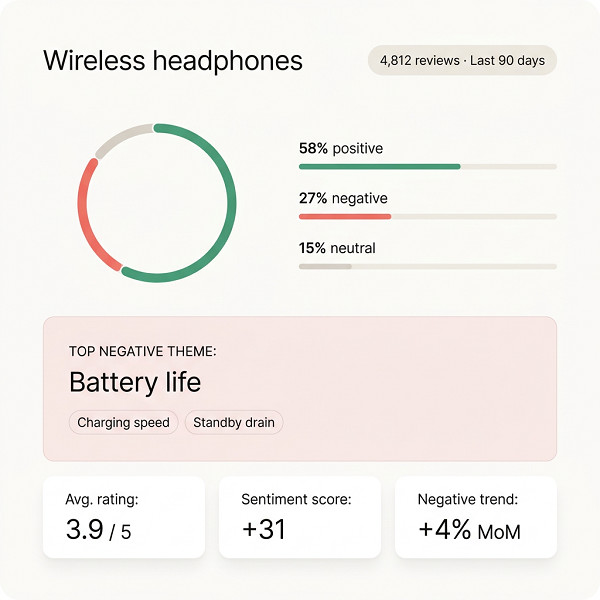
The play: The most valuable thing you can extract from Amazon reviews isn’t keywords or competitor weaknesses in isolation. It’s an emotional map of what customers fundamentally want from a product in your category, and what consistently disappoints them. This is your positioning roadmap.
A 2024 peer-reviewed study in the International Journal of Management Science and Information Technology confirmed that online customer reviews significantly impact purchase intentions, and that positive reviews increase consumer trust as an intervening variable, meaning trust-building is the real upstream lever for conversion. Reviews tell you exactly what builds and destroys that trust in your category.
How Chat4data handles it:
Pull 1,000–2,000 reviews from the top 10 ASINs in your category. Chat4data’s cross-region extraction captures full review text, star rating, and verified purchase status in one structured table, giving you a clean, analysis-ready dataset.
Then run sentiment analysis:
Workflow:
The play: Before spending money on sampling or tooling, run a “review validation audit” on the closest existing products in your target category. You’re looking for three signals: unmet needs that recur across multiple ASINs, feature requests in review text, and structural complaints about incumbents that you could solve.
This is faster and cheaper than a focus group, and the data comes from people who already spent money in the category, making it more reliable than survey responses.
How Chat4data handles it:
Chat4data’s human-in-the-loop design is especially useful here for category-wide research. If Amazon prompts a login or CAPTCHA mid-run while you’re scraping across multiple ASINs, Chat4data pauses, notifies you, and waits for you to resolve it manually, then picks up exactly where it left off. No failed runs, no lost data, no starting over.
Workflow:
Red flag signal to watch for: If reviews across your target category are uniformly positive with no consistent complaints, the category may be highly commoditized. In that case, scrape reviews from adjacent categories to find underserved demand before committing.
The play: Build an automated monitoring system that tracks your own product reviews, and your top competitors’ on a recurring schedule, surfacing alerts before a single-star drop becomes a trend.
Most sellers find out about a rating problem when it’s already hurting their conversion rate. A feedback loop built on scraped review data catches it in real time.
How Chat4data handles it:
Chat4data’s dynamic interaction means the Agent navigates Amazon’s review pages, applies filters, and pages through results without you configuring anything beyond the initial prompt. Pair that with a simple automation stack:
Chat4data’s XPath fallback and semantic validation guarantee that even if Amazon updates its page layout, which happens regularly, your weekly scrape keeps returning accurate, correctly labeled data fields. The alternative is waking up Monday morning to find your entire review monitoring pipeline returned garbage because Amazon changed a CSS class name over the weekend.
If you would rather run this monitoring through an API instead of the browser, a tool like Scrape.do can scrape Amazon reviews on a schedule and return structured data straight to your stack. It handles the proxies and anti-bot layer for you, so a weekly or daily pull keeps running even when Amazon shifts its defences. For teams automating feedback loops at scale, Scrape.do is a solid way to keep the data flowing without manual babysitting.
The compounding benefit: Over time, your review dataset becomes a training signal for your product roadmap. Every quarter, run a batch sentiment analysis on your cumulative review data and track whether your average pain point scores are improving. That’s how scraping Amazon reviews evolves from a one-time research exercise into a durable competitive asset.
The seven tactics above sit on a spectrum, from one-afternoon competitive reads to fully automated feedback infrastructure. You don’t need all seven on day one.
The fastest-growing operators I’ve seen start with tactics 1 and 2: pick two or three competitors, use Chat4data to scrape Amazon data from their top ASINs, and spend two hours reading the most helpful critical reviews. That single exercise almost always surfaces one actionable insight, a complaint to address, a feature to add, a positioning angle to test.
From there, layer in keyword mining (tactic 3), then sentiment automation (tactics 5 and 7), then pricing signals (tactic 4). Within a quarter, you have a real intelligence operation running on your category.
Research from Capital One Shopping confirms that 91% of consumers read at least one review before buying, and the number of reviews a product has influences the purchase decisions of 85% of consumers. The feedback loop between what customers write and what products win is tighter than most operators realize.
The operators who read that loop systematically, with a tool built to handle Amazon’s complexity, have a structural advantage over those who don’t. Chat4data was built for exactly this.
Start this week: open one competitor’s Amazon product page, run Chat4data, and pull their last 200 reviews. See what the data tells you in 20 minutes that a weekend of manual reading wouldn’t.
Q1: Is it legal to scrape Amazon reviews?
It depends on jurisdiction, method, and intended use. Amazon’s Terms of Service restrict unauthorized automated access. However, U.S. courts, notably in hiQ v. LinkedIn (9th Circuit, 2022), have generally held that scraping publicly accessible data does not violate the Computer Fraud and Abuse Act. That said, always consult your legal team before building a commercial data pipeline.
Q2: How do browser-based Amazon scrapers handle login walls and CAPTCHAs?
It depends on the tool. Basic scrapers and most Amazon review APIs fail the moment a login wall or CAPTCHA appears. They break silently and return incomplete data. Better-designed tools use a human-in-the-loop approach: when the scraper hits a blocker, it pauses and prompts you to handle the verification manually, then resumes automatically once you’re through. Chat4data works this way, no failed runs, no lost data, no starting over mid-collection.
Q3: What data fields can I extract from Amazon reviews?
Most Amazon review scrapers let you collect the fields that are publicly visible on the page. Standard fields include: review title, review text, star rating, reviewer name, verified purchase badge, helpful vote count, review date, and any attached images. More capable tools, like Chat4data, also pull product-level data (title, price, rating summary, specs) from the same page in the same run, so you don’t need to stitch together data from separate scrapes.
Q4: How do I know if my scraper is returning accurate data?
The main failure mode is silent breakage: Amazon regularly updates its page layout, and a scraper relying on hardcoded CSS selectors or XPaths will keep running without errors, but return garbage. Signs to watch for: fields returning empty strings, mismatched data types (a price field returning a product description), or review counts that don’t match what you see on-page. More robust tools handle this through fallback extraction layers and semantic validation. If the data doesn’t match what was requested, it auto-detects the mismatch and re-runs. Whatever tool you use, always spot-check a sample of extracted records against the live Amazon page after each run.
Q5: How often should I scrape Amazon reviews for competitive monitoring?
For active tracking of 3–5 key competitors, weekly is the right cadence, because review velocity moves slowly enough that daily monitoring is overkill for most sellers. For pre-launch product research, a one-time bulk pull across 10–20 ASINs is sufficient. If you’re tracking a competitor during a promotion or product launch, run daily scrapes for 2–3 weeks to capture the review velocity spike in real time.




