


WhatsApp is one of the most important customer service channels, especially for global businesses. Here’s how to manage it.

Chances are, your brand already uses a handful of customer service channels to connect with customers: email, social media, live chat, and maybe even SMS. But your omnichannel customer service strategy isn’t complete until you tap into the world’s most popular messaging app.
WhatsApp’s 2 billion active users are spread across the globe, so talking to customers is a must for international brands — especially if you sell in Asia, South America, and Europe.
Below, we’ll give you the basic rundown on WhatsApp and WhatsApp Business, plus a few reasons to start offering customer support on the app. Then, we’ll share a step-by-step process on how any company can start using WhatsApp plus a few tips on how ecommerce companies can do so as efficiently as possible.
{{lead-magnet-2}}
WhatsApp is the most popular messaging app in the world, thanks to its security, reliability, and ability to work without a phone plan — all it requires is Wi-Fi. WhatsApp was initially launched in 2009 and acquired by Meta in 2014.

WhatsApp’s base service is for individual users. Each user links a phone number to a WhatsApp account, making it a WhatsApp number. Then, you can call, video chat, and send SMS-like WhatsApp messages to friends and family across the globe. WhatsApp supports individual messaging, group messaging, and multimedia messaging — all with end-to-end encryption to protect user privacy.
The WhatsApp Business app lets small businesses and enterprises exchange messages with users of the regular WhatsApp service, upgraded with a few business-specific features.

When you create a WhatsApp Business account, you’ll gain access to:
Your time is limited. Even with all these WhatsApp Business features, offering customer support on WhatsApp isn’t a top priority for every business.
Here are a few reasons to consider using WhatsApp as a customer support channel:
WhatsApp is the most popular messaging app in the world, with over 2 billion monthly users and 500 million daily users. Especially if your company sells (or plans to sell) internationally, getting on WhatsApp is a great way to meet customers where they are.

The app’s global reach is due to a few key benefits for users:
? Related reading: Interested in creating new communication channels with customers? Learn how to provide customer support on Instagram and Facebook Messenger.
{{lead-magnet-1}}
WhatsApp isn’t just the most popular messaging app, it’s the fastest growing. Especially since getting acquired by Meta, WhatsApp continues to release new features — many of which are especially helpful for customer communication:

? Recommended reading: Learn how to make the most of your customer support messaging (including SMS, live chat, and WhatsApp) with our ultimate guide.
WhatsApp was built using end-to-end encryption, which protects all communication on its platform. The encryption helps prevent third parties from accessing content in calls or messages. WhatsApp themselves can’t even access the data.
Like many other social communication tools, WhatsApp also offers account verification badges for businesses. With a verified badge on your WhatsApp Business profile, you earn trust with your customers and stand apart from fraud accounts.

If you’d like to offer WhatsApp customer support, here’s a simple guide to getting started and making the most of your new channel.
If you’re just getting started with WhatsApp, you’ll need to download the WhatsApp Business app. For businesses handling high message volumes, exploring WhatsApp business automation solutions early in your setup process can help streamline operations as you scale. Once you download the app, you’ll need to review the terms of service, allow access to contacts and photos, and fill out your account.
The app walks you through basic setup, so we son’t go into much detail here. However, here’s a helpful video you can follow to help you get started:

Once you’ve set up your WhatsApp Business account, it’s time to start customizing your brand’s profile.
Throughout this process, imbue your profile with some brand-friendly copy and images. Just be sure to remain clear about who you are and what you do.

We left out one key section: Hours. But that’s an important enough step for customer service to warrant its own section — find it right below this one.
? Related reading: Read the ultimate guide to social commerce to learn how to sell directly on social media platforms like Instagram and Facebook.
The Hours section of your business profile has two potential uses:
The first option (for local businesses) is straightforward, so we’ll continue discussing how online businesses should use this section of their WhatsApp profile. Ideally, you can give your shoppers around-the-clock support. But that’s not possible for every business — in that case, you want to be very clear about when you’re available.
The hours section can help set customer expectations around your availability. Consider setting hours based around when your team is ready to provide customer care on WhatsApp. Even better, consider using part of your business description to share expected response times so customers know how long they typically have to wait for a response.
You can even set up an automated away message to let customers know when they send a message while you’re away, setting the expectation that you may take longer than usual to reply.

While they’re not using WhatsApp, you can take inspiration from Berkey Filters, a water filter brand that does an excellent job of setting clear customer expectation for their live messaging channels:

? Recommended reading: Read the ultimate guide to customer service policies to give your team the processes it needs for fast, consistent responses.
Offering WhatsApp doesn’t mean spending your day checking the WhatsApp app, or opening WhatsApp whenever you get a notification. To stay efficient, integrate WhatsApp into your heldpesk.
When you integrate WhatsApp with your helpdesk, you can send and receive WhatsApp messages from the same app you use to answer customer messages from email, SMS, social media, and others channel you use for customer interactions.

Your customer care team can keep up with customer queries from all your channels, plus access unique features including (but not limited to):
?️ Shopping for a helpdesk? Check out our list of the best helpdesk software on the market. If you’re an ecommerce brand on Shopify, check out our list of the best helpdesk for Shopify stores.
If you integrate WhatsApp with a helpdesk, you can automatically send responses to your most common questions. This has two major benefits:
For example, if you’re an ecommerce company, you likely receive a lot of customer inquiries about order status updates — called “where is my order” (WISMO) requests. On average, order status updates account for 18% of incoming customer questions, according to Gorgias data.
If you integrate WhatsApp with a helpdesk like Gorgias, the software can recognize WISMO requests (and other common questions), apply a templated response, and pull customer-specific information from your ecommerce platform.

And again, order updates are just one example. With the right helpdesk, you can automate responses to most of your common questions so your support team can spend time on complex questions, angry customers, and other situations that need a human touch.
? Recommended reading: How to automatically answer WISMO requests to save time and improve customer experience.
Even when a message isn’t fully automated, you have a variety of tools in your arsenal to provide fast, personalized, and delightful customer service. Here are a few to keep in mind.
Your customer service team doesn’t need to write every message from scratch. Customer service templates can save your agents time by giving a baseline for them to tweak for each unique situation.
Plus, templates help you ensure you’re providing consistent, in-policy advice, which is especially helpful to reinforce customer service training.

You can attach images, GIFs, videos, PDFs, and other files to WhatsApp messages. In a customer service context, this allows customers can show you pictures or videos of a product malfunction, and lets your team share images and videos to help customers troubleshoot.
With the right WhatsApp integrations you can even send WhatsApp marketing and order confirmation emails with interactive buttons. For example, WebEngage lets you send product confirmation messages with easy-to-click buttons to track packages or contact your team:

By the way, the Gorgias team is hard at work making more types of rich messages like these, such as sending automated order confirmation messages and interactive review requests. You can look out for updates in our product roadmap.
When you’re providing customer service — regardless of channel — a best practice is to consider the entire customer context before writing a response:
The list goes on (and on and on).
If you’re responding directly in WhatsApp, you’ll have to dig around a tall stack of apps to find this information: your ecommerce platform, your subscription app, your reviews app, and so on. Over the course of a day, this can eat up a ton of your team’s time.
If you use a helpdesk like Gorgias, however, you’ll have the customer’s entire order and conversation right next to the WhatsApp chat window.
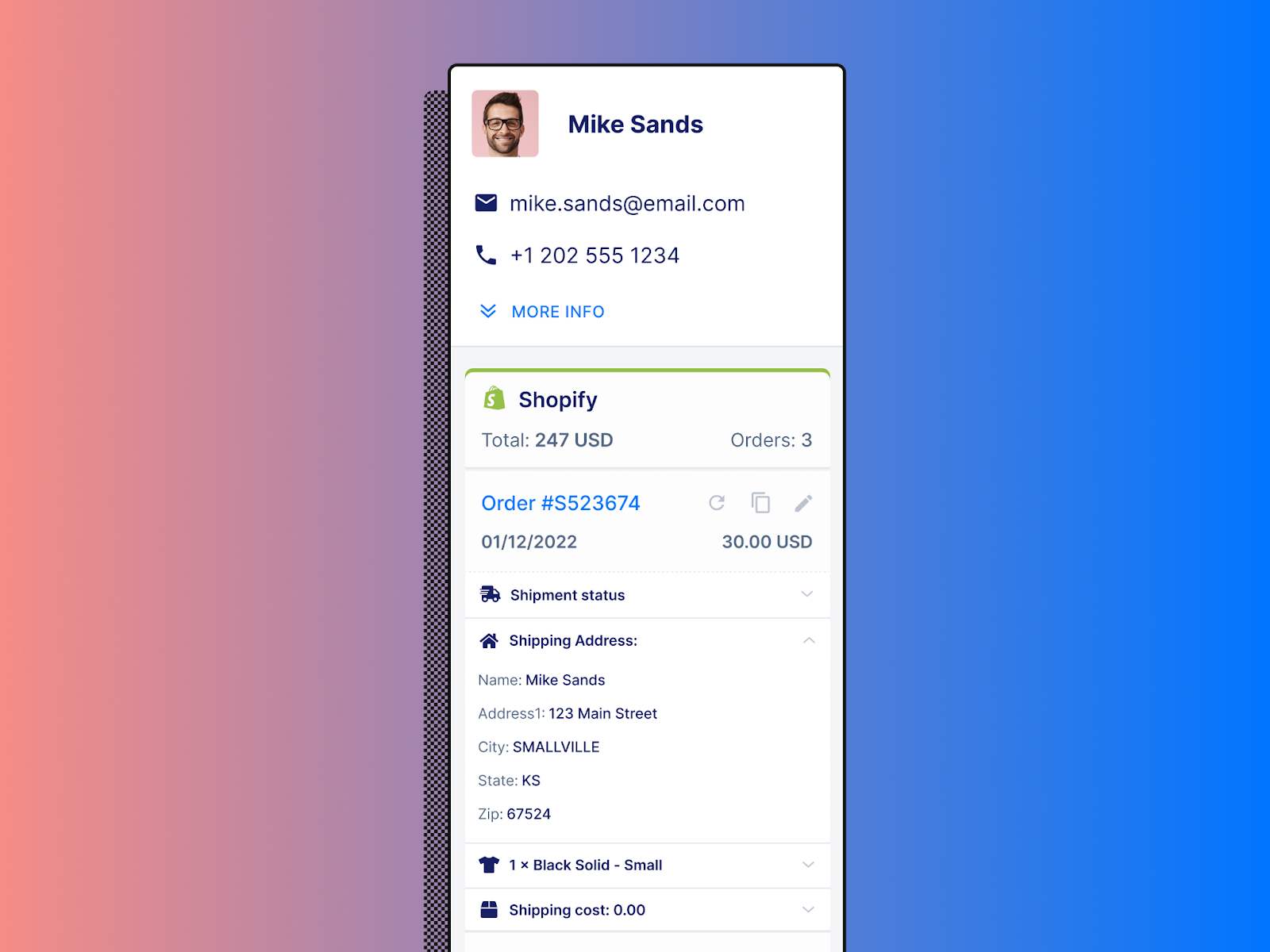
Plus, you can integrate Gorgias with other ecommerce apps (like Klaviyo, Yotpo, Recharge, and so on) to see even more customer information before responding.
One of the last tools in your kit is Whatsapp chatbots. Chatbots can be a great way to scale your customer support with a small team — however, they usually come at a cost.
Most chatbots are decent at very simple requests, but quickly provide frustrating experiences when customers ask use unusual wording or ask complex questions. And nothing is more frustrating than unhelpful service from a chatbot that tries to convince you its human.
If you want to use a chatbot, consider a tool like Ada. For best results, integrate Ada with Gorgias to also providing efficient human service and a strong customer experience.
When customers reach out to your brand, a clock starts ticking. For the first 24 hours, you can respond to the message however you’d like — the clock resets whenever the customer sends another message. But if 24 hours passes after the latest message, you can only respond with templates that WhatsApp must approve.
While you never want to make customers wait, this 24-hour window is additional incentive to set up an efficient system to respond to customer support inquiries that come through WhatsApp.
? Recommended reading: Our tips to improve customer service response times (so you don’t miss the 24-hour WhatsApp window).
Once you start offering customer service on WhatsApp, set up a system to monitor key customer support metrics. This helps you determine what you’re doing well, how you’re falling short, and where to focus on improving your customer service.
Most customer service software will track a wide range of support metrics with helpful graphs to visualize your performance. However, if you can only track a few metrics, start with:
? Recommended reading: Read our VP of Success and Support’s guide to evaluating the performance of your customer support program.
WhatsApp can be a great way to expand your customer care — and with the right tools, your team can be an efficient channel within your customer service strategy.
To get the most out of WhatsApp Business, consider pairing it with a customer service platform like Gorgias. Built exclusively for ecommerce, Gorgias centralizes your team’s support channels like live chat, email, social media, SMS into a single easy-to-use dashboard.





