

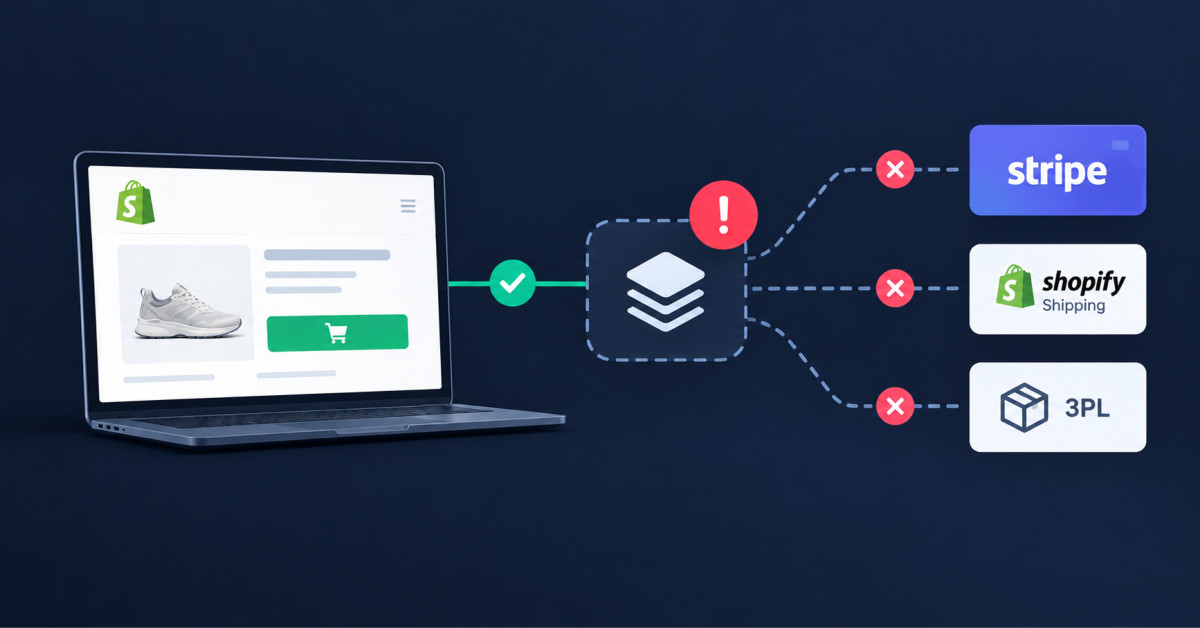
Most Shopify orders that fail do so while the storefront is online. The breakage sits in the handoffs between Shopify and your apps: webhooks that never arrive, sync jobs that lag, and payment captures nobody reconciles. Monitor those, not your homepage.
Your status page can be green in every row while a third of yesterday’s orders sit in a queue nobody is watching.
Shopify’s public status page showed no incidents on any day between September 9 and September 23, 2026. Every service operational, every row green, fourteen days clean. Merchants still lost orders during those two weeks. Not because Shopify broke, but because the status page was never measuring the part that breaks.
If you run a Shopify store between $500K and $2M, your order path is not one system. It is Shopify, plus a payment gateway, plus whatever holds your inventory truth, plus a fulfillment connector, plus a subscription app, plus the two automations somebody built last quarter and never documented. Shopify is responsible for a handful of those steps and does that job well. You are responsible for every seam between them, and the seams are where orders die.
The uptime advice you have already read covers the storefront: page weight, Core Web Vitals, theme bloat, hosting. That advice is correct and it is not this. This is about the handoffs, the quiet failures that leave a customer with a confirmation email and no package, and the seven places you can watch to catch them while they are still small.
Shopify runs your storefront and checkout at a reliability level you could not reproduce on your own, which is exactly why your order failures almost never start there. The platform handles the browse, the cart, the checkout session, the payment authorization request, and the order record. That is roughly the first five steps of a ten step chain, and it is the only part of the chain with a public status page.
Count the rest. Order created. Webhook fired to your apps. Inventory decremented in whichever system owns the number. Order pushed to your fulfillment provider. Carrier label generated. Tracking number written back to Shopify. Customer notified. Five handoffs, five different vendors, and no shared dashboard telling you whether any of them completed.
Note the fine print on Shopify’s own platform status page: some issues affecting a small percentage of stores may not be reflected there. A clean status page means the platform is healthy in aggregate. It says nothing about your store, and nothing whatsoever about the five vendors downstream of it.
The broader pattern supports this. In Splunk’s 2026 downtime research with Oxford Economics, a survey of 2,000 executives across Global 2000 companies in 20 countries, downtime traced to SaaS and third party applications has nearly tripled since 2024. The dependency layer is where the failure rate is moving, and a Shopify merchant carrying twenty apps is nothing but dependency layer.
Shopify’s developer documentation states plainly that webhook delivery is not guaranteed, which means every app in your order path has a documented failure mode you are responsible for catching. This is not a criticism of the platform. It is a design reality of distributed systems, and Shopify is unusually direct about it.
The language in Shopify’s guidance on building with webhooks is worth reading in full if you have never seen it. Webhook delivery is not always guaranteed, and an app can miss or mishandle events through its own handler failures or downtime. The documented recommendation is that an app should not rely on receiving data from webhooks at all, and should instead run reconciliation jobs that periodically fetch data from Shopify to stay consistent.
Read that as an operator rather than a developer. Every app you have installed either runs those reconciliation jobs or it does not, and you have almost certainly never asked which. When a webhook goes missing, a well built app notices within its next reconciliation window and repairs itself. A poorly built one waits for you to notice, and you notice when a customer emails.
Rate limits compound this. Shopify’s documented GraphQL Admin API limits restore at 100 points per second on a standard plan, 200 on Advanced, 1,000 on Plus, and 2,000 on Enterprise, with a 429 response when an app pushes past what it is allowed. Every app you install draws from that same allowance. On an ordinary Tuesday nobody notices. During a launch or a Black Friday hour, eleven apps polling the same store on a standard plan are rationing 100 points per second between them, and the app that loses the race is the one that quietly stops syncing.
Monitor seven specific handoffs rather than site availability: order creation, payment capture, inventory decrement, fulfillment handoff, tracking writeback, subscription renewal, and refund or cancellation. Uptime monitoring tells you the front door is open. These seven tell you whether anything that walked through it actually got what it paid for.
The practical form of this is a daily query with a threshold attached, not a dashboard you promise yourself you will check.
Scale the build to your stage. Under $500K, this is a fifteen minute manual pass each morning through the Shopify admin, and it is genuinely enough. Between $500K and $2M, automate it with Shopify Flow and a daily digest to the one person who will actually act on it. Above $2M, the seven checks belong in whatever observability tooling the rest of the business already uses, with an on call rotation attached. The mistake at every stage is building the dashboard and giving it to nobody.
Your payment stack fails quietly far more often than it fails loudly, through authorizations that never capture, subscription retries that stop running, and refunds issued in one system but never mirrored in the other. Gateway outages are loud, rare, and somebody else’s incident report. The quiet failures are yours and they compound.
Notice which payment number the industry actually talks about. Baymard Institute’s aggregate of 50 cart abandonment studies puts the average documented abandonment rate at 70.22 percent, a figure drawn from research spanning 2006 to 2025. That number gets written about constantly, and it should be, because it is large. The number nobody writes about is the far smaller share of orders that were successfully placed and then failed to settle, which costs you a customer who believes they already bought from you.
The fix is reconciliation on a schedule, not better uptime. Compare gateway payouts against Shopify order totals and flag the gap. Under $500K, weekly is fine. Between $500K and $2M, move to daily the moment you add a second payment method, because the failure mode that catches most brands at this stage is a secondary gateway or a buy now pay later provider whose settlements nobody has looked at since the week it was installed.
If you run subscriptions, watch the renewal batch size rather than the renewal success rate. A dunning configuration that silently stops retrying declined cards does not show up as an error anywhere. It shows up as a batch that is eight percent smaller than last week, and then smaller again, until someone graphs it.
Inventory is the only part of the order path where a failure produces a perfectly successful order you cannot fulfill, which is why sync lag costs more than sync downtime. A gateway outage stops orders. A sync problem accepts them and hands you the apology to write later.
Start by answering one question in writing: which system holds the true number. At $500K on a single channel, Shopify is the source of truth and everything else reads from it. Add a marketplace, a wholesale channel, or a retail location and that stops being true, usually without anyone deciding it. The recurring problems in multichannel inventory management are almost all downstream of this one unanswered question.
Then set a lag budget rather than a lag target. If your sync runs every fifteen minutes and you take forty orders an hour at peak, you have accepted a window in which roughly ten orders can be placed against stock that is already gone. That may be a perfectly reasonable trade. It is only dangerous when nobody has done the arithmetic and the oversell arrives as a surprise.
The stage aware version is straightforward. Under $500K, a fifteen minute sync interval and a weekly manual count on your top twenty SKUs is proportionate. Between $500K and $2M, tighten the interval on fast movers and reconcile daily. Above $2M with more than two channels, the source of truth moves out of Shopify into a dedicated inventory system, and the monitoring question becomes how stale the number in Shopify is allowed to be.
Every app install adds a failure mode to your order path, which is why the number of apps you carry matters more than the quality of any single one. Most merchants evaluate an app on what it does. Almost nobody evaluates it on what happens to orders when it stops doing that.
The accumulation is predictable. A full audit of app bloat and operational drift puts the typical pattern at one to two apps added per quarter with almost nothing ever removed, arriving at 25 to 40 active apps after three years. This is the single most reliable pattern at the $500K to $2M stage: brands do not fail from a missing capability, they fail from premature complexity added faster than anyone can maintain it.
Sort your list once, on one criterion. Does this app read from or write to an order, a payment, or an inventory number. Apps that do belong to the order path and every one of them needs a named owner and a manual workaround. Apps that do not, the review widgets, the popup builders, the analytics pixels, are a speed and cost question rather than a reliability question, and the performance budget approach to setting limits before you design is the right lens for those.
Then add one piece of change control that costs almost nothing. After any install, uninstall, theme update, or gateway change, place a real test order through your live checkout and follow it all the way to a tracking number. Ten minutes, every change, no exceptions. It is the cheapest reliability practice available to a Shopify merchant and the most commonly skipped.
A documented runbook turns a two hour incident into a twenty minute one, because most of the cost of a failure is the time spent deciding who does what. The technical repair is rarely the slow part. Finding the vendor login, working out who is allowed to authorize a reship, and establishing whether anyone has already contacted the customer is the slow part.
Keep it to one page per handoff from the seven above. Name the system, the person who owns it, the vendor support path and whatever response time you are actually entitled to, the manual workaround that keeps orders moving while it is broken, and the customer message that goes out if the workaround is not enough. Write the manual workaround when things are calm, because nobody invents a good one at 9pm.
The Splunk research quoted earlier found human error to be the leading cause of downtime across the technology stack. Treat the dollar figures in that study as enterprise data that does not describe your business: an average of $15,000 per minute reflects Global 2000 balance sheets and has no bearing on a $1M Shopify store. The human error finding transfers cleanly, though, because a runbook is the cheapest available control on exactly that failure mode.
Two adjacent pieces of work belong here. Test a restore rather than trusting a backup, since an untested backup is an assumption with a filename. And write down what happens if the one person who holds every credential is unreachable, which is the ground covered in this guide to preparing an ecommerce business for the unexpected loss of its owner. Most brands under $2M have a single point of failure wearing shoes, and the runbook is where you stop pretending otherwise.
Shopify covers the storefront, the checkout, platform infrastructure, and PCI compliance for payments it processes, and covers nothing about the laptops, network, email, identity, and backups your team uses to run the store. That second list is where a surprising share of order disruptions actually originate, and it is invisible from inside the Shopify admin.
Start with the part Shopify does give you. Staff permissions in the admin let you grant each person only what their job requires, which is the least privilege principle applied to the one system that matters most, and the essential guide to store security on Shopify walks through how the permission model works. Audit those accounts quarterly. Every brand I have looked at has at least one former contractor still holding admin access, and a contractor account is both a security exposure and a configuration change nobody can explain later.
Outside the admin, the surface is ordinary business IT: the machine your ops lead uses to approve fulfillment batches, the shared mailbox where carrier exceptions land, the wireless network at your warehouse, the identity provider behind your Google Workspace, and the backups of everything that is not in Shopify. A brand running lean with three people handles this in house and should. Somewhere between a team of eight and a team of fifteen, the honest answer changes, because nobody on the payroll owns it and it shows.
Brands that have crossed that line generally choose one of three paths: hire it, hand it to the agency that already builds their store, or bring in a managed provider. A firm offering Mississauga managed IT services, or the regional equivalent wherever your team sits, covers the endpoint, network, backup, and identity layer that no Shopify app touches. Skip it if your team is under five people and fully remote on managed devices. At that size you are paying for oversight of a surface that barely exists.
Orders fail on an online store because the storefront and the order path are two different systems, and only the storefront is covered by Shopify’s status page. Once an order is created, it passes through your payment gateway, your inventory system, your fulfillment provider, and your carrier integration, and a break in any of those handoffs leaves a customer with a confirmation email and no package. Shopify’s own developer documentation states that webhook delivery is not guaranteed, which means missed events between your store and your apps are an expected condition rather than an anomaly. Check for paid orders with no fulfillment record before you check whether the site is up.
You know an app has stopped syncing by monitoring the data it produces rather than the app itself, because a broken integration almost never reports its own failure. Pick the record the app is responsible for creating, a fulfillment, a tracking number, an inventory adjustment, a renewal charge, and alert on its absence past a threshold. Paid orders with no fulfillment after four hours is the highest value single check for most merchants. App dashboards showing a green connection state are not evidence of anything, since the connection can be healthy while the job that uses it has silently stopped. Add the check the day you install the app, not the day it breaks.
Reconcile weekly under $500K in annual revenue and daily above it, and move to daily immediately whenever you add a second payment method. The comparison is straightforward: total gateway payouts against total Shopify order value for the same window, with any gap investigated rather than rounded away. The failure this catches is authorized orders that never captured and refunds processed in one system but not the other, both of which are invisible in day to day operations. Merchants running subscriptions should additionally track renewal batch size week over week, because a dunning process that stops retrying declined cards produces no error message at all, only a batch that keeps getting smaller.
There is no universal app limit, but the count that matters is how many of your apps read from or write to an order, a payment, or an inventory number, and anything above roughly six in that category is difficult for a small team to maintain. Typical stacks reach 25 to 40 active apps after three years because brands add one to two per quarter and rarely remove any. Sort your list by whether the app touches the order path. Those apps each need a named owner and a documented manual workaround. Everything else is a cost and page speed question, which is a real question but a different one.
An ecommerce incident response plan needs one page for each system in your order path, covering the owner, the vendor support path, the manual workaround, and the customer message. Keep it to the seven handoffs that matter: order creation, payment capture, inventory decrement, fulfillment handoff, tracking writeback, subscription renewal, and refunds or cancellations. Add who is authorized to issue a refund or reship without asking, since that single line removes most of the delay in a live incident. Store it somewhere reachable when your main systems are not, test one backup restore per quarter rather than assuming backups work, and review the whole document after every incident while the detail is still fresh.




