

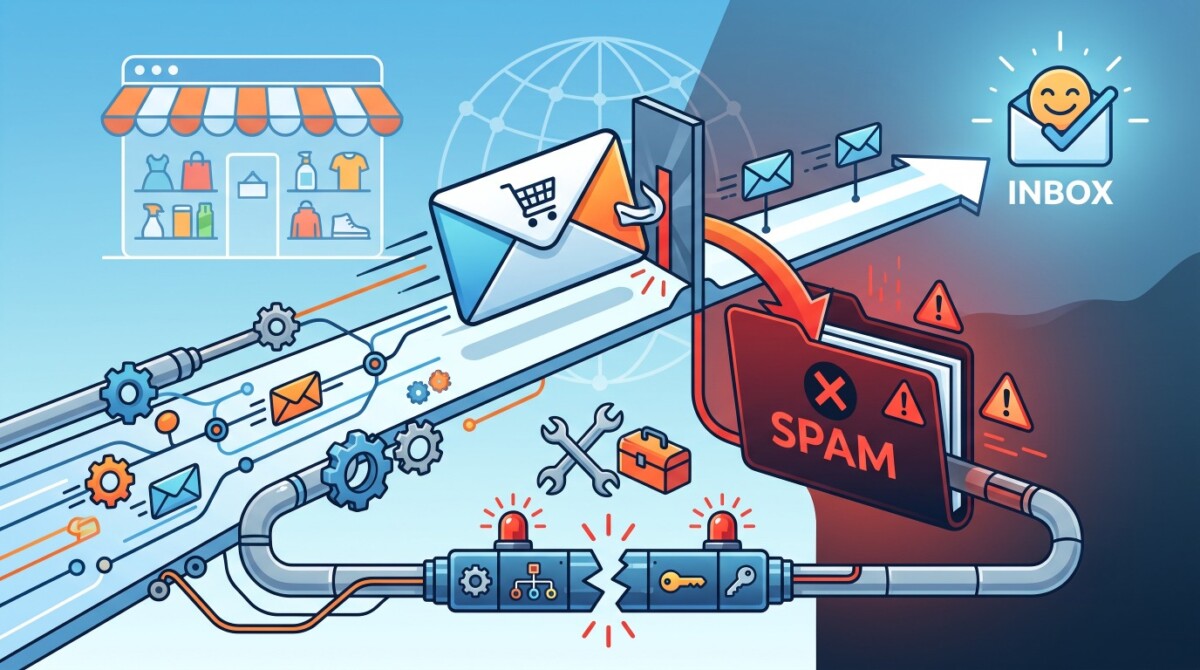
Email deliverability, not subject lines or segmentation, sets the ceiling on your email revenue. Shopify stores under $200K should fix authentication and list hygiene first, while higher volume senders gain the most from routing transactional email through a dedicated SMTP relay separate from their marketing platform.
A store sending 10,000 emails needs just 30 spam complaints to cross the line where Gmail starts routing mail to junk. Deliverability is not a creative problem. It is an infrastructure problem.
A Shopify store sends a beautifully segmented campaign to 12,000 subscribers. The open rate looks respectable at 38%. Revenue from the send is flat. The founder assumes the offer was weak or the timing was off, so the next campaign gets a new subject line and a bigger discount. Revenue stays flat again.
The creative was never the problem. A meaningful slice of that list never saw the email, because it landed in spam or the promotions tab before anyone could open it. This is the most expensive blind spot in ecommerce email, and it shows up at every stage from the $30K side hustle to the $5M brand. What follows is how inbox placement actually works, and what to fix in the order that matters for your stage.
Inbox placement caps everything downstream, which means a deliverability problem masquerades as a creative problem, a list problem, or an offer problem. If 15% of your list quietly lands in spam, no amount of subject line testing recovers that revenue, because those subscribers never get the chance to open. For the average DTC brand, owned email and SMS drive a large share of total revenue, and Klaviyo reports its customers average around $2.50 in revenue per recipient. Lose a chunk of your recipients to the spam folder and you are deleting that revenue per recipient at the source.
The trap is that surface metrics look healthy. Open rate is calculated against emails that were delivered, not emails that were sent, so a 38% open rate on a shrinking delivered pool can hide a deliverability collapse. The number that matters is inbox placement rate, which is the percentage of your sends that actually reach the primary inbox rather than spam or a filtered tab. You will not see it in your campaign dashboard by default.
If you are doing $10K months, this still applies, but your fix is simple authentication and clean list habits. If you are doing $1M months, the stakes compound, because a single reputation dip can drag down an entire quarter of retention revenue before you notice. Either way, treat inbox placement as the first lever, not the last.
SPF, DKIM, and DMARC are the three DNS records that inbox providers use to verify you are who you claim to be, and without all three configured correctly, your mail is at risk of rejection or spam placement. Since February 2024, anyone sending more than 5,000 messages a day to Gmail must set up all three, use a valid PTR record, transmit over TLS, offer one click unsubscribe, and keep their spam complaint rate below 0.3%. Yahoo enforces the same bar. These are documented in Google’s official requirements for bulk email senders, and they are now actively enforced across Gmail, Yahoo, and Microsoft.
Here is what each record does in plain terms. SPF lists the servers allowed to send on your domain’s behalf. DKIM adds a cryptographic signature that proves the message was not altered in transit. DMARC ties the two together and tells receiving servers what to do when a message fails, while giving you reporting on who is sending as your domain. The common failure is not a missing record, it is a misaligned one: a technically passing SPF check that still fails DMARC because the sending domain does not match your From address.
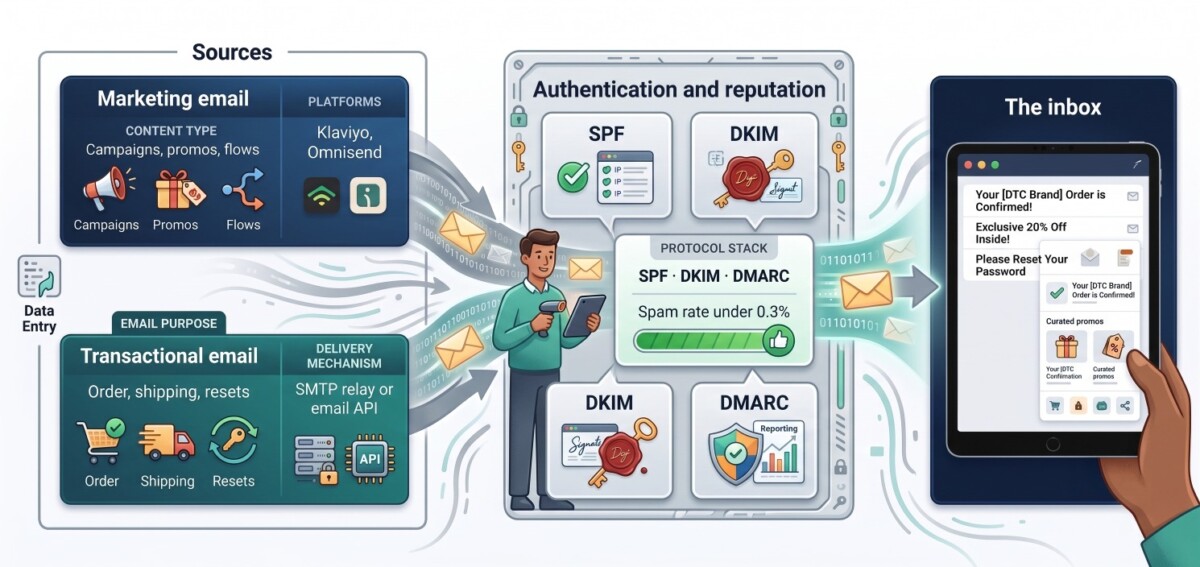
Both lanes of ecommerce email share one reputation gate. Weak sends in one lane can pull down deliverability in the other.
To check your own setup, run your sending domain through any DMARC or authentication lookup tool, then open Google Postmaster Tools to see your spam rate and domain reputation as Gmail reports it. If your DMARC policy is still set to p=none, that was an acceptable starting point in 2024, but in 2026 inbox providers treat it as a monitoring stage, not a destination. Move toward quarantine or reject once your reports are clean.
Marketing email and transactional email have different senders, different risk profiles, and different reputations, so running both through one pipeline means a promotional blast can quietly drag down the deliverability of your order confirmations. Transactional email is the mail a customer expects and needs: order confirmations, shipping notifications, password resets, back in stock alerts. Marketing email is the mail you send to drive demand: campaigns, newsletters, win back flows. When a big promo campaign generates a spike in spam complaints, that damage attaches to your sending reputation, and if your receipts ride the same reputation, customers start missing the emails they actually asked for.
For most Shopify merchants under roughly $200K, this separation is not yet urgent. Shopify sends your core transactional notifications, and your marketing platform handles campaigns. The cracks appear as you scale, add custom post purchase flows, move toward a headless build, or send transactional mail from your own app or backend rather than from Shopify’s native notifications. At that point the two streams genuinely compete for the same reputation, and blending them becomes a liability.
The platform choice on the marketing side is its own decision. Klaviyo is the default for a reason, but it is not the only fit, and if pricing is the sticking point it is worth comparing the leading Klaviyo alternatives for Shopify brands before you commit. The point of this section is narrower: whichever marketing platform you choose, do not assume it should also carry your highest stakes transactional mail as you grow.
A dedicated SMTP relay becomes worth it once your transactional volume is meaningful or you are sending mail from beyond Shopify’s native notifications, because it gives you a separate sending reputation, full delivery logs, and control that a bundled setup does not. An SMTP relay is a service you connect your store or app to using standard SMTP credentials, and it handles the actual delivery, authentication, and reputation management on dedicated infrastructure. The practical benefit is isolation: your receipts and password resets travel on a reputation you control, insulated from whatever your marketing sends are doing that week.
There are several credible providers in this category, and the right one depends on your stack and volume. Amazon SES is the low cost, developer heavy option. Postmark is known for fast transactional delivery and clean separation of streams. SendGrid and Mailgun are established players with broad feature sets. For teams that want a straightforward SMTP relay plus email API with generous entry pricing, https://unione.io/en/smtp handles both transactional and bulk sending, moves up to 150,000 emails per hour over SMTP, includes webhooks and click tracking, and offers a four month free trial with 6,000 monthly emails to test deliverability before you commit. Evaluate any provider on the same criteria: sending reputation, delivery logs, authentication support, and how cleanly it separates your transactional stream from everything else.
Notice the pattern most merchants get wrong: they reach for infrastructure complexity too early. If you are doing $40K months, a dedicated SMTP relay is premature, and the discipline to skip it is a feature, not a gap. The move earns its place when your transactional volume and custom flows outgrow the bundled setup, usually somewhere north of $1M in revenue or when you go headless.
Keep your spam complaint rate below 0.3%, and ideally under 0.1%, because that single number is the tripwire that sends your whole domain to the filters. The math is unforgiving at low volume: a sender delivering 10,000 emails needs only 30 recipients to hit the report spam button to reach the 0.3% ceiling. Google recommends staying below 0.1%, and treats 0.3% as the point where enforcement begins, not a safe cruising altitude.
Protecting that number is mostly list discipline, not clever copy. Use a genuine opt in rather than pre checked boxes, honor one click unsubscribe immediately, and run a sunset policy that stops mailing subscribers who have not engaged in 90 to 120 days, since dead weight on your list depresses engagement signals and invites spam reports. Segmentation helps here too: sending your most relevant content to your most engaged people is not only better marketing, it is better deliverability. If you want tactical ideas that lift engagement without inflating complaint risk, these creative ways to increase Klaviyo email engagement pair well with the hygiene work, and it is worth growing your list with methods that protect quality as you scale rather than chasing raw subscriber counts. Watch the number weekly in Postmaster Tools, and treat any climb toward 0.1% as an early warning, not a rounding error.
You can diagnose most deliverability problems in about 30 minutes using three free tools and no developer, which is why there is rarely a good reason to keep guessing. Start with an authentication lookup: run your sending domain through any DMARC checker and confirm SPF, DKIM, and DMARC all exist and align to your From address. That is the five minute check that catches the most common silent failure. Next, open Google Postmaster Tools and connect your domain if you have not already. Give it a few days of sending data, then read your domain reputation and spam rate directly from the source Gmail uses to judge you.
The third step is a list audit inside your email platform. Build a segment of subscribers who have not opened or clicked in 90 to 120 days and look at how large it is, because that inactive segment is dragging your engagement signals down and feeding spam complaints every time you mail it. Confirm your campaigns include a working one click unsubscribe, which Gmail and Yahoo now require. Finally, send a seed test to your own Gmail, Yahoo, and Outlook addresses and note where each lands: primary inbox, promotions tab, or spam. Fix whatever you find in priority order, authentication first, then list hygiene, then infrastructure. Most stores never run this audit, which is exactly why the ones that do pull ahead on retention revenue.
Run your sending domain through a DMARC or email authentication lookup tool, then confirm three DNS records exist and align: SPF, DKIM, and DMARC. SPF lists your authorized sending servers, DKIM adds a cryptographic signature, and DMARC ties them to your From address and reports failures. The most common issue is misalignment, where SPF passes but the sending domain does not match your visible From address, which fails DMARC. Open Google Postmaster Tools to see your domain reputation and spam rate as Gmail reports it. If any of the three records is missing, that is your first fix before touching campaign strategy.
Transactional email is mail a customer expects and needs, such as order confirmations, shipping updates, and password resets, while marketing email is mail you send to drive demand, such as campaigns, newsletters, and promotional flows. The distinction matters because they carry different risk. Marketing sends generate the bulk of spam complaints, and if your transactional mail shares the same sending reputation, a bad promo blast can push your receipts into spam. As you scale, keeping the two streams on separate reputations protects the mail your customers actually rely on from the volatility of your marketing calendar.
Not usually below roughly $200K in revenue, because Shopify handles your core transactional notifications and Klaviyo handles marketing, which keeps the streams reasonably separate already. A dedicated SMTP relay earns its place once you send meaningful transactional volume from your own app or backend, run custom post purchase flows, or move to a headless build where Shopify’s native notifications no longer cover you. At that stage, a relay gives your transactional mail its own reputation, full delivery logs, and control that a bundled setup lacks. The trigger is volume and architecture, not simply having a bigger store.
Keep your spam complaint rate below 0.3%, and target under 0.1%, because 0.3% is the point where Gmail and Yahoo begin filtering or rejecting your mail. The threshold is easy to hit at ecommerce volumes: a store sending 10,000 emails needs only 30 recipients to mark a message as spam to reach 0.3%. Google recommends staying under 0.1% for reliable inbox placement and treats the 0.3% mark as an enforcement line, not a safe target. Monitor the number weekly in Google Postmaster Tools, and treat any steady climb toward 0.1% as an early signal to tighten list hygiene.
Landing in the promotions tab is a filtering decision driven by content signals and engagement, not an authentication failure, so it is a softer problem than the spam folder but still costs you visibility. Heavy image to text ratios, many links, promotional language, and low recent engagement all nudge Gmail toward the promotions tab. The fixes are practical: send more plain, personal looking mail to your most engaged segment, cut unnecessary links, and prune inactive subscribers so your engagement signals stay strong. Some promotions tab placement is normal for genuine marketing, so focus your energy on keeping transactional and high intent mail in the primary inbox.




