





I know the feeling of grinding through 10-hour days in the Shopify admin, inside Klaviyo, and on back-to-back Zoom calls while your office chair squeaks under you.
When I started building eCommerce Fastlane and talking with founders and marketers, I still sat in a mid-range chair I told myself was “good enough.” I treated it like a prop, not a piece of equipment. The real work was in funnels, LTV, and retention, right?
Then the quiet tax started to show up. Nagging lower-back pain, extra caffeine to fight the 3 pm crash. Slower deep work because I was constantly shifting around. I was sitting on a $400 Autonomous chair, but it might as well have been a $200 budget special.
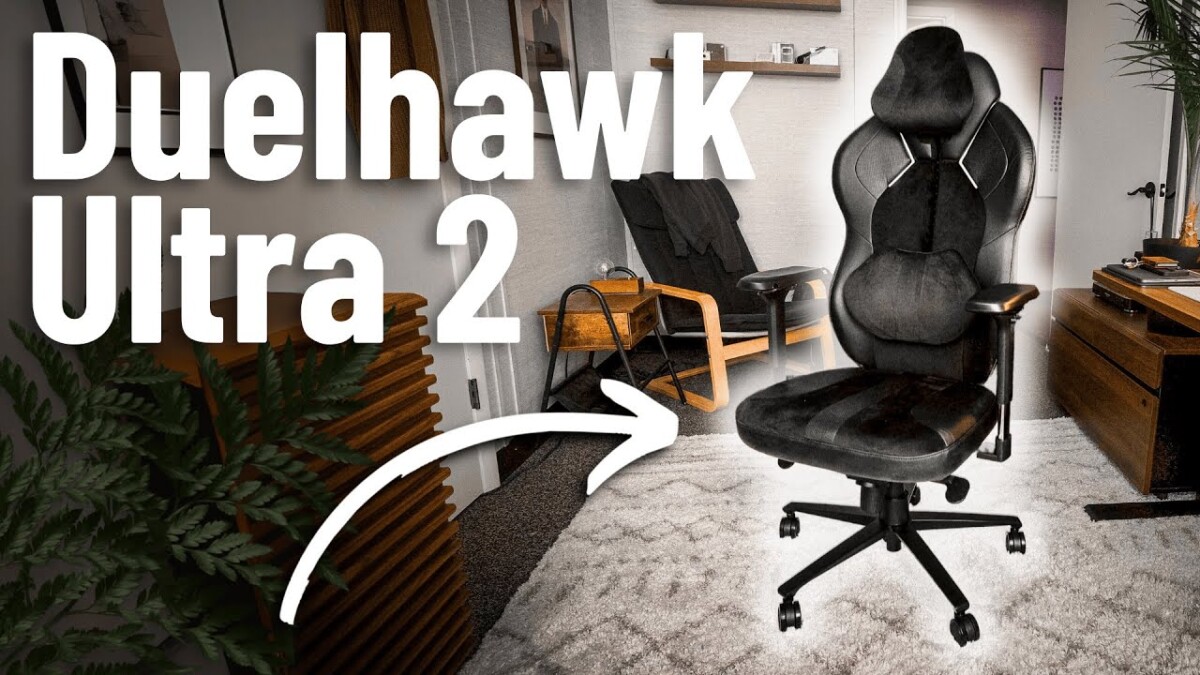
What finally changed things was upgrading to the DuelHawk Ultra 2. Same calendar, same workload, same brain. Different chair. My back pain eased, my energy improved, and my work quality during long strategy sessions and podcast interviews increased.
This is not a love letter to one brand. It is a mix of personal experience, basic ergonomics, and a practical buying guide to help you protect your body and your business long term, whether you buy a DuelHawk, a Herman Miller, or anything else that is truly ergonomic.
The Silent Productivity Killer In Your Office Chair
If you run a DTC or Shopify brand, you probably sit more than most office workers. Typical desk workers clock around 1,300 sitting hours a year at work. Remote operators, including many ecommerce founders, typically work 1,400-1,500 hours.
That is 1,500 hours of load into your spine, not counting Netflix on the couch.
Around 1 in 4 workers reports back pain. In some desk-heavy groups, that number jumps toward 70 to 80 percent. Layer that on top of long sessions in Shopify, ad dashboards, and Fulfillment issues, and you get a quiet tax: pain, distraction, and fatigue.
Here is the pattern I see across founders:
- Chair is uncomfortable.
- You shift more and focus less.
- Tasks take longer, so your day stretches.
- More hours in the same bad chair, more pain.
That is what happened to me recording and editing eCommerce Fastlane episodes. At about the 6-hour mark of a deep day, my lower back would light up and my focus would crater. I was “saving” money by not buying a premium chair and losing it in dull thinking and short workdays.
If you want a fast mindset reset on productivity, bookmark the TED-talk roundup 8 Must Watch TED Talks For Massive Productivity. This chair conversation fits into the same category: less friction, more output.
How Many Hours Do You Really Sit
Let us do simple math for a typical founder or operator:
- Morning metrics and email: 1.5 hours
- Ad account review and creative feedback: 2 hours
- Slack, vendors, and team calls: 2 hours
- Deep work on strategy, offers, or flows: 2 to 3 hours
- Late-night “just one more thing” session: 1 to 2 hours
You are sitting for 8 to 10 hours on plenty of days.
Even if you average only 7 hours a day, 5 days a week, 50 weeks a year, that is 1,750 hours a year in your chair. Any tool you use for more than 1,500 hours annually deserves the same attention you give your laptop or 3PL.
Why Ignoring Back Pain Is Quietly Slowing Your Business
Sitting loads your lumbar discs more than standing. When your chair does not support the natural curve of your lower back, the discs experience increased pressure, the muscles around them work harder, and you feel this as stiffness and pain.
Modern ergonomic research is clear. Good seating that supports posture and micro-movement can:
- Cut back and neck pain reports by around half
- Reduce broader musculoskeletal issues by up to 70 to 75 percent
- Lift productivity by 20 to 30 percent because people can stay focused longer
Translate that to ecommerce work. Less fidgeting in your chair means sharper ad reviews, better pricing calls, and fewer afternoons where you tap out early because your body is cooked.
What Really Makes An Office Chair Ergonomic (And Why Most $200 Chairs Fail)
Ergonomics is not about “sitting up straight” because you decided to have better posture today. It is about supporting the S-curve of your spine so your body can relax into a healthy position while you think.
Most cheap chairs focus on style and a basic height adjustment. What you actually need is a frame and cushion that fit your size, follow the shape of your spine, and move with you over long sessions.
Here is the problem. At $200, almost all of that budget goes to:
- Basic metal or plastic frame
- Thin foam that packs out in months
- Simple tilt that feels either locked upright or floppy
The result is exactly what I lived with on my Autonomous chair. It looked fine, checked the “ergonomic” box on the product page, but failed under real founder use.
The Science Of Sitting: Why Most Chairs Flatten Your Spine
Your spine should look like a gentle S from the side. When a chair back is flat or fixed too low:
- Your pelvis tilts backward
- Your lower back rounds
- Your head shifts forward like a bowling ball on a stick
Every inch your head moves forward multiplies the load on your neck and upper back. You feel that as tight shoulders, tension headaches, and the classic hunched founder posture on Zoom.
Studies show that well-designed ergonomic chairs can halve reported back pain and cut musculoskeletal complaints by up to three quarters. This is not about you trying harder. If the chair shape fights your body for 8 hours, willpower loses.
Non-Negotiable Features Of A True Ergonomic Chair
Here is the checklist I wish I had years ago. Screenshot this before you shop:
- Adjustable lumbar support that moves up and down or in and out, not just a fixed bump
- Seat depth adjustment so you keep a 2 to 4 inch gap behind your knees
- 4D armrests that move up, down, in, out, forward, back, and pivot, so your shoulders can relax while you type
- Synchronized tilt that lets you recline while your feet stay planted and your back stays supported
- Solid build quality that does not wobble, squeak, or loosen within 6 months
- Weight and height range that matches your body, not a vague “one size fits all” promise
You are not just buying comfort. You are buying the ability to sit through strategy reviews, build flows, and listen to long-form podcasts without your body screaming at you.
The Hidden Cost Of Budget Chairs: What You Lose At $200
At the $200 tier, you usually trade away:
- Real lumbar adjustability for a shaped plastic shell
- High density foam for thin padding that compresses and creates hot spots
- Stable armrests for wobbly supports that loosen with daily use
- Heavy duty bases for lighter parts that wear faster under rolling and tilting
My $400 Autonomous chair landed somewhere between these worlds. Within 6 months, the first squeaks showed up. Around the 12-month mark, the back started to rock. By 18 months, the arms had noticeable play, and I was doing constant micro-movements to stay comfortable.
Those “micro-movements” are hidden cost. They pull attention away from a key CRO decision or ad account review dozens of times a day.
How To Calculate The Real Cost Per Hour Of Your Chair
Treat the chair like any other piece of business equipment.
Use this simple formula:
Cost per hour = Chair price ÷ years of use ÷ hours per year
Example:
- $200 chair, 2 years, 2,000 hours per year
- $200 ÷ 2 ÷ 2,000 = $0.05 per hour
- $2,145 chair, 5 years, 2,000 hours per year
- $2,145 ÷ 5 ÷ 2,000 ≈ $0.21 per hour
Here is the key insight. For a tool you use thousands of hours, paying an extra 16 cents per hour for real support and focus is usually a smart trade. That is the lens that finally made the DuelHawk Ultra 2 feel like a rational business expense, not a splurge.
From Autonomous To DuelHawk Ultra 2: Why I Finally Upgraded
The switch did not start with excitement. It started with frustration.
I had already stretched from cheap Amazon chairs to the mid-range Autonomous model. For a while it felt fine. Then long recording days exposed every weakness.
What Finally Broke My Relationship With My Old Chair
At first, the Autonomous chair felt like an upgrade. Mesh back, clean lines, enough adjustability to feel “pro.”
Then the long days stacked up:
- New squeaks whenever I leaned back
- Backrest that began to rock side to side
- Armrests that wobbled when I typed or grabbed the mic
- Needing to shift position every few minutes during 90-minute interviews
One day I stood up after an extended recording block and my lower back locked. I had that half-panicked shuffle where you are hoping it loosens up before the next call.
In that moment I realized: I am helping founders scale on the podcast while sitting in a chair that is actively limiting my ability to lead and think.
Why I Chose The DuelHawk Ultra 2 Over Herman Miller And Steelcase
Like many of you, I went straight into comparison mode. Herman Miller Aeron, Steelcase Leap, upgraded Autonomous models, plenty of YouTube reviews.
Here is what I took away:
- Aeron: legendary mesh, long warranty, very durable, but a firmer sit and specific fit by size
- Leap: brilliant adjustability and a cushioned seat, classic workhorse chair
- DuelHawk Ultra 2: heavy steel frame, dense cold-cure foam, and a rail system that lets lumbar and neck support slide into the exact spot my body needs
The DuelHawk came in at $2,145, with a $199 refundable deposit to reserve. That number stung at first.
I got past it with one reframing. I am going to sit in this thing for 2,000+ hours a year. My brain is my main asset. This is the dock that supports it.
Unboxing And Setup: First Impressions Of The DuelHawk Ultra 2
The box arrived heavy in a good way. The frame and base felt closer to commercial gym equipment than a home office toy.
Assembly took around 20 minutes at a measured pace. Everything slotted together cleanly, with no mystery steps. Compared to the old chair, the Ultra 2 felt solid the moment it stood upright.
The first sit was a surprise. The cold-cure foam had a firm but forgiving feel, not plush, not hard. The Ultraweave fabric version I chose stayed cool over long sessions. Most noticeable was the lack of noise. No creaks, no shifting sounds when I leaned or moved.
The FlexGuide rail system made the biggest difference. I could slide the lumbar pad up and down until it hit the exact spot in my lower back, then lock it. Same with the headrest for my neck.
It took a few days of small tweaks, but once I found the sweet spot, I stopped thinking about the chair.
What Changed In My Body And Work After 8 Weeks In The DuelHawk
Eight weeks in, a few things stood out:
- Still no squeaks, no wobble, and the casters roll smoothly on both mat and hard floor
- The foam feels the same at 6 p.m. as it does at 9 a.m.
- I use the 4D armrests in three standard positions: low and in for typing, slightly out and back for podcasting, up and forward for reading on an iPad
- The headrest stops my neck from craning forward during long Zoom calls
- The lumbar pad stays exactly where my back needs it
Workwise, I noticed:
- Longer deep work blocks before I feel the need to stand
- Fewer breaks just to stretch out an angry lower back
- Ending the day tired from thinking, not from fighting my chair
One specific moment: I recorded a 90-minute session and realized afterward that I had not adjusted the chair once. That had never happened in the old setup.
The Health And Productivity ROI Of A Real Ergonomic Chair
You do not need a DuelHawk for this part. Any well-designed ergonomic chair delivers similar categories of benefit.
Research in 2025 points to ergonomic seating cutting back pain and related issues while boosting productivity 20 to 30 percent. That shows up as fewer missed days, more consistent focus, and better decision quality.
Short Term Wins: Less Pain, More Focus
In the first few weeks with a real chair, most people notice:
- Less muscle tension at the end of the day
- Fewer numb legs or pins and needles
- Less constant shifting to stay comfortable
That translates directly to focus. When your body is not sending distress signals every few minutes, it is easier to stay in flow while working on ad creative or reviewing metrics.
Medium Term Gains: Better Posture And Lower Fatigue
Over 1 to 3 months, your body starts to adapt:
- Your spine settles into a healthier S-curve as the “default”
- Your shoulders sit lower and farther back, even when you stand
- Tension headaches and end-of-day neck pain drop
Subjectively, it feels like finishing a strong training session, not getting hit by a truck.
Long Term Protection: Guarding Your Most Important Asset
Over years, good seating cuts down on chronic back and neck problems, flare-ups that take you out for days, and money spent on treatment that could have been reduced with better support.
Ergonomic programs in companies often show 3:1 to 10:1 ROI when you combine lower injury cost and higher productivity. Your personal version of that is fewer forced slowdowns and more years where you can show up at full strength.
A Simple Way To Put A Dollar Value On Comfort
Here is a quick thought experiment.
- Take your effective hourly rate. If you pay yourself $120,000 and work 2,000 hours a year, that is $60 per hour.
- Assume better seating improves your productivity or decision quality by even 10 percent.
- That is an effective gain of $6 per hour, or $12,000 a year of higher value work.
Even if you cut that in half, the payback period on a $1,000 to $2,000 chair is short. The math works the same whether you end up with a DuelHawk, Herman Miller, Steelcase, or another well-built ergonomic option.
Beyond The Chair: How To Build A Founder-Friendly Workspace
The best chair cannot fix everything if the rest of your setup fights you. The good news is that simple tweaks go a long way.
Sit, Stand, Move: The Balance Your Body Needs
The goal is not perfect sitting. It is changing position often.
Simple pattern:
- Stand or walk for 1 to 2 minutes every 30 to 45 minutes
- Take calls standing when you can
- Use a standing desk or counter for lighter tasks like Slack and email
You do not need a fancy treadmill desk. You just need movement baked into your day.
Dialing In Monitor, Desk, And Keyboard Height
Basic setup rules:
- Top of your screen around eye level
- Screen about an arm’s length away
- Elbows near 90 degrees when typing
- Wrists flat, not cocked up or down
- Feet flat on the floor, or on a footrest if you are shorter
If you are on a laptop, a simple stand plus external keyboard and mouse can transform your neck and wrist comfort in a single afternoon.
Micro Habits That Keep Founders Out Of The Pain Cycle
A few tiny habits that stack up:
- Shoulder rolls while you wait for builds or reports to load
- Gentle backbends after intense typing blocks
- A water walk between calls
- The 20-20-20 rule for eyes: every 20 minutes, look 20 feet away for 20 seconds
Tie each habit to a trigger you already have, like hitting save on a big doc or closing a Zoom window.
Is The DuelHawk Ultra 2 Worth It For You?
Let’s discuss who should consider a chair at this price point.
Who Should Seriously Consider The DuelHawk Ultra 2
You are in the target zone if:
- You sit 6+ hours a day most days
- You already have back or neck issues, or feel them coming
- You plan to keep a single chair for 5 years or more
- You see your chair as core gear, like your microphone, camera, or laptop
If you have senior team members with significant revenue responsibility, they are also strong candidates.
Who Might Be Better Off With A Different Chair
You probably do not need a $2,000+ chair if:
- You sit under 4 hours a day on average
- You are still changing work locations often
- Spending that much would create real financial stress
There are solid options in the $600 to $1,000 range with real adjustability. The important thing is the feature set, not the logo.
How DuelHawk Compares To Herman Miller, Steelcase, And Autonomous
Quick feel comparison:
- Aeron: all-mesh, cooler, firmer, long warranty, very proven
- Steelcase Leap: cushioned seat, highly adjustable, great for all-day use
- Autonomous: friendlier price, decent early comfort, weaker long term build in my experience
- DuelHawk Ultra 2: heavy steel frame, dense foam, rail-based lumbar and neck adjustment, premium price, 3-year warranty
Day-to-day, the Ultra 2 feels more like a gaming-plus-professional hybrid that happens to be built like a tank.
My Verdict After Switching: Zero Regrets, But Not For Everyone
For me, the DuelHawk Ultra 2 has been the best chair I have used. It solved the specific problems my Autonomous could not and made long, deep work sessions feel sustainable again.
At a 5-year, 2,000 hours per year clip, my cost per hour is about $0.21. Given the quality of work I can ship because my body is not the limiting factor, I am comfortable with that trade.
If we were chatting at a Shopify conference, I would say: if you are in the chair all day and have the budget, it is worth serious consideration. If not, apply the same cost-per-hour thinking to a mid-range chair with real ergonomic features and skip the fancy marketing.
How To Choose The Right Office Chair For Your Body And Workday
Use this as a quick buying framework, whether you are browsing high end or mid-range.
Questions To Answer Before You Even Start Shopping
Write down:
- How many hours do you sit on a typical workday?
- Do you already have back, neck, or shoulder pain?
- What is your real budget without stressing cash flow?
- How many years do you want this chair to last?
- Your height and weight range.
Then think in cost per hour, not just sticker price. That mental shift alone keeps you from buying the cheapest option on the page.
What To Look For When You Can Try Chairs In Person
When you can sit in a chair:
- Spend at least 10 to 15 minutes in it
- Adjust every setting: height, depth, lumbar, arms, tilt
- Recline a few times and listen for noise or feel for wobble
- Notice any pressure points in your seat or lower back
Before you leave, ask about warranty length and return policy. You want time to test it in real work, not just under showroom lights.
How To Evaluate Chairs When You Can Only Buy Online
If you are ordering online:
- Look for at least a 30-day trial or return window
- Expect a 3+ year warranty, with 10+ years at the very top tier
- Check reviews that mention 6+ months of use, not just “day 1” takes
- Confirm that replacement parts like wheels and armrests are available
With DuelHawk Ultra 2, you place a refundable deposit to reserve and get a 3-year warranty. That combination told me they expect the chair to hold up under real use.
Office Chair Investment Questions
Is The DuelHawk Ultra 2 Really Worth It?
For someone who sits 6 or more hours a day, the Ultra 2 may be worth it if its build quality, foam, and rail-based support help you work longer with less pain. When you spread the cost over thousands of hours, the math often works out in favor of a premium chair. It is still a high-end choice, not a must for every budget.
How Does The DuelHawk Ultra 2 Compare To The Herman Miller Aeron?
Aeron uses full mesh and the PostureFit system, which feels cooler and firmer. DuelHawk uses dense foam, fabric, or PU leather, with a rail system for lumbar and neck support, providing a more cushioned, customizable feel. Both can be excellent; the right one depends on whether you prefer mesh or foam and how your body responds.
What Is The Warranty And Return Policy Like?
DuelHawk offers a 3-year warranty that covers defects, not normal wear. They pair that with a refundable pre-order deposit and a standard return window, so you are not locked in if it does not fit. Policies can change, so always double-check details on their product page before buying.
How Hard Is It To Assemble The DuelHawk Ultra 2?
Most people can assemble the chair in 15 to 30 minutes using the included tools and instructions. The parts are heavy in a solid way, so having a second person helps, but it is absolutely doable on your own if you take your time.
Will The DuelHawk Ultra 2 Fit My Height And Weight?
The Ultra 2 is designed for people roughly 5’3″ to 6’3″ and up to around 300 pounds. The adjustable seat height, rail-mounted lumbar, headrest, and 4D arms help it fit a wide range of body types. If you sit at the extremes of those ranges, check DuelHawk’s sizing guide or contact support with your exact measurements.
Conclusion
I went from brushing off my back pain in a $200 to $400 chair to seeing, very clearly, how much a truly ergonomic setup like the DuelHawk Ultra 2 changes my workday.
Your body is a core business asset, just like your ad account or email list. If you are going to sit for 2,000+ hours a year, your chair should support that, not fight it.
You do not need to copy my exact choice, but you do owe yourself a real ergonomic chair that fits your body and budget. This week, audit your setup. Upgrade one thing, whether it is the chair, the monitor height, or your movement habits.
Build something that lasts while sitting in something that supports you.
