

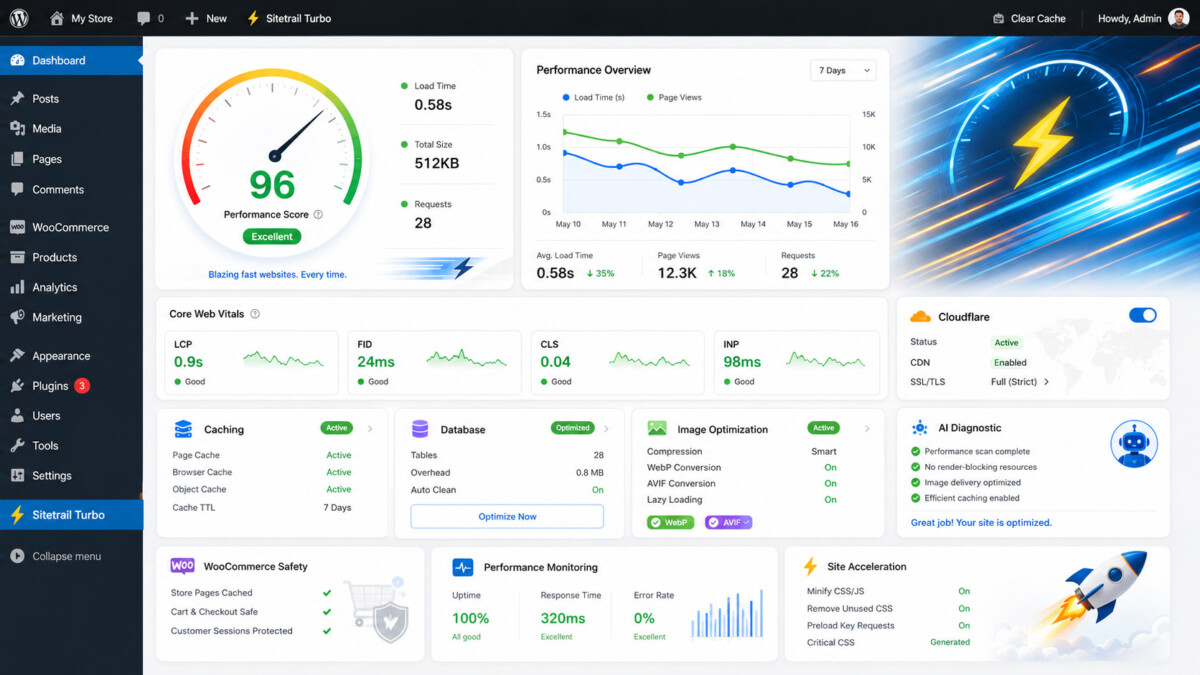
Sitetrail Turbo is a WordPress performance plugin that bundles caching, image conversion, Cloudflare controls, and real-user monitoring into one dashboard. It suits WooCommerce and Elementor sites wanting fewer plugins. WP Rocket remains the safer pick for most who only need fast, simple caching.
The honest test for any performance suite is not how many features it lists. It is whether it lets you delete four other tools without breaking checkout.
WordPress performance plugins are evolving.
For years, the standard approach was straightforward: install a caching plugin, enable a few optimizations and hope for a faster website. That approach still works for simple sites. However, the modern WordPress ecosystem has become more demanding.
Many websites now rely on Elementor, WooCommerce, Cloudflare, dynamic forms, membership tools, analytics scripts, chat widgets and increasingly complex themes. Images must be converted into modern formats. JavaScript needs to be delayed without breaking essential functionality. Checkout pages must remain dynamic. Performance needs to be assessed using the experience of real visitors, not just a one-off laboratory test.
This creates an important question for WordPress users:
Should you install an established caching plugin such as WP Rocket, or choose a broader performance suite such as Sitetrail Turbo?
The answer depends on the website. WP Rocket remains a respected and widely recognized WordPress caching plugin. Sitetrail Turbo takes a more expansive approach: it combines caching, asset optimization, local image conversion, Cloudflare controls, WooCommerce safeguards, real-user Core Web Vitals, reports, restore points and optional AI-assisted diagnostics inside one plugin.
For website owners trying to reduce plugin sprawl while retaining greater control, that distinction matters.
A credible comparison must begin by acknowledging what WP Rocket does well.
WP Rocket is known for simplifying WordPress caching. It generates static HTML files, automatically clears cached pages when content changes and includes cache preloading so visitors do not need to wait for the first page request before receiving a cached version.
It also includes front-end optimization tools such as CSS minification, JavaScript deferral, delayed JavaScript execution and Remove Unused CSS. WP Rocket automatically excludes important WooCommerce pages such as cart, checkout and account pages from its cache.
For many conventional WordPress sites, that combination is enough. Users who want a familiar caching tool with sensible defaults may remain satisfied with WP Rocket.
However, the comparison becomes more interesting when a website needs more than page caching and front-end file optimization.
Sitetrail Turbo is not merely another caching plugin.
It is a self-contained WordPress performance suite built for Elementor, WooCommerce and Cloudflare environments. It is designed for website owners, developers, agencies and hosting companies that want to manage more of the performance stack from one dashboard.
Its primary dashboard, called Fix My Speed™, provides a clear starting point. Rather than sending users through a maze of unrelated settings, it highlights the current condition of the website, identifies important performance issues and prioritizes the next improvements.
The Turbo Health Score™ assesses factors such as cache configuration, Cloudflare linkage, image-optimization coverage, plugin conflicts, database-cleanup opportunities, object-cache detection, OPcache availability and compression settings.
Users can then choose between Safe, Balanced and Maximum presets or adjust individual settings manually.
The goal is practical: reduce the technical complexity of performance optimization without taking control away from advanced users.
Both plugins can improve WordPress performance, but they are built around different product philosophies.
| Feature | Sitetrail Turbo | WP Rocket |
| Full-page caching | Included | Included |
| Cache preloading | Included | Included |
| CSS and JavaScript optimization | Included | Included |
| Remove Unused CSS | Included locally | Included |
| Lazy loading | Included | Included |
| Local WebP and AVIF image conversion | Included | Requires a separate image-optimization workflow |
| Cloudflare-focused management tools | Included | Cloudflare compatibility and integration available |
| Real-user Core Web Vitals dashboard | Included | Different performance-monitoring approach |
| WooCommerce safeguards | Included | WooCommerce cache exclusions included |
| Restore points and rollback protection | Included | Different troubleshooting workflow |
| Managed-host and server-cache Purge Mode | Included | Hosting-specific compatibility behavior available |
| Local PDF and HTML reports | Included | Not the central product focus |
| Optional bring-your-own-key AI diagnostics | Included | Not the central product focus |
| Multisite network analytics | Included | Different multisite capabilities and workflow |
The strongest case for Sitetrail Turbo is not that it copies WP Rocket. It is that it combines several categories of performance tools that WordPress users frequently manage separately.
Images are one of the most common causes of slow WordPress pages.
WP Rocket supports performance improvements related to image loading, but it does not itself create WebP images. Its own documentation points users toward an additional image-optimization tool such as Imagify for image conversion.
Sitetrail Turbo takes a different approach.
It includes local image compression, WebP conversion and AVIF conversion inside the plugin. It can resize oversized uploads, lazy-load images and videos, exclude hero images from lazy loading, preload the likely LCP image and identify heavy media files.
Original images are preserved.
The preferred delivery sequence is:
AVIF → WebP → original image
This makes Sitetrail Turbo especially appealing to website owners who want to reduce the number of plugins and external services involved in their optimization stack.
A single speed-test result can be useful, but it does not tell the whole story.
A website may perform well in a controlled test while delivering a slower experience to visitors using older mobile devices, congested networks or different geographic locations.
Sitetrail Turbo includes Visitor Experience™, a lightweight real-user monitoring system. It tracks three important Core Web Vitals metrics:
Results are shown using the 75th percentile and familiar “good”, “needs improvement” and “poor” threshold bands. Users can view desktop and mobile results separately and monitor trends over time.
The analytics remain local. Aggregated results are stored in the website’s own database. Sitetrail Turbo does not create visitor profiles or send analytics data back to Sitetrail.
For agencies and serious website owners, this creates a more useful feedback loop: optimize the site, review how real visitors respond and continue improving the weakest areas.
Cloudflare can significantly improve WordPress performance, but many users never configure it properly.
Sitetrail Turbo includes Turbo Cloudflare Manager, which brings relevant Cloudflare controls into the WordPress performance workflow.
Users can connect Cloudflare using an API Token or Global API Key, verify the connection, detect the active Cloudflare plan, review settings such as Brotli and HTTP/3, clear the edge cache and apply safer caching recommendations.
The plugin also accounts for dynamic WordPress behavior by recommending bypass rules for logged-in users, carts, checkout pages, customer account pages and selected requests that should remain uncached.
For websites already using Cloudflare, this can be more convenient than managing caching, image optimization, analytics and edge behavior through disconnected tools.
A basic blog and a WooCommerce store do not have the same performance requirements.
WooCommerce depends on dynamic pages, customer-specific cookies, cart updates, checkout flows, account pages and payment-gateway interactions. Elementor sites can also load substantial CSS and JavaScript assets.
Aggressive optimization may improve a benchmark score while quietly breaking a layout, form or checkout process.
Sitetrail Turbo includes WooCommerce-aware exclusions, dynamic-page safeguards, script controls and compatibility profiles for widely used WordPress tools. These include Elementor, Divi, Gutenberg, JetEngine, JetFormBuilder, Gravity Forms, Contact Form 7, WPForms, LearnDash, LifterLMS, WPML and Polylang.
The objective is not simply to make a site fast. It is to make the site fast without compromising the functionality that generates revenue.
Performance optimization sometimes requires experimentation.
A delayed script may affect a form. A CSS optimization may disrupt a page layout. A caching rule may conflict with a dynamic workflow.
Sitetrail Turbo reduces that risk with restore points, settings snapshots, one-click restoration, change logs, break detection, HTTP validation after risky changes and auto-rollback notices.
It also supports per-page and per-script exclusions.
This is particularly valuable for agencies and developers working on client websites. They can make meaningful improvements while retaining a record of what changed and a clear route back if an optimization causes a problem.
Hosting companies and managed WordPress providers occupy an important position in the performance ecosystem.
A server may already use LiteSpeed Server Cache, FastCGI Cache, Varnish or a managed-host caching layer. Installing another page-caching tool without accounting for the hosting environment can create unnecessary overlap.
Sitetrail Turbo detects managed-host and server-level caching conditions. When appropriate, it can enter Purge Mode.
Purge Mode disables duplicate page caching while preserving the tools that still add value: image optimization, Cloudflare controls, diagnostics, reports, asset optimization and Core Web Vitals monitoring.
This makes the plugin a practical fit for hosting providers, agencies and infrastructure partners that want to deploy a broader performance toolkit without fighting the server stack.
Sitetrail Turbo is designed to remain self-contained.
Caching, image processing, analytics aggregation and reporting happen locally on the customer’s server.
Routine external communication is limited to license validation, plugin updates and optional integrations deliberately configured by the user. Cloudflare is contacted only when Cloudflare integration is enabled. OpenAI is contacted only when the user enables the optional AI module, enters their own API key and actively requests a diagnostic.
This approach gives privacy-conscious businesses and technical users greater control over their data and infrastructure.
For most websites, yes.
A site owner who only wants a familiar caching plugin may still prefer WP Rocket. It is an established option with a strong focus on simplicity.
However, a business, agency, developer or hosting provider seeking a broader self-contained performance suite may find Sitetrail Turbo more suitable. It also builds on Sitetrail’s growing WordPress plugin track record, including AI Live Chat PRO, which adds AI-powered live-chat support to WordPress sites, and Woo Toolbox, an all-in-one WooCommerce utility suite.
Sitetrail Turbo can replace the need for a separate caching plugin, image-conversion workflow, Cloudflare management layer and real-user performance-monitoring tool in many common setups. It also includes a migration wizard that can identify competing caching and optimization plugins, detect overlapping functionality and help simplify the stack.
WP Rocket helped establish caching as an essential part of WordPress performance optimization.
Sitetrail Turbo represents the next step: a broader performance suite built for the realities of modern WordPress websites.
It combines caching, CSS and JavaScript controls, local WebP and AVIF conversion, Cloudflare management, WooCommerce safeguards, managed-host detection, Purge Mode, real-user Core Web Vitals, restore points, reports and optional AI diagnostics in one plugin.
For users who want a simple caching tool, WP Rocket remains a credible option.
For users who want to consolidate a fragmented performance stack and gain deeper visibility into how their WordPress site actually performs, Sitetrail Turbo deserves serious consideration.
Sitetrail Turbo is not categorically better than WP Rocket; it is a different bet. WP Rocket is a focused, established caching plugin with transparent $59 per year pricing and a long track record, and it is the safer default for most sites. Sitetrail Turbo’s advantage is consolidation, since it bundles caching, local WebP and AVIF image conversion, Cloudflare controls, and real-user monitoring into one dashboard rather than relying on separate tools. Turbo is the stronger choice only if reducing the number of plugins and services is a specific goal, and if you are comfortable as an early adopter of a newer tool with a thinner independent track record.
Yes, Sitetrail Turbo is built specifically for WooCommerce and Elementor environments, which is one of its clearer selling points. According to Sitetrail, it includes WooCommerce-aware cache exclusions for cart, checkout, and account pages, dynamic-page safeguards, and compatibility profiles for page builders and tools including Elementor, Divi, Gutenberg, Gravity Forms, and Contact Form 7. That focus matters because aggressive optimization can break a layout, a form, or a checkout while improving a benchmark score. As with any performance plugin on a store, test it on a staging copy first and confirm your checkout and forms still work before enabling it on a live WooCommerce site.
Sitetrail does not publish transparent per-site pricing for Turbo that I could verify as of June 2026, which is a genuine drawback for a tool whose pitch is replacing several paid services. To get pricing, you currently need to contact Sitetrail or start a trial. For comparison, WP Rocket is a flat $59 per year for one site and $119 for three, and tools like LiteSpeed Cache are free on compatible hosting. Before committing to Turbo, add up what you currently spend across a caching plugin, an image-optimization service, and a monitoring tool, then confirm Turbo’s price actually comes in below that combined total for your number of sites.
No, Sitetrail Turbo cannot be used on a Shopify store, because it is a WordPress plugin and Shopify is a fully hosted platform that does not allow caching or performance plugins. Shopify manages caching, its CDN, and server-level performance for you at the platform level. If you are on Shopify and want to improve speed, focus on right-sized images, a lean theme such as Dawn, removing unused apps and scripts, and Shopify’s own web performance dashboard. Sitetrail Turbo is only relevant if you run self-hosted WordPress or WooCommerce, where you control the hosting and caching layer yourself.
Yes, in most cases you still benefit from a caching plugin even when you use Cloudflare, because the two do different jobs. Cloudflare caches and serves content at the edge and handles network-level performance, while a WordPress caching plugin generates optimized pages and manages front-end assets, database, and dynamic-page rules at the origin. They work best together. Sitetrail Turbo’s angle is bringing Cloudflare controls into the same dashboard as caching, which can be more convenient than managing them separately. If your host already runs server-level caching such as LiteSpeed or Varnish, watch for overlap, since running duplicate page caching can cause conflicts.





