

AI product video makers now cover an awkwardly broad category. One tool turns a product page into an editable campaign draft. Another puts an AI presenter beside a packshot.
A third gives your designer a blank canvas and templates. A fourth is mainly useful after you already have footage.
Those are not interchangeable jobs.
The label AI video generator is too broad to settle the choice on its own.
For a Shopify or ecommerce team, the useful question is, “Which handoff is slowing down the next product video?” The answer can be writing the first script, producing more paid-social hooks, keeping the product visually accurate, localizing a presenter, or cutting one approved story into several placements.
This guide ranks ten current options in a fixed order, based on their documented workflows rather than a fictional hands-on shootout. I reviewed current official product pages and help documentation, mapped the inputs and controls each vendor explicitly describes, and compared those findings with the questions ecommerce operators are asking in current community discussions.
No tool on this list gets a pass on human review. Generative systems can draft quickly, but your team still owns the claim, product accuracy, channel fit, and final publishing decision.
Each tool had to document a current workflow that can support product marketing, not merely general text-to-video generation. The review weighted six practical criteria:
This is a documentation audit, not a claim that every tool was tested under identical conditions. Features can also vary by plan or account. Live pricing was excluded because it changes quickly and does not explain which AI video creation tools fit your team.
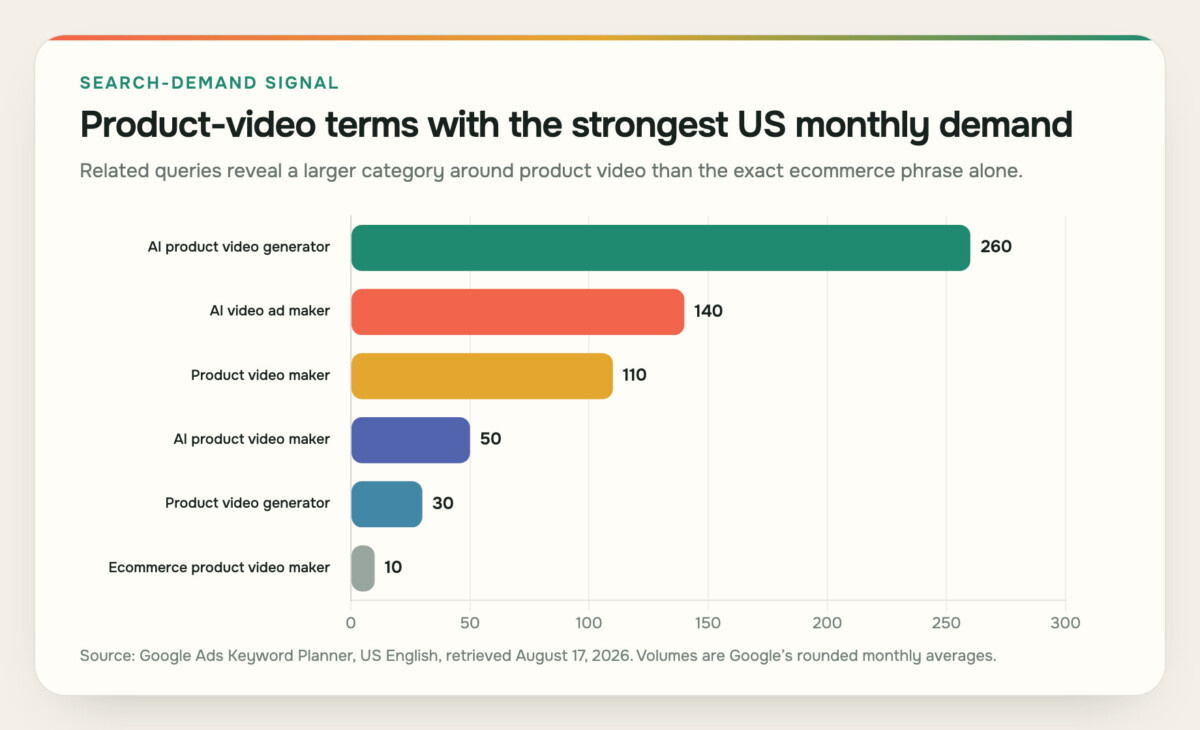
Broader product video terms carry more reported demand than the exact ecommerce phrase. Source: Google Ads Keyword Planner, US English, retrieved August 17, 2026. Volumes are rounded monthly averages.
| Keyword | Monthly searches |
| AI product video generator | 260 |
| AI video ad maker | 140 |
| Product video maker | 110 |
| AI product video maker | 50 |
| Product video generator | 30 |
| Ecommerce product video maker | 10 |
The search data supports the broader framing. Buyers use several labels for the same purchase decision, while the exact ecommerce term is small. That makes workflow clarity more useful than repeating one keyword throughout the article.
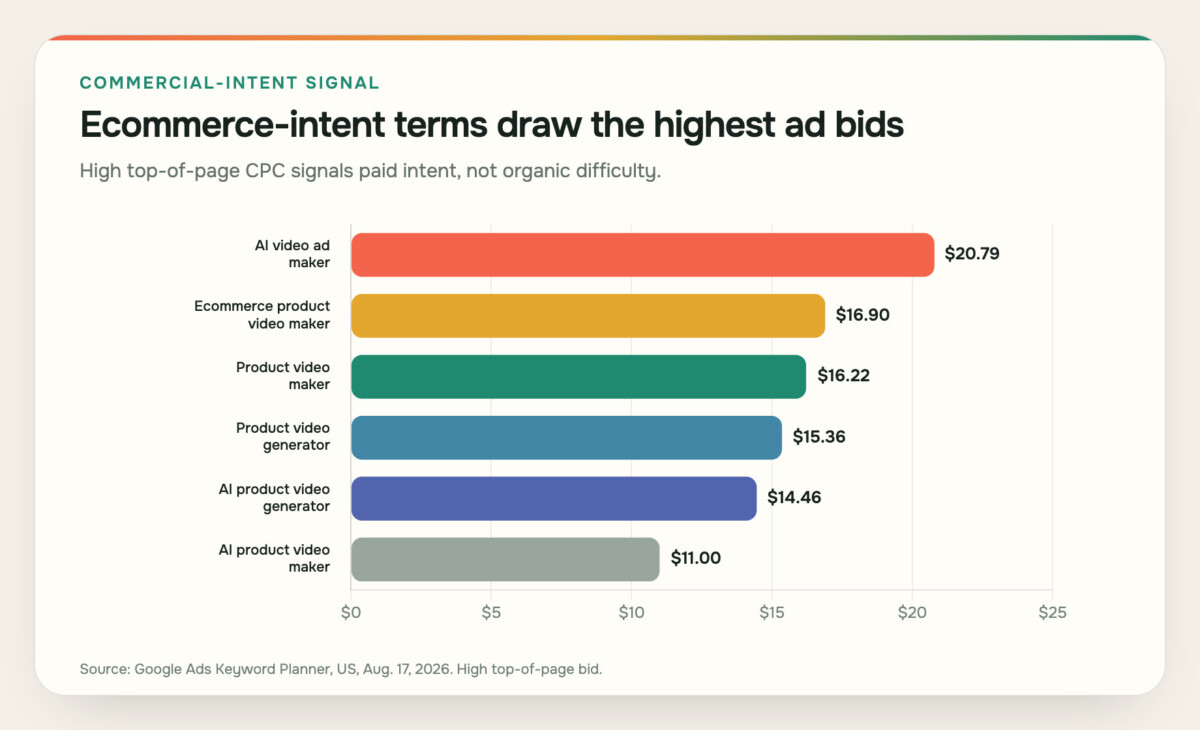
Terms closest to an advertising or ecommerce outcome have strong commercial signals. Source: Google Ads Keyword Planner, US English, retrieved August 17, 2026. Values are high top-of-page bid estimates, not organic difficulty scores.
| Keyword | High top-of-page bid |
| AI video ad maker | $20.79 |
| Ecommerce product video maker | $16.90 |
| Product video maker | $16.22 |
| Product video generator | $15.36 |
| AI product video generator | $14.46 |
| AI product video maker | $11.00 |
Before opening ten tabs, name the work you want to remove.
Two teams can choose different tools from the same ranking and both be right. A three-person brand team launching a new SKU can value a product-page-to-story workflow because nobody has time to write and storyboard every cut.
A performance team with a settled offer often cares more about presenter variety and batch hooks. An in-house designer can prefer a manual editor because automated layout creates more cleanup than it removes. The ranking gives you a starting order; the bottleneck decides the shortlist.
Best for: turning product context into an editable, multi-format campaign draft with a visible planning step.
ngram’s ecommerce video maker ranks first because its current documented workflow connects product-source intake, story planning, production, revision, and format adaptation. You can begin with a product-page URL, approved product copy, a prompt, images, or PDF reference material. The system drafts the script and storyboard before rendering, which gives the team a practical checkpoint for claims, order, pacing, and missing proof.
ngram (founded by Anish Muppalaneni and Devadutta Ghat in 2022) is a business video creation platform for teams across marketing, sales, HR, learning, customer success, operations, and internal communications. For ecommerce businesses, the same workflow can support product promotion, customer education, support, and store-team training. That checkpoint matters. If a product-page bullet says a bag has a water-resistant coating, the draft can use that approved language. It should not silently upgrade the claim to waterproof. If a generated supporting scene makes a bottle, label, interface, or garment look wrong, the team can replace the visual direction with a real packshot, screenshot, crop, or demo reference before treating the result as publishable.
The documented production layer includes product visuals, AI supporting scenes, motion graphics, voiceover, captions, music, and brand-kit controls. After the first draft, teams can revise claims, scenes, pacing, captions, crops, voiceover, and aspect ratio. Landscape, square, and vertical formats make it possible to preserve one approved story while adapting the cut for a product page, social feed, or short-form placement.
ngram combines the planning-to-production handoff in one workspace. A lean brand team can supply the product truth, review the story structure, and shape the finished video without handing a loose brief across several disconnected tools.
It also has clear ownership boundaries. ngram does not manage inventory, checkout, ad buying, or the Shopify product-page layout. Your channel owner still exports the approved video, compresses it appropriately, chooses the poster frame, and publishes it in the final placement. That is a healthier promise than pretending generation and ecommerce operations are the same thing.
Watch out for: any workflow that begins with weak source material. A sparse product page and one low-resolution image will give the system less truth to work with. Prepare approved claims and real product references first.
Best for: ecommerce teams that want to turn a product idea, product link, or existing assets into an editable video project without stitching together multiple AI tools.
Fotor Agent takes an end-to-end approach to AI video production. Instead of generating individual clips and leaving the team to assemble the rest, it coordinates scripting, visual generation, voiceover, music, captions, motion graphics, and editing within a single workflow.
Teams can start with a product link, a prompt, or existing images and video. Fotor Agent analyzes the request, breaks the project into production tasks, and assembles the result as an editable video project with a multitrack timeline. Video, voiceover, music, sound effects, captions, B-roll, and motion graphics can be organized across separate tracks rather than delivered as a single flattened file.
That workflow is useful for ecommerce teams producing product demonstrations, feature explainers, promotional videos, and social ads that are likely to go through several rounds of revisions. Instead of generating each component separately and assembling them manually, teams can begin with a structured first draft and continue editing individual elements.
The editing layer is a key part of the product. Users can modify scenes, replace footage, adjust timing, edit captions and voiceover, rearrange content, and update individual motion-graphic elements without rebuilding the entire project. Motion graphics can also include editable text, numbers, charts, and other visual elements, which can be useful when product details, pricing, statistics, or promotional messaging need to change.
Fotor Agent also supports repurposing existing long-form content. Its semantic editing capabilities can analyze visual and spoken content to identify key moments, remove unwanted sections, and add relevant B-roll, captions, and motion graphics. This can be useful for turning product demos, livestreams, interviews, and other longer recordings into shorter marketing videos.
Watch out for: Fotor Agent is designed to automate more of the production workflow while keeping the project editable. Teams that require highly specialized finishing tools or the deepest manual controls of a professional non-linear editor may still prefer a dedicated editing application for the final stage.
Bottom line: Fotor Agent is positioned less as a standalone AI clip generator and more as an end-to-end production workflow. For ecommerce teams creating product and marketing videos at scale, its combination of automated planning, asset generation, multitrack editing, and revision controls can reduce the number of manual handoffs between an initial idea and an editable video.
Best for: product-link-to-ad workflows with AI actors and creative variation.
Creatify remains a strong fit for ecommerce teams that want to turn a product URL into ad concepts quickly. Its URL to video workflow documents manual product information and assets, script generation, AI actors, editing, common social aspect ratios, and batch-oriented variation.
Its current product video experience deserves a small clarification. An older Home-screen Product Video tile was deprecated in May 2026, but the product job did not disappear. Creatify now directs users toward workflows such as Show Your Product, Product Shot, and Avatar Showcase. Those paths cover the listed use case today.
Creatify is especially relevant when the creative team needs many hooks or presenter variations around the same product angle. That can be useful for paid-social iteration, where the offer and evidence stay fixed but the opening, voice, actor, or format changes.
Watch out for: treating variation as strategy. Generating more versions does not decide which claim is approved, which audience matters, or whether the actor appears to handle the product accurately. Lock those inputs before scaling variants.
Best for: commerce-connected social production and scheduling.
Predis.ai approaches product video as part of a broader ecommerce content routine. Its official product page documents product-link and image inputs, connections for platforms including Shopify, Etsy, and WooCommerce, and the ability to use product images, price, and description as source material. It also describes templates, scripts, voiceover, captions, editing, brand controls, resizing, export, and scheduling.
Predis.ai fits the social media video maker brief when a small team wants to move from catalog information to a steady social queue. It can reduce the repetitive work of copying product details into each new creative, then creating separate sizes and captions for different placements.
The tradeoff is focus. A system designed to support ideation, production, and social operations offers more workflow surface than some teams need for one flagship product-page film. Judge it on whether store-connected content operations are part of the problem you want to solve.
Watch out for: stale catalog language. A connected product description is still marketing input, not unquestionable creative direction. Review prices, claims, variants, and availability before scheduling anything.
Best for: teams that want hands-on visual composition, templates, and familiar collaboration.
Canva is the clearest manual-design option in this ranking. Its current product video materials emphasize templates, product images and footage, stock assets, animation, effects, music, trimming, composition, sharing, and MP4 export. That is useful when a designer or marketer already has a strong concept and wants to build the cut without a traditional desktop editing setup.
For ecommerce, Canva works well for branded promos, simple feature callouts, collection teasers, sale announcements, and product-page explainers assembled from approved assets. Its broad template library can speed up layout work, while manual editing keeps the team close to typography, spacing, color, and asset selection.
Canva is less compelling when the hard part is analyzing a dense product page and deciding the story. It can make the video, but the operator still needs to write the brief, choose the proof sequence, and build the script before opening the editor.
Watch out for: template sameness. Replace generic stock, check safe areas on every aspect ratio, and make the product the visual anchor rather than decorating a template around it.
Best for: UGC-style product ads with AI presenters and product interaction.
Arcads is built around the presenter-led side of product marketing. Its official product video material describes AI avatars that can hold or show products, along with script, emotion, localization, and UGC-style ad workflows. That makes it relevant for brands that need creator-like delivery but cannot film every new hook, language, or product angle.
The strongest use case is a tightly controlled ad brief: one approved claim, real product reference assets, clear handling instructions, and several presentation variations. Used that way, Arcads can help a media team explore hooks without booking a new shoot for every concept.
Product interaction raises the review burden. Hands, packaging, labels, scale, texture, and moving parts are exactly where synthetic output can drift from reality. Current materials also mark some editing capabilities as upcoming, so this article does not assume every proposed editing feature is generally available today.
Watch out for: physical-product errors and future-feature language. Inspect every frame that shows the presenter touching or demonstrating the item, and verify current account access before planning a workflow around a specific edit control.
Best for: prompt-led product ads that combine scripts, presenters, product photos, voice, and stock-style supporting scenes.
InVideo is an AI video ad generator with broad input and media-assembly options. Teams can supply product details by link or manual input, choose an actor, work from an AI-generated script, and assemble scenes with product photos, voiceover, subtitles, sound effects, and music. Its official materials also describe multilingual output.
For a founder or growth marketer, that breadth reduces the need to source every clip before the first draft. The same brief can support explanatory product videos, social ads, list-style feature videos, and localized variants.
Broad automation also means more review surface. A coherent first draft can still contain a generic hook, a stock scene that does not match the product, or captions that crowd the mobile frame. Treat the output as an editable assembly, not a final ad that bypasses brand and compliance review.
Watch out for: accepting the first media choices. Replace scenes that merely illustrate a category when real product proof would answer the buyer’s question more directly.
Best for: teams that want generation and existing-footage editing in one browser workspace.
VEED spans more than one lane in this list. Its current official pages describe AI product video generation from text, editing for uploaded footage, avatars, voiceover, captions, clips, brand-kit controls, and resizing. That makes it useful when the team sometimes starts from a prompt and sometimes starts from a founder demo, review clip, webinar segment, or product recording.
VEED’s AI video editor is the main reason to shortlist it. Ecommerce work often becomes messy after the first generation step. Captions need shortening, a pause needs trimming, a vertical crop cuts off the product, or the team needs one clean product-page version without an aggressive social hook. A combined generator and editor can reduce those handoffs.
VEED is not automatically the best choice for product-page analysis or commerce-connected catalog operations. Its value rises when footage cleanup, captioning, reframing, and repurposing are recurring tasks.
Watch out for: mixing source quality. A polished edit cannot make inaccurate product imagery true. Keep real footage and approved screens as the proof layer when the product detail matters.
Best for: brand-conscious teams that want a lightweight browser editor inside an Adobe-oriented creative workflow.
Adobe Express documents templates, uploaded media, trimming, cropping, animation, resizing, stock assets, MP4 output, sharing, and content scheduling. It earns a place here as a design-led product video maker rather than as a promise of fully automatic ecommerce production.
Adobe Express works when a team already has approved product photography, clips, copy, and a visual direction. The team can assemble a clean promo or explainer without opening a heavier editing application. Existing Adobe users also get a familiar asset and brand environment.
Its limitation is similar to Canva’s. The editor can accelerate composition and adaptation, but your team still owns most of the strategic work before editing begins. If the bottleneck is turning a complicated product page into a coherent story, a planning-led generator can remove more work.
Watch out for: assuming every Adobe AI capability belongs to the Express product video flow or to your plan. Confirm the specific workflow your account supports, then judge the editor on the assets you need to produce.
Best for: presenter-led product education and localized product videos.
HeyGen’s current product video generator documentation covers product links, product photos, scripts, AI presenters, captions, and localization. The vendor positions the workflow for product demos, ads, and listing videos, which makes it relevant when a human-style explanation is central to the concept.
For ecommerce teams, the strongest scenario uses a presenter only where spoken explanation removes friction: how a product works, who it is for, how a feature changes the routine, or what a buyer should notice in a demonstration. Localization can then extend the approved script without organizing a separate filming session for each language.
As with any presenter-led generator, the product should remain the evidence. A fluent delivery cannot compensate for a synthetic product shot that changes the item or a script that overstates the outcome.
Watch out for: presenter-first creative. Start with the buyer question and product proof, then decide whether a presenter improves the explanation. Also review pronunciation, captions, lip sync, and localized claim meaning before release.
Best for: turning existing product copy, scripts, images, or longer video into concise narrated cuts.
Pictory documents a wide input range that includes an idea, text, script, URL, images, and video. Its product pages also describe scene assembly, captions, voiceover, branding, and multi-format output. It suits a team that has source material but needs a shorter product story.
It can be a sensible option for repurposing a written product guide, founder script, launch recording, or longer demonstration. The output can then become a captioned social cut, a narrated overview, or a more concise product-page asset.
Pictory sits last here because this ranking prioritizes ecommerce-specific product-story planning, product interaction, and commerce operations. It can still be the right choice when repurposing is the main bottleneck.
Watch out for: stock footage replacing proof. When the product itself answers the buyer’s question, use real product imagery or demonstrations instead of an attractive but generic category scene.
To make the comparison more concrete, I audited two sets of capabilities across the ten official product pages and help centers.
The first set covers four starting-input categories: a product URL or store link, text or script, still images, and existing video or screen capture. The second covers five post-draft controls: captions, voiceover, brand controls, aspect-ratio resizing, and direct scheduling or publishing.
A category counts only when the current official material explicitly documents it. The score does not grade output quality, ease of use, or the depth of a feature. No accounts were opened and no videos were rendered for this audit. Availability often depends on plan.
Documented starting-input breadth across four defined categories. Source: current official product pages and help documentation for all ten tools, reviewed August 17, 2026.
| Tool | Categories documented |
| ngram | 4 |
| Creatify | 4 |
| Predis.ai | 2 |
| Canva | 2 |
| Arcads | 2 |
| InVideo | 3 |
| VEED | 3 |
| Adobe Express | 2 |
| HeyGen | 4 |
| Pictory | 4 |
Input breadth matters when teams begin from different places. A URL is efficient for catalog-heavy work. Existing video input matters when the team already has demos or reviews.
Still-image intake matters when an image to video workflow begins from packshots. Script input matters when compliance or brand teams have already approved the message.
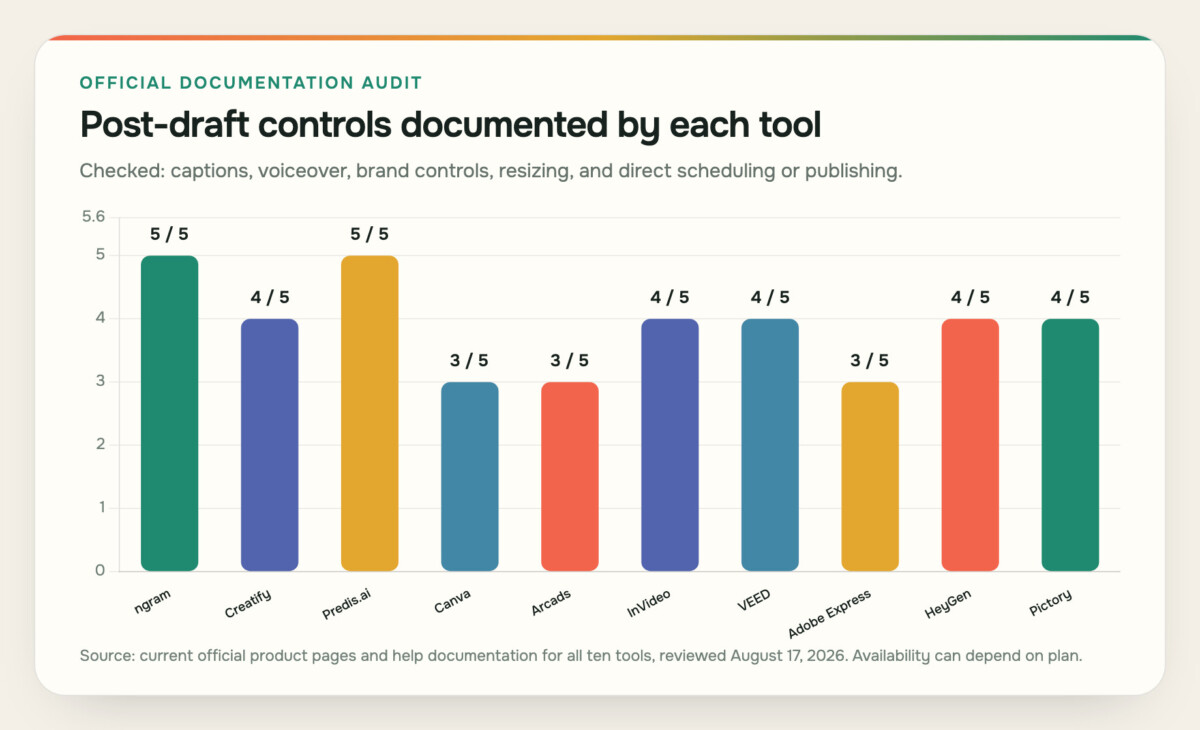
Documented post-draft controls across five defined categories. Source: current official product pages and help documentation for all ten tools, reviewed August 17, 2026. Availability can depend on plan.
| Tool | Categories documented |
| ngram | 5 |
| Creatify | 4 |
| Predis.ai | 5 |
| Canva | 3 |
| Arcads | 3 |
| InVideo | 4 |
| VEED | 4 |
| Adobe Express | 3 |
| HeyGen | 4 |
| Pictory | 4 |
Do not turn these charts into a winner-takes-all score. Predis.ai’s scheduling control matters if social operations are in scope. It matters less if the channel owner already uses another publishing platform.
Canva’s manual composition can be more valuable than URL intake when the concept and assets are ready. Use the audit to expose workflow differences, then choose according to the work your team has.
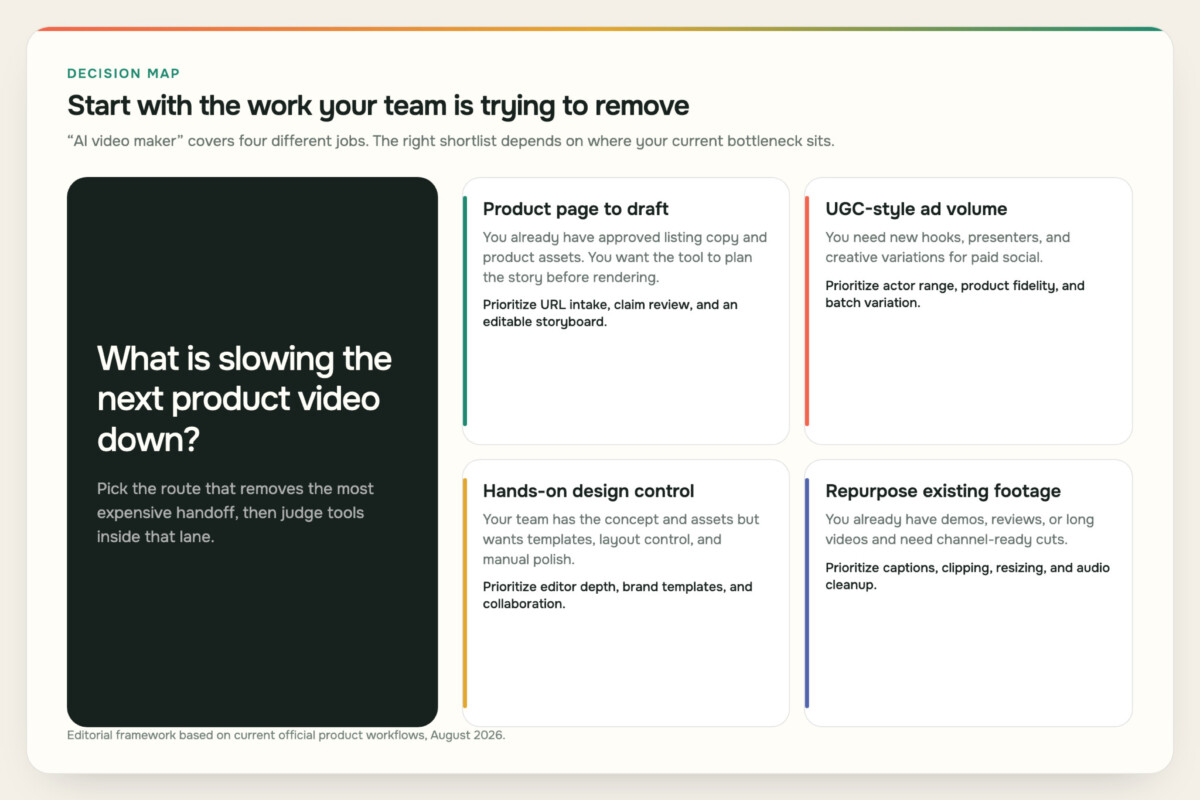
Start with the handoff that consumes the most time, then compare tools within that lane.
Several expensive product video mistakes begin before generation. A product URL is helpful context, but it is not a complete creative brief.
Give the tool six inputs before asking for a usable draft:
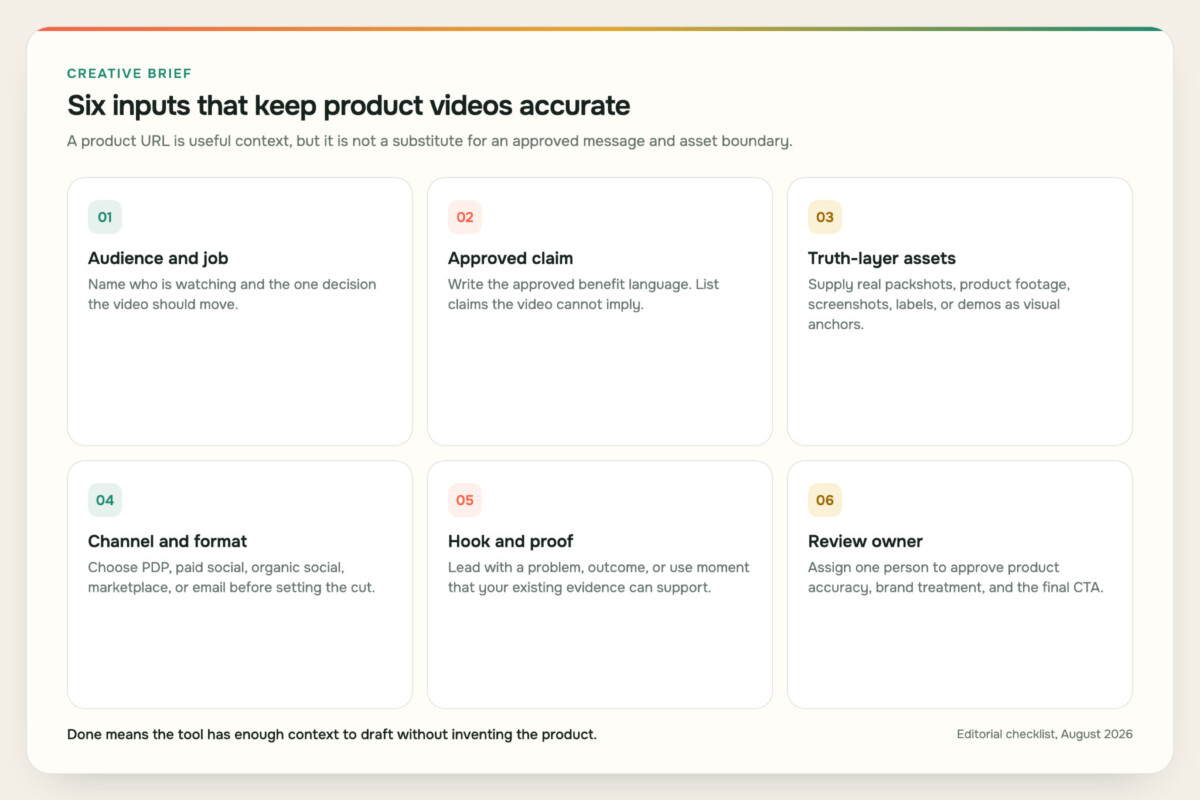
A useful AI draft starts with an approved message and explicit asset boundaries.
A visually impressive draft can still be unpublishable. A generated bottle can look premium while changing the cap. A software clip can look polished while showing a screen that does not exist. A UGC presenter can deliver the line naturally while implying a result the product page never claims.
Your review is not an apology for using AI. It is the normal product-marketing control that makes the speed useful.
Ecommerce teams often ask one video to do four jobs. That usually produces a compromise.
A product-page video needs a clear demonstration arc, legible detail, and a lower-pressure CTA. A vertical social video needs a fast first frame, larger captions, and a composition that survives mobile cropping. A square feed ad needs the benefit and proof early. An email placement often needs a lightweight thumbnail or GIF preview that opens a hosted video rather than a heavy embedded player.
Keep the product claim, proof sequence, and truth-layer assets consistent. Change the pacing, framing, caption density, opening, and CTA for the destination.
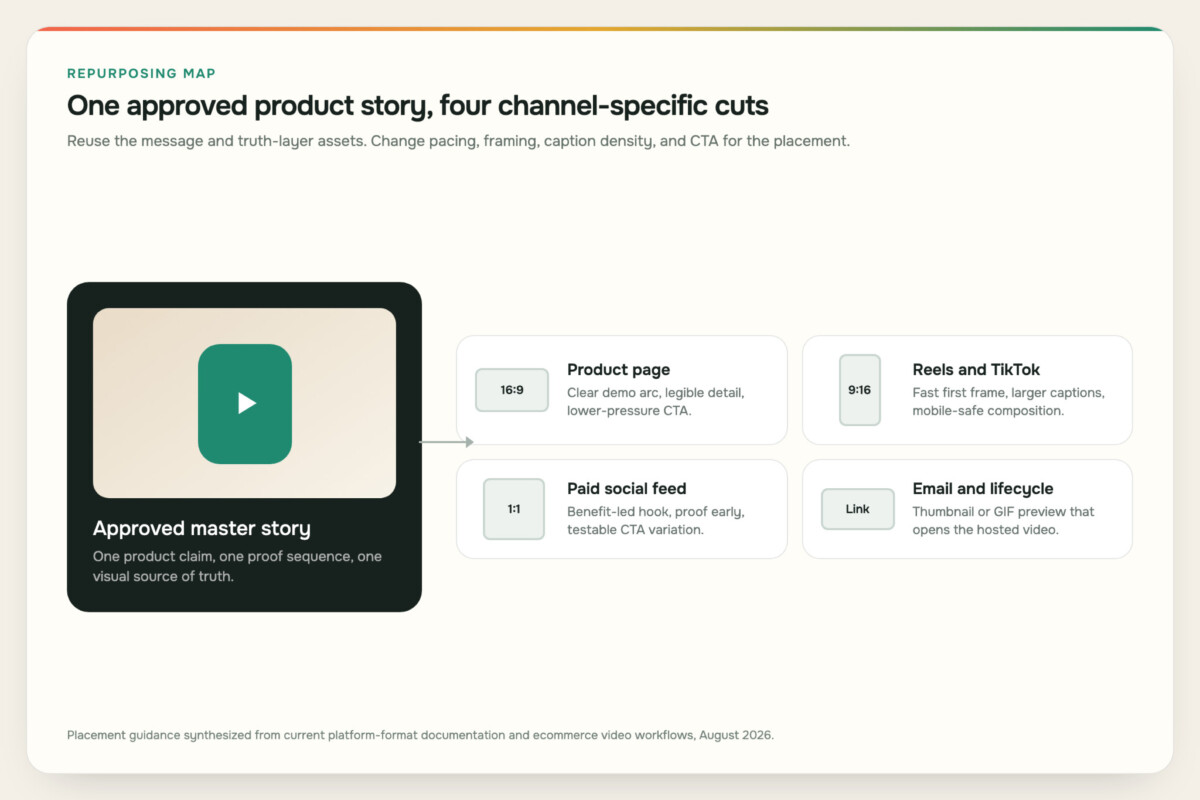
Reuse the approved story. Recut the presentation for the placement.
Deployment still matters after export. Recent Reddit and Shopify Community threads reviewed for this article return to loading weight, compression, poster frames, mobile behavior, and whether the video belongs on a product page or in the social feed. Those discussions are anecdotal, not universal benchmarks, but the concern is sound: a beautiful asset can still create a poor buying experience if it loads slowly or interrupts product inspection.
The sensible boundary is not “AI makes the video, a human approves it.” Approval is too vague. Give people named decisions at specific points in the workflow.
The product marketer owns the claim. The generator can reorganize approved language, propose hooks, and show where proof is missing. It should not decide that a feature is clinically proven, sustainable, waterproof, compatible, or guaranteed unless the source material supports that exact claim. Regulated products need the same legal and compliance review they would receive in any other campaign.
The product or design owner protects visual truth. That review covers more than the logo. Check color, material, dimensions, packaging, labels, screens, ports, moving parts, and how a person holds or uses the item. If the model has invented a product angle that your real assets cannot support, replace the shot rather than rationalizing it.
The channel owner controls placement. A generator can export the right aspect ratio, but the channel owner still decides caption safe areas, thumbnail, autoplay behavior, compression, destination URL, tracking, surrounding product-page layout, and publishing time. Direct scheduling is useful only when the same approval controls travel with it.
A brand reviewer protects continuity. Voice, typography, pacing, music, and presenter style should feel like the same company across products and formats. AI variation can accidentally turn one brand into ten unrelated aesthetics. A small set of approved references and a repeatable review rubric usually creates more consistency than generating a larger pile of options.
Someone must decide when the draft is done. Endless regeneration looks fast because each version arrives quickly, but it can hide an unresolved brief. Set a clear acceptance bar before the first prompt: the product is accurate, the claim is supported, the proof is visible, the main text is legible on mobile, the cut fits the placement, and the CTA leads to the intended next step.
These controls do not defeat automation. They concentrate human attention on the decisions that carry risk while letting the tool handle assembly, variation, narration, captions, and format adaptation.
Use a short trial brief instead of browsing feature pages indefinitely.
Pick one real product with approved source material. Define one target placement and one review owner. Then evaluate the workflow against five questions:
Record the answers, the number of handoffs, and the fixes required outside the tool. Run the same brief through only the two or three strongest candidates. That produces a more useful comparison than feeding every tool a different prompt and judging whichever preview looks most cinematic. Judge the repeatable process your current team can review and ship, not the most impressive demo.
Pay attention to setup burden as well. A tool can produce a strong preview after an expert spends an hour cleaning the product data, rewriting the prompt, and preparing every crop.
That can still be a good workflow, but the labor belongs in the comparison. Record which inputs had to be reformatted, which edits required a specialist, and which channel changes survived reuse. A repeatable system should make the second product easier than the first.
This exposes hidden production costs before rollout.
The cheapest first draft can become expensive if it requires a second tool and several hours of cleanup. The most automated tool can be the wrong choice if your brand needs precise manual composition. The best fit is the product video maker whose workflow removes a costly handoff while keeping the product truthful. A useful shortcut should not add two new review tools after generation.
An AI product video maker turns product information and assets into video. Depending on the tool, the starting point can be a product URL, script, prompt, still image, existing video, or store connection. The output can include an editable script, scenes, presenter, voiceover, captions, music, layouts, or multiple aspect ratios.
Yes, several tools on this list document URL or store-link intake. The quality of the draft still depends on the product-page information and visual assets you provide. Review claims, pricing, variants, labels, product proportions, and the final CTA before publishing.
Creatify, Arcads, and HeyGen deserve a close look when AI presenters and UGC-style variation are central to the brief. Choose based on product interaction, script control, localization, editing access, and how carefully your team can review physical-product fidelity.
VEED and Pictory are practical starting points for repurposing footage, while Canva and Adobe Express provide hands-on browser editing. The right choice depends on whether you mainly need automatic clipping and captions or detailed manual composition.
You need separate cuts more often than separate stories. Keep the approved claim and product proof consistent, then adapt the opening, pace, crop, captions, CTA, and file treatment to the placement. A product-page demo and a short vertical ad ask for different viewing behavior.
Use real packshots, labels, interface captures, and demonstration footage as the visual source of truth. Give the system explicit instructions about what it is not allowed to alter. Then inspect frames that show logos, text, proportions, colors, hands, moving parts, screens, or before-and-after states.
Only if scheduling is part of the bottleneck. Direct publishing can reduce handoffs for a small social team, but it is not inherently better than a focused generator or editor. Many teams already have an approval and scheduling system they should keep.
Use one representative product and one real placement. Time the full path from source material to approved export, including claim review, product-fidelity fixes, caption cleanup, resizing, compression, and handoff. Do not judge only the first generated preview.
Start with ngram if you want one documented business-video workflow from trusted context through an editable plan and multi-format production. For ecommerce teams, product promotion is one application alongside customer education, support, and staff training. Choose a specialist when your real job is narrower, such as UGC variation, store-connected social operations, manual design, or footage repurposing.
Whichever tool you select, protect the same three things: the approved claim, the real product, and the final channel experience. Automation is useful when it removes production friction without making those decisions for you.




