
As of October 2026, retailers spending around £10K or more on UK or EU shopping ads get the most from ShoppingIQ; smaller self-serve teams can trial FeedIQ.ai from about $63 to $100 a month; and Shopify stores advertising only on Google can start free with Merchant Center.
The feed is where most shopping campaigns are won or lost before a single bid is placed. A product Google cannot understand, or one still advertised after it sold out, costs money no matter how good the campaign settings are.
Picture a Black Friday morning. A bestselling jacket sells out at 9:40, but the product file Merchant Center fetches once a day does not refresh until the next morning, so the ads keep running against an out of stock page for the rest of the peak day. Every click on that ad is spend with nowhere to convert. That gap between what your store knows and what your ad channels know is the problem feed management tools exist to close, and closing it in real time is the starting point for the ShoppingIQ platform, the first of the three tools below.
Product feed management is the work of cleaning, enriching, and distributing your product data (titles, descriptions, prices, availability, images, GTINs, and categories) to the channels that turn it into ads and listings. For years that meant spreadsheets and static rules. The tools now arriving add AI-assisted optimization, faster syncing, and in some cases targeting and creative features that sit on top of the feed itself.
This guide covers three options at three price points: a managed premium platform, a newer self-serve AI tool, and Google’s free baseline. They are listed by budget tier, from the highest spend to free, so the order follows cost and scope rather than a quality ranking. Whether you are a $500K Shopify brand running Google alone or a multi country retailer on five channels, the comparison grid and the Best For section near the end are built to show you which tier fits your situation.
These three tools were chosen to represent three distinct budget tiers for retailers whose product data feeds paid shopping channels, each checked against the same four criteria. The criteria are channel coverage (which ad and shopping channels each tool can feed), update frequency (how quickly a price or stock change reaches those channels), optimization depth (what the tool does beyond passing data through, such as rules, AI rewriting, targeting, or creative), and pricing transparency (whether a merchant can see the cost before a sales call). The research base is each vendor’s public site, the Shopify App Store, and Google’s own documentation, all checked in October 2026. Channable and DataFeedWatch were considered and left out to keep the list to one tool per tier; both are established self-serve platforms worth shortlisting next to FeedIQ.ai. Shopify’s free channel apps are covered in the Merchant Center section.
ShoppingIQ is a London-based shopping feed and ad platform for ambitious start-ups and established retailers who want feed management, campaign management, and extra targeting in one service.
What it is. ShoppingIQ combines the core feed work (product data transformation, rules, automation, and distribution) with campaign creation and optimization for Google Shopping, Bing Shopping, Meta catalog ads, TikTok Shopping, and ChatGPT Shopping ads, and Google’s partner directory also lists Performance Max targeting. It connects to Shopify, WooCommerce, BigCommerce, Magento, Salesforce, and Wix, or to XML, CSV, and JSON files. On top of the feed, ShoppingIQ adds keyword-to-product matching, product-level targeting, segmentation by commercial signals such as margin, best sellers, promotions, and stock depth, plus image and creative enhancements for shopping ads. Google’s Comparison Shopping Services directory describes ShoppingIQ’s feeds as real time, and the company runs both self-service and managed models for a fixed monthly fee. ShoppingIQ shows Ikea and Casio among the brand logos on its site.
Pricing. As of October 2026, ShoppingIQ publishes three plan names (Entry Level, Professional, and Enterprise) without public prices, so the full platform is quoted after a demo. Its Comparison Shopping Service on its own is advertised at a limited-time 99p a month, then £35 a month. ShoppingIQ describes its typical customer as a brand spending £10K or more, without stating the period, so confirm on the demo how the plans scale for smaller budgets.
Standout strengths. The first is speed. Merchant Center checks a hosted product file once every 24 hours, so a store relying on a scheduled file can keep advertising a sold out product for most of a day; ShoppingIQ’s real time syncing is built to close that gap, which matters most during Black Friday, Cyber Monday, and flash sales when stock and pricing change by the minute. The second is targeting that sits outside the feed: keyword-to-product matching and segments built around margin or stock let a team push budget toward the products that earn it. The third is creative. ShoppingIQ is listed as a Google Premium Partner in Google’s Comparison Shopping Services program, and ads served through its CSS can carry custom tags, logos, and messages, as the example below shows.
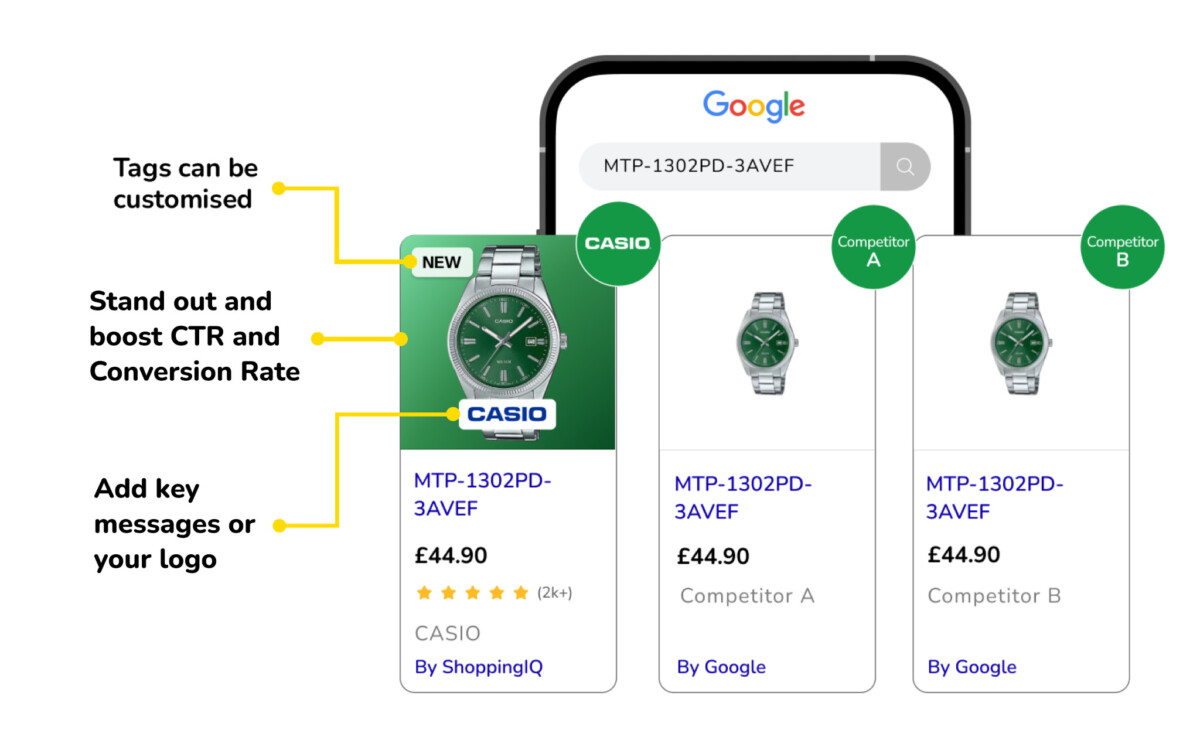
Honest limitations. The CSS layer, meaning the CSS placements and the “By ShoppingIQ” label shown above, only operates in the 31 European markets Google’s directory lists for ShoppingIQ (the UK, the EU countries, Norway, Switzerland, and Liechtenstein). A Shopify brand advertising only in the US or Canada still gets the feed, targeting, campaign, and image enhancement tools, but not the CSS placements; confirm with ShoppingIQ which creative features need CSS. The second limitation is price visibility: with no published plan prices, a merchant cannot compare ShoppingIQ’s total cost against self-serve tools without a sales conversation, and its premium positioning means a smaller store should check the entry plan’s cost early.
Best fit. Choose ShoppingIQ if you sell into the UK or EU, spend at or near the £10K level it describes as typical, and want feed management, targeting, and CSS placements handled in one managed platform. It suits growing and enterprise retailers with large catalogs and frequent price or stock changes.
Skip if. Skip ShoppingIQ if your shopping budget is far below the £10K level it describes as typical, you advertise only in North America and would not use the CSS features, or you want to see the full price before booking a demo.
FeedIQ.ai is a self-serve product feed tool with AI-based optimization, aimed at teams that want to manage multichannel feeds themselves without buying a managed advertising platform.
What it is. FeedIQ.ai moves the work away from large spreadsheets and static rule sets into one interface where a team connects its store, imports products, maps attributes, and builds rules such as find and replace, append, prepend, and exclude. It supports channel-level overrides, custom labels 0 to 4, include and exclude filters, XML and CSV previews, image editing, team roles, and a feed quality score. FeedIQ.ai feeds Google Ads and Shopping, Meta, TikTok, Bing, Reddit, and ChatGPT, and connects to Shopify, WooCommerce, and Magento. FeedIQ says its AI optimization, included on the Advance plan, improves product titles, descriptions, attributes, categories, colors, and product types, which is where most of the repetitive work in a large catalog sits. FeedIQ.ai has been listed on the Shopify App Store since January 2026. ShoppingIQ’s own site recommends FeedIQ.ai for smaller, self-serve needs, and both list the same Great Portland Street office in London.
Pricing. As of October 2026, FeedIQ.ai’s pricing page lists Basic at $100 a month, Professional at $149, and Advance at $249 on monthly billing, with a lower set of rates (Basic $96) that appears to be annual billing, and the price moving according to catalog size on a slider from 500 to 3 million items. AI-based optimization is listed on the Advance plan. The same page also shows a $34 a month Basic offer, and the Shopify App Store listing shows Basic at $63 a month with a 30 day free trial, so confirm the price for your catalog size at signup.
Standout strengths. FeedIQ.ai covers six ad and shopping destinations from one feed, including Reddit and ChatGPT. Its rule set covers the everyday fixes (renaming, appending sizes or brands to titles, excluding low margin items) without a consultant. And at a $149 a month base price for Professional as of October 2026, it sits well below the managed tier for a team that only needs clean, channel-specific feeds.
Honest limitations. FeedIQ.ai is new. Its Shopify App Store listing had no reviews as of October 2026, so a merchant cannot yet check how it performs for stores like theirs, and the three different Basic prices across its own site and the App Store make the true entry cost hard to pin down. It also does not offer ShoppingIQ’s incremental targeting, keyword matching, or CSS creative, so it improves the data going into your ad channels rather than the campaigns themselves.
Best fit. Choose FeedIQ.ai if you advertise on three or more channels, have someone on the team who can own feed rules, and want rule-based feed control at a self-serve price, with AI help on titles and attributes from the $249 Advance plan (pricing as of October 2026). It fits stores from about $500K to $5M in revenue with catalogs too large to fix by hand.
Skip if. Skip FeedIQ.ai if you need a vendor with a long public track record, case studies, and app reviews before you hand over your catalog, or if you advertise on Google only and Merchant Center already covers your needs.
Google Merchant Center is Google’s free, native tool for submitting and managing product data across Google Shopping, Shopping ads, Performance Max, free listings, and YouTube.
What it is. Google Merchant Center is the account every retailer needs before Google will show their products, whether or not they use a specialist feed tool on top. Products arrive in one of several ways: Google can read them automatically from structured data on your site, you can connect an ecommerce platform such as Shopify, upload a file once or host it at a URL Google checks every 24 hours, keep products in a Google Sheets template that syncs every 24 hours, or push them through the Merchant API, which Google recommends for large or frequently changing catalogs. For Shopify merchants, the usual route is Google’s free Google & YouTube app, which syncs products, deals, and shipping to Merchant Center and connects Performance Max and YouTube Shopping. Merchant Center then flags disapprovals and missing attributes in its diagnostics.
Pricing. As of October 2026, Merchant Center and the Google & YouTube app are both free to use. Ad spend is billed separately through Google Ads, and free listings cost nothing.
Standout strengths. It costs nothing, it is the source of truth Google itself reads, and for a Shopify store the Google & YouTube app sets it up in an afternoon. The app had a 4.5 rating from more than 5,500 reviews on the Shopify App Store as of October 2026, and its diagnostics tell you exactly which products Google has rejected and why.
Honest limitations. Merchant Center only feeds Google. Meta, TikTok, and Microsoft each need their own catalog, either through Shopify’s free channel apps for those platforms or through a specialist tool. Its rules and bulk editing are limited and can feel clunky on large catalogs or complex variant structures. And file and Sheets sources refresh on a daily schedule, so fast moving stock and pricing need the API or a platform connection to stay current; at least one recent Google & YouTube app review also reports inventory sync problems.
A specialist tool does not replace Merchant Center. ShoppingIQ and FeedIQ.ai both still pass their optimized data into Merchant Center for Google campaigns; they work one layer above it, improving titles, enriching attributes, segmenting products, and structuring data differently for each channel before it reaches Google.
Best fit. Choose Google Merchant Center on its own if you run a Shopify store that advertises only on Google, your catalog is a few hundred to a few thousand products, and your diagnostics are mostly clean. It is the right starting point for nearly every store under $500K in revenue.
Skip if. Skip relying on Merchant Center alone if you advertise on three or more channels (two channels can usually still run on Shopify’s free channel apps), manage tens of thousands of products, or keep running into the limits of its rules. That is when a specialist tool starts to earn its fee.
The right product feed management tool depends on three numbers: your monthly shopping ad spend, how many channels you advertise on, and how large and fast moving your catalog is.
If you are a Shopify store under $500K in revenue advertising only on Google, start with Merchant Center through the Google & YouTube app and spend your effort on clean titles, accurate GTINs, and fixing every diagnostic warning. A paid feed tool at this stage usually adds a monthly bill before it adds revenue, and the most common mistake in this band is buying optimization software before the basic data is right.
If you are between roughly $500K and $5M, advertising on Google plus Meta or TikTok, the free channel apps start to strain because each channel needs its own fixes and nobody sees the whole catalog in one place. This is where a self-serve tool earns its place. FeedIQ.ai is one option, with plans starting at $100 to $249 a month and rising with catalog size as of October 2026; Channable and DataFeedWatch are the established names to compare it against, and the deciding factor between them is which one your team will actually maintain.
If you sell into the UK or EU and spend at or near the £10K level ShoppingIQ describes as typical, ShoppingIQ’s combination of real time feeds, product-level targeting, and CSS placements is built for your situation, and the managed model suits teams without a dedicated feed specialist. The trade off is cost visibility: you will not know the full price until after a demo, so go in with your current spend, channel list, and catalog size ready.
If you sell mainly in the US or Canada at the same spend level, ShoppingIQ’s feed and targeting tools still apply, but its CSS features do not, so weigh it against self-serve tools on the feed and targeting value alone.
No single product feed management tool is right for every retailer, which is why these three are presented by budget tier rather than ranked. Each one earns its place at a different stage. Google Merchant Center is the free foundation every store needs and the one every other tool feeds into. FeedIQ.ai is a newer self-serve option for multichannel teams that want AI help on product data without a managed contract, provided they are comfortable with a tool that has no public reviews yet. ShoppingIQ is the premium, managed choice for larger retailers in the UK and EU who want feed management, targeting, and creative in one place.
The wider direction is clear enough. Feed management is moving from fixing attributes and exporting files toward tools that use AI, faster syncing, and advertising data to decide how each product is presented on each channel. Before you pay for any of that, check your Merchant Center diagnostics. If they are not clean, that is still the first job, whatever tool you choose.
There is no single best product feed management tool for every ecommerce store; the right one depends on your ad spend, channel count, and catalog size. As of October 2026, ShoppingIQ suits UK and EU retailers at or near the £10K spend level it describes as typical who want managed targeting and CSS placements. FeedIQ.ai suits self-serve teams feeding several channels, with plans starting at $100 to $249 a month and rising with catalog size. Google Merchant Center, free through Shopify’s Google & YouTube app, suits stores advertising only on Google. The Best For section above maps each one to a specific merchant situation.
Product feed management is the process of organizing, optimizing, and distributing your product data to advertising platforms and shopping channels. That data includes titles, descriptions, prices, availability, images, GTINs, categories, and custom labels. Each channel, whether Google Shopping, Meta catalog ads, or TikTok Shopping, has its own requirements, and a product with a vague title or missing attribute may be disapproved or shown for the wrong searches. Good feed management keeps that data accurate, current, and shaped for each channel, so ad budget goes to products that are in stock and clearly described.
You do not need a paid product feed management tool to run Google Shopping, because Google Merchant Center is free and Shopify stores can connect it through Google’s free Google & YouTube app. Many stores under $500K in revenue that advertise only on Google never need more. A dedicated tool becomes worth paying for when you advertise on several channels, manage a large or fast changing catalog, or need rules, AI rewriting, and segmentation that Merchant Center does not offer. Even then, the optimized data still flows into Merchant Center for your Google campaigns.
Yes, AI can optimize ecommerce product feeds by rewriting titles and descriptions, filling missing attributes, assigning categories, and suggesting feed rules across thousands of products at once. Tools such as FeedIQ.ai and ShoppingIQ both use AI for this work as of October 2026. The time saved is real on large catalogs, but the output still needs review: an AI rewritten title that drops a key size, material, or brand term can lower relevance instead of raising it. Start by running AI changes on one product category, compare click-through rates against the original titles, and expand only when the results hold.
Google Merchant Center is Google’s free tool for managing product data inside Google’s ecosystem, while product feed management software optimizes and enriches that data before it reaches Merchant Center and sends tailored feeds to other channels. Merchant Center only feeds Google Shopping, Performance Max, free listings, and YouTube. Software such as ShoppingIQ or FeedIQ.ai adds stronger rules, AI rewriting, segmentation, and distribution to Meta, TikTok, Microsoft, and others. The two work together rather than competing, because Google campaigns still read from Merchant Center whichever tool sits above it.




