

The best event marketing stack covers six jobs: registration, promotion, delivery, data capture, automation, and measurement. Start with one platform that handles the event itself, then add specialist tools only where your workflow has a real gap.
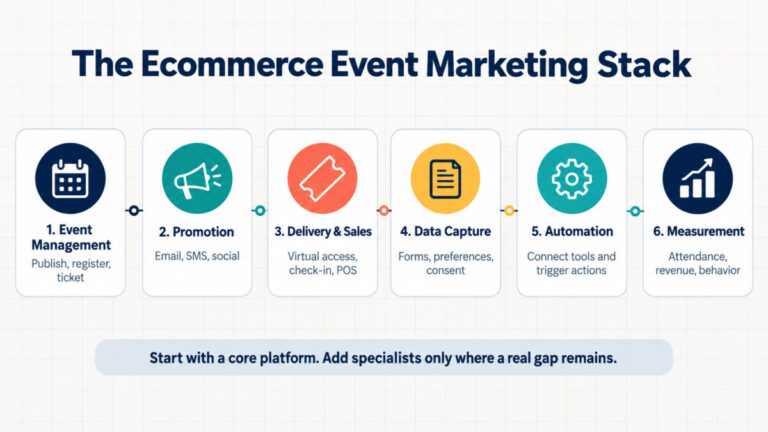
An ecommerce event can be a product launch, pop-up shop, customer workshop, livestream, VIP night, or trade-show appearance. Each format changes the details, but the software still needs to move a customer through a recognizable path:
That journey creates six software needs: event management, audience communication, delivery or in-person selling, data capture, workflow automation, and measurement.
The categories below describe each product’s primary reason for being in the stack. They are not hard boundaries. A platform listed under event management may also send emails, text attendees, accept payments, and trigger follow-ups. Those overlaps matter because they can save you from buying another tool.
For campaign ideas before you choose software, Ecommerce Fastlane’s guide to event marketing for retail covers product launches, pop-ups, workshops, and online events.
A core platform should own the event record: date, venue or meeting link, capacity, registration, tickets, and attendee status. For a simple campaign, it may also cover enough promotion and follow-up to run the whole event.
Modern Events Calendar is a strong fit when a brand wants events to live on its own WordPress site. Its core role is calendar publishing and booking, but that label understates the wider workflow.
Depending on the plan, module, integration, or add-on, MEC can support customizable booking emails, scheduled messages before and after an event, Twilio SMS notifications, email-marketing connections, webhooks, WooCommerce workflows, QR codes, attendee reporting, and virtual-event details. A WordPress team may therefore use MEC as the system coordinating several parts of the customer journey, not merely as a public calendar.
Also handles: Notifications, SMS, follow-up emails, payments, integrations, and reporting.
Watch-out: It is a WordPress-centered choice. Confirm which capabilities are included in the configuration you plan to use.
Eventbrite combines event pages, registration, ticketing, payment collection, organizer email tools, advertising, check-in, and reporting. Its distinctive advantage is distribution through a consumer event marketplace, which can help public events reach people beyond a brand’s existing list.
That reach is less important for an invite-only wholesale preview or customer VIP night. In those cases, compare the economics and brand control with a site-owned registration flow.
Also handles: Email campaigns, paid promotion, check-in, and reporting.
Watch-out: Fees and marketplace dependence should be weighed against the audience you expect Eventbrite to bring.
Ticket Tailor suits teams that want hosted event pages and ticketing without building a full event site. It supports payments, automated attendee emails, check-in, reporting, integrations, webhooks, and reminder options that include SMS or WhatsApp.
It is a useful middle ground for workshops, paid brand experiences, and recurring community events. The question is whether its hosted flow gives you enough control over the path back to your store.
Also handles: Reminders, check-in, integrations, and analytics connections.
Watch-out: Plan the handoff between the ticket page, customer record, and ecommerce storefront.
Promotion software earns its place when you need richer customer segmentation, coordinated campaigns, or a repeatable social schedule than the core event platform provides.
Klaviyo can build event audiences from shopping behavior, profile data, predicted attributes, and campaign engagement. A skincare brand could invite customers who bought a cleanser twice but have not tried its new moisturizer, then send different follow-ups to registrants, attendees, and buyers.
Its flows can coordinate email, SMS, and other actions around registration or purchase events. Ecommerce Fastlane’s Klaviyo review goes deeper into its Shopify data and segmentation model.
Also handles: Forms, automated flows, SMS, push, and reporting.
Watch-out: It adds the most value when customer and event data flow back into usable profiles.
Omnisend brings email, SMS, push, forms, segmentation, automation, and reporting into one ecommerce-focused platform. It is worth comparing when the team wants multichannel follow-up without the depth or operational overhead of a more elaborate customer-data setup.
Also handles: Lead capture, automated messages, and campaign reporting.
Watch-out: Check that your event or registration platform passes the fields needed for attendee-specific segments.
Buffer helps a small team schedule event announcements, speaker clips, countdown posts, behind-the-scenes material, and post-event recaps across supported social channels. Its analytics can show which posts earned attention, while the publishing calendar makes gaps easier to spot.
Also handles: Basic social analytics and engagement workflows.
Watch-out: It does not replace registration attribution or store analytics.
The event format decides this part of the stack. A pop-up needs reliable in-person selling. A virtual launch needs registration, streaming, and engagement controls.
Shopify POS connects event sales with a Shopify store’s products, inventory, orders, and customer profiles. That makes it practical for pop-ups, markets, launch parties, and show-floor selling where stock and customer history should not live in a separate system.
Also handles: Customer capture, discounts, receipts, and location-level sales reporting.
Watch-out: It manages commerce at the event, not the complete registration and promotion workflow.
Zoom Events supports virtual sessions, registration, ticketing, engagement features, and event analytics. It fits product demonstrations, expert panels, training sessions, and hybrid programs where the live online experience is central.
If the launch itself is still being designed, this product launch event guide covers planning, promotion, measurement, and follow-up.
Also handles: Registration, attendee engagement, reporting, and integrations.
Watch-out: Decide where the lasting event page and customer record should live after the broadcast ends.
These tools are most useful when the chosen platforms do not exchange the fields or trigger the actions your campaign needs.
Typeform is useful when registration needs branching questions, applications, lead qualification, or a polished post-event survey. Logic can show different questions based on prior answers, while integrations and workflows route responses to other systems.
Also handles: Payments, lead capture, feedback, and workflow triggers.
Watch-out: Do not create a second registration database unless the added questions justify it.
Zapier can move data between apps through trigger-and-action workflows. A new registration might add or update a marketing profile, notify an event channel, create a task, and place the attendee in the correct follow-up sequence.
Also handles: Data formatting, branching logic, and scheduled workflows.
Watch-out: Automations need an owner. Test duplicate registrations, cancellations, consent fields, and failed runs before launch day.
Registration totals alone cannot tell an ecommerce team whether an event influenced product discovery, purchases, repeat visits, or a better landing-page experience.
GA4 can connect event landing-page behavior with ecommerce events such as viewing products, adding items to a cart, and purchasing. Use campaign parameters and a consistent measurement plan so the team can compare channels and follow the path from event promotion to store action.
Setup matters. GA4 does not automatically receive every ecommerce event or event-platform action. Ecommerce Fastlane’s GA4 ecommerce tracking guide explains the implementation choices.
Also handles: Funnel exploration, audience analysis, and campaign reporting.
Watch-out: Define events and test data collection before traffic arrives.
Contentsquare’s heatmaps and session replay help teams see where visitors click, stop, backtrack, or struggle on an event landing page. That is useful when traffic is healthy but registrations are weak and aggregate analytics cannot explain why.
Also handles: Form and journey analysis, depending on the product and plan.
Watch-out: Configure privacy controls and data masking, and use recordings to investigate a specific problem rather than watch sessions at random.
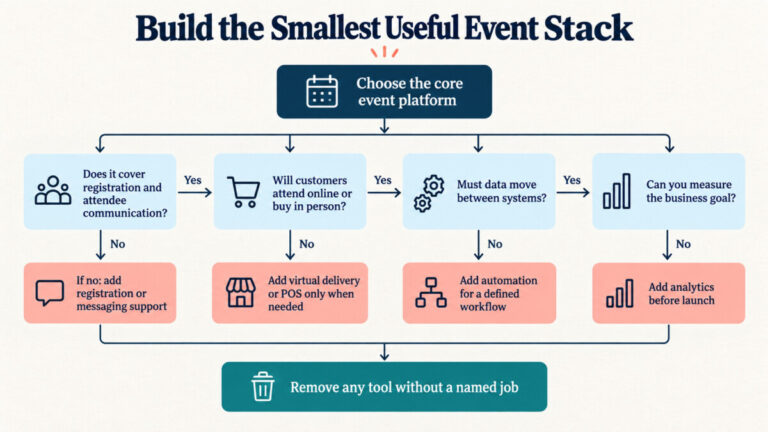
Start with the event’s conversion goal and work backward. Then ask four questions:
A WordPress brand might run MEC with its existing email platform and GA4. A ticketed public event might pair Eventbrite with Klaviyo and Zapier. A Shopify pop-up may need Shopify POS, a lightweight registration flow, and a clear reporting setup.
The cleanest event stack is rarely the one with the most logos. Pick the core platform first, map its real capabilities, and add a specialist only when it closes a named gap.
Event marketing tools help businesses publish events, collect registrations, communicate with attendees, run online or in-person experiences, connect customer data, and measure results. Some platforms cover several of these jobs, while others specialize in one part of the process.
Use the smallest stack that covers the event’s actual requirements. A simple workshop may need one event platform and an analytics tool. A larger launch may also need ecommerce messaging, virtual delivery, point-of-sale, or workflow automation. Every product in the stack should have a named job.
Yes, depending on the platform and configuration. For example, Modern Events Calendar can support bookings, customizable notifications, scheduled pre-event and post-event emails, and Twilio SMS notifications. Some functions may require a particular plan, module, integration, or add-on, so verify availability before choosing a setup. See the official MEC features and event notification documentation.
No. Its central function is publishing and managing events on WordPress, but it can also participate in booking, payment, attendee communication, reporting, email-marketing, SMS, webhook, WooCommerce, and virtual-event workflows. Its wider value depends on the features and integrations included in the selected configuration.
An event platform manages event-specific information such as dates, capacity, tickets, registrations, and attendee status. A marketing automation platform uses customer data and behavioral triggers to send campaigns or place contacts into follow-up sequences. The two systems can overlap, but larger campaigns often connect them.
The answer depends on the event format. Shopify POS is useful when customers will buy products at a pop-up, market, or launch party. Klaviyo or Omnisend can handle customer segmentation and campaign messaging. A separate event platform may still be needed for registration, tickets, capacity, and attendee management.
Begin with one commercial goal, such as event-attributed purchases, qualified leads, new subscribers, or repeat orders. Track the customer’s route with campaign parameters, registration data, attendance status, discount codes, and ecommerce events. Google explains that ecommerce actions must be sent to GA4 through an integration or custom implementation because they are not all collected automatically. See Ecommerce Fastlane’s GA4 ecommerce tracking guide.




