

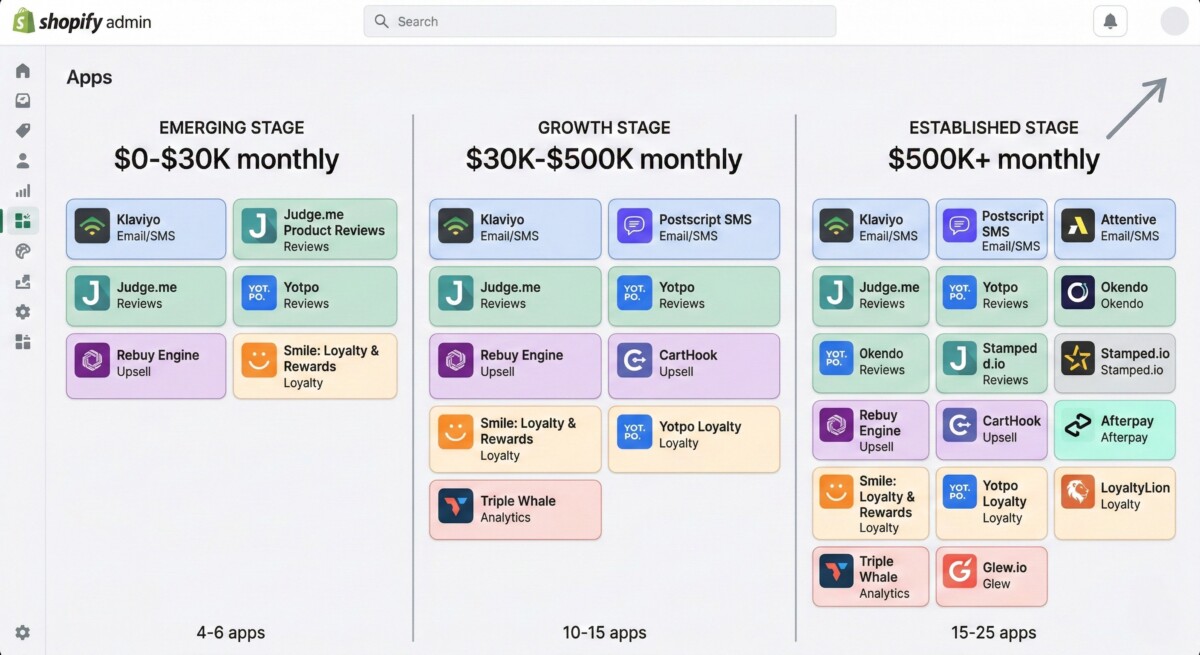
The average Shopify store has six apps installed. The stores doing $1M and above have between twelve and eighteen. The difference is not the number of apps. It is knowing which six to install first, which six to add at $100K, and which six to add at $500K.
Here is what I have learned from hundreds of conversations with Shopify merchants on the eCommerce Fastlane podcast: the stores with the healthiest margins are almost never the ones with the most apps. They are the ones who install the right apps at the right stage and ruthlessly remove anything that is not earning its keep.
The Shopify App Store has 13,000 apps. That number is not a resource. It is a trap. Every app promises to solve a problem. Most of them solve it adequately. Almost none of them are worth the monthly fee at every stage of your store’s growth. I have watched merchants spend $2,000 a month on apps doing $40K in revenue. The math does not work, and it quietly kills margin before the merchant even realizes what is happening.
Here is what I want you to question: are you installing apps because you have a specific, measurable problem to solve, or because someone in a Facebook group said it was essential? Those are two very different reasons, and only one of them leads to a healthy app stack.
This guide is not a list of apps with star ratings. It is a stage-specific framework for thinking about your app stack the way a CFO thinks about a budget line: what is this returning, what would I lose if I removed it, and is there a better use of this $49 per month? That discipline, applied consistently, is the difference between a store with a 20% net margin and one with a 12% net margin at the same revenue level. The math compounds fast.
A note on how this guide is structured: apps are organized by category and then by stage. Each category covers what the app type actually does, which stage it becomes essential versus premature, and which specific tools have earned consistent trust across the merchant conversations I have had over more than a decade in the Shopify ecosystem. Where I have affiliate relationships with specific tools, those are disclosed. Where I have no relationship, that is noted too.
Before you read a single app recommendation, open your Shopify admin and go to Apps. Look at every app you have installed. For each one, answer three questions.
First: what specific problem does this app solve? If you cannot answer that in one sentence, the app is probably not being used effectively. Second: what did you pay for this app in the last twelve months? Include the monthly fee multiplied by twelve, plus any usage-based charges. Third: what would break in your store if you removed this app tomorrow?
If the answer to question three is “not much,” that app is a candidate for removal. If the answer to question one is vague, that app is a candidate for review.
I have run this audit with merchants at every stage. The pattern I see consistently is the same: two or three apps they forgot they installed, one or two apps solving the same problem, and at least one app they outgrew without realizing it. Removing those apps before adding new ones is always the right first step.
Quick question: what is your total monthly app spend right now, and what percentage of your monthly revenue does it represent? Drop it in the comments. I will tell you if it is in a healthy range for your stage.
There are six app categories that every Shopify store eventually needs. The question is not whether to have them but when. Installing them too early wastes margin. Installing them too late costs revenue. Here is the stage-specific framework for each.
Reviews are the only marketing asset that gets more valuable over time without additional investment. Every review collected today is a conversion tool that works forever. The mistake most early-stage merchants make is waiting too long to start collecting reviews, then scrambling to catch up when they realize their product pages are converting at 1.2% while competitors with 500 reviews are converting at 3.8%.
I have seen this gap close within 90 days when merchants get serious about review collection. The good news: you do not need an expensive review platform to start. You need a platform that matches your current stage and grows with you.
For the emerging stage (under $30K monthly), Judge.me’s free plan is the right answer. Unlimited reviews, unlimited review requests, Google Rich Snippets, and photo reviews at zero cost. The only reason to move off Judge.me’s free plan at this stage is if you are running Google Shopping ads and need Google Seller Ratings to appear in paid search listings. That is the trigger. That is the trigger. Our text: Merchants at this stage who want to consolidate their app stack from day one should also consider Vitals, which bundles reviews alongside 40+ other conversion tools under a single subscription.
For the growth stage ($50K to $500K monthly), the decision splits based on your primary priority. If you need multi-channel syndication, getting your reviews onto Google Shopping, TikTok Shop, and eventually retail partners like Target and Walmart, the Yotpo review for Shopify brands covers exactly when and why Yotpo’s channel distribution capabilities justify the premium. If your priority is product intelligence, attribute-based reviews that tell you which product qualities drive repeat purchase and which drive returns, the Okendo review for Shopify brands covers Okendo’s five-product ecosystem and when it delivers its full value.
For the established stage ($500K and above), the review platform decision is almost always about ecosystem fit. Yotpo for brands with retail ambitions. Okendo for brands building a unified customer marketing platform connecting reviews, loyalty, quizzes, referrals, and surveys. Judge.me remains a legitimate option for brands that want powerful review functionality at flat, predictable pricing without order-volume pricing surprises.
The one thing that does not change across stages: start collecting reviews from your first order. The compounding value of a review library built over three years versus one built over one year is not linear. It is exponential.
Email is still the highest-ROI channel in ecommerce. Not because it is the most exciting channel. Because it reaches customers who have already bought from you, costs almost nothing per send, and compounds in value as your list grows.
Here is what I want you to sit with: every month you operate without a proper email platform is a month of potential repeat purchase revenue you are not capturing. I have seen brands leave $15,000 to $40,000 per month on the table simply because their abandoned cart flow was not set up. That is not a small problem.
The platform decision at the emerging stage is simpler than most merchants think. Klaviyo’s free plan covers up to 250 contacts and 500 email sends per month. That is enough to set up your welcome flow, your abandoned cart flow, and your post-purchase flow before you spend a dollar on email marketing. Those three flows alone typically recover 15 to 25% of abandoned carts and drive 20 to 30% of repeat purchase revenue for stores that set them up correctly.
The Klaviyo review for Shopify brands covers the full platform in detail, including when Klaviyo’s paid tiers become justified versus when Omnisend’s lower entry price makes more sense for stores that want email and SMS in a single platform without Klaviyo’s complexity.
For SMS specifically: add it when email is already working and you have a list of customers who have opted into text communication. SMS before email is putting the cart before the horse. Build your email revenue first, then layer SMS on top for time-sensitive offers and abandoned cart recovery on mobile.
The app stack mistake to avoid in this category: running two email platforms simultaneously. It happens more often than you would think, usually when a merchant switches platforms and does not fully migrate. Two email platforms means split customer data, inconsistent flows, and double the monthly cost. Pick one and commit.
Average order value is the most underrated lever in ecommerce. Here is the math I keep coming back to: acquiring a new customer costs four to seven times more than selling more to an existing one. An app that increases your AOV by 15% on a store doing $100K monthly is worth $15,000 in additional monthly revenue from the same traffic. That math justifies a significant monthly app investment.
The emerging stage mistake is installing AOV apps before you have enough traffic to test them. A/B testing upsell placements requires statistical significance. At 50 orders per month, you do not have enough data to know if an upsell widget is helping or hurting. The trigger for AOV apps is 200 or more monthly orders, enough volume to see meaningful results within 30 days of testing.
Rebuy Engine is the tool that consistently comes up in my conversations with growth and established stage merchants. It powers personalized product recommendations, in-cart upsells, post-purchase offers, and smart cart functionality from a single platform. At the growth stage, the ROI case is straightforward: if Rebuy increases your AOV by $8 on 500 monthly orders, that is $4,000 in additional monthly revenue. The platform cost is a fraction of that.
The established stage consideration is integration depth. Rebuy connects natively with Klaviyo, Yotpo, Okendo, Recharge, and most major Shopify Plus apps. That integration layer means your upsell recommendations can be personalized based on review history, loyalty tier, subscription status, and purchase behavior simultaneously. That level of personalization is not possible with simpler upsell tools.
Subscriptions are not right for every product category. But for stores selling consumables, replenishable products, or anything with a natural reorder cycle, subscriptions are the single most powerful lever for predictable revenue and customer lifetime value.
Here is the math I share with every merchant considering subscriptions: a customer who subscribes at a 15% discount and stays for twelve months is worth twelve times more than a customer who buys once at full price. I have seen this transformation happen in real time with brands on the podcast. Subscription revenue is also more defensible than one-time purchase revenue. Subscribers are less likely to comparison shop, less likely to churn to a competitor, and more likely to expand their subscription over time.
Recharge is the market leader for Shopify subscriptions and the platform that comes up most consistently in my conversations with established merchants. Its integration with Shopify Plus is deep, its analytics are comprehensive, and its migration tools handle the complexity of moving an existing subscription base without disruption. For stores doing $500K and above with a subscription component, Recharge is almost always the right answer.
For growth-stage stores entering subscriptions for the first time, the decision between Recharge and newer entrants like Skio or Stay AI depends primarily on your product complexity and how much customization you need in your subscription portal. Simpler subscription models with straightforward billing cycles can start with a lighter platform and migrate to Recharge when volume justifies the investment.
The stage trigger for subscriptions: when you have a product with a natural reorder cycle and at least 100 monthly orders. Below that, the operational overhead of managing a subscription program outweighs the revenue benefit. Above that, the compounding LTV advantage of even a 10% subscription conversion rate becomes significant within six months.
Loyalty programs are one of the most misunderstood app categories in ecommerce. Most merchants think of loyalty as a points program. The best merchants I talk to think of loyalty as a customer data system that tells you who your best customers are, what they buy, how often they buy, and what makes them refer friends.
The emerging stage mistake is building a loyalty program before you have enough customers to populate it. A loyalty program with 50 members is not a loyalty program. It is an overhead cost. The trigger for loyalty is 500 or more active customers, enough of a base to create meaningful tier differentiation and referral momentum.
Smile.io is the most accessible entry point for growth-stage stores. Its free plan covers basic points and rewards, its paid plans add VIP tiers and referral programs, and its Shopify integration is clean and well-documented. For stores that want loyalty connected natively to their review platform, Okendo’s loyalty product eliminates the need for a separate loyalty app entirely, with the trade-off of higher platform cost in exchange for unified customer data.
The established stage consideration is loyalty program sophistication. Yotpo Loyalty, Okendo Loyalty, and LoyaltyLion all offer more advanced segmentation, automation, and analytics than Smile.io at scale. The right choice depends on which review and email platform you are already running, since native integrations between loyalty and those platforms drive significantly better outcomes than third-party connections.
Shopify’s native analytics are adequate for understanding what happened in your store. They are not adequate for understanding why it happened or what to do about it. As your store grows and your marketing mix becomes more complex, the gap between what Shopify tells you and what you need to know to make good decisions widens significantly.
Here is the attribution problem I hear about constantly from merchants running multi-channel campaigns: when a customer clicks a TikTok ad, visits your site twice through organic search, and then converts through an email link, which channel gets credit? Shopify’s last-click attribution gives it all to email. That leads to merchants cutting ad spend that is actually working and doubling down on channels that are getting credit they did not earn.
Triple Whale solves this. Its multi-touch attribution gives you a more accurate picture of what actually drove the sale, and its creative analytics tell you which ad concepts are generating profitable customers versus which are generating high-cost, low-LTV buyers. I have seen merchants shift their entire media mix after seeing Triple Whale data for the first time.
The stage trigger for advanced analytics is $50K monthly revenue and three or more active marketing channels. Below that, Shopify’s native analytics plus Google Analytics 4 give you enough visibility to make good decisions. Above that, the cost of making decisions based on inaccurate attribution data exceeds the cost of a proper analytics platform.
Three app categories are being fundamentally transformed by AI in 2026 in ways that will change which tools are worth evaluating now versus waiting for the market to mature.
The first is personalization. AI-powered product recommendations, dynamic pricing, and personalized site experiences are moving from enterprise-only capabilities to growth-stage tools. Rebuy’s AI recommendation engine is already delivering this at the growth stage. The next twelve months will see this capability become standard across the mid-market.
The second is customer service. AI agents that can handle tier-one support questions, process returns, and escalate complex issues to human agents are reducing customer service costs by 30 to 50% for established merchants who have implemented them well. The integration of these tools with Shopify’s order data and customer profiles is what makes them genuinely useful rather than just chatbots with a Shopify logo.
The third is content and creative. AI-generated product descriptions, ad creative, and email copy are moving from novelty to operational tool. The stores using these tools effectively are not replacing their creative teams. They are multiplying their creative output without multiplying their headcount.
Understanding how agentic commerce is transforming Shopify operations gives the broader context for why these AI app categories are accelerating now rather than gradually. The infrastructure Shopify has built for AI integration is maturing faster than most merchants realize, and the stores that build AI-native app stacks in 2026 will have a meaningful operational advantage by 2027.
App stacks drift. An app that was essential at $50K monthly may be redundant at $200K monthly if a newer platform absorbed its functionality. A quarterly audit using these five questions keeps your stack lean and your margin healthy.
First: which apps have I not logged into in the last 30 days? If you are not actively managing an app, it is either running on autopilot effectively or it is running without oversight. Know which one it is.
Second: which apps overlap in functionality? Review your stack for apps solving the same problem. Two review apps, two loyalty platforms, or two email tools in the same stack is always a sign of incomplete migration or scope creep.
Third: what is my total monthly app spend, and what percentage of revenue does it represent? At $100K monthly revenue, $2,000 in monthly app fees is 2% of revenue. At $500K monthly, that same $2,000 is 0.4%. The percentage matters more than the dollar amount.
Fourth: which apps would I reinstall immediately if I had to remove them all? Those are your core stack. Everything else is supporting infrastructure that should be evaluated more critically.
Fifth: which app categories am I missing that merchants at my revenue level typically have? This is where the stage-specific framework in this guide becomes a diagnostic tool rather than just a recommendation list.
The complete guide to agentic commerce for Shopify covers how AI is changing the app evaluation framework itself, including which traditional app categories are being absorbed into platform-level features and which are becoming more specialized as the market matures.
The best app stack is not the one with the most tools. It is the one where every tool has a clear job, a measurable return, and a defined trigger for when it gets replaced by something better. That discipline, applied consistently, is what separates stores with 25% net margins from stores with 12% net margins at the same revenue level.
There is no universal right number, but the pattern across high-performing Shopify stores is clear: emerging stores do well with four to six carefully chosen apps, growth stores typically run ten to fifteen, and established stores often have fifteen to twenty-five. The number matters less than the discipline behind each installation. Every app should have a clear job, a measurable return, and a defined cost. Stores that install apps reactively, adding a new tool every time they encounter a problem, typically end up with bloated stacks, redundant functionality, and monthly app costs that quietly erode margin. A quarterly audit that asks “what would break if I removed this?” is more valuable than any app recommendation list.
For a store under $30K monthly, the essential stack is deliberately minimal: a review app (Judge.me’s free plan), an email platform (Klaviyo’s free plan up to 250 contacts), and whatever shipping or fulfillment tools your logistics model requires. Everything else is premature. The most common mistake new Shopify merchants make is installing enterprise tools before they have the order volume to justify them or the team bandwidth to manage them. Build your first ten sales, then your first hundred, before you think about loyalty programs, advanced analytics, or subscription infrastructure. The apps that matter at $10K monthly are different from the ones that matter at $100K monthly, and treating them as the same is how you end up with a $1,500 monthly app bill on a store doing $8,000 in revenue.
The honest answer is: some are, most are, and a meaningful minority are not. The apps worth their monthly cost are the ones where you can calculate a specific return: this review app increased my conversion rate by 0.4%, which at my current traffic is worth a specific dollar amount per month. This upsell tool increased my AOV by $7, which at my current order volume is worth another measurable amount per month. The apps that are not worth their cost are the ones where you cannot answer that question. If you cannot articulate what an app returns in revenue, recovered margin, or saved time, you are paying for potential rather than performance. Potential does not pay your Shopify bill.
The answer depends entirely on where your current conversion funnel is leaking. If your product pages have no reviews, a review app is your highest-ROI install. If your cart abandonment rate is above 70%, an abandoned cart email flow through Klaviyo will return more than any other investment. If your average order value is below your customer acquisition cost, an upsell tool like Rebuy is the priority. There is no single best app for increasing sales because sales come from fixing the specific bottleneck in your specific funnel. The right diagnostic question is not which app increases sales but where in my funnel am I losing the most revenue, and what is the most direct tool for fixing that specific leak.
Every app you install adds code to your Shopify storefront, and that code has a performance cost. The cumulative impact of twelve to fifteen apps on page load speed is real and measurable. The fastest way to check is Google’s PageSpeed Insights, which shows your current Core Web Vitals scores and flags specific scripts contributing to load time. Apps that inject large JavaScript files, load external resources, or add multiple tracking pixels are the most common culprits. A one-second delay in mobile page load time reduces conversions by up to 20% according to Google’s own research. If your store has more than ten apps installed and you have not run a performance audit in the last six months, that audit is worth doing before you install anything new.





