
BoostifyThemes is a credible Shopify Theme Store designer for small and growing stores that want a niche-styled theme for $100 to $170, backed by responsive support. Its review base is small, so trial the theme in your own store first, because theme purchases are final.
A 100% rating on eight reviews and a 94% rating on 1,304 reviews are not the same signal. Before you pay for any Shopify theme, prove it in your own store, because the Theme Store treats every theme purchase as a final sale.
Six Shopify themes, twenty ready-made presets, one designer, and a 100% positive rating on each of the four BoostifyThemes theme listings checked for this review. That is what the Shopify Theme Store showed in October 2026. It is a strong first impression, and it deserves a closer look rather than a quick click on “Buy.”
Choosing a theme is one of the first real decisions a Shopify merchant makes, and it is one of the hardest to reverse once your product pages, collections, and apps are built around it. Beyond visual appeal, a well-built theme helps you hold a consistent brand identity, present products clearly, and give shoppers a smooth path from browsing to checkout.
This review looks at BoostifyThemes from the merchant’s side of the table: its theme collection by industry, the features and customization options inside each theme, how to test design and performance before you commit, how its reviews compare with bigger theme designers, and which stores should buy it or skip it. Whether you are doing $10K months or $1M months, the goal is the same: pick the theme that fits your products and your stage, not the one with the best demo store.
BoostifyThemes is a Shopify theme designer based in Hanoi, Vietnam, that sells premium Shopify themes through the official Shopify Theme Store, with six themes and 20 presets listed at $100 to $170 as of October 2026. Each purchase is a one time payment that you keep for one store, and the company also offers two free Shopify apps, Boostify Size Charts and Boostify Sections.
The positioning on its own site is direct: themes built for speed, browsing, and conversions, with “no coding skills required” and free lifetime theme updates. The homepage also promises an “unlimited free trial” and “pay if you publish.” That trial is real, but it is worth knowing where it comes from. Shopify lets every merchant preview paid themes in their own admin before buying, up to 19 paid themes at the same time, so the trial is a feature of the Theme Store rather than something unique to BoostifyThemes.
Being listed in the Theme Store matters more than most merchants realize. Shopify’s Theme Store requirements for designers set a minimum average Lighthouse performance score of 60 and an accessibility score of 90 across home, collection, and product pages on desktop and mobile. Designers must answer merchant support requests within two business days and ship every update with a version number and release notes. Themes bought outside the Theme Store carry none of those guarantees and do not receive updates through your Shopify admin.
The other detail to hold onto is the refund position. Shopify states that theme purchases are final sale, and the developer cannot issue a refund. That single fact shapes the rest of this review: with BoostifyThemes or any other designer, the trial period is your only safety net, so the testing you do before you click buy is where the decision really gets made.
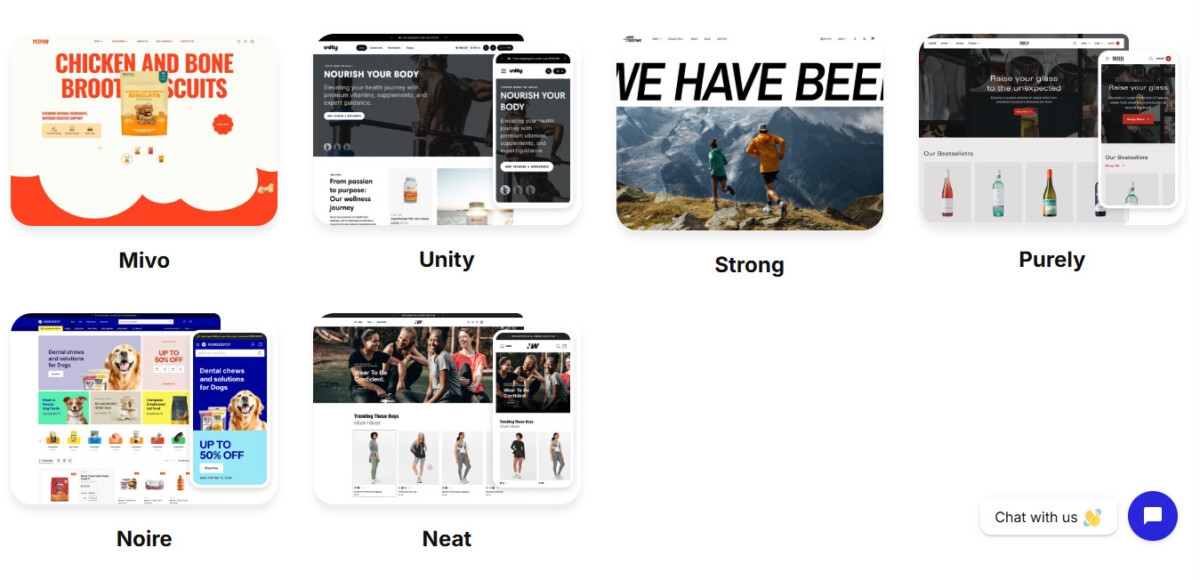
BoostifyThemes builds its themes around industries and catalog sizes, and four of them cover most of the merchants who will consider the brand: Purely for beverage and luxury goods, Neat for active and casual apparel, Noire for large and varied catalogs, and Unity for beauty-forward brands. Each theme ships with several presets, which are alternative ready-made designs inside the same theme, so one purchase gives you more than one starting look.
Purely takes an elegant, refined design direction suited to coffee, wine, watch, and jewelry stores. It leans on large imagery and visual storytelling, and its feature list includes an age verifier (useful for wine and spirits), gift wrapping, cart notes, and in-store pickup. The Theme Store lists four presets (Purely, Bean, Sight, and Atomic) and pitches it at catalogs of roughly 11 to 100 plus products.
BoostifyThemes positions Neat for fitness, outdoor, and apparel businesses, and the Theme Store describes it as a modern theme for visual storytelling brands, a style that suits active and casual labels. It gives you lookbooks, image hotspots, size charts, and product tabs for showcasing collections, and a straightforward layout for small to mid-sized catalogs. Its four presets are Neat, Razor, Wilderness, and Limitless.
Noire caters to diverse niches, including pet products, home decor, and tech accessories, and the Theme Store describes it as built for large catalogs. That shows up in the feature set: infinite scroll, swatch filters, a stock counter, quantity pricing, and combined listings (the last two require Shopify Plus). Presets include Noire, Lignum, Neon, and Binky.
Unity offers flexibility for merchants who want a distinctive storefront, and the Theme Store frames it as a theme for beauty-forward brands. Its Liora preset provides a second design direction to explore when deciding how to present products and establish a consistent brand identity. Unity carries the broadest feature list of the four, including pre-order, back-in-stock alerts, and trust badges.
Neat shows two prices because its Theme Store listing and the BoostifyThemes designer page disagreed when this was written. Check the price inside your Shopify admin at the moment you buy, since that is the figure you will actually pay.
BoostifyThemes themes include the core Online Store 2.0 toolkit merchants expect from a paid theme, including quick buy, a slide-out cart, mega menus, product filtering and sorting, color swatches, size charts, and editable sections, but the exact feature list changes from theme to theme. That variation is the reason to compare the individual Theme Store listings rather than the brand as a whole.
On customization, every Theme Store theme must support sections on its JSON templates, which means you can add, remove, and reorder blocks in the theme editor without touching code. BoostifyThemes adds its own Boostify Sections app, which its App Store listing says adds more than 100 sections and blocks, for merchants who outgrow what the theme ships with. If your brand needs layouts beyond those sections, plan for developer time and budget it up front rather than discovering the gap after launch.
When you compare individual themes, five areas decide whether the theme supports your selling model. Storefront customization covers how far you can adapt layouts, colors, and fonts to your brand. Product presentation covers images, video, variants, and the purchase information shoppers need. Navigation and merchandising covers menus, collection layouts, recommendations, and promotional sections that help customers find products. Responsive design covers how the store behaves on phones, tablets, and desktops. Ecommerce functionality covers the tools and integrations you need, such as pre-order, back-in-stock alerts, or B2B quantity pricing.
Clear calls to action, well-organized product pages, and logical collection layouts all reduce friction. It is important, though, to separate conversion-supporting design from guaranteed results. A theme can present products well and guide shoppers, but your conversion rate still depends on pricing, product quality, traffic sources, page speed, and customer trust. A merchant who switches themes to fix a pricing or traffic problem usually ends up with a prettier store and the same numbers. Judge a theme’s features against your sales strategy instead of assuming a new design will lift conversions on its own.

Evaluate a BoostifyThemes theme by loading your own products into it during the free preview, then judging visual presentation, product discovery, the mobile shopping experience, and brand consistency on your real catalog rather than on the demo store. Demo stores use professional photography and a hand-picked number of products, so they flatter every theme.
Visual presentation means layouts, typography, imagery, and spacing working together as one consistent storefront. Product discovery means collection pages, menus, and product displays that help customers find the right item without extra steps. The mobile shopping experience means product information, images, menus, and buttons that stay easy to use on a small screen, which is where many of your shoppers will first meet your store. Brand consistency means customizable design elements that let the storefront match the brand you have already built in packaging, social, and email.
The right design also depends on what you sell. A jewelry brand may prioritize detailed product imagery and an elegant presentation, which points toward Purely. An outdoor retailer may need layouts that put product categories, specifications, and practical information first, which points toward Neat or Noire. A store with 40 products and a store with 4,000 products need very different collection pages, even inside the same industry.
A simple test keeps this honest. Preview the theme with your best selling product, your busiest collection, and your homepage, then hand your phone to someone who has never seen your store and ask them to find and add a specific item to the cart. If they hesitate, the theme or your setup of it needs work before it goes live.
Test performance and compatibility by measuring an unpublished preview of the theme with your own products and apps in Google PageSpeed Insights, then confirming that every essential app, key page, and checkout path works on desktop and mobile before you publish. General claims about theme speed, including “speed-optimized” on any designer’s homepage, tell you nothing about how the theme performs with your images and your app stack.
Run PageSpeed Insights on your current live product page and collection page to set a baseline, then run the same pages on the previewed theme. If you want a structured routine, the 60-minute Shopify speed audit for Core Web Vitals walks through baselining, duplicating the theme, applying fixes, and retesting. Remember that the Theme Store’s Lighthouse floor of 60 is measured on the designer’s demo content, not on your store.
Compatibility deserves the same attention. Confirm your essential apps render correctly, test responsive behavior on key pages, check whether the theme already covers features you currently pay an app for, and read the documentation and support options. One BoostifyThemes reviewer on the Noire listing reported that installing a third-party app broke a section of their theme template, and that support fixed it within minutes once given store access. That is one merchant’s experience, not a typical outcome, but it shows exactly the kind of issue a preview test catches before customers do.
Plan for updates too. Shopify says theme editor customizations carry over when you update a Theme Store theme, but custom code edits are only included when they do not conflict with the update, so keep a copy of any code you change. A theme switch is also the cheapest moment to remove apps you no longer need, which is the core idea behind a Shopify tech stack audit that cleans up app bloat.
BoostifyThemes reviews are uniformly positive but small in number: as of October 2026, Neat showed 100% positive across 24 reviews, Purely across 19, Noire across 8, Unity and Strong across 7 each, and the newest theme, Mivo, had a single review. Larger designers have far more history, such as Impulse by Archetype Themes at 94% positive across 1,304 reviews and Prestige by Maestrooo at 91% across 873.
Read those numbers carefully. A perfect score on a handful of reviews tells you the early buyers were happy, and the review text backs that up: almost every BoostifyThemes review praises fast, hands-on support. What a small sample cannot tell you is how the theme holds up across hundreds of very different stores, app combinations, and years of Shopify platform changes. A 94% score on more than a thousand reviews includes the complaints, which is exactly why it is useful.
The price gap matters as well. Impulse lists at $500 and Prestige at $400, so a $100 to $170 BoostifyThemes theme costs a fraction of the established names. For a store under $500K a year, that difference is real money that could go into product photography or inventory instead. For a store above $2M, the theme price is a rounding error, and a long track record and large community of developers who know the theme often matter more than the savings.
The practical move is to treat support as part of what you are buying and test it before you pay. Send BoostifyThemes a specific pre-sales question about your catalog or a must-keep app during your trial, and see how quickly and how specifically they answer. Theme Store designers must respond within two business days; a reply in a few hours, with a real answer, is a better signal than any star rating.
BoostifyThemes suits merchants in its target niches who want a polished, industry-styled storefront without starting from scratch and without paying $400 to $500 for a theme, especially new and growing stores that value responsive support. It is a weaker fit for stores that have not yet proven their offer and for large brands that need a long, public track record.
New Shopify store owners can use a BoostifyThemes theme as a ready-made starting point for organizing products. If you are pre-launch or under about $50K a year, though, start by asking whether Shopify’s free Horizon theme covers what you need. Horizon arrived as part of the ten free themes Shopify launched in its 2025 Summer Editions, and early on, your time is better spent on your offer, payments, and shipping than on theme tweaks. The launch priorities that matter more than theme tweaks are laid out in this practical launch plan for first-time Shopify founders. A paid theme earns its price once you know which features your customers actually use.
Small and mid-sized businesses between roughly $50K and $2M a year are the clearest fit. At this stage you have real product photography, a defined brand, and a sense of which merchandising tools matter, so a theme like Purely or Neat can lift presentation without adding apps. Established merchants planning a redesign should look at Noire, whose Shopify Plus features (combined listings and quantity pricing) point at larger operations, or Unity for its broad merchandising toolkit, and weigh the small review base against designers with deeper histories.
Brands in specific product niches, such as fashion, beauty, jewelry, coffee, wine, pets, or home decor, will find the most value, because that is where the BoostifyThemes catalog is most focused. Before choosing, compare design, customization, features, app compatibility, and budget, and ask whether the theme can grow with your plans for the next 18 months.
BoostifyThemes is worth it for niche Shopify stores under roughly $2M a year that want a professional, industry-styled theme for $100 to $170 and value fast, direct support, provided the theme passes a hands-on trial with your own products and apps. It is worth considering for merchants looking for premium Shopify themes with versatile designs and ecommerce-focused features.
The collection gives businesses in beverage, jewelry, apparel, pets, home, and beauty a sensible place to start, and the Theme Store listing means you get Shopify’s performance floor, support response rules, and update path. The open question is track record. With 7 to 24 reviews on each of the four themes covered here, and a single review on the newest theme, you are betting on a smaller, newer designer, and the free preview is how you make that bet with your eyes open.
Before choosing a theme, compare its features, customization options, compatibility, and pricing to make sure it meets your requirements, run the PageSpeed Insights comparison on your own pages, and send support one real question. If it passes all three, you are buying a good theme at a fair price. If it does not, the trial cost you nothing.
Explore the BoostifyThemes Shopify theme collection to find a theme that fits your store and business goals.
Yes, BoostifyThemes is a legitimate Shopify theme designer with six themes and 20 presets listed in the official Shopify Theme Store as of October 2026. Theme Store listing means Shopify reviewed its themes against published requirements, including a minimum average Lighthouse performance score of 60, an accessibility score of 90, support replies within two business days, and versioned updates with release notes. The four BoostifyThemes listings checked for this review (Purely, Neat, Noire, and Unity) all showed 100% positive reviews at that time, although each had between 7 and 24 reviews. Buying through the Theme Store, rather than from a third-party marketplace, also means your theme updates arrive inside your Shopify admin.
BoostifyThemes Shopify themes cost between $100 and $170 as a one time payment, based on its Shopify Theme Store designer page in October 2026, with the $170 price belonging to its newest theme, Mivo. Purely and Unity were listed at $150 and Noire at $100, while Neat showed $100 on its own listing and $150 on the designer page, so confirm the price in your Shopify admin before you buy. You keep the theme for one store, and Theme Store updates are free. For comparison, established premium themes such as Impulse and Prestige were listed at $500 and $400. Theme purchases are final sale, so use the free preview before paying.
Yes, you can try any BoostifyThemes theme for free in your own Shopify admin before buying it, and you only pay if you decide to publish it. Shopify lets merchants preview up to 19 paid themes at the same time, so you can load your real products, test your apps, and run PageSpeed Insights on the preview. Use that window fully, because Shopify treats theme purchases as final sale and the developer cannot issue refunds. A good trial covers your best selling product page, your busiest collection page, your homepage, and a full add to cart flow on a phone.
Purely is the best BoostifyThemes theme for coffee, wine, watch, and jewelry stores, Neat for fitness, outdoor, and apparel brands, Noire for large catalogs, and Unity for beauty-forward brands. Purely sells on imagery and storytelling. Neat, which BoostifyThemes positions for active brands, suits small to mid-sized catalogs. Noire handles large or varied catalogs such as pet products, home decor, and tech accessories, and includes Shopify Plus features like combined listings. Unity offers a second design through its Liora preset. Shortlist two, preview both with your own products, and choose the one that makes your best seller easiest to find and buy on mobile.
Switching to a BoostifyThemes theme should not break well-built apps, but any theme change can disrupt apps that inject code into your old theme, so test every essential app in the unpublished preview before you publish. Check that review widgets, subscriptions, upsells, and size charts render on product pages and that the cart and checkout path still works. One Noire reviewer reported that a third-party app broke a theme section and that BoostifyThemes support fixed it within minutes after being given store access. Keep a copy of any custom code, because code edits are not always carried over during theme updates.




