

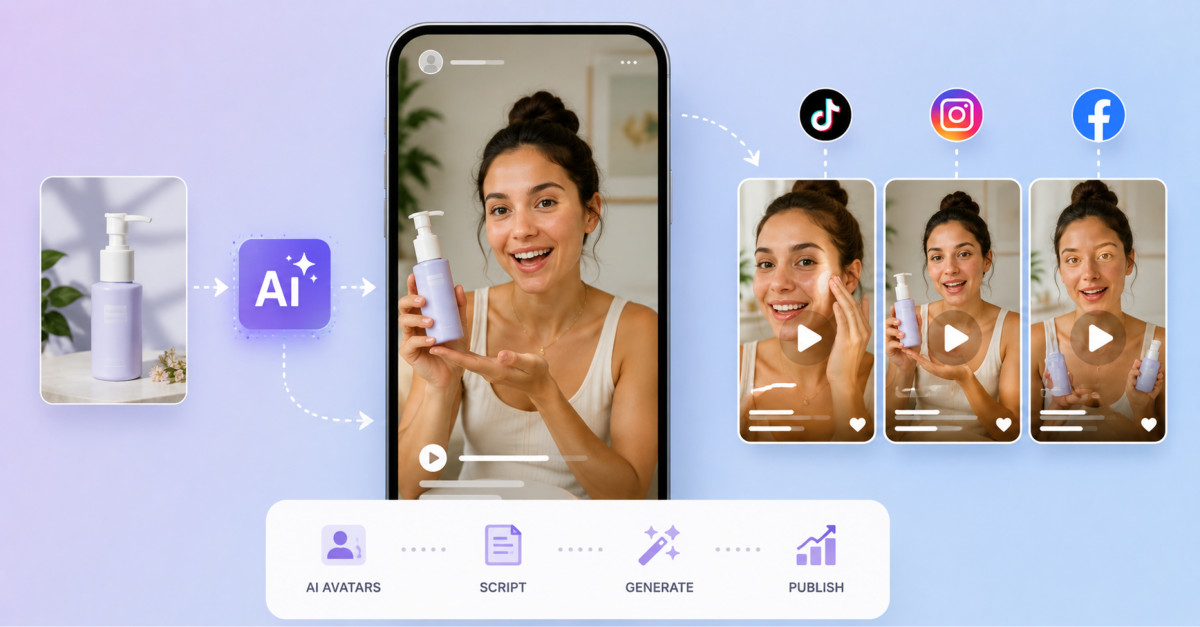
Flyne AI’s UGC Video Maker gives ecommerce teams a faster way to turn product info, scripts, and images into creator-style vertical videos for TikTok, Reels, and Shorts while keeping human control over hooks, accuracy, and campaign testing.
AI UGC tools are most valuable when they accelerate your testing loop while keeping product accuracy, disclosure, and human judgment firmly in the publishing workflow.
User-generated content has become one of the most influential formats in ecommerce marketing. Instead of looking like a traditional studio advertisement, a UGC video often feels like a recommendation, product demonstration, review, unboxing, or personal experience shared by an ordinary creator.
That less formal presentation can make a product feel easier to understand and more relevant to everyday life. However, producing a steady supply of UGC-style advertisements can require creators, product samples, scripts, filming schedules, revisions, voiceovers, and editing. When a brand needs multiple hooks, audiences, offers, or platform formats, the workload becomes even larger.
The UGC Video Maker for Ecommerce by Flyne AI gives brands, sellers, agencies, and performance marketers a browser-based way to develop creator-style videos from product details, scripts, prompts, images, and campaign ideas.
Flyne AI also provides a dedicated AI UGC video generator designed for product demonstrations, presenter-led clips, testimonial-style concepts, social advertisements, and short-form ecommerce content.
Ecommerce shoppers cannot physically examine a product before making a purchase. They rely on listing images, descriptions, reviews, demonstrations, and social proof to understand what the item looks like and how it may fit into their lives.
A polished commercial can communicate quality, but it may also feel distant from the way people naturally encounter content on TikTok, Instagram Reels, YouTube Shorts, and other social feeds.
UGC-style videos use a more direct format. A presenter may speak to the camera, show the product in use, explain a problem, demonstrate a benefit, or share a short personal reaction.
Common ecommerce UGC structures include:
Flyne AI presents its UGC generator as a tool for creating social-first advertising concepts that feel closer to creator content than conventional polished commercials. The platform specifically positions it for ecommerce brands, social media teams, agencies, app marketers, SaaS companies, creators, and small businesses.
A UGC video begins with a clear message.
Before generating, a brand should identify:
The audience + the problem + the product benefit + the proof + the call to action
For example, a skincare advertisement might target people whose makeup looks dry after several hours. The product benefit could be long-lasting hydration, while the proof might involve showing the texture and application process.
A simple script could follow this structure:
My makeup used to look dry by the middle of the day, especially around my cheeks. I started applying this lightweight serum before foundation, and it helps my skin stay smoother without feeling greasy. The texture absorbs quickly, so it also works well when I am in a hurry.
The script does not need to sound like a formal commercial. UGC usually works best when the language is direct, specific, and conversational.
Flyne AI allows users to begin with product details, a campaign idea, uploaded visuals, or a written script. The generator is intended to turn those inputs into product demos, talking scenes, promotional clips, testimonial-style videos, and other creator-led formats.
The opening seconds of a UGC video are especially important. Viewers may decide almost immediately whether to continue watching or scroll to the next post.
A strong hook should introduce a recognizable problem, surprising result, useful benefit, or clear reason to pay attention.
Possible hook structures include:
The hook should match the actual product and should not make an unsupported promise. Dramatic language may attract attention, but misleading claims can damage trust and create advertising-compliance risks.
Brands can use Flyne AI to test several versions of one concept. The platform highlights scalable creative testing across different hooks, pain points, product benefits, creator personas, calls to action, scenes, languages, and video angles.
Instead of attempting to perfect one advertisement immediately, a team could create five opening hooks and continue developing the two that communicate the product most clearly.
Many UGC advertisements rely on a person speaking directly to the camera.
This format can work well because the product explanation feels personal and easy to follow. The presenter can identify a problem, show the item, explain a benefit, and provide a final recommendation within one short video.
Flyne AI describes its generator as supporting avatar-style delivery with direct-to-camera presentation, natural speech rhythm, facial expression, and product explanation.
A useful presenter prompt should define:
For example:
A friendly female lifestyle creator in a bright home office speaks directly to the camera while holding the supplied portable blender. Casual vertical smartphone framing, natural hand movement, warm daylight, clear enthusiastic delivery, authentic UGC advertisement style. She explains that the blender is compact, easy to clean, and useful for preparing smoothies before work.
The visual direction should remain simple. Too many camera changes, props, actions, and locations can make a short UGC clip feel artificial or difficult to follow.
Brands that already have product photographs can use them as starting assets.
An uploaded image can help establish the product’s appearance while the prompt explains how it should be presented. A seller might request a demonstration, close-up reveal, rotating product shot, unboxing-style scene, or creator interaction.
For example:
Create a vertical UGC product demonstration using the supplied handbag image. A fashion creator holds the bag toward the camera, opens the main compartment, and briefly shows the interior pockets. Casual bedroom setting, natural window light, realistic smartphone-video appearance, confident but conversational delivery.
Flyne AI’s UGC workflow supports optional image uploads alongside prompts and social-video settings. Its current generator interface displays image input, prompt optimization, vertical output, and selectable video-generation models.
Product accuracy still requires careful review. AI video may alter logos, labels, proportions, closures, colors, textures, or small design features. A clip should not be published if it misrepresents the item customers will receive.
UGC advertisements are usually designed for vertical viewing.
Flyne AI positions its UGC generator for TikTok, Instagram Reels, YouTube Shorts, Facebook, Meta advertising, Shopify stores, landing pages, and other ecommerce publishing workflows.
A vertical video should keep the product and presenter near the center of the frame. Important details should remain visible even when interface elements, captions, buttons, or platform controls appear around the edges.
Prompts can specify:
Vertical 9:16 social-ad composition, presenter centered, product visible near chest height, clean background, sufficient space for captions in the lower third.
Captions, prices, discount codes, product names, and calls to action should generally be added after generation. AI-generated text inside a scene may be misspelled or visually unstable.
A conventional editor gives the brand more control over typography, accuracy, accessibility, timing, and visual identity.
One of the largest challenges in performance marketing is creative fatigue. An advertisement may perform well at first and then gradually lose effectiveness as audiences see it repeatedly.
Brands therefore need a steady supply of new variations.
A single campaign can be adapted through:
Flyne AI highlights faster production and scalable testing as central advantages of its UGC generator. It is designed to help teams move from product information or campaign assets to multiple social-video concepts without organizing a separate shoot for every variation.
This can be particularly useful for smaller ecommerce businesses that do not have an in-house studio or a large creator network.
The goal should not be to generate endless random videos. Each variation should test a specific hypothesis.
For example:
Structured testing makes it easier to learn from campaign performance.
Flyne AI provides a broader collection of image and video tools in the same platform. Its current site lists text-to-video, image-to-video, product-to-video, TikTok video, talking-avatar, consistent-character, product-photography, background-editing, and other creative tools.
This can support a wider ecommerce workflow.
A team might:
Flyne AI also integrates multiple video models rather than limiting users to one underlying generation system. Its general video generator currently lists models and workflows for text, images, audio, cinematic motion, product advertising, short drama, and ecommerce animation.
Available models, controls, and credit requirements may differ between tools, so users should review the settings shown before generating.
A practical AI-assisted UGC process could look like this:
This approach preserves human decision-making while using AI to accelerate production.
UGC-style AI videos may look convincing while still containing errors.
Teams should inspect:
Generated testimonials should not be presented as genuine customer experiences when they are fictional or AI-created. Brands should follow the disclosure, endorsement, advertising, and consumer-protection requirements that apply in the markets where the video will appear.
They should also avoid using a real person’s face, voice, identity, or creative work without permission.
Flyne AI uses a credit-based system. Its current pricing page lists a free plan with starter credits and daily check-in credits, alongside paid monthly plans with larger credit allowances, faster queues, longer generation histories, private generations, and stated commercial rights.
The platform’s subscription terms state that different AI models consume different amounts of credit and that plan and refund conditions apply.
Because prices, included credits, models, and generation requirements can change, ecommerce teams should verify the current information before planning campaign costs.
Commercial rights displayed on a plan page also do not eliminate the need to check permissions for uploaded images, actors, voices, trademarks, music, product claims, and third-party intellectual property.
AI-generated UGC can help ecommerce teams move more quickly from a campaign idea to a collection of testable social videos.
Flyne AI’s dedicated generator combines product and script inputs, image uploads, presenter-style delivery, vertical social formats, and creative variation within one browser-based workflow.
Its greatest value is not simply replacing a filming session. It is giving teams more opportunities to test messages, hooks, scenes, presenters, and product benefits before committing larger budgets.
The strongest results will still depend on accurate product information, believable scripts, responsible disclosure, careful output review, strong editing, and thoughtful campaign analysis.
Used as part of that wider process, the UGC Video Maker by Flyne AI can help ecommerce brands create more advertising concepts, respond faster to changing campaigns, and build a more scalable short-form content workflow.
Ecommerce brands should structure Flyne AI UGC inputs around one clear audience, a specific problem or desire, a principal product benefit, concise hooks, and a natural script anchored in accurate product images or details.
Starting with this focused message stack helps the generator produce UGC videos that feel like authentic creator content instead of generic ads. When teams add well-described presenter style, social format, and platform ratio, the tool can better match vertical feed environments on TikTok, Reels, and Shorts.
Flyne AI is designed to generate a range of UGC formats including product demonstrations, presenter-led talking clips, testimonial-style concepts, unboxing scenes, problem-solution ads, lifestyle integrations, and short offer announcements.
Within its UGC generator and related tools, brands can combine text prompts, scripts, and images to produce social-first vertical videos tailored to specific products and campaigns. This flexibility lets teams build multiple angles around one SKU without organizing a separate shoot for each idea.
Flyne AI supports vertical TikTok, Reels, and Shorts workflows by offering 9:16 social-ad formats, prompt optimization for feed-friendly framing, and generator interfaces tuned for short-form ecommerce content.
Prompts can specify vertical composition, presenter and product placement, caption space, and motion style so outputs fit platform UI without obscuring key details. Brands can then bring these vertical clips into their editors to add captions, prices, and CTAs before publishing or running ads.
Teams should review AI-generated UGC videos for facial and hand realism, lip-sync quality, product shape and color accuracy, logo and label correctness, natural object interaction, voice clarity, background continuity, and any visible text or claims.
They should confirm that no generated testimonial is presented as a genuine customer review without disclosure and that all creative respects local advertising, endorsement, and consumer-protection rules. Any clip that misrepresents the product or uses unapproved likenesses should be revised or discarded.
Flyne AI’s credit-based pricing affects UGC campaign planning because each video generation consumes credits that vary by model, and subscription tiers define how many credits, speed, and commercial rights a team receives.
Before allocating budgets, ecommerce teams should calculate how many UGC variations they plan to test, map those needs to current credit costs, and confirm plan terms such as renewal, private generation options, and commercial use conditions. This helps avoid surprises around limits or rights when campaigns move from experimentation to scaling.




