

Moving upmarket requires SaaS companies to reposition around trust, operational readiness, and buyer-specific outcomes, not simply raise prices. Mid-market and enterprise buyers evaluate security, implementation risk, support depth, and long-term partnership before they commit.
The moment a SaaS company moves upmarket, it stops competing only on product capability and starts competing on whether buyers trust it with operational risk.
Expired domain research often starts with momentum and ends with dozens of open reports and a spreadsheet where nobody remembers why one candidate survived and another was dropped. Finding domains is rarely the hardest part. The time disappears into repetitive work: setting filters, reviewing results, copying data, checking history, and running the same process again for the next project.
In my own work, I separate initial screening from the final decision with Karma.Domains Expired Domains MCP. The first pass produces a quick list of domains that match the topic and clear the basic filters. Its job is to remove obvious mismatches. In the second pass, I open the full reports, review questionable periods in the Wayback Machine, inspect the backlinks, and only then decide whether to register the domain or bid at auction.
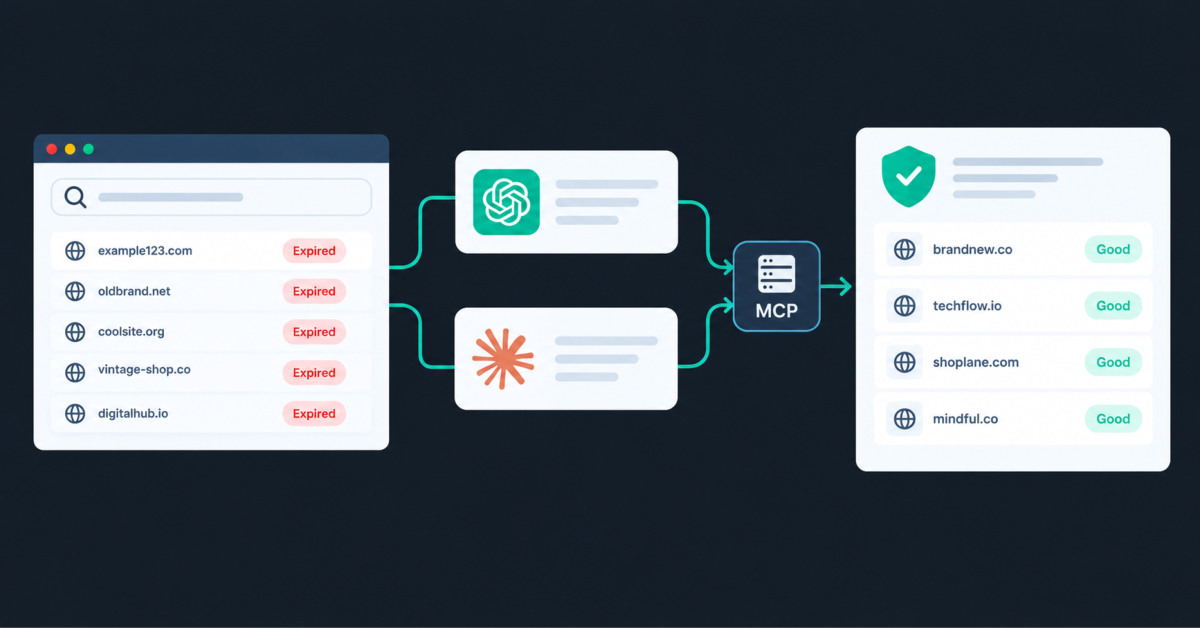
MCP fits this workflow well because it gives ChatGPT or Claude access to Karma.Domains data and tools. I can describe the assignment in plain English, refine the criteria in conversation, and get a small set of candidates with links to their reports. It cuts out much of the repetitive screening work. The AI assistant still does not make the purchase decision.
A standard AI chat knows the general principles of expired domain selection. It can explain domain age, backlink profiles, or topic changes, but it cannot see the actual data for a particular domain.
MCP connects an AI application to an external data source and a set of actions. Once connected, the assistant can query Karma.Domains, retrieve current domain listings and data, and bring the results into the conversation for analysis. ChatGPT or Claude becomes the interface to the domain database; Karma.Domains remains the source of the metrics, reports, and search results.
MCP works especially well for exploratory research because you can adjust the criteria as the conversation develops and run several searches to build a better candidate set. A recurring, high-volume process that must run on the same logic and schedule is usually better suited to an Expired Domains REST API and other integrations. The two approaches complement each other: MCP supports an analyst working interactively, while an API handles automation with predefined logic.
Through a connected assistant, you can search expired, auction, backorder, and buy-now listings. A request can specify the content topic, TLD, language, price, auction end date, and SEO metrics. The response can include a shortlist, the total number of matches, and links to full reports or a results table with the applied filters.
You can also run actions on a specific domain: open its report, check registration availability, retrieve its Karma Metric, or review age, anchor text, DNS, WHOIS, and individual backlink metrics. Favorites let you save candidates and return to them in a later conversation.
I do not request every available data point at once. I search first, narrow the pool, and reserve live checks for a handful of finalists. That keeps the conversation readable and avoids spending additional checks on candidates that were weak from the start.
You need a Karma.Domains account with MCP access. OAuth is the simplest authentication option; an API key from your profile is required only if you connect with a Bearer header. The remote server URL is:
https://mcp.karma.domains/mcpAuthentication can be completed in the browser through OAuth, which works with Claude, ChatGPT, and Grok. You can also use a Bearer header. The examples below use YOUR_API_KEY instead of a real key.
Treat the API key like a password. Do not leave it visible in screenshots, paste it into a public prompt, or share it in a team channel. If the key appears in a public document, revoke it and create a new one immediately.
ChatGPT menu labels may change, but the basic connection process remains the same.
Open ChatGPT settings and go to the section for custom apps or MCP servers. Create a connection named Karma.Domains, choose Streamable HTTP, and enter https://mcp.karma.domains/mcp. OAuth opens a browser page where you sign in to Karma.Domains. If you use Bearer or token authentication instead, enter the API key from your Karma.Domains profile.
Save the connection and open a new chat. Enable Karma.Domains from the tools menu, then ask the assistant to read the server instructions. Start with a simple test: find several expired .com domains related to a topic and return links to their reports. You can also request your account information and available credit balance.
Claude Desktop can connect through browser-based OAuth by using the MCP server URL. You can also use a local configuration with the mcp-remote wrapper; that method requires Node.js 18 or later.
Add the following server to claude_desktop_config.json:
{
  "mcpServers": {
    "karma-domains": {
      "command": "npx",
      "args": [
        "mcp-remote",
        "https://mcp.karma.domains/mcp",
        "--header",
        "Authorization: Bearer YOUR_API_KEY"
      ]
    }
  }
}
Save the file and restart Claude Desktop. In a new chat, confirm that the Karma.Domains server appears in the available tools. If it does not load, check your Node.js version, the server URL, and the API key first. Most connection problems come from one of those three places.
In Claude Code, you can add the same server with the claude mcp add command, using HTTP transport and an Authorization header or browser sign-in. Claude Desktop is often simpler for day-to-day domain research because it does not require an open terminal and makes it easy to discuss results in a long conversation.
Consider a straightforward assignment. An SEO agency needs an English-language .com for a home improvement project. Expired domains and active auctions are both acceptable. The domain’s history must be free of gambling, pharma, adult content, doorway pages, and abrupt language changes.
I start with a request that defines the topic, listing types, and hard exclusions:
Find expired or auction .com domains for an English-language home improvement site. Exclude gambling, pharma, adult content, doorway pages, abrupt language changes, and obvious spam. Show up to 50 of the strongest candidates. For each one, include the source, key SEO signals, risks found in its archived history, and a link to the full report.
That request is specific enough to produce useful results, but I still avoid setting a dozen thresholds at once. An overly strict filter can eliminate promising domains before I see them, especially when SEO metrics are involved.
When the budget is firm, it makes sense to cap the price in the initial request.
After the first result set, I look for whatever is creating noise. If the names are too long, I add a length limit. If topical relevance is weak, I keep domains with a consistent history in home improvement, construction, interior design, or closely related categories. If the pool is too small, I relax one criterion, such as minimum DA or backlink count, and ask the assistant to state exactly which condition changed.
The next request might be:
Keep the 10 candidates with the most consistent topical history. Compare them in the same format. Separate facts from the reports from your own conclusions. Do not consider price when evaluating domain history.
That instruction about facts matters. A model can produce a clean summary while drawing an overly confident conclusion from several weak signals. Separate columns for report data and interpretation make it easy to see where the source ends and the assistant’s judgment begins.
If SEO metrics carry more weight for the project, I can sort this set by the relevant field, putting higher DA, DR, or backlink counts near the top.
For the final two or three domains, I request more detail on past topics, languages, redirects, and suspicious periods. Then I open the full Karma.Domains reports. A human reviewer can read the Wayback timeline, archived pages, and sharp content changes more reliably. The summary helps direct my attention; it does not replace the review.
I also document the final step in the conversation. I ask for the reasons to keep or reject each domain, add suitable candidates to favorites, and list any questions that still need manual review. The decision then has a record instead of becoming an unexplained row in a spreadsheet.
For a favorite, I may ask the assistant to produce a SWOT analysis based on the complete domain report, including its SEO metrics and history. This provides a compact view of the domain’s potential strengths, weaknesses, opportunities, and risks.
| Task | Example prompt | What to verify |
|---|---|---|
| Initial search | Find expired or auction .com domains related to home improvement. Exclude spam, pharma, gambling, and adult content. | Topic, listing type, and number of matches |
| Narrowing | Keep five domains with a consistent English-language history and no abrupt topic changes. | Which conditions eliminated the other candidates |
| Comparison | Compare the candidates in the same format. Separate report facts from your conclusions. | The same criteria applied to every domain |
| Risk review | For each finalist, list past topics, languages, redirects, and suspicious periods. | Archive dates and a link to the full report |
| Decision record | Return the reasons to keep or reject each domain, followed by anything that still needs manual review. | Wayback history, anchor text, availability, and trademarks |
For PBN projects, MCP can quickly remove domains with obvious spam or irrelevant history, then pass a small group into detailed manual review. I would not automate the purchase itself. The cost of a bad decision is too high, especially when a domain looks strong in the metrics but spent several months as a doorway site or caught up in black-hat casino SEO.
An agency can maintain a separate checklist for each client. Paste it at the start of the conversation and ask the assistant to return only domains that meet every mandatory condition. For internal or client review, the assistant can prepare a shortlist with report links and a brief reason each candidate made the cut.
Affiliate and iGaming teams often care about GEO, live backlinks, language, and strict exclusions for past topics. A staged conversation works well here: start with a broad pool for the target market, review history, and then weigh the metrics. Starting with aggressive metric thresholds can surface link-heavy domains with the wrong history while accidentally filtering out viable candidates.
For a 301 redirect or a site rebuild, topical alignment is the central question. MCP speeds up candidate discovery, but the decision still requires archived-content review, backlink verification, and a clear understanding of the redirect destination.
A high Karma Score, DA, or any other metric cannot guarantee future SEO performance. Metrics help compare candidates; they do not predict search rankings.
I do not buy a domain based on a short AI summary. Before bidding or registering, I review critical periods in the Wayback Machine, anchor text, live backlinks, current availability, and trademarks. An expensive domain also gets a separate legal review.
I keep three layers separate in every working result: Karma.Domains data, the model’s interpretation, and the specialist’s decision. When all three are blended into one paragraph, the assistant’s confident tone can easily be mistaken for a verified fact.
An ecommerce product video should show the product’s most important value or resolve the shopper’s biggest hesitation within the opening moments. Start with the clearest proof: a visible result, a product demonstration, a comparison, or a real-use moment that helps shoppers understand why the video is worth watching. A travel bag should show scale, access, and movement. Skincare should show texture and routine. Apparel should show fit and motion. The opening should answer a buying question quickly instead of delaying the explanation with a generic brand introduction or a decorative scene.
Product video length should match the channel and the viewer’s purchase intent. A product-page video can run longer when it needs to explain fit, material, setup, use, or product differences, while paid-social content usually needs to communicate one idea in the opening seconds. The best approach is to plan multiple edits from the same shoot: a short vertical hook for paid media, a demonstration-led product-page edit, and concise reminder clips for email and retargeting. One master edit rarely performs equally well across every placement because each viewer arrives with a different level of awareness and intent.
Ecommerce brands do not always need lifestyle footage, but every product video needs a believable context that helps shoppers understand use, scale, fit, and relevance. Lifestyle scenes are valuable when they make the product easier to imagine in real life, such as a travel bag in transit, a desk tool in use, or cookware during cleanup. Other products may perform better with clear demonstrations, material close-ups, and straightforward setup footage. Choose the environment based on the customer question the video needs to answer, not because lifestyle footage automatically makes a product feel more premium.
Production planning should happen before a product shoot because it ensures the team captures required formats, demonstrations, proof points, objections, and channel-specific clips while the product, location, crew, and talent are available. Without a detailed plan, a finished video can look polished but fail to answer the shopper’s question about size, fit, setup, texture, durability, or real-world use. Planning also reduces reshoot costs by identifying alternate hooks, vertical framing, close-ups, caption requirements, still frames, rights requirements, and edit variations before the camera starts rolling.
One ecommerce shoot can support ads and product pages when the brief defines each output before filming: product-page demonstrations, paid-social hooks, vertical clips, close-up proof, lifestyle context, still frames, founder explanations, and caption-ready moments. The crew can capture the same product use from multiple angles and in multiple formats without repeating the production. Product-page video should resolve deeper buying questions, while paid-social creative must earn attention quickly. Planning distinct openings, clean demonstrations, and short proof moments gives the editor what they need to build channel-specific assets from one organized shoot.




