Free every Thursday · 59,694 Readers
Fastlane Insider Newsletter: What's working for Shopify in the AI era?
Free every Thursday · 59,694 Readers
Fastlane Insider Newsletter: What's working for Shopify in the AI era?

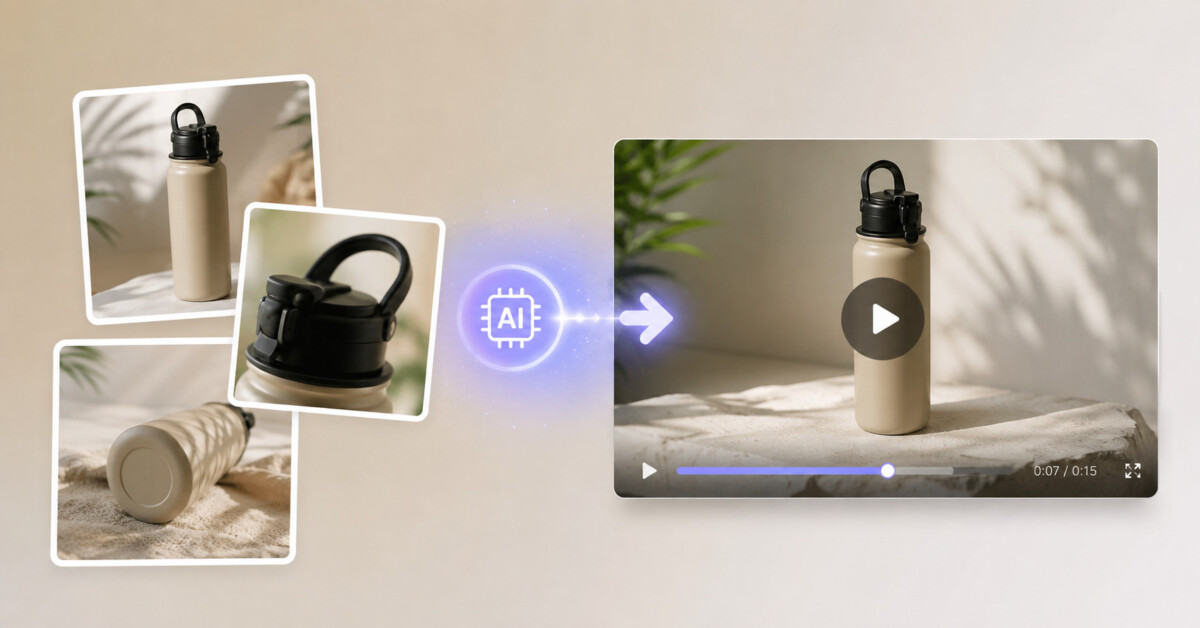
AI product video works best when it answers a specific product question that still photography cannot, such as drape, mechanism, scale, or texture. For Shopify merchants, image-to-video is the safer default because it can preserve the approved product look while adding a short, useful motion cue.
AI video is not a replacement for product photography. It is a way to make one approved product image answer the question that a static gallery cannot.
Shopify merchants already know stills convert. A clean hero image, a couple of angles, maybe a lifestyle shot. Video is the thing that keeps getting postponed because a studio day costs more than the SKU you wanted to test.
An AI product video is a short clip generated from a text prompt, a product photo, or both. It is not a talking avatar reading a script, and it is not a slideshow with Ken Burns zoom. The model invents motion around what you give it. That is useful on a product page. It is also easy to misuse.
This piece is for catalog operators, not film crews. The job is a 6 to 12 second clip that belongs on a PDP, in a Meta ad, or in a Reels slot, built from photos you already shot for the listing.
Shopify’s own product video guidance still starts from a familiar place: show the object, show the benefit, keep it short. Generative video does not replace that brief. It changes who has to be in the room to execute it.
On a product page, video has one job: answer a question the stills left open. How heavy does the fabric look when it moves? Does the bottle pump or twist? Is the bag structured or slouchy?
If the stills already answer that, skip the clip. Motion for its own sake adds load time and gives people something to bounce off. Ecommerce Fastlane’s own notes on high-converting Shopify product pages are still the right frame: the page has to help someone decide. Video is a module, not a personality transplant.
Where motion helps:
Where it usually fails:
Two inputs, two failure modes.
Photo-led (image-to-video). You upload a catalog still as the first frame. The model animates it. Use this when the product has to look like your product: the same colorway, the same silhouette, the same label layout. The trade-off is that the camera is stuck with that composition. A badly cropped Amazon-style pack shot will still be a badly cropped pack shot, now with a nervous zoom.
Prompt-led (text-to-video). You describe a scene and the model invents the object. Fine for mood films, launch teasers, and “what if we shot this on a wet street at dusk.” Dangerous for a PDP. The model will happily redesign your bottle.
A middle path exists on some tools: one to a few reference photos plus a prompt, so the object stays recognizable while the scene changes. Treat that as a test, not a guarantee. If the logo warps, throw the take away.
If you already use generative stills for banners, keep the same discipline you would for matching listing styles across a catalog. One lighting family per collection. Do not mix a clinical pack shot with a cinematic rain scene on the same PDP.
Write the brief like you would write a shot list for a junior freelancer who has never seen the product. One object. One motion. One setting.
A usable brief has four lines:
Then generate. If the first clip is muddy, shorten the brief before you add adjectives like cinematic or premium. Those words are seasoning. They will not fix a confused shot.
Keep duration short. Most generators top out around 5 to 15 seconds per clip. That is enough for a PDP loop. A 45-second story needs several clips and an editor. Do not ask the model to do the editor’s job.
Aspect ratio is a placement decision, not an aesthetic one:
Run the same brief twice: once horizontal for the PDP, once vertical for ads. Do not crop a 16:9 generate into 9:16 and hope the logo stays in frame.
Here is a brief you can copy for a typical bottle SKU:
Subject: 12oz matte black water bottle, current hero JPEG, logo centered.
Motion: Slow 15-degree orbit, then hold. No splash, no condensation inventing itself.
Setting: Same light gray sweep as the pack shot. No marble, no gym.
Do not: Extra labels, a straw, a second bottle, on-screen slogans.
If the output adds condensation or a gym bench, the model ignored “do not.” Tighten that line and run again before you touch lighting words.
Pick one collection, not the whole store.
Credits and queue times vary by model and vendor. Whatever tool you use, look at the cost estimate before you hit generate. A “quick test” of 40 SKUs at the expensive tier is how catalogs light money on fire.
If you want a longer walkthrough of prompt shape, duration, and model choice, including a side-by-side workspace, that write-up lives on Epochal. This article stays on store operations: what to generate, what to reject, where to put the file.
Reject a clip if any of these are true:
Also watch the edges of the frame. Generators love to invent a table that does not match your photography set, or a shadow that points the wrong way. Shoppers may not pause the video, but they feel the cheapness.
Audio is optional on a PDP. Some models add ambience or music. You usually cannot feed a custom voiceover script into the same generate and get a reliable read. If you need spoken claims, record them separately. If you do not need sound, upload a silent file and save yourself a copyright headache from the stock bed the model guessed.
Commercial use depends on the platform and the underlying model. Read the terms for the clip you are about to put in a paid ad. Do not assume a playground generate is cleared for Meta.
Product page. Above the fold if the clip is the only way to show motion. Otherwise under the gallery, autoplay muted, no soundtrack that fights the rest of the page. Loop only if the move is a clean orbit. A clip that ends on a different angle than it started will hitch.
Ads. Vertical, first second must be a recognizable product. Paid social users will not wait for your cinematic fog. Put the logo in later as an overlay so a warped generate does not ship your mark.
Email. A still poster frame plus a play affordance. Many clients will not autoplay. The poster should already look like the product, not like a mystery still from a music video.
Do not replace every gallery image with video. Bandwidth on mobile is still a conversion tax.
File hygiene matters more than people admit. Export MP4 (H.264), under a few megabytes if the theme hosts locally. Name the file with the SKU, not `final_v7_really_final`. Keep the poster frame as a still in the gallery so the page does not look empty while the player buffers. If you use Shopify’s native video object, test the theme’s mobile autoplay. Some debut-style themes ignore autoplay and show a giant play button over your carefully framed bottle. That button is now part of the design. Check it.
It will not give you a 60-second brand film. It will not match a real model’s face across a lookbook. It will not keep a complex pattern (paisley, small logos all-over) stable for the whole take. It will not make a bad product look good; it will make a bad photo look busy.
It also will not settle an argument about whether you need UGC. Reviews, worn-in photos, and customer clips still do a different job. Generated motion is catalog infrastructure. Treat it like retouching, not like a campaign concept.
If a SKU is high AOV and the stills are already weak, spend the money on a real photographer for that line and use generation on the mid-tail where a studio day will never happen.
One more operational rule: freeze a “hero still” per SKU and do not swap it mid-test. If merchandising updates the pack shot next week, regenerate from the new still. Mixing an old generate with a new photo on the same page is how you get two slightly different bottles and a support ticket.
Do I need new photography?
No, if the hero still is sharp, well lit, and cropped with room for motion. Yes, if the only file is a marketplace infographic with badges baked in.
How many reference photos?
Start with one hero. Add a detail crop only if the tool actually uses extra references. Dumping six messy angles into the prompt box usually makes a chimera.
Can I show on-pack text?
Not as the source of truth. Animate the object, then composite real type if the claim has to be exact.
How long should the file be?
For a PDP loop, under 12 seconds. For a paid hook, under 6. Stitch clips in an editor if you need a longer demo.
Will this replace my UGC?
No. Generated clips show the object. UGC shows other humans living with it. You still want both if reviews are part of the page.
What should I test first?
One bestseller, two briefs (studio orbit vs. simple fabric move), cheap tier, phone QA. If neither brief survives, the still is the problem.
Do not rebuild the media pipeline. Take the hero image of a SKU you already understand, write a four-line brief, generate two takes, reject anything that changes the object, and put the survivor on a staging theme. Watch it muted on a phone. If it earns its slot, copy the brief across the collection. If it does not, you lost an afternoon instead of a production invoice.