


Table of Contents
** Minutes
What is NetSuite order fulfillment?
How does NetSuite order fulfillment work?
ShipBob’s NetSuite integration
How to integrate NetSuite with your ShipBob account
ShipBob’s NetSuite integration solves order fulfillment challenges
Much like a house, a growing ecommerce brand needs a strong foundation to be built upon.
For many mid-market and enterprise-sized brands, Oracle NetSuite is that foundation.
As the leading ERP utilized by many of the fastest-growing ecommerce brands today, NetSuite is the source of truth platform your business needs to stay running. That’s why ShipBob’s built a NetSuite integration that helps streamline logistics and share fulfillment, shipping, and order data at the right time and via the right customizable workflows.
Our direct integration can help your business scale while seamlessly layering ShipBob and NetSuite. In this blog, we’ll share more details about NetSuite fulfillment and how ShipBob’s integration helps your brand operate at its best.
NetSuite order fulfillment refers to your business’s orders being picked, packed, and shipped on time across sales channels while maintaining visibility within the NetSuite ERP.
Ecommerce retailers can fulfill orders with NetSuite using a variety of common fulfillment practices like picking, packing, shipping, and inventory management.
While these practices are standard throughout the order fulfillment process, NetSuite order fulfillment offers distinct features like extensive customization and deep integration with the NetSuite ERP which enables seamless business functions for financials, customer relationship management (CRM), and supply chain management.
NetSuite order fulfillment has the same core principles as standard order fulfillment. However, there are additional capabilities and integrations that are afforded to businesses that use NetSuite order fulfillment.
Once a customer places an order and the order is processed within NetSuite, items are picked and packed. NetSuite generates a pick list to aid warehouse staff with locating and choosing the items in the order. Once picked, warehouse staff packs the order and prepares it for shipment. NetSuite can generate packing slips and shipping labels to ensure items are ready for transit and will arrive at their final destination.
Cross-subsidiary fulfillment is a feature in the NetSuite ERP that allows companies with various subsidies to fulfill orders across entities within the same NetSuite account. This feature is most often used for businesses that operate in different geographic regions or countries.
When an order is received in NetSuite, the system determines the ideal subsidiary or location to fulfill the order from based on factors such as availability, proximity, and shipping cost. At that point, the order fulfillment process begins.
If the subsidiary doesn’t have the needed inventory on hand, NetSuite will facilitate an inventory transfer from another subsidiary.
NetSuite allows businesses to integrate with multiple shipping carriers, allowing real-time shipment tracking and label printing from the NetSuite interface.
NetSuite supports popular carriers like UPS, USPS, FedEx, and DHL.
You can use NetSuite’s dropdown lists to view and manage information at different points of the fulfillment process. Using dropdown lists in NetSuite, you can filter the packing slip list by orders as picked or packed and view order status to view when orders are pending, in progress shipped, or canceled. Additionally, there are dropdown lists for shipping methods, integrated carriers, and package types.
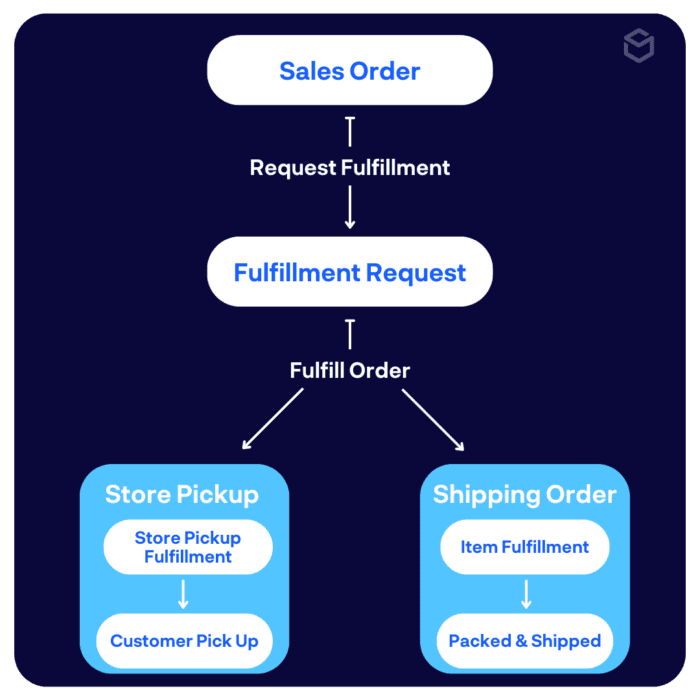
A fulfillment request in NetSuite is a transaction that acts as a step between the sales order and the fulfillment process. This is most frequently used to allow employees to manage orders that need to be shipped or picked up by customers. Depending on the type of fulfillment request, shipping orders are sent to the customer’s shipping address, and pickup orders are picked up by customers at the retail store or location.
ShipBob has a native integration with NetSuite for businesses that utilize ShipBob’s fulfillment solutions to save a lot of time on custom integrations. By providing the groundwork on connecting these systems, you’re still able to further tailor it to your exact needs.
What does that mean? Let’s take the metaphor of building a house.
In order to build a reliable, stable structure, you need a leveled foundation, which is the most challenging part of the building process.
With our direct integration with NetSuite, ShipBob acts as your contractor: we’ve leveled the foundation, laid groundwork and built the bones of the structure. As a result, we’ve completed the most difficult part of building the integration so you’re able to customize what’s built on top of it so you can create something that is uniquely yours.
ShipBob’s integration with NetSuite gives you the freedom to create the tech stack that is best for your business so you can excel. The integration offers benefits such as making a seamless transfer of information, increasing visibility, lowering costs, and more.
Benefits of the ShipBob and NetSuite integration include:
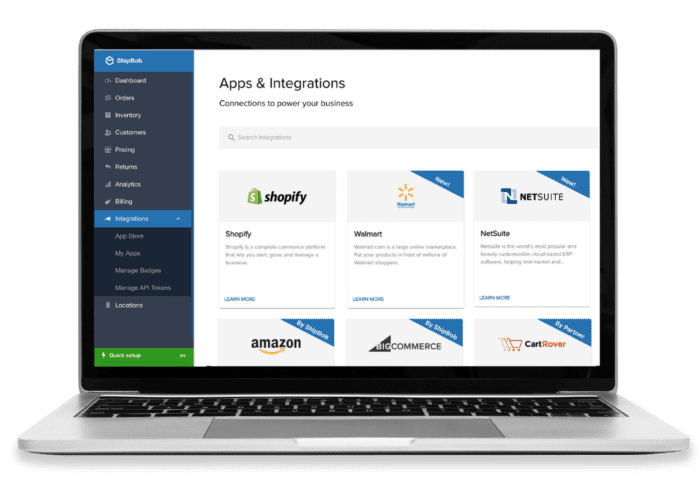
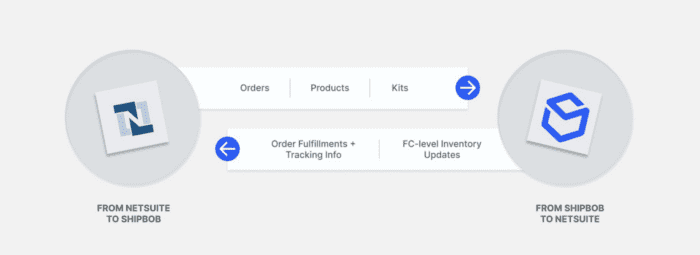
By using ShipBob’s direct integration with NetSuite, customer orders from NetSuite sync to ShipBob and fulfillment information from ShipBob syncs back to NetSuite.
This data sync will allow you to import sales orders from NetSuite to ShipBob. When an order is placed on your site (or any of your DTC sales channels), ShipBob will automatically upload order tracking information and create item fulfillment records that are linked to your sales order records in NetSuite.
There are various configurations possible using the order sync workflow, including:
With the ShipBob and NetSuite integration, you can manage your inventory in NetSuite and rest assured that the updates will be synced with ShipBob’s platform.
You can create and update inventory items, as well as create and update kits in NetSuite for ShipBob to fulfill. This integration allows you to use one platform to manage the entirety of your inventory.
Using our inventory quantity workflow, you’re able to sync inventory counts from ShipBob to NetSuite, either by specific product or network-wide, for “True Up” syncs.
Here is a quick context summary of the different types of product concepts that NetSuite supports:
No matter if you’re outsourcing fulfillment to ShipBob or using ShipBob’s warehouse management system (WMS), ShipBob’s solutions can help you optimize your order fulfillment process while NetSuite remains your single source of truth.
ShipBob provides best-in-class logistics to ecommerce brands of all sizes. Our advanced technology and global fulfillment network allows brands to get DTC and B2B orders into the hands of customers quickly.
In addition to direct-to-consumer fulfillment, ShipBob is a proven omnichannel fulfillment solution. With both retail dropshipping and retail distribution capabilities, ShipBob supports all of merchants B2B fulfillment needs. Our integrations with EDI providers makes it easy to connect with retailers to automate shipping to today’s most popular retailers and marketplaces.
Now more than ever, customers expect fast shipping and premium delivery experiences. ShipBob understands that this is a non-negotiable for ecommerce businesses. That’s why we partner with UPS, FedEX, USPS, DHL, and other regional carriers to offer shipping methods that provide white glove delivery to ensure your customers get their orders quickly.
With over 40 fulfillment centers worldwide (and more continually underway), ShipBob offers an expansive fulfillment network so merchants can provide a fast, localized shipping experience for customers.
ShipBob’s presence in the US, UK, EU, Canada, and Australia helps brands expand internationally with ease.
By utilizing numerous of ShipBob’s fulfillment centers in different regions of the country (or world), brands are able to enjoy significant time and cost savings. Additionally, with fulfillment centers in countries across the world, brands improve customer satisfaction by offering decreased shipping costs and faster in-country shipping.
The beautiful thing about it is everything was connected. I could log on to our ShipBob account and see everything in one place, no matter if I’m looking at our facility in Kankakee, IL, or the ShipBob fulfillment centers in Canada or Europe. It was all the same system. I didn’t have to learn various different platforms or deal with support representatives at different companies. Plus, if we experience any issues with syncing orders between systems, there’s one place we go to reconcile it. ShipBob is connected to our ERP, NetSuite, which is our single source of truth. Now we only have one place to troubleshoot and resolve potential issues across all logistics.”
– Adam LaGesse, Global Warehousing Director at Spikeball
ShipBob has created a two-way integration with NetSuite. Read on to learn how to set up the integration for your business:
Before you can integrate your NetSuite account with ShipBob, you’ll do some preliminary set up.
First, you’ll need to add a custom field in NetSuite in order to receive order import acknowledgements:
Next, you’ll need to set up NetSuite to allow the ShipBob integration to update NetSuite orders:
Now, you’ll be able to authenticate your integration.
First, you’ll create an Integration Record:
Next, you’ll create a Role:
After creating the Role, you’ll be able to assign it to the User that will be used for the integration.
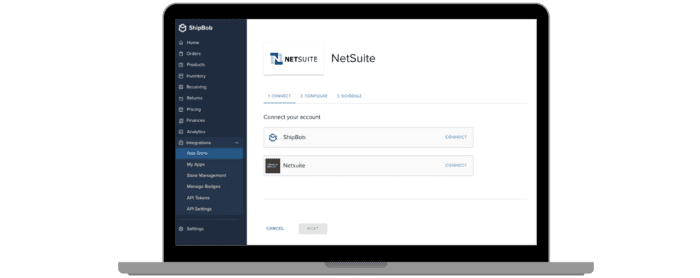
Lastly, you’re ready to navigate to the ShipBob App Store from the Integrations tab of your ShipBob dashboard. Find the NetSuite integration, and continue the connection.
Today’s most popular ecommerce brands have unique needs, that’s why they partner with NetSuite. Whether it’s custom operational processes and workflows or specific integrations, brands want to create the functions that will make their business run at its best.
ShipBob understands the importance of NetSuite and what it offers to mid-market and enterprise brands. That’s why we’ve developed our NetSuite integration.
This semi-customizable NetSuite integration is ideal for customers who use the ERP solution and want to maintain using it as their single source of truth while utilizing ShipBob’s fulfillment services.
The integration allows your ShipBob account to directly connect to NetSuite to either pass orders from NetSuite to ShipBob, or pull key data from ShipBob to NetSuite for accounting purposes.
ShipBob has created and will maintain the direct integration with NetSuite so you can focus on what matters: your business.
“Onboarding with ShipBob’s WMS was our first time connecting to a warehouse management system, so we had to get data and SKUs synced with the platform, do warehouse mapping, and get our various integrations (like Shopify and NetSuite) set up. Once everything was in place, we just had to flip a switch to start fulfilling orders. The ShipBob team even came out to our facility for a week to show us how to do everything. It was a super straightforward process. It’s a very plug-and-play solution that is also customizable to our workflows.”
– Jourdan Davis, Operations Manager at Pit Viper
If you’re ready to partner with ShipBob and implement our direct integration with NetSuite, request a quote to connect with our team of experts.
Below are answers to the most common questions about ShipBob’s NetSuite fulfillment capabilities.

ShipBob is a trusted international fulfillment partner. ShipBob ships orders to all countries served by USPS, UPS, FedEx, DHL, and other carriers.
As a third-party logistics provider, ShipBob stores items until they’re ordered, after which ShipBob’s fulfillment team picks, packs, and ships the order to the end customer. In addition to fulfillment, ShipBob offers advanced technology to assist brands with inventory management, order management, and more to help them make informed decisions for their business and succeed.
ShipBob has a direct integration with NetSuite which allows brands to utilize ShipBob’s best-in-class logistics while using NetSuite as the single source of truth for their business.
Many of today’s most popular brands, such as Bloom Nutrition, Spikeball, Pit Viper, PetLab, Chamberlain Coffee, and TB12, use ShipBob for fulfillment.
Yes! You can integrate your NetSuite account with a third-party logistics (3PL) partner to outsource order fulfillment. ShipBob, a leading omnifulfillment platform, has a native integration with NetSuite to ensure accurate and efficient order fulfillment. With ShipBob’s NetSuite integration, your brand can enjoy benefits such as real-time data syncing between platforms, centralized business-critical information in NetSuite, and more.
You can set up automated fulfillment requests in NetSuite. Automation features are part of the Advanced Order Management module. By using NetSuite’s order fulfillment automation, you can assign fulfillment locations to sales order lines and create fulfillment requests for locations.
The post NetSuite Order Fulfillment: Made Better With ShipBob appeared first on ShipBob.




