


Verified & Reviewed
Published on July 13, 2026 Written By Meredith Flora

Published on July 13, 2026 Written By Meredith Flora

Subscribe for More
You’ve scaled past your first million in sales. You’ve added a second sales channel. Maybe a third. The SKU count has tripled since last year, and you’re now shipping from more than one fulfillment center. Somewhere along the way, the inventory count in your system stopped matching what’s actually on the shelves, and you don’t know why.
This is the visibility gap that catches most ecommerce and omnichannel brands off guard. Warehouse visibility isn’t a reporting project you tackle once and forget. Without real-time data captured at each step, brands are forced to make decisions with stale information, and the consequences compound quickly.
This guide breaks down what warehouse visibility actually includes and why it typically degrades as operations scale, what “real-time” looks like in practice, and how to operationalize visibility across multiple fulfillment locations.
Whether you’re running your own warehouse or outsourcing to a fulfillment partner, you’ll walk away with a framework for turning visibility into a competitive advantage.
What warehouse visibility includes, and what breaks it as you scale
There’s a meaningful difference between “dashboard visibility” and “operational visibility.” Dashboard visibility shows you what happened after the fact as reporting. Operational visibility captures data as work happens: when inventory is received, where it’s stored, and when it ships.
For ecommerce and omnichannel brands, visibility should support a specific set of decisions:
- Prevent oversells. Know exactly which units are available to promise across channels, not just what’s physically in the warehouse.
- Plan replenishment. Identify when SKUs are running low and trigger reorders before stockouts occur.
- Route orders. Direct orders to the optimal fulfillment center based on inventory availability and customer location.
- Manage exceptions. Spot delays, short picks, or receiving backlogs before they cascade into customer-facing problems.
- Forecast promos. Understand how much inventory you’ll need to support upcoming sales or marketing campaigns.
- Improve customer support responses. Give support teams real-time order status so they can answer “where is my order” questions without chasing updates.
This level of visibility relies on tracking a defined set of data points. At minimum, brands need to know:
- What’s in stock (on-hand counts by SKU)
- Where it is (location within each fulfillment center)
- What’s allocated (reserved for open orders)
- What’s on hold (quarantined, pending QA, or flagged for issues)
- What’s inbound (in transit from suppliers or between locations)
- What’s being picked/packed (in process for fulfillment)
- What shipped (carrier confirmation and tracking)
- What’s delayed (stuck at any stage of the workflow)
Consider this example:
A DTC brand that also sells on Amazon and has a wholesale order due to ship. A flash sale runs on their Shopify store while a bulk PO sits pending. If the brand only sees “inventory on hand,” they can’t tell which units are already promised to the wholesale order, which are reserved for the Amazon listing, and which are truly available for the DTC promo.
This chaos results in oversells, canceled orders, and a scramble to figure out what went wrong.
Why visibility breaks down as operations scale
Basic dashboard visibility works fine when you’re shipping a few hundred orders a month from one location, but it degrades when order volume grows, catalogs expand, and teams add new warehouses or fulfillment centers.
As merchants scale across marketplaces and social platforms, the complexity of handling inventory and fulfillment grows exponentially. Several failure modes can create operational surprises like:
- Lagging inventory adjustments that don’t reflect real-time movements
- Misaligned cutoffs between sales channels and warehouse operations
- Untracked inventory holds or quarantines
- Delayed receiving updates for inbound shipments
- Channel sync gaps that create mismatched inventory counts
- Manual spreadsheets that quickly become outdated
Low visibility leads to late shipments, canceled orders, increased shipping costs, and more support tickets. It also ties up capital in inventory that won’t sell, hurting cash flow and growth. Cross-functional teams, such as operations, marketing, finance, and support, also end up working off different numbers, which creates friction and misaligned decisions.
Symptoms checklist
Do any of these sound familiar?
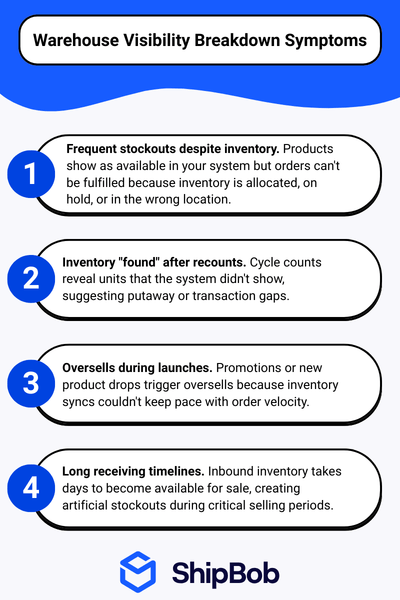
If you’re nodding along to several of the above symptoms, your visibility problem likely requires changes at the fulfillment layer, not just better dashboards or reports.
How to build real-time warehouse visibility that supports faster decisions
Real-time warehouse visibility means inventory and order status update as work happens, not hours or days later. Every scan, pick, and shipment changes the data instantly.
Building this capability requires a systematic approach across your fulfillment operations. The following steps walk through how to capture the right data at each stage, track inventory states accurately, and extend visibility across multiple locations and channels.
Step 1: Capture visibility at each stage of the order lifecycle
Visibility begins with defining what needs to be captured at each stage of warehouse work. Without clear requirements, data gaps emerge that undermine decision-making downstream.
Here’s what must be visible at each stage:
- Receiving: Track what inventory arrived and what’s pending count. Know what’s available to sell versus what’s not yet processed.
- Putaway and storage: Know exactly where each SKU is stored and what location rules apply. See what’s pickable.
- Picking and packing: Monitor what’s picked and what’s short. Track what’s substituted (if needed) and what’s awaiting pack.
- Shipping: See what shipped and when it shipped. Know what tracking is associated and what’s delayed before carrier pickup.
Defining visibility at each stage makes it possible to spot issues early and keep operations running smoothly. When each stage captures accurate data, brands can identify exactly where delays occur and take action before problems escalate.
Step 2: Track inventory states that prevent oversells and backorders
When stock levels aren’t updated instantly across all channels, overselling and duplicate orders become inevitable. This disconnect leads to canceled orders and loss of trust. Practical inventory states to track include:
- Available. Ready to sell and fulfill immediately
- Allocated. Reserved for open orders not yet picked
- On hold. Blocked from sale due to QA, disputes, or other issues
- Quarantined. Flagged for inspection or pending disposition decision
- Inbound. In transit from suppliers, not yet received
- Transferred. Moving between fulfillment locations, temporarily unavailable
Tracking inventory beyond “on hand” this way helps prevent selling units that exist physically but aren’t actually available.
Step 3: Use a WMS as the system of record (not spreadsheets)
A warehouse management system (WMS) becomes the backbone for real-time visibility by capturing every transaction that changes inventory or order status.
For example, let’s compare “inventory audits by spreadsheet” to “inventory updates by scan-based transactions.” With spreadsheets, a team counts inventory weekly, enters numbers manually, and hopes nothing changed during the count. With a WMS capturing scan-based transactions, every pick updates inventory in real time.
Brands typically need a stronger system when they hit certain thresholds:
- Selling on multiple channels (DTC, marketplaces, wholesale)
- Operating from more than one warehouse or 3PL
- Processing higher order volumes with tighter delivery SLAs
- Managing meaningful returns volume that affects available inventory
By implementing a WMS and connecting it with inventory management software, you streamline your logistics tech stack. This enables accurate, real-time data throughout your distribution network.
Step 4: Capture accurate transactions with barcode scanning (and when RFID helps)
Barcode scanning ensures every inventory movement is recorded accurately at the moment it happens. Barcode scanners are the foundation of modern inventory management, offering improved accuracy and seamless integration with a WMS.
Each scan creates a transaction record that updates the system without manual data entry. This eliminates transcription errors and delays. RFID can also help in high-volume environments or where dense item counts make manual scanning impractical, but it’s not required for most brands.
Practical implementation note: Standardize SKU labels across your product catalog and require every unit to be scannable. When products arrive without barcodes (or with manufacturer codes that don’t match your system), manual workarounds introduce the errors you’re trying to eliminate.
Step 5: Set up physical location standards that support visibility
Physical warehouse organization directly impacts whether system data reflects what’s actually on the floor. Warehouse barcode systems improve efficiency and location accuracy, and allow you to tag each warehouse location, rack, and container with a barcode label.
Similarly, zone organization reduces “lost inventory” and speeds picks. When products have defined storage locations (and workers actually put them there) the system can direct picks accurately. When inventory ends up in random spots because “there was space,” pickers waste time hunting and inventory becomes invisible to the system.
Clear zones also support better receiving workflows, faster cycle counts, and easier identification of slow-moving products taking up premium pick locations.
Step 6: Add labor visibility to keep execution predictable
Labor management and visibility helps brands understand not just what needs to happen, but whether the team has capacity to execute on time. Inventory and order visibility alone can’t tell you if today’s orders will ship on time if the warehouse is understaffed or overwhelmed.
Labor visibility in practice means tracking:
- Work queues. How many orders, picks, or receipts are waiting to be processed
- Workload by zone. Where bottlenecks are forming in the warehouse
- Performance tracking. How quickly tasks are being completed versus targets
- Staffing plans. Whether labor allocation matches the day’s workload
When labor visibility connects to inventory and order data, brands can see when receiving backlogs will delay picking or when picking can’t keep pace with packing. This prevents cascading delays during peak periods and helps teams proactively shift resources where they’re needed most.
Step 7: Standardize KPIs and fix root causes (not just reports)
Visibility only drives improvement when teams use shared KPIs to identify and fix root causes, not just track what went wrong. Reports that highlight problems without context lead to blame-shifting rather than operational improvement.
A small set of shared KPIs keeps teams aligned:
- Inventory accuracy. Percentage of SKUs where system counts match physical counts
- Receiving turnaround time. Hours from dock arrival to inventory available for sale
- Order cycle time. Hours from order placement to shipment
- On-time shipment rate. Percentage of orders shipped within the promised window
- Short picks. Number of picks that couldn’t be completed due to missing inventory
Recommended review cadence:
- Daily. Review exceptions and orders requiring action
- Weekly. Analyze trends in KPIs and address emerging patterns
- Monthly. Assess network-level performance and plan inventory distribution
Using KPIs to identify root causes means looking beyond the metric to understand why. A spike in short picks might trace back to receiving delays (inventory not available), slotting issues (products stored in wrong locations), or pick errors (wrong items pulled). Each root cause requires a different fix.
Step 8: Extend visibility across multiple fulfillment locations and channels
Multi-location visibility requires solving for latency, sync timing, and process consistency across every node in your network. Brands must address:
- Location-level accuracy: Trusting per-location inventory availability
- Preventing oversells across channels: Maintaining a single source of truth for available-to-promise inventory
- Inventory transfers and rebalancing: Keeping units visible while they move between locations
Decide when to split inventory based on factors like customer distribution, SKU velocity, and seasonal demand. Here are a few examples of when to split inventory across locations:
| Factor | Consideration |
| Customer distribution | Where are most orders shipping? Position inventory closer to demand. |
| SKU velocity | Fast-movers may benefit from multiple locations; slow-movers may consolidate. |
| Product weight | Heavier products benefit more from distributed inventory due to shipping cost savings. |
| Seasonal demand | Pre-position inventory ahead of regional demand spikes. |
| Channel mix | Marketplace and B2B orders may have different geography than DTC. |
For brands selling internationally, this means stocking in the US, UK, Canada, and Australia to support local fulfillment. This approach maintains clearer inventory positions in each market rather than shipping cross-border and losing visibility once products leave your primary warehouse.
How ShipBob turns warehouse visibility into execution
ShipBob’s approach to warehouse visibility is built on centralized, real-time data across inventory, orders, and fulfillment operations, while ShipBob executes the underlying warehouse work.
Using this approach, brands don’t need to run their own warehouses to get this level of visibility. Here’s what you can get with the ShipBob platform:
- Unified platform for multi-channel visibility: ShipBob integrates with major ecommerce platforms and marketplaces, consolidating order and shipment status in one place. This eliminates fragmented data and manual reconciliation.
- Real-time inventory tracking across fulfillment centers: ShipBob’s integrated inventory management software (IMS) prevents oversells by providing SKU-level visibility by location. It sends automatic reorder notifications and identifies slow-moving inventory.
- Transparent fulfillment operations through the merchant dashboard: Brands can monitor receiving status, order status, and inventory changes as they happen. That means no more chasing updates. Tonies, a leading toy brand, relies on ShipBob’s dashboard as their real-time source of truth when they shipped 5.7 million boxes worldwide.
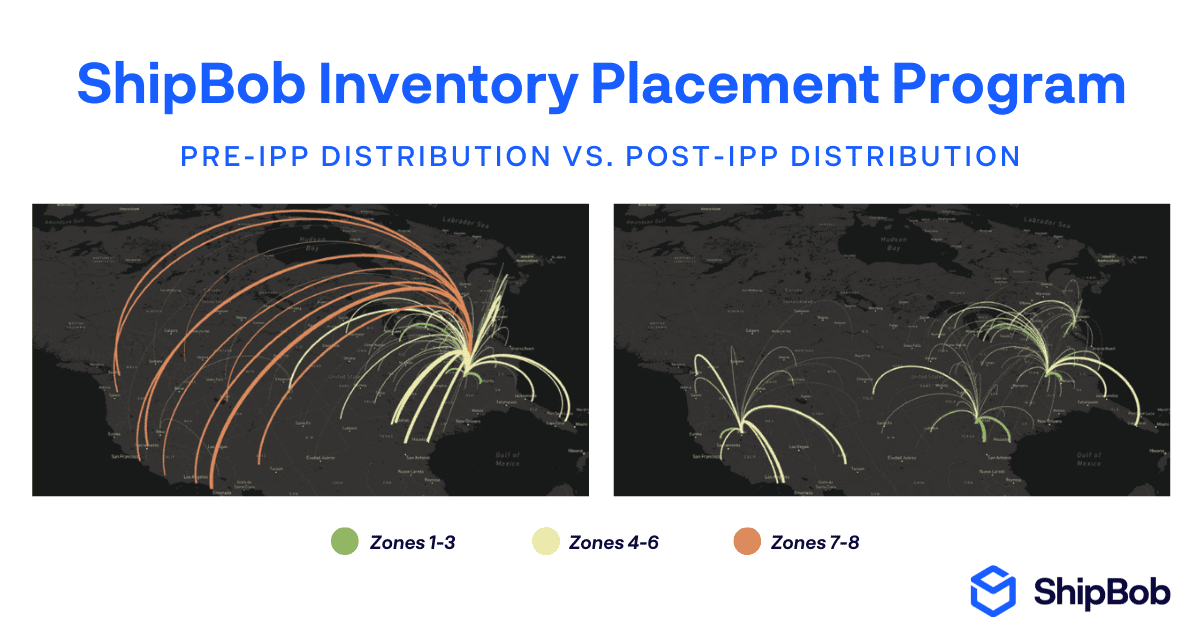
- Inventory Placement Program for optimized distribution: In the US, ShipBob’s Inventory Placement Program uses sales data and network logic to balance inventory across fulfillment centers, reducing shipping costs and transit time. Semaine Health, a wellness brand, cut shipping times by a third and reduced fulfillment costs by over $2 per order after adopting IPP.
- Proactive exception management via support tool integrations: ShipBob’s integration with Gorgias pushes real-time fulfillment events into support tickets, so teams can notify customers before they ask.
- Proven outcomes from brands: Pit Viper, an apparel brand, improved order accuracy from 92% to 99.7% after implementing ShipBob’s WMS, reducing mispicks by 2,100 units per year and eliminating double shipping.

Get started with ShipBob
Better warehouse visibility isn’t just about better dashboards. It’s about changing how fulfillment is executed. Ready to see how ShipBob can improve warehouse visibility for your brand?
Warehouse visibility FAQs
What is real-time warehouse visibility in practice?

Real-time warehouse visibility means inventory and order status updates instantly as work happens, so every scan, pick, and shipment is reflected in the system without delay. This enables brands to make decisions based on current, accurate data.
What systems are needed for warehouse visibility?
A warehouse management system (WMS) is essential for capturing every transaction and maintaining real-time data. Integrations with ecommerce platforms, marketplaces, and analytics tools help centralize information and keep all teams aligned.
How does a WMS improve warehouse visibility?
A WMS records every inventory movement and order status change as it happens, eliminating manual updates and spreadsheet errors. This provides a single source of truth for inventory, orders, and fulfillment performance.
How does ShipBob provide warehouse visibility across multiple fulfillment centers?
ShipBob’s platform gives brands real-time SKU-level visibility by location, tracks inventory movements, and updates order status as work happens across dozens of fulfillment centers. Brands can monitor everything through a single dashboard.
Can ShipBob help centralize inventory and order data from multiple sales channels?
Yes, ShipBob integrates with all major ecommerce platforms and marketplaces, consolidating inventory and order data in one place. This unified view helps brands prevent oversells, manage exceptions, and support omnichannel growth.




