

Flexible office space makes business change easier because it lets teams add desks, meeting capacity, private work areas, and shared amenities without committing to a permanent layout before their hiring, hybrid-work pattern, and client needs are clear. It works best when flexibility solves a proven operational constraint, not a vague desire for a nicer office.
The office decision is not about how many desks you can afford today. It is about how much friction your workplace creates when the next hire starts, the client arrives, the team needs to collaborate, or your operating model changes again.
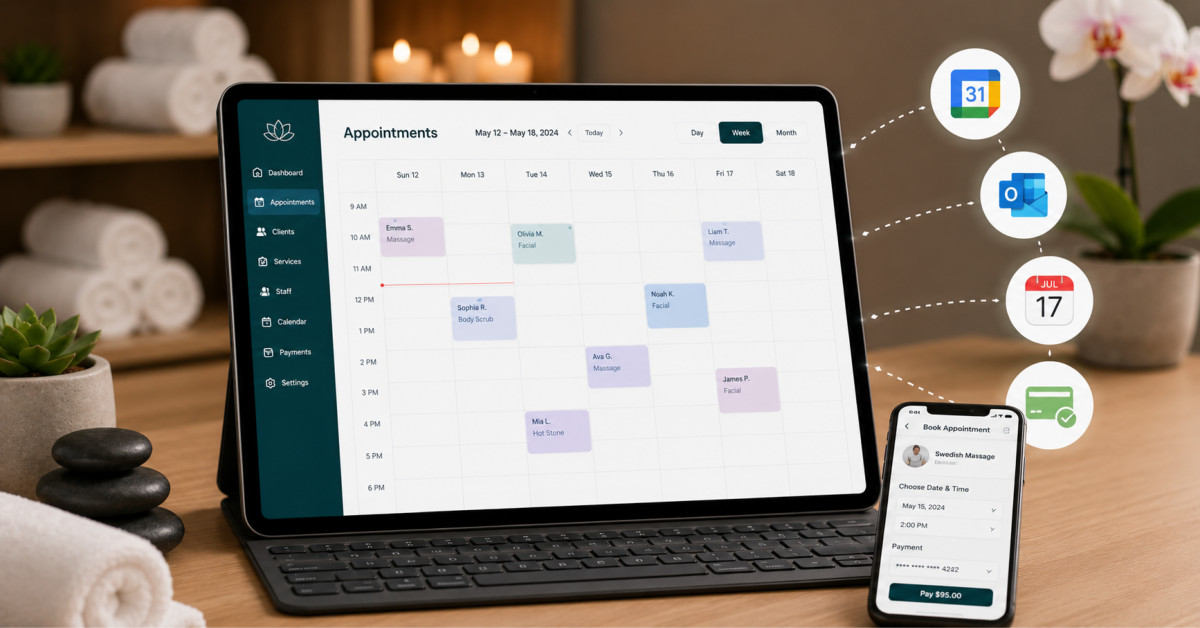
Two features quietly decide whether a spa’s booking software helps or hurts: whether its calendar sync actually protects you from double-booking, and whether its payment setup lets you take deposits without handing over control of your processing rates. Most comparison guides lump these in with forty other checkboxes. We pulled them to the front, because they are the two that touch your calendar and your margin every single day.
We looked at eight platforms that keep surfacing in spa and salon software searches, and judged each one on the same things: how its calendar sync works, what payment models it supports, whether you can bring your own processor, a real user rating with the source named, visible pricing, and one honest weakness. The category is worth real money, the global spa and salon software market was estimated at $1.57 billion in 2025, so the field is crowded and the products genuinely differ. None of these is a bad tool. They are built for different owners at different stages.
The phrase gets used loosely, and the difference matters. One-way sync pushes bookings from your scheduling software out to Google, Outlook, or Apple, so a new appointment shows up on your phone. That is it. It does not read anything back.
Two-way sync does both directions. Bookings still write to your personal Google, Outlook, or Apple calendar. Still, the block you add to that personal calendar (a dentist visit, a supplier meeting, a school pickup) writes back and closes off that slot in your booking system so no client can grab it. Google’s own help documentation describes this behavior plainly: when you use appointment schedules, your booking page blocks off times when you are not available based on your other calendar events. One-way sync is the trap. It shows you the collision after it has already happened, rather than preventing it. For a spa with several providers and shared treatment rooms, two-way is the only version that actually stops double-booking.
“Takes online payments” hides three very different things:
A serious platform lets you mix these by service and by client type. The other thing to check is who processes the money. Integrated payments connect your booking system directly to a payment processor so the transaction completes without the client leaving your page, as Stripe describes it. The question is whether you get to pick that processor or the platform picks it for you. That single distinction, covered in the matrix below, separates the tools that leave your rates in your hands from the ones that lock you in.
| Platform | Calendar sync | Payments and processor | Starting price |
| Bookeo | Two-way (Google, Apple, Outlook) | Deposits and full pay, bring your own gateway | About $14.95/mo (USD) |
| Mangomint | Two-way (Google, Apple, Outlook) | Deposits and full pay, own processor | $165/mo |
| Vagaro | Two-way (Google, Outlook, iCal) | Deposits, steers to Vagaro processing | $23.99/mo |
| Fresha | Two-way (Google, Outlook, Apple) | Deposits, locked to Fresha Payments | Free core |
| Square Appointments | Two-way (Google, Outlook) | Deposits on paid tiers, Square only | Free (solo) |
| Boulevard | Two-way (Google, Outlook, Apple) | Deposits, own processing | About $176/mo |
| Zenoti | Two-way (Google, Outlook) | Deposits and full pay, own processing | Custom quote |
| Acuity Scheduling | Two-way (Google, Outlook, iCloud) | Deposits and full pay, bring your own gateway | $20/mo |
No per-booking commission and no forced processor. That combination is what puts Bookeo at the top of a comparison built around calendar sync and payment flexibility, because it is one of the few platforms here that lets a spa collect deposits while keeping its own processing rates. Rather than one generic tool stretched across every use case, Bookeo ships three separate products (Appointments, Classes and Courses, Tours and Activities), so the appointment version is built around service scheduling rather than adapted from a class template.
Best for: independent and multi-service spas and salons that want deposits and two-way calendar sync without being tied to one payment processor.
Calendar sync: genuinely two-way with Google, Apple, Outlook, and Office 365. A booking writes to your personal calendar, and a block on that personal calendar closes the slot in Bookeo, which is the behavior that prevents self-inflicted double-bookings.
Payments: open gateway model. It connects to Stripe, Square, PayPal, and others (you can connect two at once), with deposits, full prepayment, and a “Pay Later” pay-at-spa option built into checkout. There is an integrated Square POS option for in-person tap and swipe. No per-booking consumer fees and no commission on bookings.
Other features worth noting: color-coded per-staff scheduling, resource allocation for both staff and treatment rooms, memberships and gift vouchers, paperless intake forms, and automated email reminders (SMS reminders are a paid add-on). Merchant Maverick described it as “a near-perfect mix of simplicity” with a substantial feature set, and it holds a 9 out of 10 on GetApp. Pricing runs across five tiers with a 30-day free trial and no credit card required, plus a 30-day money-back guarantee. USD Appointments plans start around $14.95 per month; the euro-denominated list runs from 10.95 to 89.95 per month (these are separate regional price lists, not currency conversions of each other), with booking caps from roughly 200 to 3,000 per month.
Not good for: a spa that wants one system to also run retail inventory, payroll, commission tracking, and marketing automation. Bookeo is a booking engine, not a full salon operating system like Zenoti or Vagaro; its interface looks more dated than Mangomint or Boulevard, and there is no dedicated native mobile app, just a mobile-responsive site.
Highest user rating in this comparison, and it earns it on polish. Mangomint is aimed at growing salons and spas that want a modern, fast interface and are willing to pay for it. Everything from the booking flow to the staff dashboard is built to feel current rather than like back-office software from a decade ago.
Best for: established multi-staff spas that want a design-forward all-in-one and can absorb a higher entry price.
Calendar sync: two-way with Google, Apple, and Outlook, so personal-calendar blocks close off bookable time the same way a booking writes out to your phone.
Payments: deposits and full prepayment at booking, plus integrated processing and a POS. Payment processing runs through Mangomint’s own integrated setup rather than a bring-your-own gateway, which is smooth in practice but not a free-choice model.
The platform bundles automations, two-way texting, memberships, and a light retail and inventory layer. Mangomint carries a 4.9 out of 5 on G2, one of the highest scores in the category. Pricing starts at $165 per month for Essentials (2 to 10 service professionals), $245 for Standard, and $375 for Unlimited.
Not good for: solo operators or budget-conscious single-chair spas. At $165 a month to start, Mangomint is priced for a team, and a one-person studio will pay for the headroom it does not use yet.
Ask a random independent salon in the United States what it books on, and Vagaro comes up a lot. It became widely adopted by trying to be one login for booking, POS, payroll, and its own consumer marketplace app, which suits an owner who wants breadth over specialization.
Best for: spas and salons that want booking, retail, and payroll in one platform and do not mind a la carte add-ons.
Calendar sync: two-way with Google, Outlook, and iCal, keeping staff schedules conflict-free across devices.
Payments: deposits and prepayment are supported, but Vagaro steers you toward Vagaro Pay, its own integrated processing, with in-person rates in the roughly 2.2 to 3.5 percent range. Bringing a fully independent processor is not the design intent here.
Vagaro adds native client and staff apps, inventory, and commission tracking. It holds a 4.6 on G2 across several hundred reviews, with breadth of features cited as good value. Pricing starts at $23.99 per month for the One Location plan (one user or calendar) and scales from there.
Not good for: owners who want an accurate all-in price up front. Text marketing, custom forms, and other add-ons bill separately, and reviewers report real monthly costs climbing toward $80 to $100 once the extras are switched on.
Zero dollars a month for core booking is the headline, and for the base plan, it is close to true. Fresha makes its money on payment processing and a commission on new clients who find you through its marketplace, which is a fundamentally different business model from everything else here.
Best for: spas that want free core software and get most new clients through their own marketing rather than a marketplace.
Calendar sync: two-way with Google, Outlook, and Apple, so bookings and personal blocks stay in step.
Payments: deposits and prepayment are built in, but this is the clearest case of processor lock-in in the comparison. Card processing runs through Fresha Payments, and while you can technically decline to process through Fresha, the platform is built around its own payment rails rather than a free choice of gateway. A one-time 20 percent commission (with a minimum fee) also applies to new clients who book you for the first time through Fresha’s marketplace.
Fresha holds a 4.4 on G2. The core plan has no monthly subscription; the Team plan adds features like advanced reporting at $14.95 per team member per month, with an Individual plan around $19.95.
Not good for: a busy spa leaning on the marketplace for growth. Twenty new marketplace clients a month at an $80 average service works out to roughly $320 in commission that month, and it repeats, so run that math against a flat-fee competitor before assuming “free” is cheapest.
Plenty of spa owners already swipe cards through Square before they ever shop for booking software, and Square Appointments exists to capture that. If you are already inside Square, adding scheduling is close to frictionless, at least at the free entry point.
Best for: solo providers and very small teams already processing payments through Square.
Calendar sync: two-way with Google and Outlook, with a native app for both booking management and staff schedule viewing.
Payments: Here is the catch. Square Appointments requires Square’s own processing; there is no bring-your-own-gateway option, which is real lock-in if you later want to shop for processing rates. Deposits and no-show protection sit on the paid tiers rather than the free plan.
The free plan covers a single location and single provider with an online booking page, calendar sync, and email reminders. Square Appointments carries a 4.4 value-for-money score on Capterra. Paid tiers run $49 per month for Plus and $149 per month for Premium, as the team grows, with processing fees on top.
Not good for: a spa that wants to keep its processor options open, or one that needs waitlists and no-show protection without paying for Plus. Those are reserved for the paid tiers, and the Square-only requirement is permanent.
There is a specific kind of med-spa that wants its software to feel as polished as its treatment rooms, and Boulevard built its identity around exactly that buyer. The client booking page and staff dashboard carry a level of visual design that stands out in a category still full of utilitarian tools.
Best for: premium spas and med-spas that want a design-forward front desk and can commit to a contract.
Calendar sync: two-way with Google, Outlook, and Apple.
Payments: deposits, memberships, and prepaid packages are built in, with integrated processing. Boulevard runs its own payment layer rather than a fully open gateway, so this is an own-processing model rather than a bring-your-own one.
Boulevard bundles POS, marketing, and HIPAA-relevant charting tools for the aesthetics side (sold as an add-on package). It holds a 4.6 on Capterra from several hundred reviews, praised for ease of use, with reporting depth being the recurring criticism. Plans start at $176 per month for Essentials, $293 for Premier, $410 for Prestige, and a separate Aesthetics Bundle around $421.
Not good for: owners who want month-to-month flexibility or a cheap entry point. Boulevard typically asks for a 12-month contract, and add-ons like Forms and Charts carry extra monthly fees on top of the base plan.
Zenoti is not chasing the single-room spa, and it does not pretend otherwise. It was architected from the ground up for chains running dozens or hundreds of locations, where the hard problems are cross-location reporting, centralized inventory, and commission complexity across large rosters.
Best for: multi-location spa and salon chains and franchises that need centralized, enterprise-grade operations.
Calendar sync: two-way across Google and Outlook, with native client and staff apps.
Payments: deposits, full prepayment, and integrated processing, all managed centrally so policy stays consistent across every site. Processing is handled through Zenoti’s own enterprise setup.
Corporate-level reporting rolls data up across every location, inventory tracks centrally while reflecting per-site stock, and staff permissions scale from a corporate admin down to a single front desk. Zenoti earns a 4.3 on G2, with reviewers praising reporting depth while flagging a steep learning curve. Pricing is entirely custom and quote-based, with no public price list; industry reporting suggests larger operators pay from several thousand to well over ten thousand dollars a month, depending on scope.
Not good for: a single-location spa or a small two- or three-shop group. Zenoti is almost certainly more platform and more costly than the business needs.
Acuity was never built specifically for spas, and that is both its appeal and its ceiling. It is a general-purpose appointment scheduler that works fine for an esthetician, is fast to set up, and integrates tightly with Squarespace, which acquired it in 2019.
Best for: solo providers who want straightforward scheduling, ideally already on a Squarespace site, without salon-specific extras.
Calendar sync: two-way with Google, Outlook, and iCloud, so a personal-calendar block closes the corresponding slot in Acuity.
Payments: This is Acuity’s quiet strength for processor freedom. You connect your own gateway, Stripe, Square, or PayPal, and Acuity charges no transaction fees of its own; deposits and full prepayment are both supported per service. That bring-your-own model is rare among the tools here.
Acuity posts a 4.7 on G2, among the highest in this comparison, with reviewers praising the booking-page experience and fast setup. There is no free plan, only a short trial. Pricing runs $20 per month for Starter, $34 for Standard, and $61 for Premium on monthly billing, lower on annual plans.
Not good for: a multi-room spa. Acuity has no dedicated resource allocation for treatment rooms alongside staff, no built-in retail inventory, and no commission tracking, so it thins out fast once you are juggling rooms, retail, and staff pay.
Start with the two features this comparison is built around, because they map cleanly to how you get burned. When your providers share treatment rooms, and you keep a busy personal life on your phone, insist on genuine two-way calendar sync and test it before you commit; one-way sync will let you double-book yourself into a slot you already blocked. If deposits are your main defense against no-shows, confirm the platform lets you set them by service and client type rather than forcing one blunt policy on everyone.
You need to look hard at who controls your processing. Fresha and Square Appointments tie you to their own payment rails, and Vagaro, Mangomint, Boulevard, and Zenoti run their own integrated processing, which is fine until you want to renegotiate rates. If keeping your processor and your rates in your own hands matters, the bring-your-own-gateway options are Acuity and Bookeo.
Teams that want a predictable, no-commission cost structure alongside that processor freedom tend to land in the same place. A flat monthly fee costs the same whether you book five new clients or fifty, whereas a marketplace commission scales up with exactly the growth you are working for. If a flat-fee spa scheduling software with deposits, two-way calendar sync, and a free choice of payment gateway describes what your salon or spa actually needs, Bookeo is worth a serious look as a booking system that scales from a solo room to a multi-service, multi-staff operation without adding per-booking fees as you grow.
When you run a chain, flip the priorities entirely: weight centralized reporting, per-location inventory, and staff permission tiers above sticker price, and a purpose-built enterprise platform will earn its cost in operational sanity. Whatever the size, run a real free trial with your own services and prices before signing. A platform can look excellent in a screenshot and fall apart the moment you try to configure a 90-minute treatment with a partial deposit and a room-specific schedule.
Which spa booking platforms let me bring my own payment processor? Among the eight here, Acuity Scheduling and Bookeo let you connect your own gateway (Stripe, Square, or PayPal) and keep your existing rates. Fresha routes payments through Fresha Payments and Square Appointments requires Square’s processing, while Vagaro, Mangomint, Boulevard, and Zenoti run their own integrated processing. If processor choice matters to you, confirm it directly with the vendor before signing, since these terms change.
What is the difference between one-way and two-way calendar sync? One-way sync only pushes your bookings out to Google, Outlook, or Apple so they appear on your phone. Two-way sync also reads back: a block you add to your personal calendar closes that slot in your booking system, which is what actually prevents you from being double-booked. For a spa with shared rooms, two-way is the version that protects the schedule.
Do all of these support online deposits, or only full prepayment? Most support both, but configured differently. A deposit collects a partial amount at booking, often 25 to 50 percent, to cut no-shows without charging the whole service up front. Full pay-at-booking charges the entire price. The better platforms let you require a deposit for some services and full payment for others, plus a pay-at-spa option for low-risk regulars.
Which platform is best for a multi-location spa group? For genuine multi-location complexity, cross-site reporting, centralized inventory, and tiered staff permissions, Zenoti is built for that scale, and Vagaro and Mangomint handle small multi-site groups well. Square Appointments and Acuity can technically run more than one location, but were designed around solo and single-site operators, so they thin out as you add sites.
Does booking software actually reduce no-shows? The consistent pattern across scheduling practice is that automated reminders and deposit requirements both measurably cut no-shows compared to trusting clients to remember. A deposit raises the financial cost of skipping, and a reminder with an easy cancellation link turns a would-be no-show into a canceled slot you can refill, which is why most spa-focused platforms build deposit collection directly into the booking flow.




