

For creators animating approved brand imagery, choose Seedance 2.5 when long, reference-heavy sequences matter most; choose MiniMax H3 for shorter 2K clips and editable modular production; treat Wan 3.0 as an interesting but unconfirmed preview until its public specifications and access are verified.
A finished image changes the job. The model is not being asked to invent a world. It is being asked to respect an approved one while adding believable time, movement, camera work, and sound.
Starting from a finished image changes the whole problem. A text-to-video prompt asks a model to invent a world. An image-to-video job asks it to respect a world that already exists, then add believable time to it. The still already fixes the subject, the framing, the lighting, the product, the typography, and often the brand.
Success is measured less by imagination and more by restraint: how little the model drifts from what was already approved, and how naturally it introduces motion, camera, and sound without breaking that approval.
That reframing matters because most model marketing is written for the text-to-video case. Headlines celebrate cinematic scenes conjured from a sentence. Creators working from product photos, campaign frames, character art, or a social portrait need a different scorecard.
This article builds that scorecard, then applies it to three models that arrived within weeks of each other in 2026: ByteDance’s Seedance 2.5, MiniMax’s H3 (also called Hailuo 3.0), and Alibaba’s Wan 3.0. All three are examined here specifically through the eyes of a creator who already has an image in hand.
One boundary is set up front. Topview is a platform that provides access to these models and wraps them in its own production tools. The capabilities of a model and the conveniences of a platform are not the same thing, and the two are kept separate throughout. Wan 3.0 carries an additional caveat, explained in its own section: as of the Topview page’s August 12, 2026 review, Alibaba’s public model catalog still lists Wan 2.7 as the latest documented Wan video release, so every Wan 3.0 figure here is treated as a preview rather than a confirmed specification.
Comparing image-to-video tools by trailer reel is a mistake, because every vendor’s reel is its best day. A more durable approach evaluates four things in order, since each depends on the one before it. This article uses that sequence as its spine and calls it the Anchor-to-Motion Framework.
Each model is strong in different layers, and no single tool wins every layer for every asset type. The sections below walk the four layers, then test them against four real starting points: a product photograph, a social media portrait, a fashion campaign image, and a character illustration.
Before the layers, a factual baseline. The table below separates what each vendor has confirmed from what remains a preview. Two entries deserve caution. Seedance 2.5’s resolution ceiling differs by venue: ByteDance’s launch materials cite up to 4K, while the Topview generator currently exposes up to 1080p, a clear example of a platform ceiling sitting below a model ceiling. Every Wan 3.0 cell is a preview value.
| Attribute | Seedance 2.5 | MiniMax H3 | Wan 3.0 (preview) |
| Developer | ByteDance (Seed team) | MiniMax | Alibaba (Tongyi Lab) |
| Status | Announced Jun 2026, rollout through mid-2026 | Launched Jul 31, 2026; weights
Aug 3 |
Invite preview; not in Alibaba’s public catalog |
| Longest single pass | Up to 30 seconds | Up to 15 seconds | Up to 30 seconds (preview) |
| Resolution | Up to 4K (vendor); 1080p on Topview | Native 2K, 24 fps | 480p / 720p / 1080p (preview) |
| Reference inputs | Up to 50 (30 image, 10 video,
10 audio) |
Up to 12 (9 image, 3 video, 3 audio) | 10 image, 5 video, 5 audio, plus docs and webpages (preview) |
| Native audio | Yes, joint audio and video | Yes, native stereo | On by default (preview) |
| Editing | Timestamp and region local edits | Instruction-based editing | Reference-locked revision (preview) |
| Open weights | No, proprietary | Yes, with license and regional limits | Pledged, unconfirmed |
| Distinctive angle | Length, reference volume, timestamp direction | One open-weight omni-modal model with editing | Document and webpage to video (preview) |
Table 1. Confirmed and preview attributes across the three models, framed for image-first work.
Pricing is the one area where firm figures are not yet available for all three, so precise numbers are not asserted here. MiniMax H3’s API was live and priced from launch, and early reports placed its rate well below Seedance 2.0’s. Seedance 2.5 launched without published retail pricing at the time of writing.
Wan 3.0 has no official pricing and would likely follow Alibaba’s usual open-weights-plus-API pattern if the open release lands. Any budget planning should confirm live rates in the product before committing.
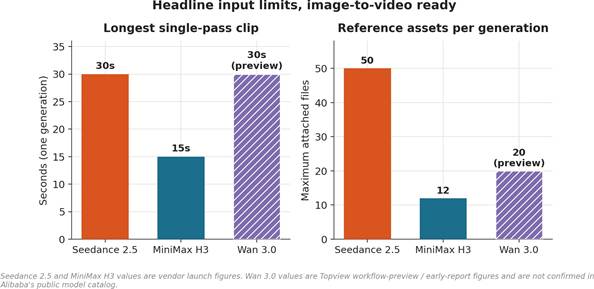
Figure 1. Longest single-pass clip and maximum reference assets. Wan 3.0 values are preview figures.
This is where image-to-video is won or lost, and it is also where the evidence is thinnest, so claims here are handled with care.
A reference image is guidance, not a locked layer, and every vendor says so in softer words. MiniMax positions H3 around omni-reference control and preserving product cues, typography intent, and logos more reliably, while its own page adds that results vary by prompt, reference quality, and settings. Seedance 2.5 offers reference-to-video and up to thirty image references, which gives the model more angles on a subject, plus green screen and white-model references for tighter control of placement. Wan 3.0’s preview describes identity, prop, and space controls and states plainly that consistency is a direction to review, not a guaranteed pixel-perfect result.
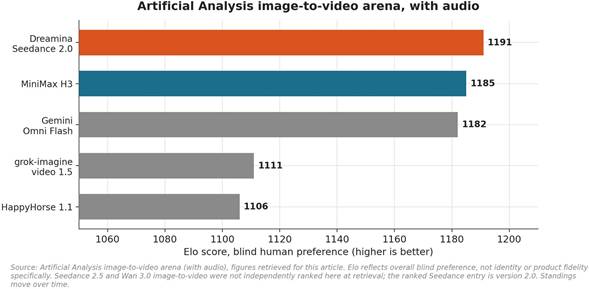
A creator naturally wants to know which model holds a face or a product best. That is exactly the claim that cannot be made responsibly right now. The most credible public yardstick is the Artificial Analysis Video Arena, which ranks models by blind human preference. On its image-to-video board with audio, the retrieved standings place Dreamina Seedance 2.0 first, MiniMax H3 a close second, and Gemini Omni Flash third; without audio, Gemini Omni Flash leads, with MiniMax H3 second and Seedance 2.0 third.
Two cautions are essential. First, that Seedance entry is version 2.0, the predecessor to 2.5; independent image-to-video benchmarks for Seedance 2.5 were not yet published at the time of writing, and Wan 3.0’s image-to-video standing does not appear in those top results. Second, and more important for this layer, Elo measures overall preference, not identity or product fidelity specifically. A model can win an arena on motion and lighting while drifting on a logo. No published test isolates face, product, or label preservation across these three models, so this article makes no claim that any one of them preserves such details better than another.
Treat every image-to-video result as a fidelity draft. Compare the output against the source frame by frame for the one thing that matters, whether that is a face, a serial number on a product, a garment seam, or a logo, and expect to re-roll or region-edit rather than trusting the first pass. MiniMax H3 adds a wrinkle worth knowing: its 2K path is an in-context regeneration, not a deterministic upscale, so a 2K result can differ from the approved lower-resolution draft and should be re-checked at full size.
Once the subject holds, the question becomes what kind of life the model breathes into it. Basic animation is a slow zoom or a drifting pan across a static frame, and any tool can do that. The gap between models shows up in secondary motion and physics: how cloth settles, how hair moves, how liquid pours, and whether a walking model carries weight or glides.
All three target realistic motion in their materials. Seedance 2.5’s positioning leans on longer continuity, up to thirty seconds in a single pass, which gives an action beat or a product reveal room to establish, develop, and resolve without the drift that stitching short clips introduces. MiniMax H3’s materials emphasize physics-heavy scenarios, fabric and hair behavior, and complex interactions such as holding a bottle or dispensing liquid, at up to fifteen seconds. Wan 3.0’s preview describes photoreal materials, light, and motion, with the same review-every-frame caveat.
For image-first work, the practical implication is about prompt direction. The still already sets the look, so the motion prompt should describe behavior, not appearance: how the subject moves, the speed, the weight, the direction of the camera relative to the subject, and the single action that should carry the clip.
Overloading the motion prompt with a second scene change is where drift and morphing tend to appear.
Beyond animation, creators want to specify the shot. All three models accept camera language in the prompt: orbit, tracking, push-in, whip pan, and crane. Seedance 2.5 adds second-level timestamps, so a camera behavior can be assigned to a specific interval of a thirty second clip rather than hoping the model paces it. MiniMax H3’s materials show complex camera paths and drone-style moves.
Wan 3.0’s preview describes shot-level direction across camera, action, and pacing in one brief. The reliable pattern across all three: state one clear camera intent per shot and keep it readable, since fast or compound moves are where small text and fine product detail smear.
The source image usually sets composition, and the better instinct is to protect it. When the subject needs to stay in a particular part of the frame, or the product needs to remain readable while the camera moves, that constraint belongs in the prompt explicitly.
Seedance 2.5’s green screen and white-model references, together with its storyboard and keyframe inputs, are aimed exactly at controlling staging before generation. It is worth stressing that some of those planning aids, the 3D previs and white-model blocking in particular, are Topview workflow features built around the model rather than native model capabilities, a distinction that gets its own section below.
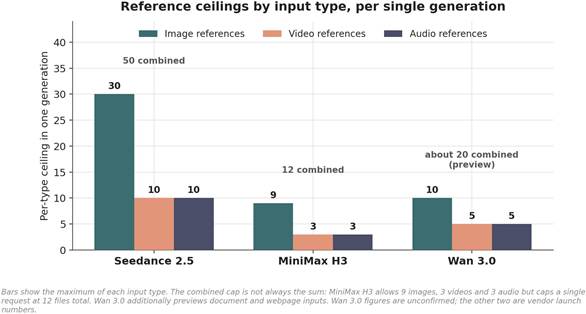
This is where the three diverge most clearly, and where the numbers matter. Seedance 2.5 accepts up to fifty reference assets, as many as thirty images, ten videos, and ten audio files within its duration limits, the most permissive grid of the three. MiniMax H3’s omni-reference accepts up to twelve files: nine images, three videos, and three audio, capped at twelve combined.
Wan 3.0’s preview describes ten images, five videos, and five audio, plus documents and webpages as extended context. For an image-first creator, more image slots means more angles of the same subject, a product from several sides or a character with several expressions, which is the most direct lever on consistency that a creator actually controls. On raw reference capacity, Seedance 2.5 leads on confirmed numbers.
A single animated frame is one shot. A sequence needs the same subject across several. Seedance 2.5 is built around this, organizing multiple connected shots inside one thirty second generation with timestamped direction, the cleanest single-pass path to a short narrative among the three. MiniMax H3 threads shorter sequences and is designed to carry a character, a voice, and a look across generations, which suits a shot-by-shot workflow rather than one long pass. Wan 3.0’s preview describes reference-locked story worlds across shots, subject to the same unconfirmed status.
The most practical production feature is changing one wrong element without regenerating the whole clip. Seedance 2.5 offers timestamp-level and region-level local editing. MiniMax H3 offers instruction-based editing and, on its own platform, debuted at the top of Artificial Analysis’s separate video-editing board. Both reduce the re-roll tax that makes image-to-video expensive. Wan 3.0 previews reference-locked revision, unconfirmed.
Audio is covered in full below, but as an assembly concern, all three generate sound in the same pass rather than bolting it on afterward, which keeps action, speech, and atmosphere aligned. On length, Seedance 2.5 supports continuing a strong clip with better contextual consistency, and Wan 3.0 previews a smart-duration concept that would adapt length to a brief. These are the levers for turning a good short clip into a longer one without starting over.
The framework becomes concrete when applied to the assets creators actually hold. Each example below names what matters most for that asset, then maps it to confirmed capabilities, without claiming any model renders a given detail more accurately than another.
Starting point: a clean studio shot, for instance a skincare bottle on marble. What matters most is that the bottle’s geometry does not warp, the label text stays legible, and reflections behave.
This is an anchor-fidelity and text-fidelity problem first. MiniMax H3’s materials specifically foreground product cues, typography, and logos, and its influencer-style demos show hands holding and dispensing, which maps well to a product-in-use clip. Seedance 2.5’s larger image-reference grid lets a creator supply the bottle from several angles, then direct a thirty second reveal with a timestamped camera move and a clean end card. The shared discipline: keep the camera move slow enough that the label stays readable, verify the label frame by frame, and region-edit the text if it drifts rather than re-rolling the whole shot.
Starting point: a single creator portrait for a vertical clip. What matters is identity across the clip, natural facial motion, and lip sync if the portrait is meant to speak. The Topview MiniMax H3 reference example is built around exactly this, using an image to preserve a subject’s identity, hair, and outfit through camera motion. Seedance 2.5’s multilingual dialogue and more reliable subtitle rendering suit a talking portrait meant for several markets.
The practical path: attach the portrait as the identity reference, keep the first motion beat small, add a short audio or script reference for a talking clip, and review the eyes and mouth closely, since that is where avatar-style artifacts appear first. Vertical framing fits both, given MiniMax H3’s adaptive aspect ratio and Seedance’s vertical support.
Starting point: an editorial frame of a model in a specific outfit. What matters is that the garment’s cut, drape, and color survive movement, and that the motion reads as premium rather than stiff. This is a Layer 2 problem, secondary motion and cloth physics, sitting on top of Layer 1 identity.
All three vendors show fashion and model-walk material, and fashion and beauty rank near the top of actual Seedance 2.5 usage per Topview, with its thirty second continuity suiting a tracking shot down a runway or a street. The discipline: describe the walk and the camera, not the clothes, since the image already fixes the clothes; keep lens moves smooth; and watch the garment’s edges and any pattern for warping during motion.
Starting point: illustrated or anime artwork rather than a photo. What matters is that the art style does not drift toward photoreal, that line and color hold, and that motion matches the medium’s conventions. All three show stylized and anime examples in their reels. The key instruction is to name the style explicitly and lock it as a reference so the model does not default to realism, a common failure when photoreal capability is the headline.
Seedance 2.5’s keyframe and storyboard inputs help stage an anime action beat, and MiniMax H3’s reference-driven path carries a character design across shots. Style consistency, like identity, is a direction to review rather than a guarantee, and stylized assets often need more re-rolls than photos because the model has a stronger realism prior to fight against.
Many teams do not start from a single image but from a library: a prior ad, a brand film, a set of campaign frames, a logo, a sonic signature. Two capabilities matter here. First, video references and video-to-video motion transfer let a creator carry an approved motion or camera language onto a new subject; MiniMax H3 lists video-to-video motion transfer as a named capability, and Seedance 2.5 accepts up to ten video references.
Second, audio references let a brand’s existing music or sonic logo drive the edit. The governing caution is rights: every uploaded image, clip, voice, logo, document, and webpage used in a commercial generation must be cleared, and all three vendors’ terms make commercial use conditional on the plan and licensing in force at export. Brand safety here is a legal review as much as a creative one.
For years, audio was a separate stage after the video was locked. All three of these models change that by generating sound in the same pass. Seedance 2.5 coordinates video, dialogue, music, and sound effects together, supports audio references and time-coded sound direction, and improves lip sync and subtitle rendering across languages. MiniMax H3 generates native stereo audio in one pass, with voice cloning and a set of stably supported languages.
Wan 3.0’s preview treats voice, music, and sound as part of the brief, with audio reportedly on by default, unconfirmed. For an image-first creator, the useful shift is that a still can become a talking or scored clip in one step, though dialogue timing and lip sync still depend on prompt and reference quality and still need review. Audio references are also the cleanest way to keep a brand’s music or a creator’s voice consistent across a series.
Longer is not automatically better, but length changes what a single image can become. A five second clip animates a frame; a thirty second clip can tell a small story from that frame. Seedance 2.5’s thirty second single pass and its extension feature are the most concrete levers here on confirmed numbers, letting a creator establish, develop, and resolve without stitching.
MiniMax H3 favors a build-in-shots approach at up to fifteen seconds, carrying continuity across generations rather than one long take. Wan 3.0 previews a smart-duration concept that would adapt length to the density of a brief. The trade-off to weigh: a single long pass reduces drift but gives less shot-by-shot control, while assembling shorter shots gives more control but reintroduces the continuity problem that Layer 4 is all about.
Image-to-video is the right tool when a specific look already exists and must be honored. It is the wrong tool in several common cases. When no asset exists yet and the concept is still fluid, text-to-video explores faster, because there is nothing to preserve. When many divergent variations of a scene are needed, prompting from text generates spread more cheaply than re-referencing one image.
When the desired output deliberately departs from any source, forcing an image reference only fights the model. All three models support text-to-video as a first-class mode, and a realistic workflow often mixes the two: generate or choose a strong first frame, then switch to image-to-video to animate the approved frame. The decision is not which mode is better in general, but whether a fixed visual identity is the constraint that matters for this specific shot.
No single model is the right answer for every image-first job, and the professional pattern in 2026 is routing, choosing a model per shot rather than committing to one. The guidance below follows from confirmed capabilities and the evidence limits already stated.
| If the priority is | Weigh | Because |
| Longest single-pass narrative from one frame | Seedance 2.5 | 30-second single pass, timestamped multi-shot, and clip extension (confirmed) |
| Maximum reference angles on one subject | Seedance 2.5 | Up to 50 assets and 30 image slots, the largest confirmed grid here |
| Native 2K with tight single-model editing | MiniMax H3 | Native 2K, instruction-based editing, and a downloadable model within license limits |
| Self-hosting or private deployment | MiniMax H3 | Open weights, subject to regional license exclusions noted below |
| Turning documents or webpages into video | Wan 3.0 (preview) | Its distinctive claimed direction, currently unconfirmed |
| Independently benchmarked image-to-video today | MiniMax H3 (with Seedance 2.0) | The two with retrieved arena standings; Seedance 2.5 and Wan 3.0 are not yet ranked |
| Lowest commitment while specs settle | MiniMax H3 or Seedance 2.5 | Both are confirmed launches; Wan 3.0 remains a preview |
Table 2. Routing guidance by creator priority, grounded in confirmed capabilities and stated evidence limits.
A note on the MiniMax H3 open-weight option: its Community License permits commercial use for organizations under a revenue threshold with attribution, but excludes open-weight use in several regions, including the United States, the European Union, the United Kingdom, and South Korea, without separate authorization. Any self-hosting decision should start with that license, not the capability list.
This distinction runs through the whole comparison and deserves to be stated plainly. A model capability is something the underlying model does: generate thirty seconds in a pass, accept fifty references, produce native audio, transfer motion from a video.
A platform workflow tool is something Topview builds around a model to make it usable: a 3D director console and white-model previs for blocking shots, a conversational canvas for refining a result in natural language, a link-recreation feature for rebuilding a proven format, and an extension workflow.
Topview’s own Seedance page is explicit that its previs and canvas tools are workflow capabilities built around the model, not model-exclusive features. The reason this matters for evaluation: a creator comparing raw models on an API will not get the previs console or the conversational canvas, and a creator on Topview should not attribute those conveniences to the model itself. Both are legitimate, but they answer different questions, which model to license versus which platform to work in.
Wan 3.0 is treated throughout as a preview, and the reason is documented. As of the Topview page’s August 12, 2026 review, Alibaba Cloud’s public model lifecycle lists Wan 2.7 as the latest documented Wan video release and does not list Wan 3.0, so the durations, resolutions, reference counts, and modes shown for Wan
3.0 are workflow-preview figures rather than confirmed model specifications.
The picture beyond Topview is mixed and moving. Some third-party channels and hands-on reports describe an invite-only Wan 3.0 beta that reportedly opened around August 6, 2026, and Wan 3.0 does appear on the Artificial Analysis text-to-video-with-audio board, but there is no confirmed general availability, no independently verified image-to-video benchmark, and no settled public license or pricing.
The Wan line’s history reinforces caution: earlier versions were pre-announced as open and then shipped closed or delayed, so an Apache 2.0 open-weight pledge for 3.0 is a stated intention, not a delivered fact. For an image-first creator planning a real deliverable, the safe reading is to design against Wan 3.0’s distinctive document-and-webpage direction as a possibility, verify the live generator’s actual model and settings before rendering, and avoid planning a dated project around unconfirmed specifications.
The honest summary is that image-to-video in 2026 rewards a scorecard, not a favorite. The Anchor-to-Motion Framework puts fidelity first because a beautifully animated but drifted subject fails the only test that image-first work sets: honoring an image that was already approved.
Seedance 2.5 leads on confirmed length and reference volume and on single-pass multi-shot direction. MiniMax H3 leads on a unified open-weight model with native 2K, strong editing, and the only independently benchmarked image-to-video standing of the three at the time of writing. Wan 3.0 previews an intriguing document-to-video direction that remains unconfirmed. On the one question creators ask most, which model best preserves a face, a product, or a logo, the responsible answer is that no published evidence settles it, so every output should be treated as a fidelity draft and checked against the source. The models will keep moving; the discipline of anchoring first will not.
Seedance 2.5 is the first model to test when you need a longer, reference-heavy product sequence, while MiniMax H3 is the first model to test when you need short 2K product clips that can be reviewed and assembled modularly. The best result depends on your product’s failure sensitivity, especially label readability, geometry, reflective surfaces, and hands interacting with the item. Use the same product image and motion brief in both tools, then compare accepted-output cost rather than judging from a single generation. Seedance 2.5’s larger reported reference capacity is useful when multiple angles of the product are available.
No, image-to-video models cannot be assumed to preserve logos and product labels perfectly, so treat every result as a fidelity draft until it passes frame-by-frame review. A reference image guides the model but does not function as a locked compositing layer. Fine text, brand marks, serial numbers, small print, and reflective packaging are common high-risk details. Reduce risk by using a slow camera move, supplying extra product references, avoiding occlusion, and selecting a clip with a clean label before moving to final editing. If an asset must be legally or visually exact, consider compositing the approved label or product packshot in post-production.
Use image-to-video when the visual identity already exists and must be protected, and use text-to-video when the concept is still open and you need broad creative exploration. Image-to-video works best for approved campaign frames, product photography, creator portraits, fashion imagery, and character assets. Text-to-video works best for finding new concepts, testing settings, inventing environments, or producing many deliberately different variations. A practical hybrid workflow is to explore several concepts with text-to-video, choose or design the strongest first frame, then switch to image-to-video for controlled animation and continuity.
Use only the number of reference images that resolves a real ambiguity, which is usually three to 10 strong references rather than every asset in your campaign folder. For a product, use front, side, back, close-up label, material detail, and one approved lifestyle view. For a person, use a clean portrait plus additional angles, expressions, and wardrobe views if needed. A large reference allowance is useful, but redundant or contradictory references can weaken direction. Seedance 2.5 is reported to allow substantially more reference assets than H3, which can help with complex product or character consistency tests.
MiniMax H3 is a strong fit for short-form social video when native 2K output, shorter clips, audio, and a shot-by-shot workflow matter more than a single extended generation. Public coverage describes H3 as handling roughly four to 15 second clips with up to 2K output and mixed reference inputs, which aligns with vertical creator clips, paid-social cutdowns, and modular campaign production. Seedance 2.5 remains worth testing when the short-form asset is part of a longer connected narrative or needs a larger reference pack to stabilize a difficult subject.




