



Verified & Reviewed
Published on July 6, 2026 Written By Rachel Hand

Published on July 6, 2026 Written By Rachel Hand

Subscribe for More
Once order volume trends toward 7,000–10,000 shipments per month, manual processes and basic shipping tools begin to crack. Errors pile up, orders slow, and onboarding new warehouse staff becomes increasingly difficult.
These growing pains signal that the tools supporting early growth are now holding the business back. At this stage, the goal is no longer just printing labels quickly; it’s running a warehouse where inventory is accurate, workflows are repeatable, and the team can scale without relying on tribal knowledge.
The smart move is to find a warehouse management system that fits your current workflows, connects with your existing tools, and gives you the reports you need. Then roll it out step by step to keep shipments flowing.
This guide walks you through a readiness check, essential features to look for, how to evaluate vendors, and a practical rollout plan that sidesteps common pitfalls.
How to decide if you need a WMS now
As orders pour in, many small businesses discover that spreadsheets, paper logs, or basic shipping tools can’t keep pace. The decision to upgrade to a WMS for small business comes down to recognizing when your current setup blocks growth instead of supporting it.
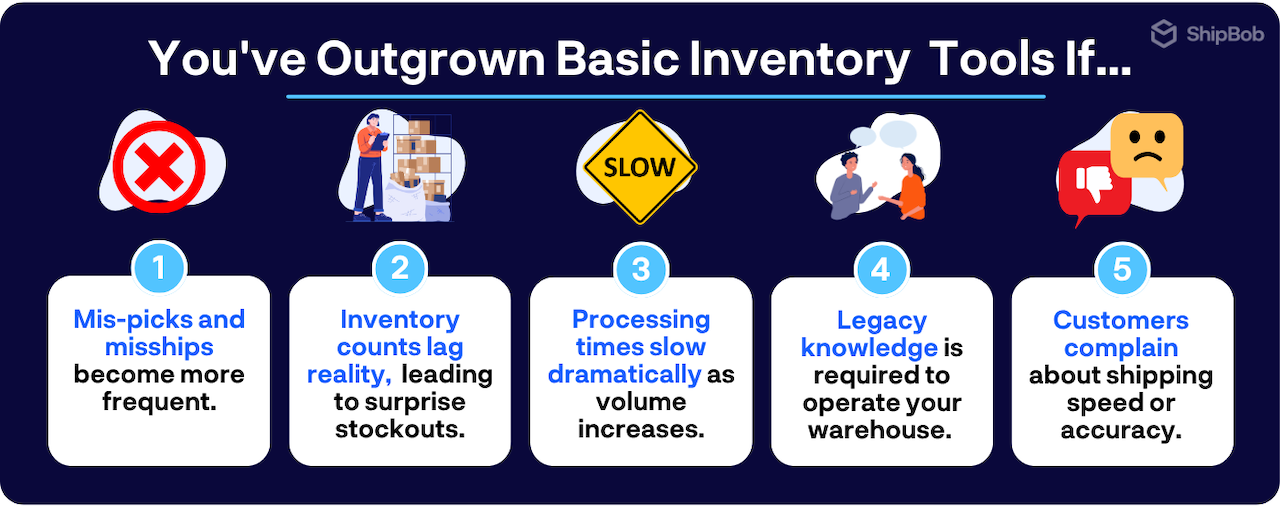
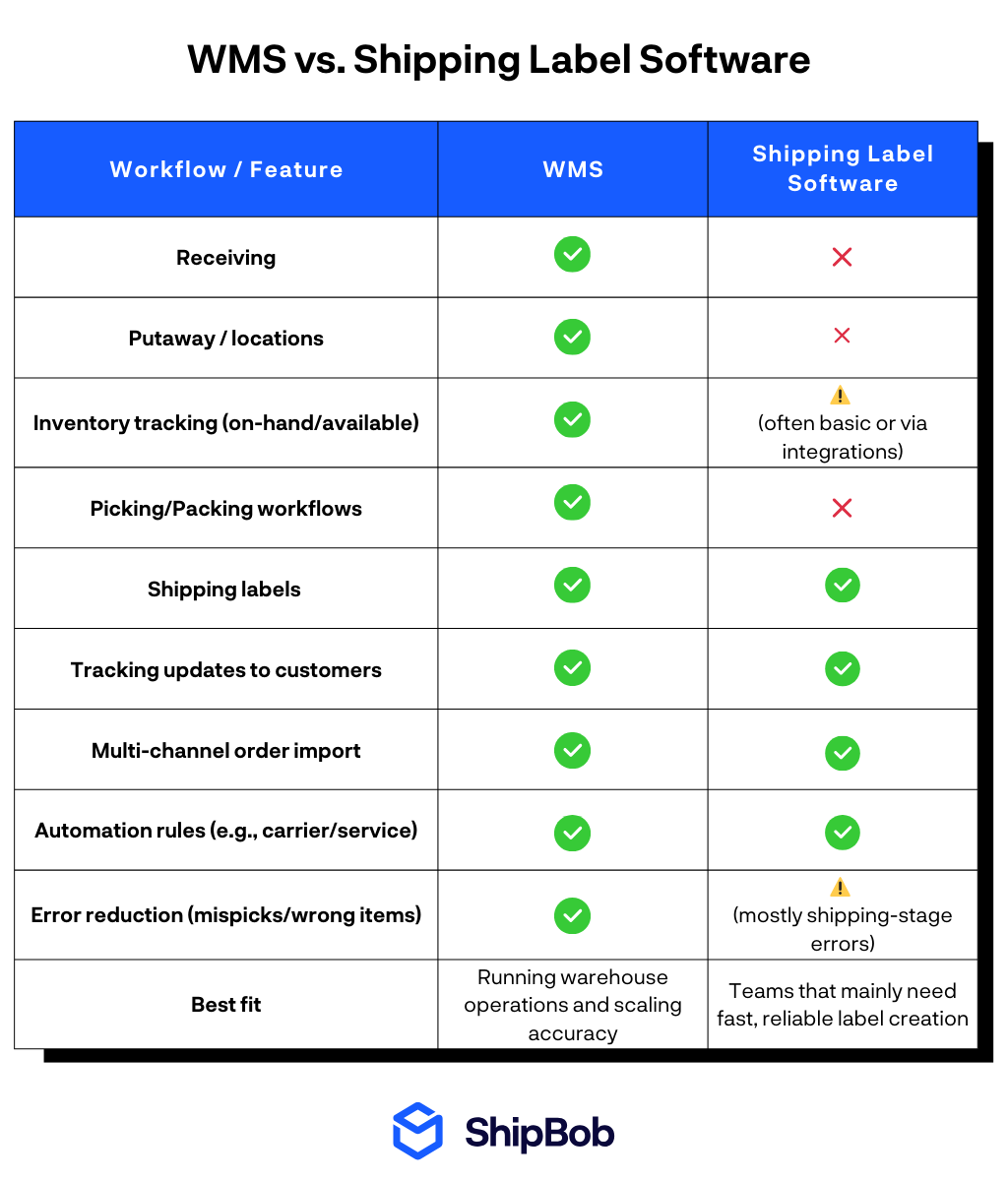
Here are some of the most common warning signs that you’ve outgrown basic tools and clarifies the real difference between a WMS and simple shipping label software.
When basic tools create more problems than they solve, a WMS becomes essential. These warning signs tend to appear before growth stalls completely:
Real-world turning points illustrate how these issues compound.
- At Spikeball, label-generation software was used without defined pick locations. Managers relied on memory to choose box sizes, estimate weights, and select carriers—turning fulfillment into a manual, error-prone process. After implementing ShipBob WMS, Spikeball eliminated this dependency on tribal knowledge and saved over $400,000 per year.
- Pit Viper experienced similar breakdowns. With only label software in place, warehouse staff could technically ship any sunglasses SKU because there was no validation step. Mispicks became common until scan-based verification was introduced through a WMS.
- Paper-based processes caused repeated setbacks at Bunker Branding. When systems failed, teams reverted to printed pick lists, slowing fulfillment and forcing managers to hunt through old orders to identify errors.
- Earthley’s inflection point came once monthly order volume exceeded 10,000. Their existing system couldn’t manage the operational complexity, leading to five-day order preparation times and multiple touches per order. Implementing a WMS restored control and more than doubled warehouse productivity.



Using a WMS vs. a shipping label generation software
Shipping label tools handle a narrow slice of fulfillment: importing orders and printing labels. They do not manage where inventory lives, validate picks, or coordinate warehouse workflows end to end.
A WMS for small business controls the entire operation, from receiving and putaway through picking, packing, and shipping, using one source of truth. This distinction becomes critical as sales channels multiply and accuracy requirements tighten.
If you’re running multiple channels, approaching 7,000 shipments per month, or seeing error rates climb, a WMS becomes a necessity rather than a nice-to-have.
What to look for in a warehouse management software for small business
Selecting a WMS for small business goes beyond checking feature boxes. You need software that mirrors how your team works today while leaving room for tomorrow’s growth.
Here we’ll outline the core workflows every small business needs, capabilities you’ll want sooner than you think, and features that let you expand to multiple sites without starting over.
Non-negotiable workflows for small teams
Every small business warehouse runs on a foundation of essential workflows. Here’s what your WMS must deliver.
Inventory and location management
- Clear bin locations with logical naming so no one relies on memory
- Barcode scanning throughout receiving, picking, and packing to eliminate guesswork
Receiving and putaway
- Purchase order receiving that catches overages or shortages before they become problems
- Guided putaway that directs staff to the best storage spots
Picking and packing
- Multiple pick methods that match your order patterns and reduce picking and packing errors
- Custom packing slips and verification steps that catch errors before shipping
Shipping and labeling
- Connections to multiple carriers with rate shopping to keep costs down
- Automatic label creation and packing slip printing
Returns management
- RMA intake with clear rules for handling returned items
- SKU-level return tracking with automated inventory updates
Cycle counting and replenishment
- Scheduled counts based on product importance
- Automatic inventory replenishment alerts triggered by actual inventory levels
These workflows create the backbone of a warehouse that runs itself. When your WMS handles them well, errors drop and your team stays productive.
Must-have scaling capabilities
Your business will change faster than you expect. New products, new channels, and new challenges all arrive sooner than planned. Some of these capabilities you may already need, depending on your products and stage of business growth.
Compliance and traceability
- Lot, batch, and serial tracking for regulated products
- FEFO (First Expired, First Out) and quarantine controls for items with expiration dates
Global expansion
- International shipping support including DDP options
- Single system that works across fulfillment centers worldwide
Channel expansion
- Integrations for direct-to-consumer, B2B, and marketplace channels
- One inventory pool visible across all sales channels
Warehouse expansion
- Multi-warehouse management for inventory and orders across locations
Hiring and training
- Simple workflows that new or seasonal staff learn quickly, with clear permission controls
Bundling and promotions
- Virtual bundling, multipacks, and subscription box support
Quality control
- Scan verification, photo capture for exceptions, and error tracking with reason codes
These features ensure your WMS keeps pace as you add products, channels, or locations.
Features for multi-site scale without rework
Planning to expand to multiple warehouses? Your WMS should handle advanced workflows from the start, including:
Multi-warehouse support
- Site-specific inventory tracking with smart order routing and safety stock rules
Transfer workflows
- Inter-warehouse transfers with in-transit tracking and reconciliation
Inventory balancing
- Regional velocity insights and replenishment suggestions
These capabilities prevent expensive migrations and system overhauls as you grow.
How to compare WMS vendors
Vendor evaluation is most effective when grounded in real workflows rather than marketing claims.
Start by shortlisting three to five vendors that serve businesses of similar size and complexity. Use a scorecard that mirrors your warehouse workflows:
- Receiving and stowing
- Inventory tracking and allocation
- Picking and packing
- Shipping and transportation
- Reporting and analytics
- Integrations and APIs
Beyond features, score vendors on make-or-break criteria such as ease of use on handheld devices, user pricing models, bulk edit capabilities, order edit flexibility, and ongoing maintenance burden.
Finally, calculate total cost of ownership. Subscription fees tell only part of the story. Implementation effort, hardware, training time, support, and integration or EDI costs all factor into the true investment.
3 Steps to roll out a small business warehouse management system
A successful rollout prioritizes adoption and continuity. Switching systems requires alignment across the team and careful timing (ideally avoiding peak seasons when possible).
1. Prep your data, locations, and barcodes before go-live
Identify the data to migrate, define bin structures that match real workflows, standardize barcode usage, and map the physical warehouse. This preparation prevents confusion on launch day.

2. Train the team around tasks, not features
Training should reflect daily work, not software menus. Role-based sessions and hands-on practice with common exceptions help teams adapt quickly.

3. Pilot, go live, and stabilize with a 30-day KPI plan
Start with a contained pilot before expanding. Track KPIs such as inventory accuracy, order accuracy, dock-to-stock time, pick rate, and order cycle time. Expect a short stabilization period as repetition builds confidence.
Strong WMS providers support this process through on-site or guided implementation, hardware setup, warehouse mapping, and integration configuration.

Use ShipBob WMS to run today’s warehouse and scale into what’s next
ShipBob WMS delivers a unified platform for warehouse, inventory, order, and transportation management—all accessible through the cloud for distributed teams. This single solution replaces multiple disconnected tools and becomes your one source of truth.
With ShipBob WMS, small businesses solve their biggest operational headaches:
Real-time inventory visibility across locations stops stockouts and overselling.
Pit Viper boosted order accuracy from 92% to 99.7%, eliminating 2,100 mispicks yearly.
“Our order picking and routing has also greatly improved with ShipBob. With the ShipBob WMS, we can create the most efficient routes through the warehouse, which has cut down on an insane amount of time and made picking, packing, and shipping so much more efficient.”
Jourdan Davis, Operations Manager at Pit Viper
Barcode scanning and visual packing flows slash shipping errors.
Earthley and Bunker Branding achieved sub-1% error rates and picked orders up to 10x faster.
“ShipBob’s WMS has more than doubled, if not tripled, our productivity in terms of labor hours.
Our average days to ship is now only 0.8 days, so most packages are shipping same-day or next-day, with rare exceptions. We’ve cut 4 days of lead time because orders are getting processed, fulfilled, and shipped more efficiently.
When we first started with ShipBob, we were doing about 15K orders per month, and now we’re processing 30K — double what we were doing just six months ago.”
Ben Tietje, Co-Founder and CEO of Earthley
Ready integrations and open API connect your ecommerce platforms, marketplaces, and carriers instantly. ShipBob’s App Store offers 50+ turnkey integrations, including Shopify, NetSuite, SPS Commerce, Gorgias, Klaviyo, Loop, and AfterShip.
“For the easiest-to-manage tech stack, we brought on the dream team of ecomm apps – ShipBob, Shopify Plus, Klaviyo, TripleWhale, Gorgias, Yotpo, etc. – as this winning combination of technologies in each category talk to each other beautifully. Seeing that ShipBob was able to integrate so neatly with Shopify Plus, Klaviyo, TripleWhale, Gorgias, and others, and pass critical information to every other software made so much sense, as we could go into one portal and get a holistic view of our operations. This was so important for the efficiency of our small team.”
Danica Quilty, Ecommerce Director of Lyres
Reporting and analytics drive smarter cycle counting and inventory placement.
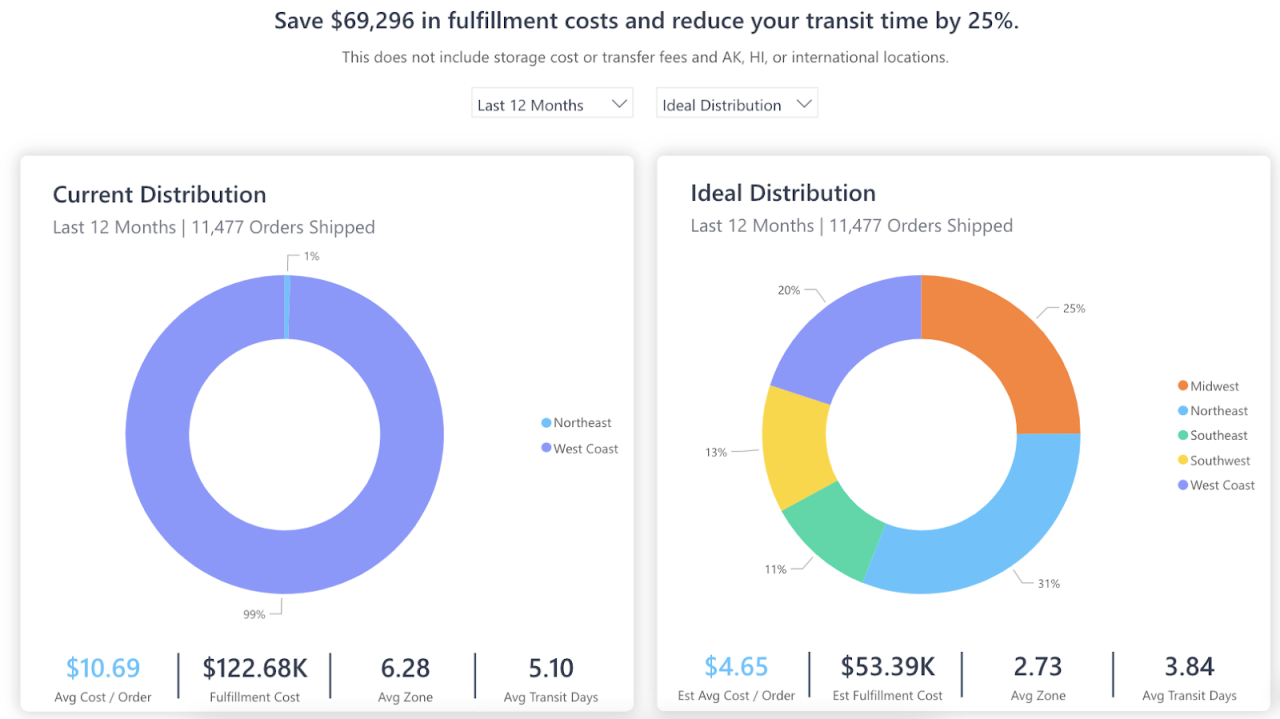
Bloom Nutrition cut costs by 13% through optimized inventory positioning.
“We’re fulfilling orders from 4 ShipBob fulfillment centers on the West Coast, Southwest, Midwest, and Northeast. By storing inventory and fulfilling orders from 4 different regions, we’ve been able to engineer it so that most of our shipments are within Zones 1 and 2. Eliminating high shipping zone ranges by distributing inventory is a no-brainer, and really helps us minimize our shipping costs, especially on high-velocity items.”
Neil Blewitt, SVP of Operations at Bloom Nutrition
ShipBob WMS lets you start in-house and expand as you grow, with no painful replatforming required.
Your no-replatform growth path with ShipBob
ShipBob’s no-replatform approach allows the same system that runs your in-house warehouse to support hybrid and outsourced fulfillment later without changing your operating model.
Here’s how it works:
Start standardizing workflows in your own warehouse using ShipBob’s WMS. As demand grows, extend into hybrid fulfillment by keeping some SKUs or regions in-house while placing fast movers closer to customers. When volume or global needs expand further, transition to outsourced fulfillment while preserving workflows, analytics, and integrations.
After go-live, teams continue optimizing by training new employees faster with visual verification tools, eliminating manual decision-making around packing and carrier selection, and refining warehouse layout to reduce steps per order.
Performance is measured through service-level metrics, fulfillment cycle time, accuracy, orders per hour, and variable cost per order—providing visibility into both efficiency and contribution margin.

To see how ShipBob WMS can fuel your growth, request a quote to get started.
WMS for small business FAQs
Here are answers to some of the most common questions about warehouse management systems for small businesses.
When should a small business switch from spreadsheets to a WMS?

Small businesses should switch to a WMS when order volumes exceed around 7,000 shipments monthly, errors increase, or managing inventory and multiple channels becomes impossible with basic tools.
What features matter most in warehouse management software for small business?
Essential features include real-time inventory tracking, barcode scanning, multi-location support, ecommerce platform integrations, and detailed reporting. These ensure accuracy, efficiency, and room to grow.
What’s the difference between a WMS and an inventory management system (IMS)?
A WMS manages your entire warehouse operation (receiving, picking, packing, shipping, and inventory), while an IMS only tracks inventory levels and locations.
What KPIs should I track after rolling out a WMS?
Track inventory accuracy, order accuracy, dock-to-stock time, pick rate, order cycle time, shrink/adjustments, and fill rate. These metrics reveal operational performance and highlight improvement opportunities.
How does ShipBob’s customer support team assist with technical issues?
ShipBob provides support through a dedicated Merchant Success Manager, case portal, email, phone, and live chat. Localized hours ensure WMS users get quick issue resolution.




