

Influencer platform troubleshooting doesn’t have to be overwhelming. And when it comes to tech glitches? We’ve seen them all.
Whether you’re an influencer trying to apply for a Collab or a brand looking to message creators, little things can throw everything off. That’s where this guide comes in.
We pulled these 10 tech FAQs straight from real Afluencer chats. They’re the most common issues people run into, and they’re almost always easy to fix.
So if your Instagram won’t connect or your application is stuck on “pending,” don’t stress. You’re not alone. And you don’t need to be a tech whiz to sort it out.
This influencer platform troubleshooting guide will walk you through each problem step-by-step. You’ll also find quick tips and helpful links to get things working fast.
Still need help? You can always reach out for Afluencer tech support through our Concierge, available 24/7.
Let’s fix those glitches and get you back to Collabing.
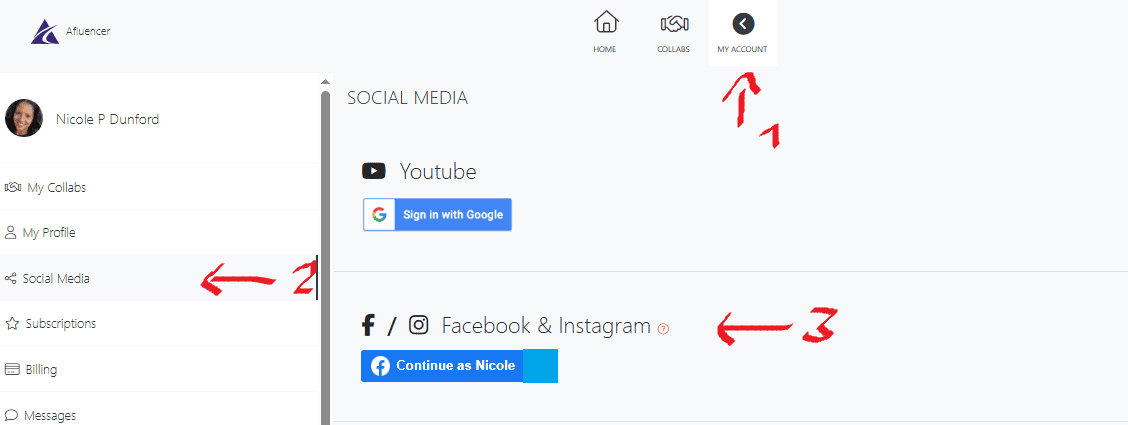
Influencers often ask this. No wonder it’s top of the influencer platform troubleshooting questions and it’s usually an easy fix.
The main issue? Your Instagram account isn’t set up as a Business or Creator account. Personal accounts won’t connect to Afluencer.
Another common reason: your IG isn’t linked to a Facebook Page. Not your personal Facebook profile—a proper Page. Meta requires this for all third-party tools.
Here’s how to fix it:
Still not working? Log out and back in. Or clear your browser cache.
If you’re stuck, you can check out this post for more details. You can also reach out to Afluencer tech support through Concierge. We’ll walk you through it step-by-step.
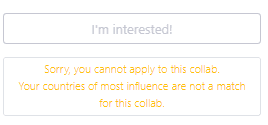
This message shows up when your audience location doesn’t match the Collab’s requirements.
Afluencer uses your Instagram audience data to determine where most of your followers are based. If your top audience isn’t in the country the brand is targeting, you might see this message.
Here’s how to fix it:
Still seeing the mismatch? It could also be that your follower base isn’t strong in that specific region.
This is a common influencer platform troubleshooting issue, especially for creators with global audiences. If you think it’s a mistake, reach out to the Afluencer tech support team and we’ll take a look.
You’ve found the perfect match but the Message or Invite button is greyed out. Why?
There are a few reasons this happens.
First, your Collab filters might be blocking interaction. For example, if your Collab only accepts U.S.-based creators and you want to message someone outside that region, messaging may be restricted.
Second, your current brand plan may limit messaging options.
Afluencer’s free plan for brands gives you the ability to send one influencer invite per day. This feature lets you directly reach out to influencers whose profiles match your campaign criteria. So, if you’ve already used your daily invite, the button may be temporarily unavailable.
Here’s what to do:
Need help? Reach out to the Afluencer tech support team. We’ll get you unstuck fast. Here’s a quick video on how to invite an influencer to your collab.
You’ve found a Collab that feels like a perfect fit, but the Apply button isn’t working. Don’t panic. It’s a common influencer platform troubleshooting issue.
Here’s why it usually happens:
To fix it:
Still think you qualify? Reach out to Afluencer tech support for a second look. We’ll help you sort it out and keep your Collab momentum going.
Don’t worry, “pending” is normal.
Once you apply to a Collab, your application goes to the brand for review. Until they take action, it stays in pending status.
Some brands respond quickly. Others take more time to look through all their applicants.
Here’s what you can do while you wait:
This is one of the most common influencer platform troubleshooting questions, especially for new users who expect instant feedback.
This message is based on your Instagram audience data, not your actual location.
Afluencer looks at where the majority of your followers are based. If most of them are outside the U.S., you may see this message when trying to apply to Collabs that are U.S.-only.
Even if you live in the U.S., this can happen, especially if your audience was built through global giveaways, paid promotions, or follower boosts.
Unfortunately, there’s no instant fix. But here’s what you can do:
Our Afluencer tech support get’s this question a lot. Monitoring your audience data over time can help you align with Collabs that fit your current reach.
You did everything right but nothing’s showing on your profile? It’s a classic case of influencer platform troubleshooting Here’s what’s likely happening.
Most of the time it’s a sync delay. After connecting your Instagram, it can take a few minutes for your audience data and insights to load into Afluencer.
If waiting doesn’t help, here are some steps to troubleshoot:
If it’s still not showing, it could be one of these issues:
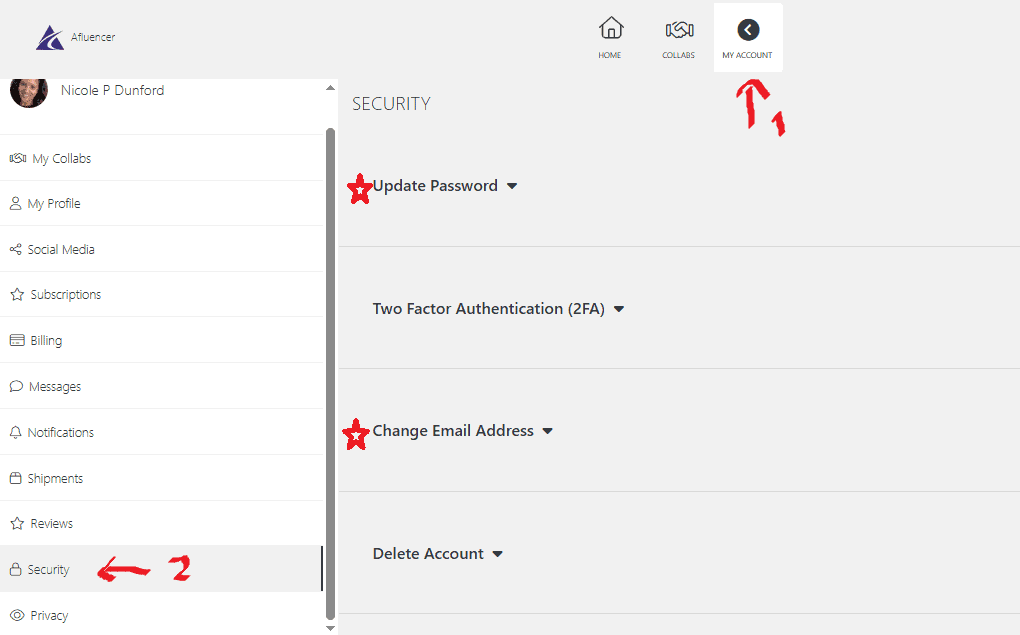
Need to update your contact info or reset your login details? It’s easy.
Just head to My Account, then click Security (bottom left).
From there:
Forgot your password completely? Just click “Forgot Password” on the login screen and follow the reset instructions sent to your email.
Small fixes like this don’t need to slow you down—and they’re exactly the kind of questions this influencer platform troubleshooting guide is here to answer.
Need more help down the line? That’s where Afluencer tech support comes in.
Need to update your billing info or remove a saved card? No problem.
Log in, click My Account, then:
Heads up: If you’re on an active subscription, you may need to cancel your plan before removing your card completely.
We know influencer platform troubleshooting can be a drag, but luckily this is a quick fix in most cases.
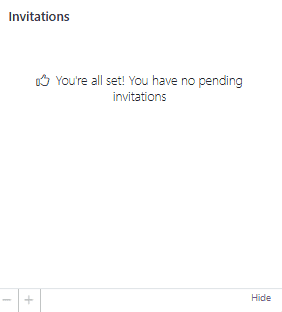
If your inbox is too quiet, don’t panic, it’s usually a visibility thing.
Brands are more likely to invite influencers who:
If any of those are missing, you might not appear in filtered searches.
Want to level up? Check out our guide on what makes an influencer profile stand out.
Tech glitches happen—but they don’t have to derail your Collab journey.
From login hiccups to IG connection issues, this guide covers the most common questions we see from both brands and influencers. Now you’ve got the tools to troubleshoot them fast—and keep moving forward.
Questions come up—we get it. Afluencer’s AI-powered Concierge is available 24/7 to help you master influencer marketing like a pro. Or contact our support team directly!
Ready to put those fixes to work?
Update your profile or post your next Collab now.





