


Are your blog articles getting lost in the noise, failing to attract readers and convert?
The problem might not be your content itself, but how you format it. Article formatting isn’t just about aesthetics—it’s a strategic layer that can transform how readers engage with your content while ensuring your pages get seen by search engines. From improving readability to naturally guiding readers toward key takeaways, blog article formatting plays a pivotal role in boosting traffic, engagement, conversions, and SEO success. This post will serve as your guide to crafting polished, reader-friendly articles that perform exceptionally well in search rankings—whether you’re aiming to publish your first 100 articles or enhance the effectiveness of your current content strategy. Let’s get started.For an additional perspective on structuring your blogs, check out this video:

In today’s fast-paced digital world, readers aren’t just looking for great content—they want that content to be easy to consume and actionable. Formatting plays an unsung but critical role in determining whether an article captivates readers or gets skimmed and forgotten. Beyond aesthetic concerns, effective formatting can enhance engagement, make information scannable, and improve search engine visibility. Let’s explore the foundational principles that bring clarity and usability to your articles.
Your article could contain groundbreaking insights, but if readers struggle to understand it, all is lost. Readability determines how easily your audience can process and retain the information you’re sharing. A widely recognized tool here is the Flesch-Kincaid readability test, which rates texts on a scale based on complexity. For blog articles, aim to hit a score between 60-70—this ensures a balance between professional depth and accessibility.
Complicated sentence structures or industry jargon can alienate readers who may bounce off your page. Tools like Hemingway Editor can simplify phrasing, helping maintain reader engagement. Remember: the easier the article is to read, the longer visitors stay, signaling positive engagement to search engines.
For those writing within competitive niches like SEO-driven content marketing, this principle isn’t just helpful—it’s indispensable.
Most online readers don’t read articles word-for-word; instead, they scan for the key insights they need. Structuring your content for scannability ensures your audience can quickly locate and digest the main points. Formatting tools such as headings, bullet points, short paragraphs, and highlighted phrases are critical to guiding your readers through the piece.
A proven strategy to optimize for scannability is the inverted pyramid model, widely used in journalism. This approach places the most critical information at the beginning of the article, gradually tapering to supplemental details. Think of it as front-loading value—you capture attention up top so the reader is invested enough to continue.
For even more actionable tips on scannability, take a look at these blog writing basics to ensure your message isn’t lost in clutter.
No two audiences are identical, and your article should reflect the particular goals of its readers. A format tailored to different types of user intent can significantly enhance engagement.
Understanding the why behind user searches gives you a roadmap for how to frame your content. A good starting point for building intent-specific strategies is this guide on content curation for better engagement.
An often-overlooked aspect of formatting is ensuring that your content is inclusive for all users, regardless of any physical, visual, or cognitive limitations. Here’s how to design articles that everyone, including those with disabilities, can enjoy:
For a practical resource on designing inclusive and SEO-driven articles, you might explore this comprehensive guide on blog formatting.
Configurability is key. By addressing readability, scannability, user intent alignment, and accessibility, any article can become more engaging and impactful. These principles aren’t casual recommendations—they’re the foundation for creating content that connects.
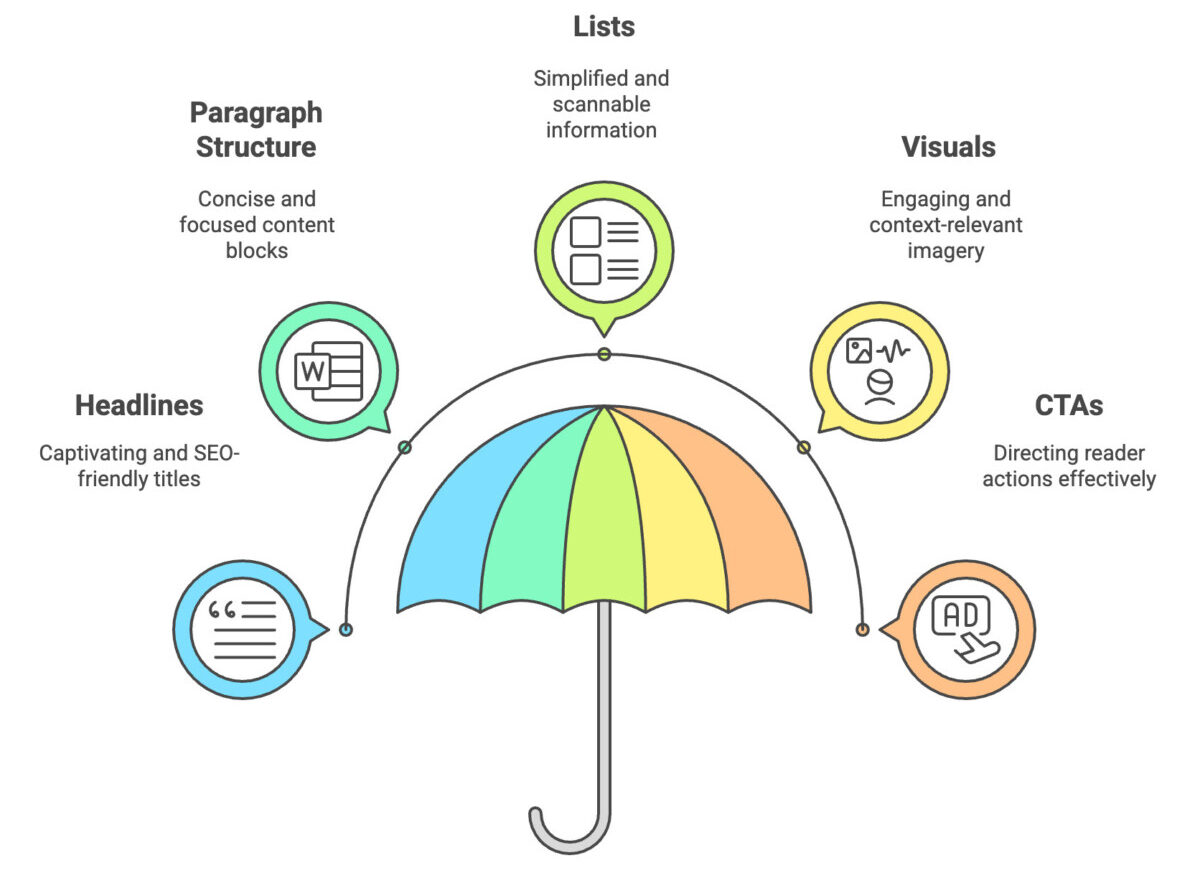
Crafting an engaging and well-structured blog article is an art and a science. The way your content is presented can significantly impact reader engagement, readability, and even SEO performance. Whether you’re writing about broad topics or specific queries like what is ORM in SEO, a clear and strategic format ensures your message resonates with your audience. Here’s a detailed breakdown of the essential elements that elevate your blog format into a user-friendly and effective experience.
Your headline is the gateway to your article. It determines whether readers click through or scroll past, and it plays a vital role in SEO. A compelling headline should combine clarity, curiosity, and benefit-driven phrasing, all while incorporating keywords. For example, instead of “Ecommerce Trends for 2024,” a more enticing option could be “The Top 5 Ecommerce Trends You Can’t Afford to Ignore in 2024.” Notice how it emphasizes value and urgency.
To support navigation, use hierarchical headings (H2-H6) throughout your article. These subheadings don’t just break down content for readers—they also signal importance to search engines. Here’s a quick structure for clarity:
Need inspiration for writing energy-filled headlines? Start here: A Guide to Writing Irresistible Content for Ecommerce Websites.
A reader’s attention span is short—a wall of unstructured text can turn them away in seconds. The ideal blog paragraph consists of 2-4 sentences focused on a single topic. This keeps your content skimmable and avoids unnecessary complexity. Each paragraph should begin with a clear topic sentence that introduces the key idea and guides the reader.
Avoid overloading your writing. Chunk down sections into digestible units, separated by subheadings. For example, if discussing a complex tactic like ecommerce launch plans marketing strategies, highlight one actionable insight per paragraph to maintain readability and flow.
Shorter paragraphs appeal visually to readers, especially when paired with tools like bulleted lists or blockquotes.
Lists are your best friend when it comes to scannability. Whether you’re delivering a set of tips or breaking down statistics, bullet points and numbered formats simplify information processing. Here’s why lists work:
When creating lists, ensure each point is concise and action-driven. Use sub-bullets sparingly to maintain clarity and avoid clutter.
They say a picture is worth a thousand words—and in blogs, visuals often complement or enhance written content. From images and charts to infographics, strong visuals can capture attention and elevate user engagement. But don’t just add visuals; optimize them to align with SEO best practices:
Well-placed infographics can make complex data more digestible, while custom visuals offer a unique touch that sets your content apart. If visual optimization feels overwhelming, tools like Canva or TinyPNG can be a lifesaver.
A blog article without a clear call-to-action (CTA) is a conversation that leaves readers hanging. Your CTA could direct readers to subscribe, explore a related article, or purchase a product. Here’s how to format CTAs effectively:
For example, an ecommerce blog could include a CTA like this: “Want actionable tips to transform your Shopify store? Check out 8 Techniques to Improve Your Shopify Store’s Blog Content.” This approach encourages readers to dive deeper without being pushy.
Thoughtful formatting doesn’t just improve aesthetics—it optimizes functionality, ensuring your message connects effectively with both readers and search engines.
One size doesn’t fit all when it comes to formatting blogs. Each article type serves a unique purpose and demands distinct formatting to maximize engagement and readability. Whether you’re producing a detailed how-to guide or a shareable listicle, proper formatting ensures your content delivers value while keeping your audience hooked. Below, I’ll break down the essentials of structuring various types of articles to match their unique goals.
How-to guides thrive on clarity. Readers come to these articles looking for actionable steps they can follow to achieve specific results. To make it easier for them:
For instance, if you’re helping store owners improve their product listings, you might link to guidelines like 10 Ways To Write Product Descriptions That Inform And Persuade for examples of successful descriptions.
Listicles are among the most scannable and shareable content formats. They perform well because they promise quick takeaways and are easy to digest. To optimize your listicle:
Not sure whether a listicle will be the right format? A strong example of list tactics can be found in ecommerce-focused content like How To Use AI To Write Engaging Ecommerce Blogs.
Pillar pages act as comprehensive resources on a specific topic, often meant to interlink several related pieces of content. Because these pages are longer, proper navigation and structure are essential.
Pillar pages help educate readers thoroughly on a subject, much like guides on effective ecommerce practices, such as Microcopy: Why Tiny Words Matter, which offers insights into improving written text on webpages.
Comparison articles work best when they provide a straightforward side-by-side evaluation. Readers need a format they can digest quickly for decision-making:
Tables and pros/cons layouts can be especially handy when you’re drawing distinctions between software tools, Shopify apps, or similar ecommerce solutions. If you’d like a more hands-on approach to this kind of formatting, resources like Mastering AI Content Creation: The Power Of Prompt Pairing offer great examples.
For news-based articles or standard blog posts, brevity and focus on readability are critical since these formats aim to provide quick insights and updates.
Plotting the right structure for each article type helps you create compelling, digestible content. By doing so, readers not only find answers faster but are also more likely to click, share, and return for more. Keep these tips as your template for smarter formatting decisions.
In today’s digital world, designing your blog articles to be mobile-friendly isn’t optional—it’s essential. Readers increasingly use mobile devices to consume content, and if your article format doesn’t adapt to various screen sizes, your audience may bounce before fully engaging. Let’s explore best practices to ensure your content looks and functions flawlessly across mobile devices.
Crafting a responsive design ensures your blog adapts seamlessly to any screen size. This involves using layouts that adjust dynamically, whether your reader is on a smartphone or a tablet. A responsive approach avoids forcing users to zoom or scroll horizontally, which directly improves their experience. Keep your layout simple, and prioritize mobile compatibility from the start. Ultimately, your content should be accessible and clear, regardless of where it’s being read.
Consider the insights shared in Tapping the Huge Market for Mobile-Optimized Apps, which emphasizes that apps—and the same applies to blogs—should adjust visually to smaller screens while retaining functionality.
Your font choices can make or break readability on mobile. Aim for a font size of at least 16px for body text and ensure titles use larger sizes to create visual hierarchy. Maintain adequate line spacing (1.5–1.8x the font size) to avoid squished text blocks. For color contrast, ensure high visibility between text and the background.
Studies have shown that illegible fonts and poor spacing are top reasons users abandon pages. Test various combinations to find what works best, taking cues from practices discussed by 10 Best Practices to Make a Mobile-Friendly Website, which highlights legibility as a key factor.
Large image files can significantly slow load times, especially on mobile networks. Compress images to reduce file size without losing quality, and utilize responsive image formats like WebP. This format is lightweight and designed for mobile compatibility. Serving high-resolution images to users who don’t need them wastes bandwidth and undermines a smooth experience.
To streamline load times and improve responsiveness, refer to Mobile Popup Best Practices, which underscores how mobile users favor lightweight, visually balanced layouts over bulky designs.
Tips to optimize media effectively:
No matter how well-designed your content appears on your desktop, testing on actual mobile devices is non-negotiable. Use tools like Google Mobile-Friendly Test or browser developer tools to preview your content on various screen sizes and troubleshoot discrepancies. Pay attention to elements like clickable buttons, which must remain tappable and spaced-out on touch screens.
For an end-to-end walkthrough, Tips for Keeping Your Site Mobile-Friendly offers insights into essential checks, such as reducing page size below 5 MB to maintain functionality across slower mobile connections.
Responsive formatting creates a better first impression, and with design practices tailored to mobile users, your content keeps readers engaged.
Proper formatting isn’t just a stylistic choice—it’s a critical factor in improving SEO and driving organic traffic. Effective formatting helps search engines better understand your content while enhancing readability for your audience. This section dives into actionable SEO-focused strategies that seamlessly elevate formatting without compromising user experience.
Placing the right keywords in strategic locations within your content can amplify SEO outcomes. Keywords should appear naturally and avoid feeling forced or repetitive. Here are some key tactics:
Balance is fundamental. Keywords should guide search engines without sacrificing the integrity of your writing. For further insights, check out Tips And Tricks For Improving SEO Ranking, which outlines practical approaches to keyword integration.
Internal linking is more than a navigation tool—it’s a strategy to enhance SEO and improve user pathways. By thoughtfully placing links, you provide readers with additional resources while boosting your website’s SEO authority.
Linking is like adding stepping stones across a river. You help guide your reader from one useful piece of content to the next, improving navigation and retention.
Schema markup is a straightforward way to make your content more appealing to search engines and users by helping Google better interpret your article’s structure. When applied correctly, it enhances search visibility with features like rich snippets.
BlogPosting or Article to provide metadata about your blog posts. This could include details like the author, date published, and main content.By clearly signaling the structure of your content to search engines, you increase your chances of standing out in search results. For a guide on boosting SEO through structured formatting, explore resources like SEO Formatting: Best Practices to Boost Ranking.
By integrating strategic keyword placement, mindful internal linking, and schema markup, your content aligns with both SEO best practices and user-focused design. This layered approach enhances discoverability while keeping the reader engaged.
Formatting plays an integral role in how your blog post is perceived by both readers and search engines. When you optimize formatting effectively, you create a seamless reading experience that retains attention, communicates professionalism, and supports your overall SEO efforts. To ensure every element of your article is polished, here are the tools and resources you need.
Content that flows smoothly and avoids errors builds credibility and fosters trust with readers. Tools like Grammarly and Hemingway Editor are indispensable for perfecting the readability and clarity of your writing.
Looking to elevate clarity even further? Check out 15 Best Readability Scoring and Checker Tools for additional resources tailored to various content needs.
Visual elements enhance engagement levels and make your articles more memorable. While compelling visuals are critical, optimizing them for web use is equally important to avoid hurting page load times. A combination of tools like Canva and TinyPNG can help create eye-catching graphics without compromising performance.
For more on staying reader-focused while trimming unnecessary load times, visit 10 Best Readability Tools to Improve Content.
Mobile optimization is non-negotiable when the majority of traffic comes from users on smartphones or tablets. Tools like Google’s Mobile-Friendly Test offer an easy way to ensure your content delivers an optimal user experience on smaller screens.
Keep readers engaged no matter where they consume your content with tools like the Mobile Friendly Test.
Strategically employing these tools ensures your blog isn’t just content-rich, but also professional, user-focused, and optimized for technical performance. With proper formats and resources in place, your content stands as a model of readability and accessibility across platforms.
Mastering blog article formatting isn’t just about polished aesthetics—it’s about creating an impactful reader experience and driving results. From structuring content with clear headings and bullet points to using visual elements that enhance comprehension, everything about your format should serve both readability and strategic goals.
Remember, great formatting ensures readers stay engaged, find value, and take action. Ready to transform your blog articles? Start by implementing key takeaways like concise paragraphs and actionable CTAs in your next post. Watch as your content delivers higher engagement and improved performance in no time.
For additional insights on enhancing your content strategy, explore How To Design An Effective Content Marketing Strategy? A Beginner’s Guide.
Blog article formatting ensures your content is easy to read and find by both readers and search engines. Well-organized articles improve user experience, encouraging longer time on site and lower bounce rates, both of which signal quality to search engines. Proper formatting also boosts accessibility and retention, turning casual visitors into loyal readers or customers.
The foundations of effective formatting include readability, scannability, alignment with user intent, and accessibility. These principles focus on structuring content to be visually appealing, intuitive to navigate, and digestible for different audiences while ensuring inclusivity through accessible designs.
Readable content makes it easier for users to understand and engage with your message. Tools like the Flesch-Kincaid readability test can guide writers to simplify sentence structures and avoid jargon, keeping reading levels between 60-70. When content feels approachable, readers stay longer and are more likely to share or return.
Most readers skim online content, so structuring your article with headings, bullet points, and short paragraphs ensures they find value quickly. Scannability hooks attention and helps readers locate key takeaways, increasing the chances they’ll stay, engage, or act on the information.
Yes, lack of formatting can harm SEO by reducing engagement metrics like time on site or scroll depth. Search engines favor well-organized content that prioritizes readability and accessibility. Without proper formatting, your content risks being overlooked in search engine results, even if it’s valuable.
Many believe formatting is just about making content “look good.” In reality, formatting serves a strategic purpose: improving the user experience, boosting SEO, and aligning content with reader expectations. It’s not merely aesthetic but essential for performance.
User intent dictates how your article should be organized to meet specific reader needs. For example, “how-to” guides benefit from numbered steps and visual aids, while comparison articles shine with tables and pros-and-cons overviews. Tailoring your format increases relevance and engagement.
Start by restructuring paragraphs to 2-4 sentences and adding descriptive subheadings. Use bullet points or numbered lists to break down key ideas, and include high-quality visuals optimized for fast loading. These small changes create immediate improvements in readability and usability.
To optimize for mobile, ensure responsive design, readable fonts (at least 16px), and proper spacing between elements. Compress images and test your content across devices to avoid issues like horizontal scrolling. Mobile-friendly formatting improves user experience and helps your blog rank better with mobile-first indexing.
Accessibility in formatting is sometimes ignored but is crucial for ensuring content reaches all users. Features like descriptive alt text for images, high-contrast designs, and clear font choices help people with disabilities engage with your content. These practices enhance usability and reflect inclusivity, appealing to a broader audience.




