
An ecommerce engineering team can make a store readable to AI answer engines in one quarter. Ship five tickets: server-rendered product pages, a clear crawler policy, complete product markup, one URL per product and fast templates. Each one has a pass or fail test.
Most GEO advice starts with content. For an engineering team it starts lower: if your price only exists after JavaScript runs, ChatGPT’s crawlers never see it, no matter how good the copy is.
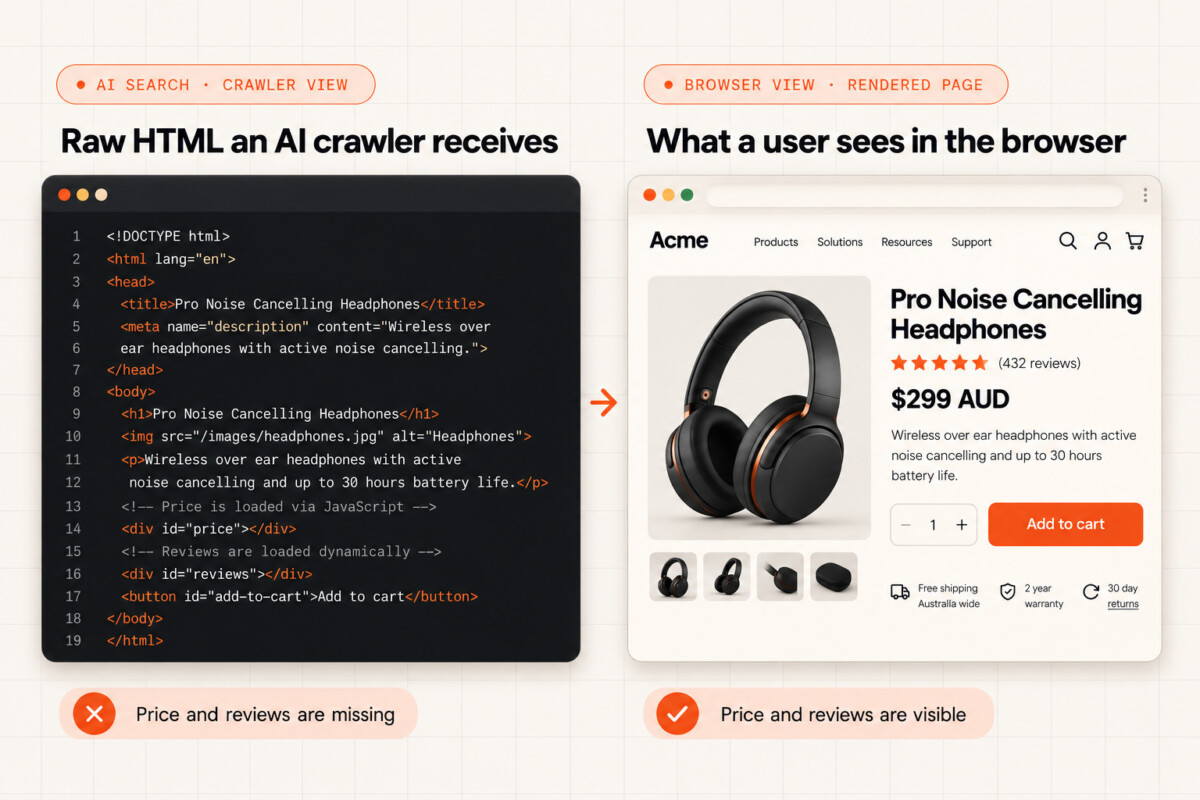
A shopper asks ChatGPT for a waterproof shell jacket under $200. OAI-SearchBot fetches your product page and gets back HTML with an empty price slot, because a currency app fills it in after the page loads in a browser. Your jacket is in stock, priced right and well reviewed, and the answer names someone else’s. That scenario is illustrative, but the mechanism behind it is documented, and every step of it lives in code your engineering team owns.
GEO (generative engine optimization) means getting AI systems to find your pages, cite them and describe your products correctly. This article covers only the engineering side: tasks that fit in a sprint and pass or fail against a clear test. The decision to be visible is already made. The tickets are yours.
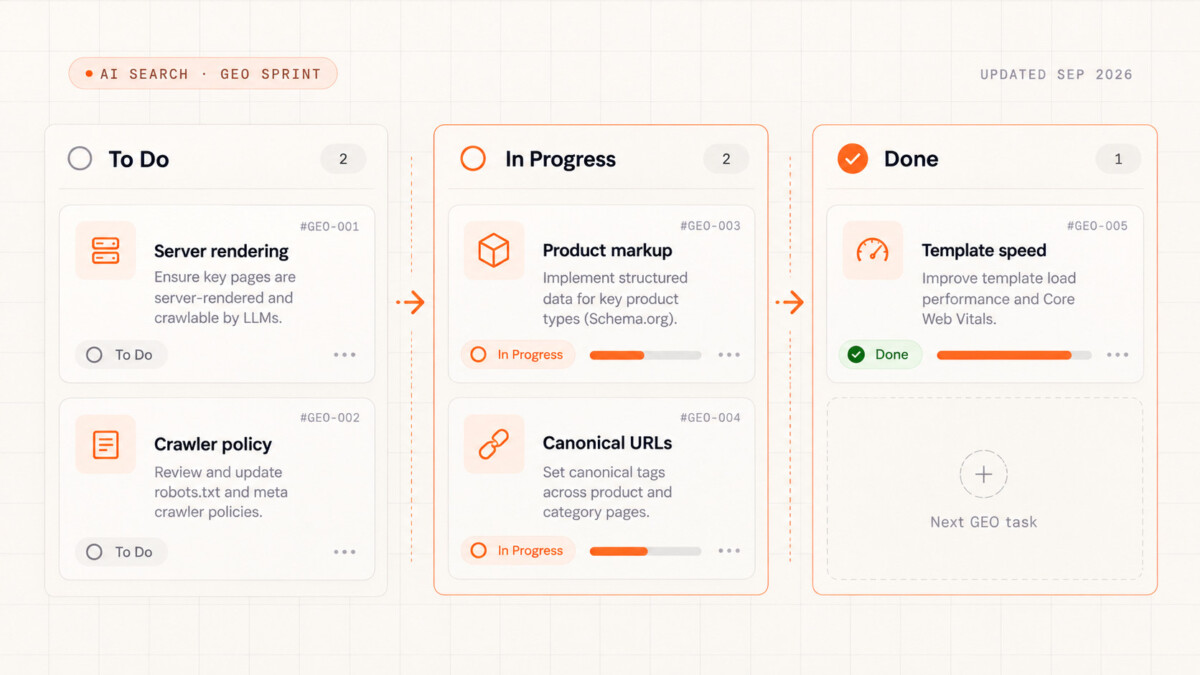
Five tickets go on the list: server-rendered product and collection pages, an AI crawler policy, complete product markup, one URL per product and fast templates. Each one clears a hurdle an AI system has to get past before it can recommend your product. It needs to reach the page, be allowed in, work out which product it’s looking at, pick the right URL and get a fast response.
Order matters. Rendering and crawler access come first, because nothing else counts until AI systems can read the page. Markup, URLs and speed then improve what they find.
Use the last column as your acceptance criteria. A ticket that can’t pass it isn’t done. Each section below expands that cell into the full test, including the edge cases that make a ticket look finished in staging and fail in production.
AI crawlers can read your product pages only if the content is in the HTML your server sends, because most major AI crawlers don’t run JavaScript.
Vercel and MERJ’s analysis of AI crawler traffic, published in December 2024, found that none of the major AI crawlers ran JavaScript. That included OpenAI’s OAI-SearchBot, ChatGPT-User and GPTBot, Anthropic’s ClaudeBot, PerplexityBot, Meta’s crawler and ByteDance’s Bytespider. ChatGPT’s crawlers downloaded JavaScript files in 11.50% of requests and Claude’s in 23.84%, but neither ran them. The exceptions were Google’s Gemini (via Googlebot’s infrastructure) and AppleBot. Crawler behavior can change, so treat this as a snapshot from that study and confirm it against your own logs.
Standard Shopify themes build pages on the server, so core product data usually lands in the HTML. Problems come from things added later in the browser: review apps that load stars by script, currency converters that rewrite prices, size guides and stock badges that load after the page, and headless builds that fetch product data in the browser. Hydrogen and Next.js storefronts can render everything on the server. Check each template to confirm yours does.
The quickest test is to fetch a product page the way a crawler does. Run curl with an AI crawler’s user agent, then search the output for the price, stock status and first line of the description. If something only shows up in a browser, AI crawlers never see it.
Rendering only gets crawlers through the door. What gets your product named once they can read it, such as comparisons, reviews and outside coverage, is covered in Steve Hutt’s guide to generative engine optimization for ecommerce.
Definition of done: on every product and collection template that drives revenue, the raw HTML includes the product name, price, stock status, description, key specs, the rating (if shown) and the JSON-LD block. Add this check to CI so a theme update or new app can’t break it unnoticed.
Blocking a training bot like GPTBot keeps your pages out of future model training without touching ChatGPT search, but blocking a search or agent bot removes you from live AI answers, and a CDN default can do both without anyone noticing.
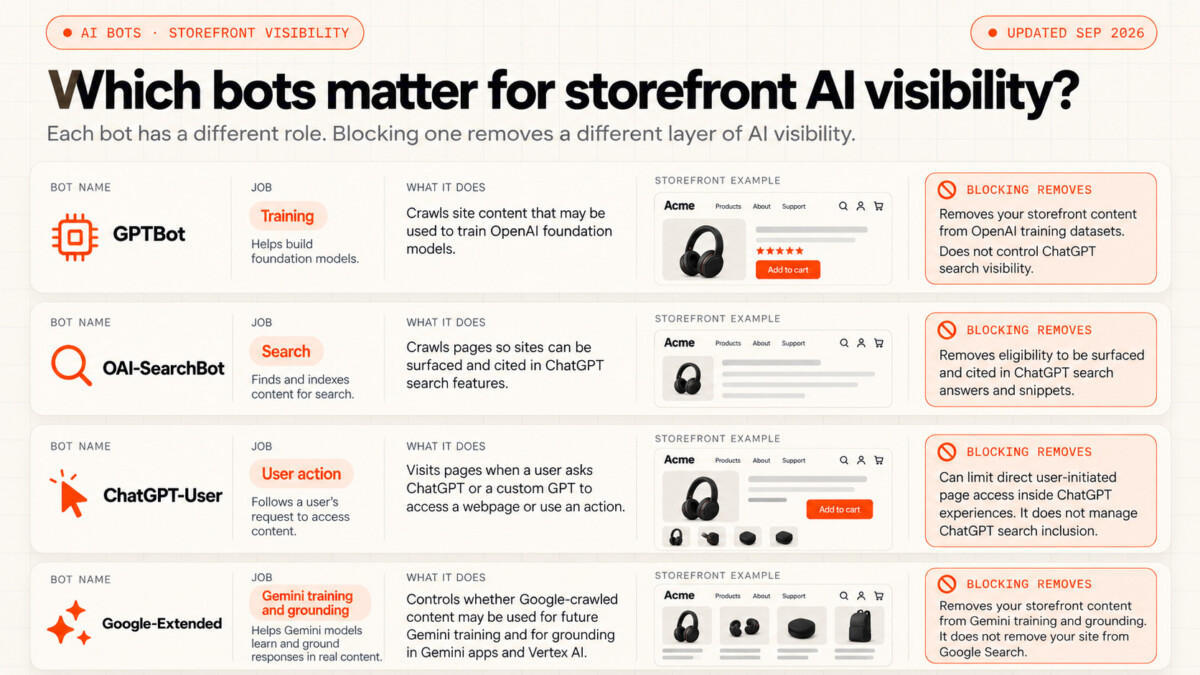
OpenAI’s crawler documentation lists a separate bot for each job, and you control each one separately. GPTBot collects content for model training. OAI-SearchBot powers ChatGPT search; if you block it, your pages won’t appear in ChatGPT search answers, apart from basic navigational links. ChatGPT-User only visits when a user’s request calls for it, and because those visits are user initiated, OpenAI notes that robots.txt rules may not apply, so your CDN and firewall rules are the real control for that bot. OpenAI says search changes take about 24 hours to apply after you update robots.txt.
Google works differently. Google-Extended is a robots.txt product token, not a separate crawler. It controls whether Google uses your content to train Gemini and to ground answers in Gemini Apps and Vertex AI. It has no effect on inclusion in Google Search. Google’s guidance on AI features describes AI Overviews and AI Mode as part of Search, where your Googlebot rules are the access control.
Accidental blocks usually happen at the CDN. On July 1, 2025, Cloudflare changed its default to block AI crawlers. A block at the CDN stops a bot before your robots.txt rules even come into play. These defaults apply when you run your own Cloudflare or other CDN zone in front of the store, which is common on headless builds; a standard Shopify theme sits behind Shopify’s own edge, where robots.txt.liquid is your main control.
Cloudflare’s 2026 update split AI traffic into three groups: Search, Agent and Training. From September 15, 2026, new domains onboarding to Cloudflare block Training and Agent bots by default on pages that show ads. An Agent bot visits a page for a person, which is exactly what a shopping assistant does.
Shopify creates a default robots.txt. You change it through the robots.txt.liquid template, which replaces the generated file, so compare it against the original output before you publish.
Definition of done: a one-page policy that lists each AI bot (GPTBot, OAI-SearchBot, ChatGPT-User, Google-Extended, plus Anthropic’s and Perplexity’s equivalents), whether it’s allowed or blocked, and why. Robots.txt.liquid, CDN settings and firewall rules all match the policy. Within a week of release, server or CDN logs show every allowed bot getting 200 responses on product pages.
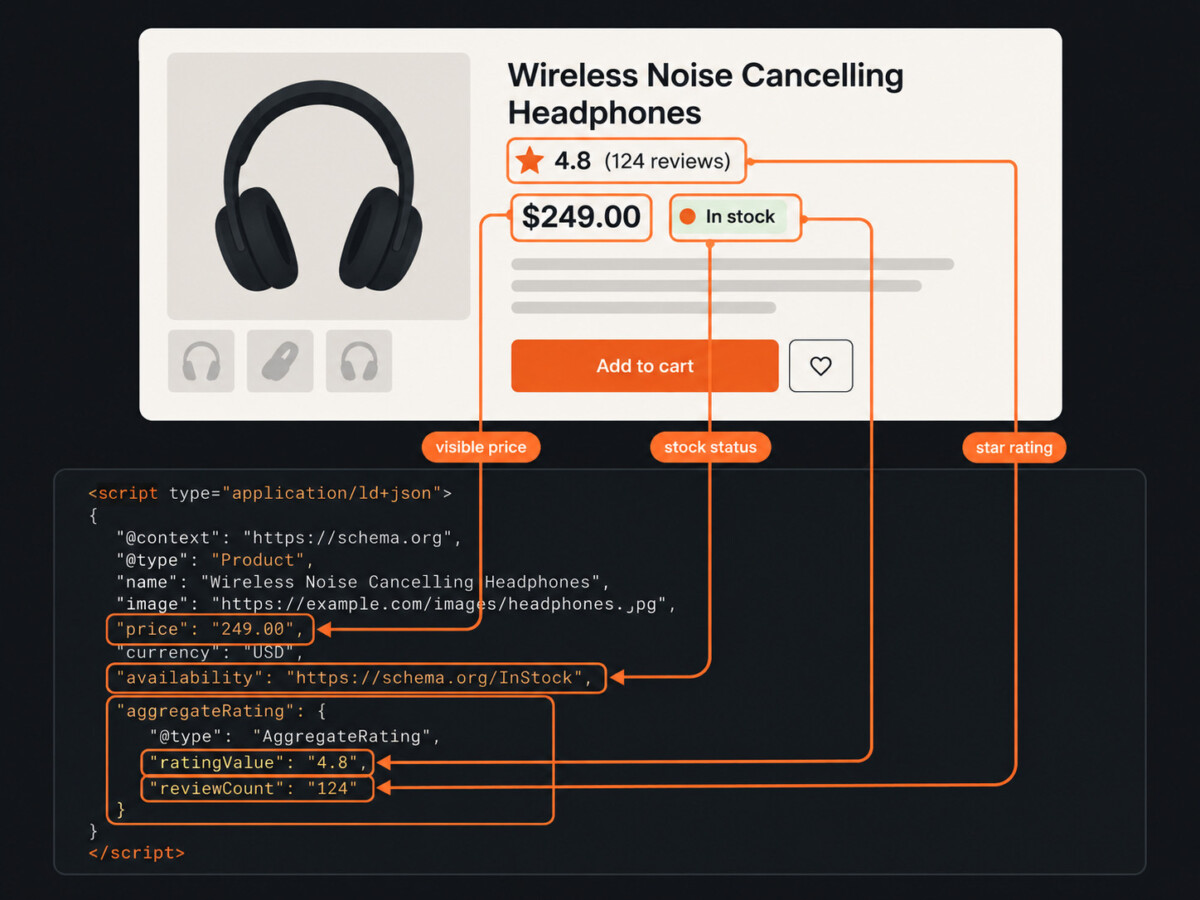
Your product markup identifies the product when three things are true: Product, Offer and AggregateRating markup sits in the initial HTML, it includes a global product ID, and it matches what the shopper sees.
Google’s merchant listing documentation recommends putting product markup in the initial HTML. Markup added by JavaScript can make Google’s Shopping crawls less frequent and less reliable. That’s a problem for fields that change often, like price and stock. Google also asks for every product ID that applies, using the most specific GTIN type.
Clear product identity is a core part of the wider discipline covered in a practical GEO guide. An AI system needs to know exactly which product a page describes before it can accurately reference it. A GTIN helps establish that identity across your product page, Merchant Center feed, Amazon and other retailers’ listings. Brand and SKU provide additional context. Without consistent identifiers, matching the same product across different sources becomes harder.
Variants need their own markup. Google’s product variant guidance uses ProductGroup to link sizes and colors to one parent product, with the variesBy, hasVariant and productGroupID properties.
Review widgets can break a ratings rule. Google’s review snippet guidelines say that if you mark up an AggregateRating, shoppers must be able to see that rating on the page. Stars hidden in a closed tab, or loaded after the page renders, fail that test.
Shopify’s guide to ecommerce schema explains that themes add product markup through the structured_data Liquid filter. Treat that as a starting point. Check variant-heavy products, where the markup can show the default variant’s price while the shopper has picked a different one.
Definition of done: every product page has one Product or ProductGroup block in the initial HTML. Price, currency and stock match the variant on screen. It includes a GTIN where one exists, plus brand and SKU. AggregateRating appears only when the rating is visible. Google’s Rich Results Test passes on 20 sample products, including at least five with variants.
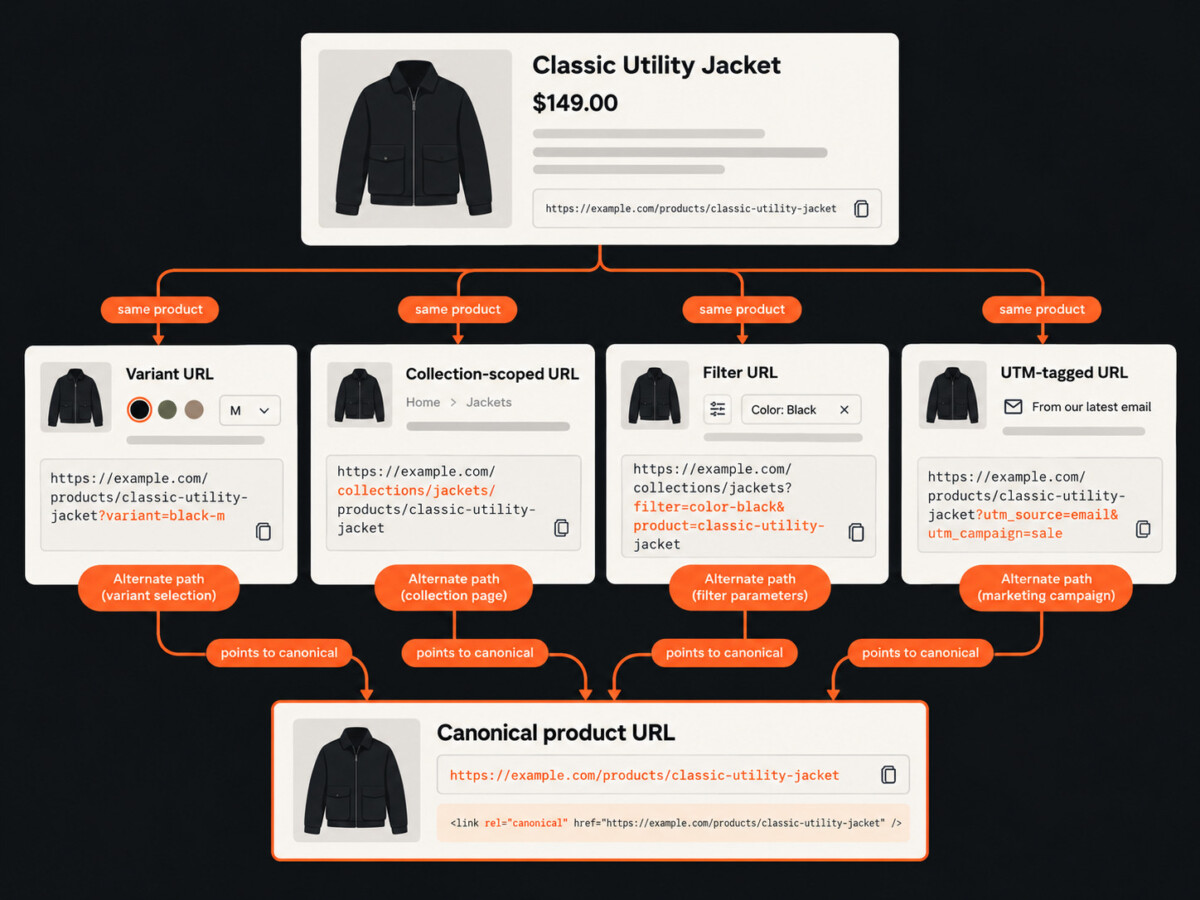
One product can have dozens of URLs once variant parameters, collection paths, filters and tracking tags each create their own, and every one of them should point to a single canonical URL.
Here’s an illustrative example. A jacket in four colors and five sizes, sold with a variant parameter and listed in two collections, can have 20 variant URLs plus two collection URLs. That’s before any filters or UTM tags. Each URL competes with the others for the same signals.
AI crawlers waste a lot of requests on bad URLs. In the same Vercel and MERJ study, ChatGPT spent 34.82% of its fetches on 404 pages and another 14.36% on redirects. Claude hit 404s on 34.16% of fetches. Googlebot spent just 8.22% on 404s and 1.49% on redirects. Every dead or redirecting URL on your store uses up fetches that could have gone to real product pages.
Filters create the most extra URLs. Google’s faceted navigation guidance offers two options. If filter pages don’t need to be in search, stop crawlers from reaching them. If they do, keep filters in a fixed order, block duplicate filters, and return a 404 when a filter combination has no products. Google says canonical tags on filter URLs are generally less effective in the long term than either option.
Definition of done: a full site crawl shows each product resolving to one canonical URL. Variant and collection URLs point to that canonical. Internal links and the XML sitemap use canonical URLs only. Filter URLs are either blocked or follow Google’s rules, empty filter pages return 404, and no redirect chain has more than one hop.
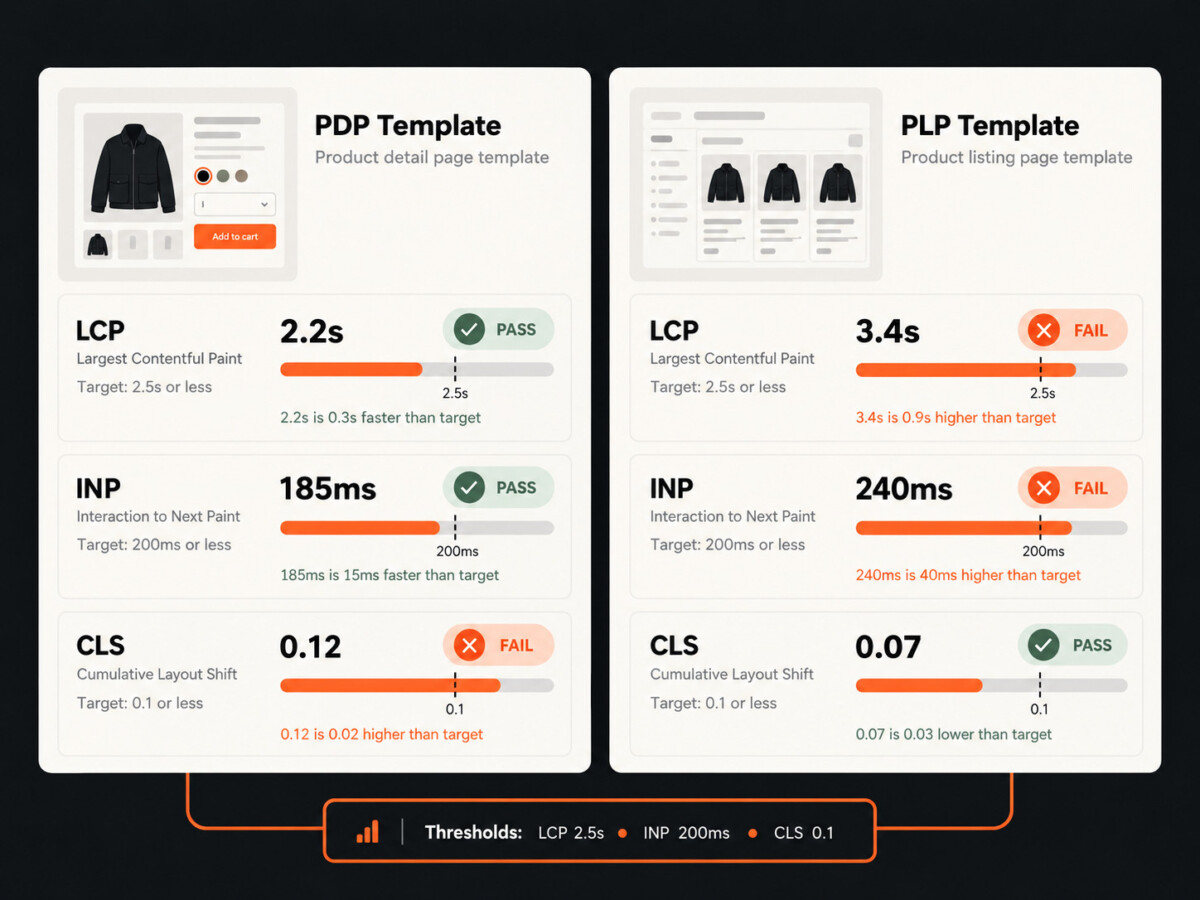
PDPs and PLPs should hit Google’s Core Web Vitals targets on every revenue template and keep server response times steady, because Google crawls less when your pages slow down.
The Core Web Vitals targets are LCP within 2.5 seconds, INP of 200 milliseconds or less and CLS of 0.1 or less. Google measures them at the 75th percentile of page loads, on mobile and desktop. A template passes when it meets all three. If your theme is failing one of them, this walkthrough on improving Core Web Vitals on Shopify covers the usual fixes for each metric.
Google’s crawl budget guide explains the link to crawling. When your response times, including time to first byte, stay steady or improve, Google crawls more. When the site slows down or returns 5xx or 429 errors, Google crawls less. Google’s AI features guidance also says AI Overviews and AI Mode have no extra requirements beyond standard Search eligibility. So if Google crawls less of your catalog, its AI features have less of it to work with.
No AI engine publishes a speed target for retrieval. Google’s numbers are the clearest benchmark available, so build to those.
Collection pages have one specific trap. Infinite scroll and “load more” buttons that load products with JavaScript hide everything after the first batch from AI crawlers. Plain paginated links in the HTML fix this.
Definition of done: product and collection templates pass all three Core Web Vitals at the 75th percentile in real-user data. Server response times stay steady during peak traffic, with no spikes of 5xx or 429 errors in crawler logs. Every product on a collection page can be reached through a plain HTML link.
Ship rendering and crawler access first at every stage, because markup, URLs and speed only help once AI systems can read the page.
Launching or early. Check two settings this week: your robots.txt and your CDN’s AI bot controls. Then run the raw HTML test on your three busiest templates.
Finding repeatable growth. Audit your apps. Any review widget, pricing tool or upsell block added since launch can load content in the browser or change your markup. Rerun the raw HTML test after every new install.
Building the operation. Clean up duplicate URLs and add the rendering and markup checks to CI, so theme updates don’t undo your work.
Eight figures and beyond. If you run a headless storefront, confirm server rendering on every template type. Track crawler logs per bot, and treat any drop in 200 responses to OAI-SearchBot as an incident. If agent-led buying is on your roadmap, make sure your CDN isn’t blocking Agent traffic. Fastlane’s breakdown of the Shopify Agentic plan shows where that’s heading.
Once all five tickets are closed, check the results. Rerun the raw HTML tests, review crawler logs for each allowed bot, then track whether your products start showing up in AI answers using one of the AI visibility tools Fastlane has mapped.
No, blocking GPTBot does not remove your store from ChatGPT search, because OpenAI uses GPTBot for model training and OAI-SearchBot for ChatGPT search, and robots.txt controls each one separately. Disallow GPTBot to opt out of training, and allow OAI-SearchBot to stay eligible for search answers. OpenAI’s crawler documentation says sites that block OAI-SearchBot won’t be shown in ChatGPT search answers, though they can still appear as navigational links, and that search changes take about 24 hours to apply after a robots.txt update. Check your CDN as well as robots.txt. A bot management default at the CDN can block OAI-SearchBot before your robots.txt rules are ever read, so the policy you wrote and the traffic your logs show can disagree.
Your Shopify theme’s built-in product schema is a starting point, not a finished job. Shopify themes output Product JSON-LD through the structured_data Liquid filter, which puts it in the initial HTML where crawlers can read it. The gaps usually sit around it. Confirm the markup includes a GTIN where one exists, plus brand and SKU. Check that price, currency and availability match the variant a shopper has selected, not just the default variant. Make sure AggregateRating only appears when the rating is visible on the page, since Google’s review snippet guidelines require that. Then run 20 products through Google’s Rich Results Test, including at least five with variants. Review and pricing apps added since launch are the most common reason a theme that once passed stops passing.
No, you don’t need an llms.txt file to appear in Google’s AI Overviews. Google’s guidance on AI features says there are no additional requirements to appear in AI Overviews or AI Mode, and that you don’t need to create new machine readable files, AI text files or special markup. Those features use the same indexing and snippet eligibility as regular Search, so your Googlebot rules and snippet controls are what count. For an engineering team, that moves the work to the basics: product data in the server-rendered HTML, structured data that matches the page, one canonical URL per product and templates fast enough that Google keeps crawling the catalog. An llms.txt file won’t fix a page whose price only appears after JavaScript runs.
A headless storefront only hurts your visibility in AI answers if product data loads in the browser instead of arriving in the HTML. Hydrogen and Next.js storefronts can render every template on the server, and when they do, AI crawlers see the same product name, price, stock and description a shopper sees. The risk comes from client-side fetching: prices, stock badges, reviews or whole product grids that load with JavaScript after the first response. The major AI crawlers other than Google’s and Apple’s don’t execute JavaScript, so that content never reaches them. Test each template’s raw HTML before launch and after every release, add the check to CI, and watch for collection pages that rely on infinite scroll, which hides every product after the first batch.
Check whether AI crawlers are reaching your product pages by filtering your server or CDN logs by user agent and looking for 200 responses on product URLs. Start with OAI-SearchBot, GPTBot, ChatGPT-User and the crawlers from Anthropic and Perplexity, then compare each one against your written crawler policy. A bot you allowed that shows 403 responses is being blocked somewhere, usually by a CDN or firewall rule. User agents can be faked, so confirm the traffic is real. OpenAI publishes the IP addresses its crawlers use, so you can check that requests claiming to be OAI-SearchBot really come from OpenAI. Review the logs within a week of any policy change, and treat a sudden drop in 200 responses to a search bot as an incident rather than noise.




