
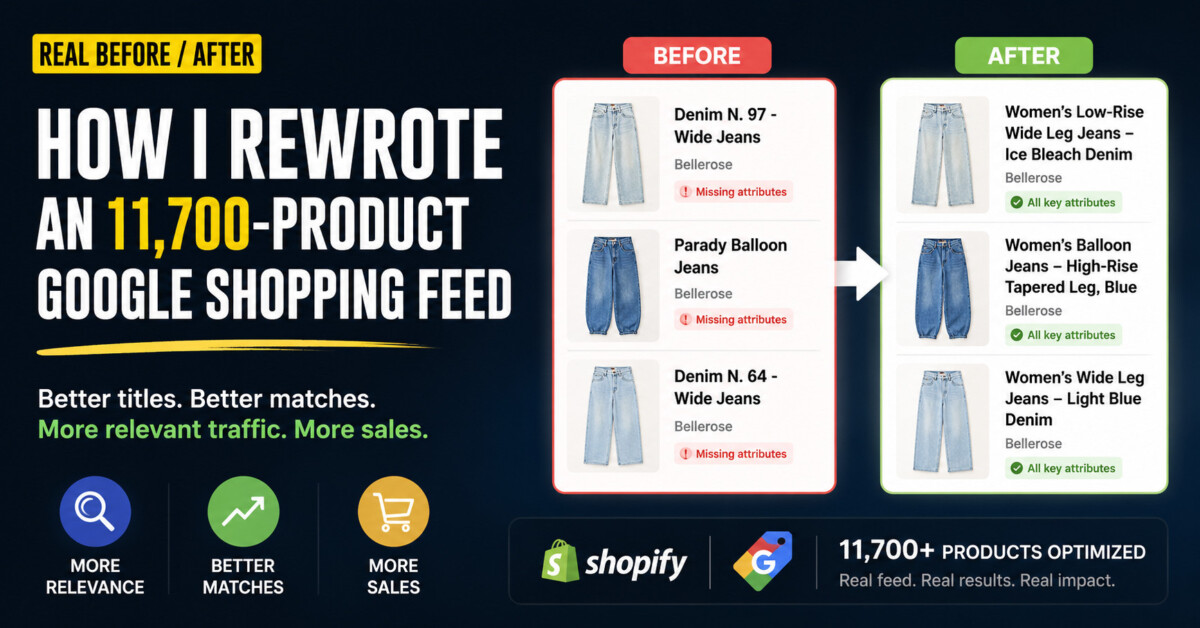
Most Google Shopping budgets are wasted on neglected product feeds, not bad bids. Front-loading product type, material, color, and key feature in titles (with brand last) is the highest-leverage fix in paid acquisition, but only consistency across the entire catalog delivers the result.
Google Shopping has no keywords to bid on. It scans your feed and decides for itself which searches you show up for, which means your product titles are the most important line of advertising copy you will ever write.
You can have great products, great photos, and a healthy ad budget, and still lose money on Google Shopping. I see it constantly. The reason is almost never the bids. It’s the feed. Google Shopping feed optimization is the most ignored lever in ecommerce, because Google doesn’t read your keywords. It reads your product feed and decides which searches you show up for. So your titles and descriptions aren’t cosmetic. They’re the single biggest signal Google uses to match you with a buyer, and most merchants never touch them. In this post I’ll walk through a real before/after from a live feed I worked on: the title structure I used, screenshots of the actual changes, and why each edit matters. No theory, no filler.
Here’s the thing almost nobody internalizes. In Google Shopping there are no keywords to bid on. Google scans your product feed (titles, descriptions, attributes) and decides on its own which search queries each product is a match for.
So your product title isn’t a label. It’s the most important line of advertising copy you’ll ever write, because it’s what Google reads to figure out what you sell and who to show it to. A title like “Aurora Lamp” tells Google almost nothing. A title like “Brass Bedside Table Lamp, Dimmable, Touch Control – Aurora” tells it everything it needs: product type, material, key feature, brand.
I wanted to show what that difference actually looks like across a real catalog, not as a best-practices lecture but as a documented before/after. So I took a live Shopping feed and rebuilt the titles and descriptions, product by product. Here’s what changed.
For this one I worked on the UK feed of Bellerose, a Belgian fashion brand running over 11,700 products in their Shopify catalog. I am not editing eleven thousand product titles by hand, so this was as much a test of process as it was of copywriting.
What surprised me most was that the data was never actually missing. Open the Denim N. 97, and the description already says “low-rise,” “wide legs,” “ice bleach denim.” The brand had described its jeans perfectly. None of it just ever reached the title, where Google actually looks first.
Before touching anything, I documented the starting point. This is what the feed looked like, and honestly it’s what most feeds look like.
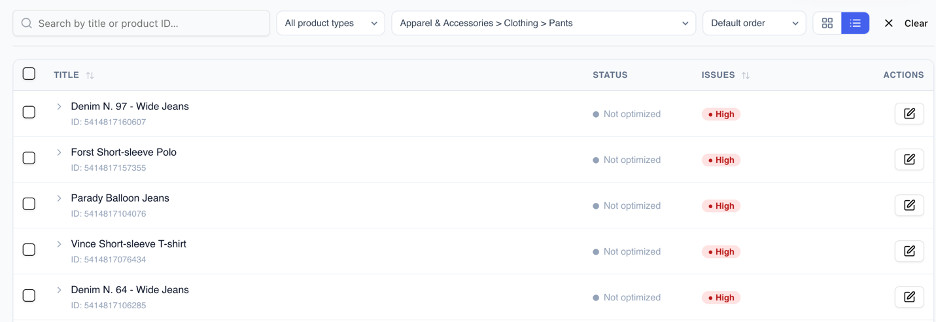
Source: MagicFeedPro — Bellerose UK feed, May 2026.
The problems were the same across the catalog:
Two things jumped out right away. First, every title was just Bellerose’s internal model name: “Denim N. 97 – Wide Jeans”, “Parady Balloon Jeans”, “Denim N. 64 – Wide Jeans”. Those names mean something inside the company, but nobody shopping for jeans types “Denim N. 97”. They type “wide leg low rise jeans” or “light blue boyfriend jeans”. Second, the titles carried none of the attributes buyers search for, no fit, no wash, no rise. And the frustrating part? The data already existed. It was sitting right there in the descriptions. It just never made it into the one field Google reads first. The feed tool even flagged these products with a high-priority issue, so the problem wasn’t hidden, it was just never acted on.
This is the part that does the heavy lifting. Below is the real before/after from the feed. The structure I applied front-loads the attributes that match what people search: product type, then material and colour and fit, then the distinctive feature, with the brand last.
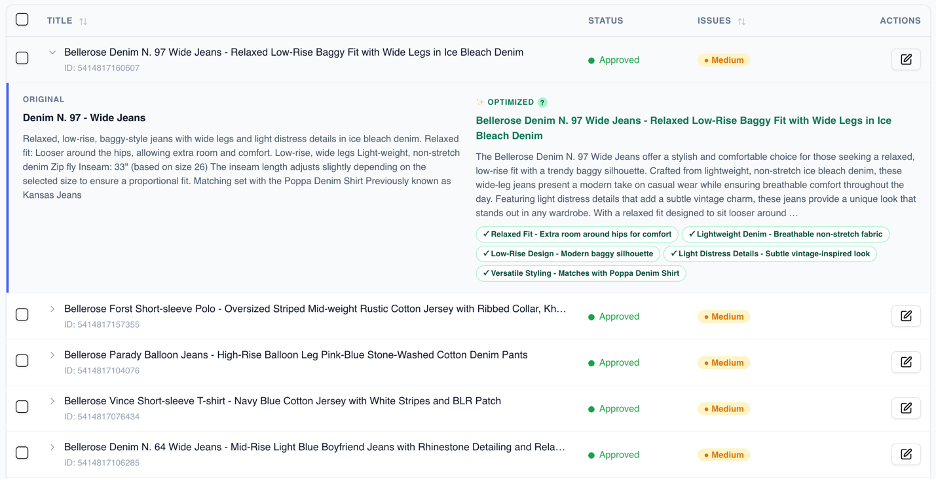
Source: MagicFeedPro — Bellerose UK feed, May 2026. Same products as above, after the rewrite.
Look at the logic behind each rewrite:
Titles get all the attention, but Google reads descriptions too. I rewrote them to be specific and attribute-rich without turning into a sales pitch. Here’s the same Denim N. 97 Wide Jeans, before and after:
Before: “Relaxed, low-rise, baggy-style jeans with wide legs and light distress details in ice bleach denim. Relaxed fit: Looser around the hips, allowing extra room and comfort. Low-rise, wide legs Light-weight, non-stretch denim Zip fly Inseam: 33” (based on size 26)…”
After: “The Bellerose Denim N. 97 Wide Jeans offer a stylish and comfortable choice for those seeking a relaxed, low-rise fit with a trendy baggy silhouette. Crafted from lightweight, non-stretch ice bleach denim, these wide-leg jeans present a modern take on casual wear while ensuring breathable comfort throughout the day. Featuring light distress details that add a subtle vintage charm…”
The original wasn’t wrong. It just read like a spec sheet. Half of it was a run of fragments (“Low-rise, wide legs Light-weight, non-stretch denim Zip fly”) with no real sentences for Google to parse. The rewrite keeps every single attribute (relaxed fit, low-rise, wide legs, lightweight non-stretch denim, ice bleach wash) but turns them into something a human can actually read. Same facts, but now both Google and the shopper can use them.
Here’s the honest obstacle. Doing this manually across a full catalog is exactly why most merchants never fix their feed. Rewriting one product in Shopify is fine. Rewriting eleven thousand, consistently, with the same attribute logic every time? You’ll lose the will to live somewhere around product 200, and your titles will drift long before that.
I used MagicFeedPro to apply one consistent title structure across the whole feed and pull the attributes into place, instead of editing products one at a time. What matters here isn’t the tool. It’s consistency at scale, which is the thing manual editing destroys the fastest. A great title on one product and a lazy one on the next tells Google your feed can’t be trusted.
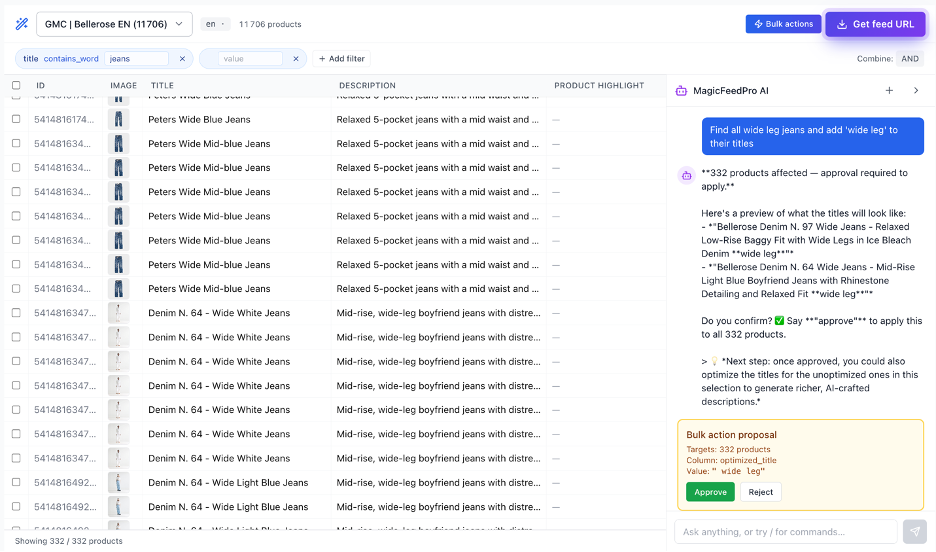
Source: MagicFeedPro — Bellerose UK feed (11,706 products), May 2026.
You don’t need a tool to start. You need to know what to look for. Open your feed and run every product through this:
The before/after up top isn’t magic. It’s just the difference between a feed written for a database and a feed written the way Google and shoppers actually search.
Here’s what to do this week, in order:
Fix the feed before you touch a single bid. It’s the highest-leverage work in ecommerce advertising, and almost nobody does it.
I’m Alain Abulafya, and I build MagicFeedPro, where I help Shopify and WooCommerce merchants fix the part of Google Shopping everyone ignores: the product feed. After years working in ecommerce advertising, I’m convinced most Shopping budgets are wasted on bad feed data, not bad ads. Let’s connect on LinkedIn.
Product titles are the highest-leverage first fix in any Google Shopping feed, because Google uses the title field to decide which search queries each product matches against. Start by rewriting titles so they lead with product type and searched attributes (material, color, fit, key feature) instead of leading with your brand or an internal SKU code. For most catalogs, this single change unlocks more visibility than any bidding adjustment, and it costs nothing beyond the time to do the work. Touch the feed before you touch the bids.
Front-load the product type and the searched attributes, then place brand last unless your brand is one buyers actively search for by name. A reliable structure for fashion is “[Product Type], [Material], [Color], [Fit], [Key Feature], [Brand].” For home goods, swap fit for room or size. For beauty, swap fit for skin type or use case. The principle is the same across categories: the first 60 to 70 characters of the title carry the words buyers actually type into the search bar, in the order they think about them.
Yes. Google indexes the description field and uses it as a secondary signal when matching products to search queries. Descriptions written as full sentences with embedded attributes (material, fit, use case, key feature) outperform descriptions built from spec-sheet fragments, because Google’s parser handles sentences more reliably than disconnected phrases. The fix is to rewrite descriptions to keep every existing attribute but present them as prose. You are not adding information, you are reorganizing the information you already have so both the algorithm and the shopper can use it.
You can fix it by hand if you have under about 500 SKUs and you commit to a written title template before you start. For 500 to 5,000 SKUs, a spreadsheet workflow with a developer to push changes back into the feed is feasible but painful and tends to drift over time. Above 5,000 SKUs, a dedicated feed management tool is the only sustainable answer, because consistency across the catalog is the thing that matters most to Google, and humans cannot maintain that consistency at scale across thousands of products and ongoing catalog updates.
Feed changes typically begin affecting impression and click data within 7 to 14 days, because Google needs to re-crawl the feed and re-match products against search queries. Conversion impact usually shows up over a 30 to 60 day window as the improved match quality compounds across the account. Two cautions: do not change bids in the same window you change titles (you will not know which lever moved the needle), and expect higher-quality impressions before higher volume. The first sign feed work is working is usually click-through rate, not raw click volume.
The biggest mistake is treating product titles as labels for internal organization instead of as advertising copy, which is why so many feeds lead with brand names, SKU codes, or internal model numbers that no buyer ever searches for. The second-biggest mistake is keyword-stuffing in the opposite direction, where every possible search term is jammed into the title and the result reads like spam. Google penalizes stuffed titles and shoppers scroll past them, so both extremes cost you. The middle path is structured, natural-language titles that front-load the words buyers actually type.
Alain Abulafya is the founder of MagicFeedPro, where he helps Shopify and WooCommerce merchants fix the part of Google Shopping most merchants ignore: the product feed. After years working in ecommerce advertising, Alain is convinced most Shopping budgets are wasted on bad feed data, not bad ads. Connect with Alain on LinkedIn.




