Free every Thursday · 60,261 Readers
Fastlane Insider Newsletter: What's working for Shopify in the AI era?
Free every Thursday · 60,261 Readers
Fastlane Insider Newsletter: What's working for Shopify in the AI era?
A prepared store removes the setup work. It does not remove the three decisions that decide whether the store sells: who buys, what they get, and what each order really costs you.
Most first time digital sellers do not stall on ambition. They stall in the weeks between “I want to sell something useful” and the first product page, choosing software, sourcing or writing products, arranging digital delivery and wiring tools together before a single buyer has seen the idea. Sellvia is built to shorten that gap. Starting at $39 a month after a 14-day trial (as of November 2026), it combines a managed storefront, a catalog of ready digital products and the business tools to run them. The seller still needs a plan to reach buyers.
For a first time operator, the more useful question is not whether Sellvia can create a store. It can. The question is whether the platform gets you to the important decisions faster: who the customer is, what to offer, and how to tell whether the idea has potential. This guide walks through what the service handles, what it costs beyond the headline price, where its limits sit, and how to use the trial as a real business test.
Sellvia’s clearest advantage is that a new seller starts with a working commerce environment instead of a pile of separate decisions. The service brings together a prepared storefront, hosting, catalog access and account tools for managing products and orders. According to Sellvia’s own terms, the turnkey store is a managed site built on WordPress, set up and hosted for you. That combination addresses a familiar beginner problem: plenty of motivation, but no interest in becoming a part time website administrator before testing an idea.
Consider someone who wants to serve freelance designers with practical digital resources. On a custom setup, that entrepreneur would have to choose the software, build or license products, organize the pages, arrange digital delivery and connect other tools. With Sellvia, much of that foundation is already in place, and the entrepreneur can spend their attention on a better question: which guide or checklist would a working designer actually pay for?
This is an illustrative scenario, not a claim of measured time savings. A prepared store still needs thoughtful presentation and a coherent audience. But there is a meaningful difference between evaluating a commercial idea and spending the first several weeks assembling the technology needed to evaluate it.
That is where Sellvia makes its strongest case. For someone with no original catalog and limited technical resources, reducing the number of tools and setup steps is a practical benefit, not merely a convenience. If you are just starting, this is the part of the offer that matters most. If you already run a store, most of this work is behind you, and the value of a prepared environment shrinks accordingly.
A beginner should use the Sellvia catalog as a shortlist to choose from, not a shelf to fill, picking a few related products that serve one buyer. Creating valuable digital products from scratch takes real work. Even a short educational guide needs research, writing, editing, design and a clear picture of the intended reader. Sellvia offers access to digital materials such as guides, ebooks and educational resources, so new operators start with a selection to evaluate rather than producing everything themselves.
This matters most when the seller already has a sense of the audience but needs help assembling an offer. A store aimed at new freelancers has a stronger premise when it features a small collection of useful client management or planning resources than when it displays an assortment of unrelated downloads.
Sellvia’s advantage is not that every product suits every audience. It is that you can examine existing offers and make commercial decisions without first building a content production operation. Browse the actual product previews, read the descriptions, and ask whether the buyer receives something specific and useful.
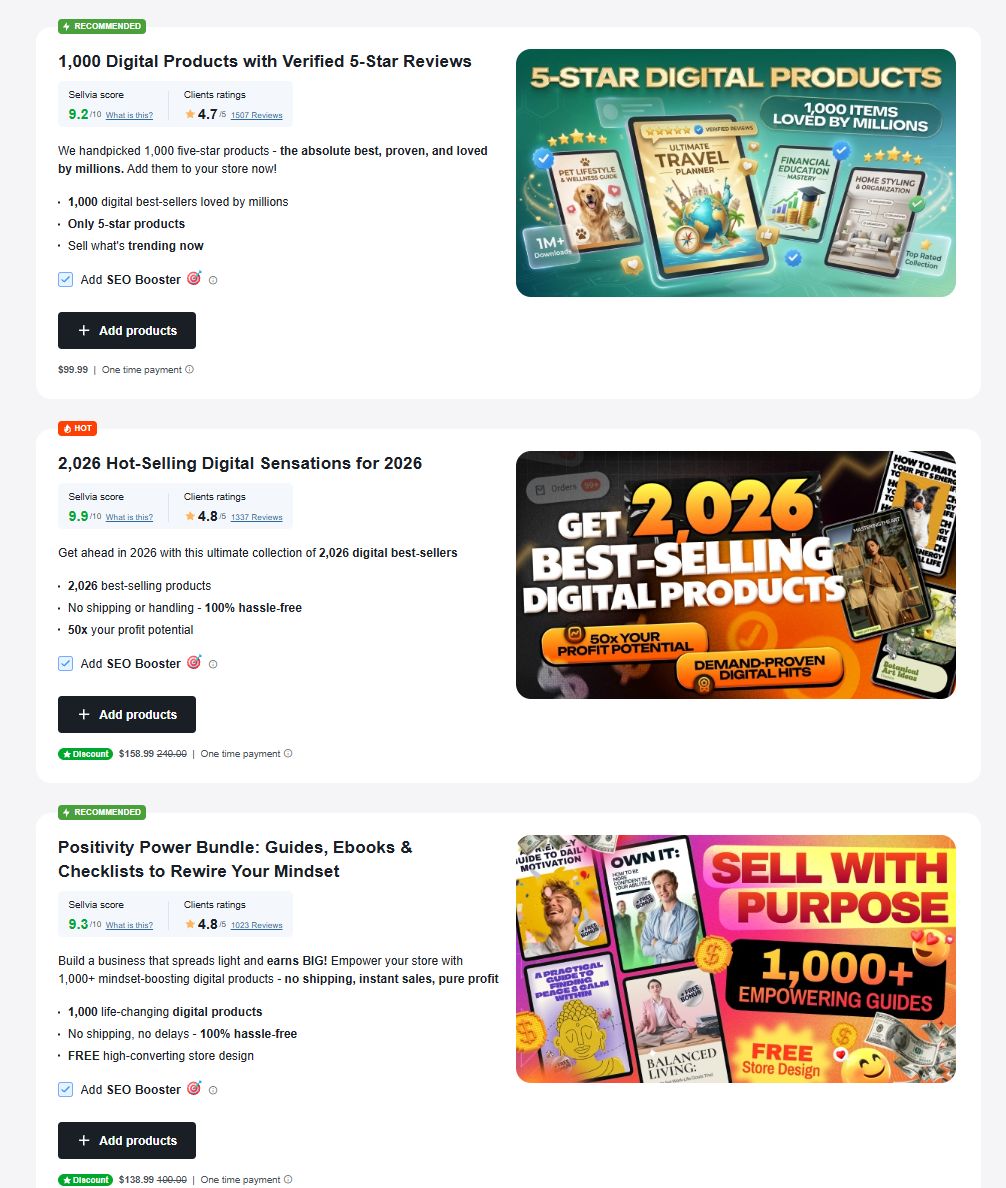
One detail deserves attention: catalog access and individual product packs are not necessarily the same thing. The Sellvia interface also shows featured digital bundles sold as separately priced additions. Before adding a bundle, check the current account price and what the purchase includes, so you are not assuming every promoted bundle is covered by the basic subscription.
The winning approach is selective. Start with three products that solve a related problem, write one sentence explaining why each belongs in the same store, and use that narrow collection to learn what prospective buyers respond to. For the freelance designer example, that might be a client onboarding checklist, a project pricing guide and a contract basics primer: three answers to the same worry about running the business side of design work. A focused offer gives a beginner more to learn from than a large catalog does.
One dashboard helps in the first months because a new seller needs to see the whole business in one place while still learning what each number means. Sellvia keeps product selection, order monitoring and its optional promotional services inside a shared account environment. That is easier to navigate than switching between unrelated providers, each with its own login, reports and vocabulary.
The difference becomes apparent after launch. A beginner needs to know whether a product page is attracting interest, whether orders have been approved, what promotional activity costs, and which amounts are actually available. Keeping these tasks close together does not automatically produce better decisions, but it makes the information easier to review consistently, and consistency is what turns early numbers into lessons.
Support also carries more value at the start than it does for an established operator with a technical team. When one provider manages the store, there is a clear first place to ask for help with its services. That can be reassuring when the founder’s real strength lies in understanding customers rather than configuring software. It also works in the other direction: Sellvia’s terms route technical changes through its support team, which may limit or decline them, so the simplicity comes with less freedom to change things yourself.
The opportunity is to use the simpler setup well. A store owner who checks performance regularly, improves the offer, and avoids buying tools without a clear purpose will get more practical value from the integrated model than someone who treats a finished website as a substitute for a business plan.
Running a Sellvia store costs $39 a month for the Basic subscription after a 14-day trial, plus separate charges for any promotion, approved orders and optional extras. Sellvia’s Terms of Use, updated November 2026, list the Basic plan at $39 a month with up to 5,000 products and 4 GB of server space, and a card is required to start the trial, so note the renewal date. The main budgeting lesson is that subscription access, optional promotion and order related charges are separate line items.
Advertising first. The 28% charge applies when credits are spent on delivery, not when you buy them, so applying 10 Ads Credits deducts 12.8 from your balance. The terms also describe the daily level stepping up at set milestones, from 10 credits a day at the starting tier to 50 a day after 30 days of continuous delivery, with an email before each change; a seller can drop back to an earlier level at any time. That describes how credits are consumed, not how many sales they will produce, which is why a written limit matters. Fastlane’s breakdown of setting a maximum cost per new customer before spending on ads is a useful frame for picking that number.
Then orders. The terms distinguish a CPA Service Fee (for promoted orders) from an Order Service Fee (for other order types), and only one applies to an order. No Product Cost Charge applies to digital products in organic orders. How you approve orders changes the total: individual approval adds nothing, a bulk approval adds 7%, and automatic approval adds 15% of catalog retail price.
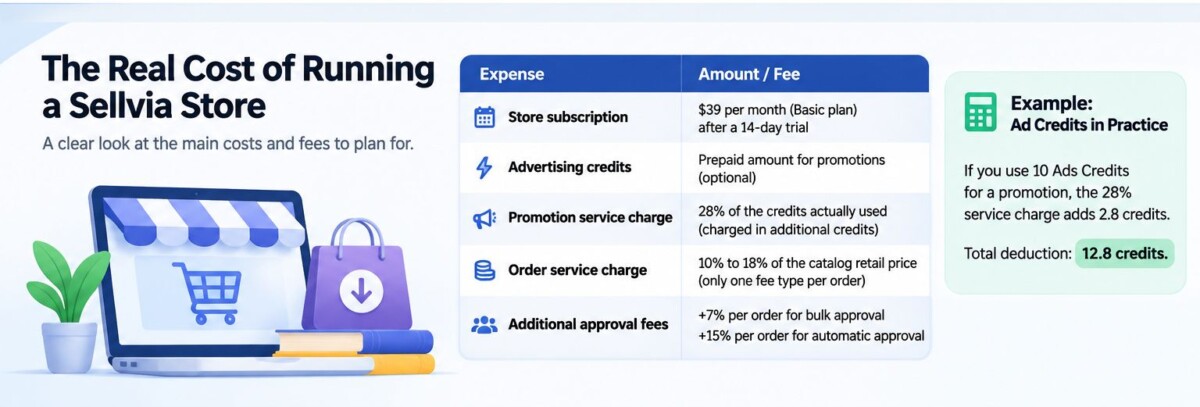
Illustrative example, assuming one approved organic order for a digital guide with a $20 catalog retail price: the Order Service Fee lands between $2.00 and $3.60. Approve it individually and that is the whole fee. Switch on automatic approval and another $3.00 is added, for $5.00 to $6.60 in fees on a $20 sale. During a trial with a handful of orders, approving each one by hand is the cheaper and more instructive choice.
Finally, payouts. Commission sits as Incoming for up to 72 hours, after which up to 75% can become available, with the remainder released over a validation window of up to 125 days. Redemption needs an active, paid subscription, identity verification (with a $4.99 fee per attempt) and a minimum of $100 for U.S. residents or $300 elsewhere. A number on the dashboard is not yet money in your account.
The store owner still has to choose the customer, shape the offer and decide how much effort or money to put behind it. Sellvia reduces setup work; it does not make marketing decisions for you. That is a fair division of responsibility: the platform provides tools and a starting product environment, and the entrepreneur decides which offer deserves attention.
Start with the product page. Does it tell a specific buyer what they will receive? Is the description clear enough that a customer can judge whether the download is useful? Does the page explain the value without inflated promises? These are ordinary editorial and merchandising decisions, and good software cannot make them disappear. Fastlane’s guide to writing product descriptions, with examples and a template, is a practical place to sharpen this before you spend anything on promotion.
Then pay attention to the signals that matter. Relevant visits are useful, but visitors are not buyers. An order record is different from money available for redemption. Optional promotional tools offer another way to reach an audience, but they deserve a spending limit and a reason for being used.
A manageable routine is to review the store once a week: check the most relevant offers, examine order statuses, compare expenses against the budget, and pick one change to test. The goal is not constant activity. It is learning from the business without letting platform features dictate the strategy.
That makes Sellvia especially relevant to solo entrepreneurs. The founder can concentrate on communicating a useful offer while the managed service handles more of the supporting environment. The advantage is real, even though meaningful progress still takes work. If you are pre-launch, treat the weekly review as the job. If you have sold before, use it to check whether the managed model is saving you time or just adding a layer.
Choose Sellvia if you have no products, no development help and a modest plan to test whether an audience wants useful digital downloads, and you are comfortable trading control for an integrated start. Choose a customizable platform such as Shopify if you already own a differentiated catalog, need specialized integrations, or have established workflows worth preserving.
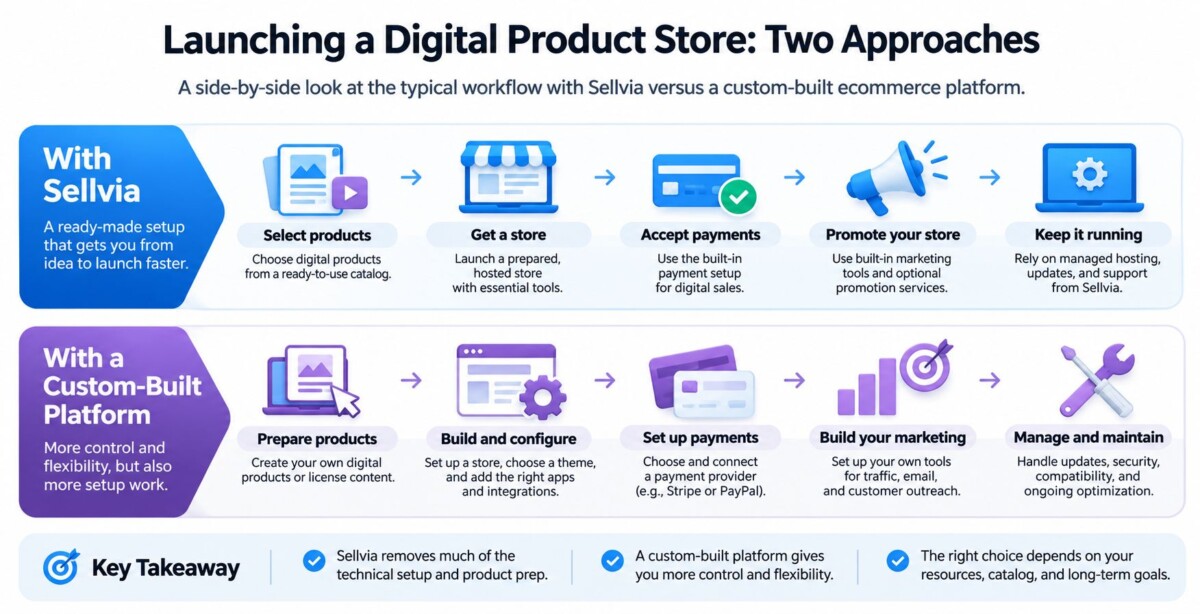
Think about two sellers. The first has no products, no development resources and a small budget to see whether people will buy practical downloads. The second owns an extensive course library, has a functioning customer base and needs precise control over checkout and integrations. The first has more to gain from Sellvia’s prepared environment. The second has more reason to build around existing assets, and Fastlane’s guide to selling digital products on Shopify covers how that setup and digital delivery work.
There is also an ownership distinction to weigh before you commit. Sellvia’s terms describe the turnkey store as a managed WordPress site: customers do not get direct access to wp-admin, the hosting control panel, server files, the database or FTP unless Sellvia approves it in writing. Sellvia’s digital products are created in house, and Sellvia holds the rights to them. The free domain included with the store is owned by Sellvia, not the customer. For a beginner prioritizing a guided start, that can be a reasonable trade. For a merchant whose growth plan depends on portability, it calls for a closer look, for example registering your own domain from the start.
Neither approach is inherently more profitable. One saves assembly work; the other allows more configuration and ownership. The right choice depends on what the seller already has and what would otherwise slow the business down.
A structured outside review is the most useful second opinion, because it lets you compare the provider’s own terms against an independent assessment. The Ecom Ratings Sellvia review brings together a platform overview, pricing context, product features, limitations, and editorial and user feedback sections in one place. It gives prospective merchants another way to organize their questions before choosing a service.
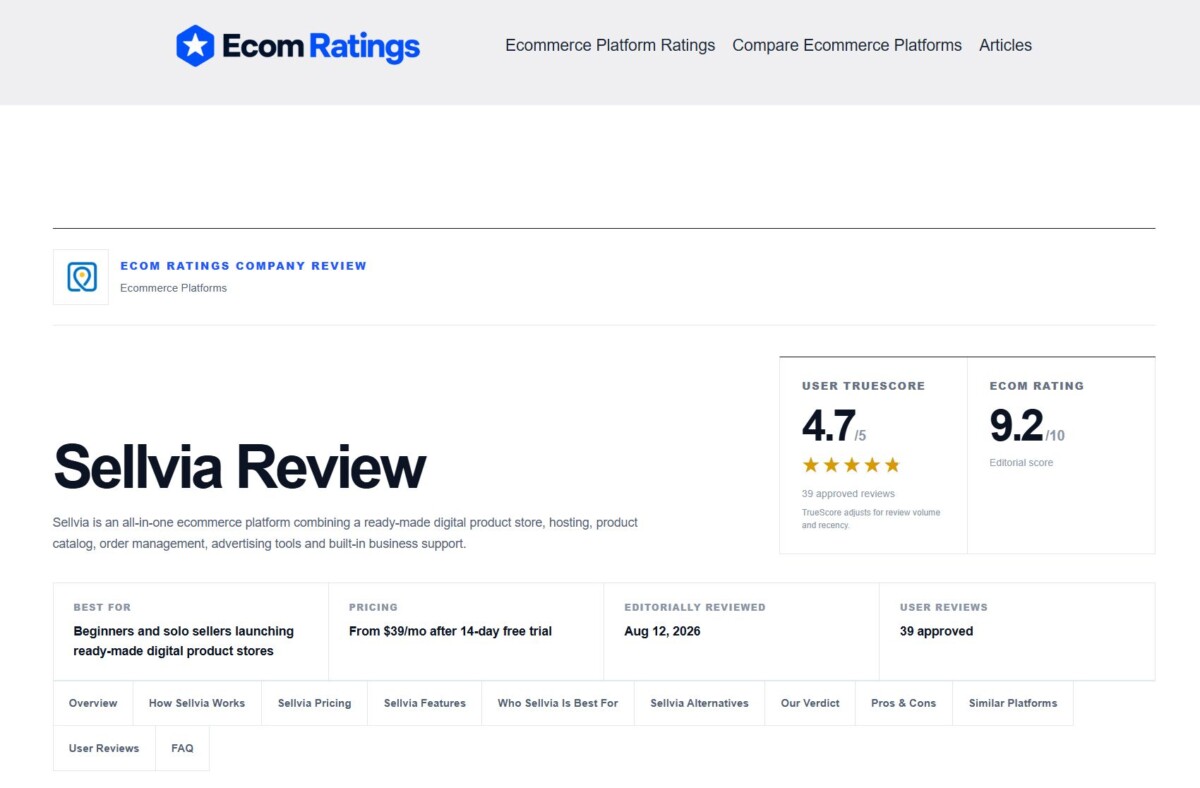
Scores are most useful when read alongside the criteria behind them. A beginner who values an easy starting point will weigh Sellvia differently from a merchant looking for advanced customization. Read the limitations and the user feedback with the same attention as the headline score, and compare both against what the terms say. The review is a resource for that comparison, not evidence that a particular subscriber will reach a specific level of sales or profit.
Turn the 14-day trial into a business test by focusing on one buyer group, three products and one written budget, rather than exploring every menu. Start by naming the buyer group, then select three digital offers that could plausibly serve it. Inspect their content, price and presentation, and check what your particular subscription includes.
Next, look at how the storefront would explain those products to a new visitor. Review the customer facing pages and the available checkout configuration. Make sure you understand how order status, approval settings, commission availability and any optional promotion work in your account before using paid services. If you want an early read on demand without paying for it, Fastlane’s guide to testing landing pages and product concepts before ad spend shows how to put an offer in front of real reactions first.
By the end of the trial, you should be able to answer four questions. Who is the buyer? What problem do these products solve? What will the store cost to operate each month, including fees at your expected order volume? What would you measure before deciding to spend more? Those answers are far more useful than concluding that the dashboard was easy to navigate. Put the renewal date in your calendar either way, so continuing is a decision rather than a default.
For a first time digital seller, Sellvia is worth serious consideration because it makes the initial store and catalog work more manageable. Its strongest contribution is giving an entrepreneur a practical place to start while leaving room to concentrate on product fit and customer demand. Begin with one audience and a small, coherent selection of products. If that plan fits the platform and the budget, the prepared store model has done exactly the job it is meant to do.
Sellvia’s Basic plan costs $39 per month after a 14-day free trial, according to its Terms of Use as of November 2026. The Basic plan covers a managed turnkey store with up to 5,000 products and 4 GB of server space. A payment card is required to start the trial, and the subscription renews automatically unless you cancel, so note the date the trial ends. Each additional turnkey store carries its own $39 monthly subscription. The subscription is not the whole budget: promotion through Ads Credits, service fees on approved orders and optional product packs or tools are charged separately. Write those down alongside the $39 before you decide whether the store makes sense for you.
Yes, Sellvia charges a service fee of 10% to 18% of catalog retail price on each approved order, excluding shipping, handling and taxes. Promoted orders carry a CPA Service Fee and other order types carry an Order Service Fee; only one of the two applies to an order. Digital products in organic orders carry no Product Cost Charge. Your approval setting can add more: approving orders individually adds nothing, bulk approval adds 7%, and automatic approval adds 15% of catalog retail price. On a $20 digital guide, that is the difference between $2.00 to $3.60 in fees and $5.00 to $6.60. Check the current rates in your account before you change approval settings.
Not freely, because Sellvia runs the store as a managed service and keeps the rights to its catalog. Its terms describe the turnkey store as a managed WordPress site where customers do not get direct access to wp-admin, hosting, server files, the database or FTP without Sellvia’s written approval. Sellvia’s digital products are created in house and Sellvia holds the rights to them, and the free domain included with the store is owned by Sellvia. If portability matters to your plans, consider registering your own domain and building your customer list from the start, and read the current terms on catalog rights before you invest heavily in a single store.
Sellvia is the better fit for a beginner with no products and no technical help, while Shopify fits sellers who own their products and want full control. Sellvia bundles a managed store, hosting and a ready digital catalog, which removes most setup work for someone testing an idea. Shopify asks you to bring or create your own products and choose your own apps, but in return you control your catalog, checkout, integrations and domain. Neither is automatically more profitable. If you already have a course library or an audience, building on a platform you control usually makes more sense. If you have only an idea and a small budget, a managed start can get you to real buyer feedback sooner.
Sellvia commission becomes available in stages, so expect part of it within days and the rest over as long as 125 days. Under its terms, commission sits as Incoming for up to 72 hours, after which up to 75% can become available, with the remainder released over a validation window of up to 125 days. To redeem, your subscription must be active and paid, you must complete identity verification, which carries a $4.99 fee per attempt, and you need at least $100 available if you live in the U.S. or $300 elsewhere. Budget your first months as if the dashboard balance is not yet cash, because until redemption it is not.