Free every Thursday · 61,308 Readers
Fastlane Insider Newsletter: What's working for Shopify in the AI era?
Free every Thursday · 61,308 Readers
Fastlane Insider Newsletter: What's working for Shopify in the AI era?

Route only the highest intent contact form submissions to SMS, never all of them. On Shopify, the native contact form cannot carry a custom subject line, so build your filter rules on Shopify Forms with Flow, or on a keyword field placed inside the message body.
Twenty three percent of the companies audited in a Harvard Business Review study never responded to a web enquiry at all. Among those that did, the average was 42 hours. Almost none of them decided to ignore the lead. They just never saw it in time.
A retailer asks whether you sell in bulk. Someone requests a quote on a 200 unit order. A customer with a $4,000 cart wants to confirm delivery timing before they check out.
Your website does exactly what it was built to do. It sends an email.
That email lands in an inbox alongside order confirmations, shipping updates, payment notifications, supplier messages, app alerts, and the seventeen automated system emails your stack generates before lunch. Nothing about it looks different from the others. By the time anyone opens it, the buyer has already contacted two of your competitors.
The fix is not a new form or a rebuilt contact page. In most cases the notification email your form already sends can become the trigger for a text message, and the whole thing takes an afternoon.
Contact form leads go unanswered because the notification email carries no signal that separates a $10,000 wholesale enquiry from a routine password reset. Email is an excellent system of record and a poor real time alerting system, and most ecommerce stacks treat it as both.
The cost is measurable. In an audit of 2,241 US companies published in Harvard Business Review, 37% responded to a web generated test lead within an hour, 24% took longer than a day, and 23% never responded at all. Among the companies that did respond, the average was 42 hours. Firms that made contact inside the first hour were nearly seven times more likely to qualify the lead than those who waited longer.
One honest caveat on that research, because it gets misquoted constantly. The dramatic multipliers you see attached to Harvard in most blog posts, the 100x and the 21x, come from a separate 2007 MIT and InsideSales study, not from the HBR audit. The HBR numbers are the 42 hour average and the roughly 7x qualification figure. The study is also from 2011, which predates business messaging entirely. The direction has held up. The precise figures deserve to be quoted accurately.
The gap widens outside business hours. A store owner doing $400K a year is not monitoring email at 9pm on a Sunday, but they will notice a text. The same is true of a scaling brand where a sales lead covers wholesale accounts across three time zones. What changes by stage is not whether the problem exists, but how many people need to be reachable.
Five submission types earn an alert on most Shopify stores: wholesale enquiries, quote requests, high value pre sale questions, callback requests, and time sensitive order problems. Everything else belongs in the inbox, and the discipline about that boundary is what makes the system work.
Wholesale sits at the top of that list for a structural reason. A retailer ordering 300 units is worth a different amount of your attention than a newsletter signup, and B2B buyers arrive with expectations that reflect it. As we covered in our guide to how wholesale buyers judge supplier service, business buyers frequently negotiate formal service level agreements with first response targets in the four to eight hour band, and they compare you against that number whether or not you agreed to it.
If you are under $500K, one rule is usually enough. Route wholesale and quote requests to the owner’s phone, and leave everything else alone. Above roughly $2M, where a sales function exists separately from support, the split becomes worth building properly, because the person who should answer a wholesale enquiry is no longer the person watching the support inbox.
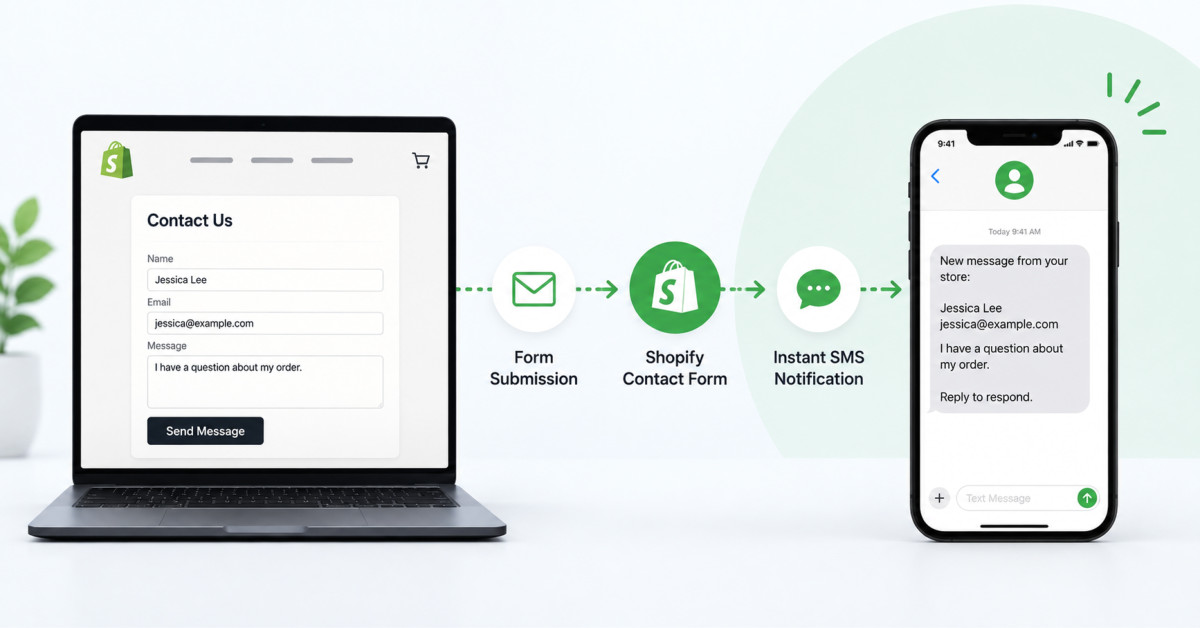
The workflow uses the notification email your form already sends as the trigger, which means you do not replace the form, rebuild the contact page, or connect your storefront to an SMS API. Four steps, in order: the customer submits the form, your platform sends its notification email, a filter rule identifies that email as important, and an SMS alert goes to the appropriate phone.
The form itself never changes. That is the whole appeal of this approach, and it is why it works across a Shopify theme form, a Shopify Forms submission, a third party form builder, a helpdesk contact widget, or a custom build. Anything that produces a predictable email notification can feed it.
The word doing the heavy lifting in that sentence is predictable. The rule has to be able to recognise the important email without opening it, which means something in that email has to be consistently and reliably different. On most platforms that is the subject line. On Shopify it is not, which is where nearly every version of this advice falls apart.
Shopify’s native contact form sends every submission to your store’s sender email address and does not let you change the subject line, which means any filter rule built on subject text will silently fail on the default form. Shopify states this plainly in its own documentation on setting up a contact page: submissions go to the sender address configured in your Notifications settings, and the subject line is not editable.
Every generic guide to this workflow tells you to write a rule like “subject contains Wholesale.” On a stock Shopify theme, that rule will never fire. You will build it, test it with a submission that does not trigger anything, and conclude that email to SMS forwarding does not work.
Two workarounds actually function. The first is Shopify Forms, where notification behaviour is configurable, and where Shopify’s documentation on managing form notifications describes using a Shopify Flow automation to send an internal email to a recipient of your choosing after a submission. Because you author that Flow email, you control its subject line and its destination address, and both become filterable. This is the cleaner path if you are already on a plan with Flow.
The second works on the theme form itself. Shopify’s developer documentation on adding fields to a theme contact form notes that inputs named in the contact[information_id] pattern have their titles appear in the contact notification. Add a required select field named something like contact[enquiry_type] with options for Wholesale, Quote, and General, and the chosen value lands in the body of the notification email. You now have a keyword to filter on, placed there deliberately rather than hoped for.
Either way, the principle holds. Do not build a rule on a signal you do not control. Create the signal first, then write the rule against it.
Build rules on the three fields you genuinely control, which are the recipient address, the sender address, and the keyword you deliberately placed in the message body, and start with two rules rather than eight. Rule sprawl is the failure mode here, and it arrives fast.
A workable starting set for a store doing $500K to $2M looks like this. Rule one fires when the notification body contains your wholesale keyword, and sends an alert to whoever owns wholesale. Rule two fires when the recipient address is a dedicated address such as [email protected], which you can point a second form at, and sends to the same phone. That is the entire configuration. Add a third rule only after thirty days of watching the first two behave.
Resist adding a rule for every scenario you can imagine. If a salesperson receives 50 alerts a day, they will start ignoring them within a fortnight, exactly the way they already ignore low priority email, and you will have spent an afternoon rebuilding the problem you were trying to solve on a smaller screen. The fewer alerts you send, the more attention each one gets.
Routine enquiries should continue flowing through your normal support queue. A store fielding a few hundred customer questions a week should be running those through a helpdesk rather than a phone, and if you have not chosen one yet, our roundup of Shopify helpdesk and customer service apps covers the options by store size. The same logic applies to routing and tagging generally, which is covered in more depth in our guide to support automation tools that hold up in production. SMS is the exception channel. It only stays valuable while it stays rare.
One option for the final step is AutoForward Text, which routes communication and alerts between phones, email, Slack, and other destinations. For a contact form workflow, your website continues generating its normal notification email, and a forwarding rule sends the selected ones through to a phone as SMS.
The practical benefit is that your ecommerce platform never needs a dedicated integration with the SMS tool. The existing email is the bridge between the form and the text message, which is why this approach survives a theme change, an app swap, or a platform migration. The same setup is useful for other operational email that should not sit unnoticed, including payment failures, booking requests, and escalated support notifications.
It is not the only route, and you should know the alternatives before committing. If you are on Shopify Plus, a Flow automation into a helpdesk that already sends SMS may cover this without a new vendor. A Zapier or Make workflow into Twilio gives you more control at the cost of setup time and per message billing. Carrier email to SMS gateways are free and genuinely unreliable for business use, so treat them as a test, not a system. Pick based on how many rules you expect to run and whether anyone on your team will maintain them.
Whichever tool you use, the goal is not to move the customer conversation into SMS. It is to make sure the right person knows something happened.
Put enough in the alert for the recipient to decide whether to act right now, which usually means name, company, enquiry type, and rough value, and leave the full submission in the original system. An alert reading “New form submission received” is technically accurate and operationally useless, because the recipient still cannot tell a $10 sizing question from a $10,000 wholesale order.
Two examples that work. “New wholesale enquiry: Northside Interiors, 80 office chairs. Check sales inbox.” Or “Quote request: J. Smith, 200 units, Product X. Full details in email.” Both fit inside a single message, both give a clear basis for triage, and neither duplicates the whole enquiry into a second channel.
That restraint is a privacy decision as much as a usability one. Contact forms often carry personal or commercially sensitive information, and before any of it leaves the system it was submitted to, ask whether it needs to. Names and short summaries are usually fine. Payment details, authentication codes, health information, and anything you would not want visible on a lock screen should stay where they are. If a phone is receiving these alerts, it needs a secure lock screen and access limited to people whose job requires it.
For most Shopify merchants the safer configuration is a concise alert plus the complete submission left in the platform, the CRM, or the inbox. You get the speed without creating a second copy of your customer data on someone’s personal handset.
Decide what response time you are actually trying to hit before you build a single rule, because an alert with no threshold behind it is just another notification with a louder delivery mechanism. The alert is not the outcome. The response is.
There are real numbers to aim at. Analysis across roughly 6,000 ecommerce companies found that top performing stores hit an average first response time of 0.54 hours, about 32 minutes, with average resolution around 1.67 hours, and we broke down that data and the surrounding metrics in our guide to the customer support metrics worth tracking. Against a 42 hour industry average for web leads, 30 minutes is an enormous competitive gap available to anyone willing to build one rule.
Set the target by stage. Under $500K, four business hours on a wholesale enquiry is a defensible commitment and a real improvement on what you are doing now. Between $500K and $2M, aim for one hour during business hours with an out of hours acknowledgement. Above $2M with a dedicated sales function, 30 minutes during business hours is achievable and increasingly expected by B2B buyers.
Then check the system after thirty days. Count how many alerts fired, how many produced a response inside your threshold, and how many were noise nobody acted on. Delete any rule where the third number is larger than the second. That review is the difference between a workflow that stays useful in month six and one that everyone has quietly muted.
Email remains the better home for detail, attachments, history, and long replies. SMS does one thing email cannot, which is refuse to be ignored. Used narrowly, that small change makes a store meaningfully more responsive without a new lead management system, a new form, or a second inbox to check.
Shopify cannot send contact form submissions as SMS natively, but you can get there in two steps. Shopify’s native SMS notifications cover customer facing order events, not internal form alerts. The working approach is to let the form send its normal notification email, then use a filter rule and an email to SMS service to forward only the important ones to a phone. On the native theme form you will need to add a keyword field first, because the subject line cannot be customised. On Shopify Forms, a Flow automation can send an internal email whose subject and recipient you control, which is easier to filter reliably.
Shopify does not expose the subject line of native contact form notifications as an editable field, and this is documented behaviour rather than a bug or a theme limitation. Every submission goes to your store’s sender email address with a fixed subject. This matters because most email to SMS guides assume you can filter on subject text, and that advice simply fails on Shopify. Your two options are to switch the form to Shopify Forms and generate an internal notification through Flow, or to add a named field to the theme form using the contact bracket notation so its value appears in the notification body and gives you something to filter on.
Route wholesale enquiries, quote requests, high value pre sale questions, callback requests, and time sensitive order problems to SMS, and leave everything else in your inbox or helpdesk. The test is whether speed of response changes the outcome. A wholesale buyer comparing three suppliers will usually go with whoever replies first, so an hour matters. A returns question does not change based on whether you saw it at 2pm or 5pm. Start with one or two rules covering your highest value enquiry type, run them for a month, and only add more once you can see the first ones producing actual responses rather than ignored buzzes.
Forwarding full contact form contents to SMS does create avoidable exposure, which is why the alert should carry a summary rather than the submission. Send the customer name, enquiry type, and an approximate value, then leave the complete message in your ecommerce platform, CRM, or inbox where access controls already exist. Keep payment details, authentication codes, health information, and anything sensitive out of the text entirely. Any phone receiving these alerts should have a secure lock screen, and access should be limited to staff whose role genuinely requires it. A concise alert is both safer and more useful than a full copy.
Cap the number of rules and review them monthly, because rule sprawl is what kills these systems rather than any technical failure. Start with two rules maximum, both pointed at your highest value enquiry type. After thirty days, count how many alerts fired, how many led to a response inside your target window, and how many nobody acted on. Delete any rule where the ignored count exceeds the actioned count. If an employee is receiving more than five or six alerts a day, the filter is too broad and you should tighten the keyword or narrow the recipient address rather than asking people to try harder.