
A useful Shopify competitor analysis covers five to ten stores across products, offers, store setup, traffic, SEO, and ads, then turns what you find into a short list of tests. The value comes from spotting gaps that fit your stage, not from copying a bigger competitor.
A competitor’s app stack, ad spend, and product range tell you what worked for their stage. The useful question is which of those choices fits yours.
Running a Shopify store means competing in an increasingly crowded ecommerce market. With millions of businesses on Shopify and many of them selling into the same niches, relying on intuition alone is no longer enough to build a sustainable competitive advantage. The stores that consistently find new growth opportunities are often the ones that pay close attention to what their competitors are doing and turn those insights into better decisions.
A proper Shopify competitor analysis helps you understand what competitors sell, how they price and promote their products, where their traffic comes from, and what strategies they use to attract customers. In this guide, we’ll cover the key steps of Shopify competitor analysis and show you how to use SellerCenter to streamline the research process and reduce the time and cost involved.
One filter runs through every step below: stage. A competitor doing $20M a year can afford tools, channels, and product lines that would bury a $300K store. Use their choices as evidence of what customers respond to, then decide what your store can actually execute this quarter.
Shopify competitor analysis matters because it shows you what is already working in your market, where customer needs are going unmet, and where your own store falls behind, so your next decision rests on evidence instead of guesswork. It gives you a clearer picture of the market you are actually competing in.
First, it shows you what successful competitors are doing. Studying their products, pricing, store experience, and marketing reveals what customers in your niche already respond to, which saves you from testing ideas the market has already rejected.
Second, it helps you identify market gaps and customer needs. You can find products, customer segments, or problems competitors are overlooking, and each one is a chance to differentiate rather than compete on price alone.
Third, it surfaces opportunities to improve your own store. Comparing your products, website, SEO, and marketing side by side with competitors makes weak spots obvious in a way that looking at your own analytics rarely does.
Finally, it supports data-driven decisions. Real market and competitor data lets you validate ideas and prioritize opportunities instead of relying on assumptions. The caution is that most competitor numbers you will see, from traffic to sales, are estimates built by third-party tools, so treat them as direction and scale rather than as a competitor’s real books.
Start with a focused shortlist of 5 to 10 competitors: three to five direct competitors selling similar products at comparable price points, and two to three indirect competitors that solve the same customer problem with different products. A shorter list keeps the analysis deep enough to be useful, and the indirect group stops you from missing the substitute a customer chooses instead of you.
There are three fast ways to build that list. The first is to Google your head terms. The top 10 organic results and the Google Shopping listings for your main product keywords are your search competitors. Running site:myshopify.com “[your keyword]” surfaces Shopify stores, with one limit to keep in mind: it mostly finds stores still using their myshopify address, which skews toward newer and smaller shops, so pair it with the regular results.
The second is to scan the ad libraries. The Meta Ad Library, TikTok Creative Center, and Google Ads Transparency Center are free and let you look up advertisers. Stores consistently advertising products in your niche are worth adding to your list, because sustained ad spend is a signal the product sells.
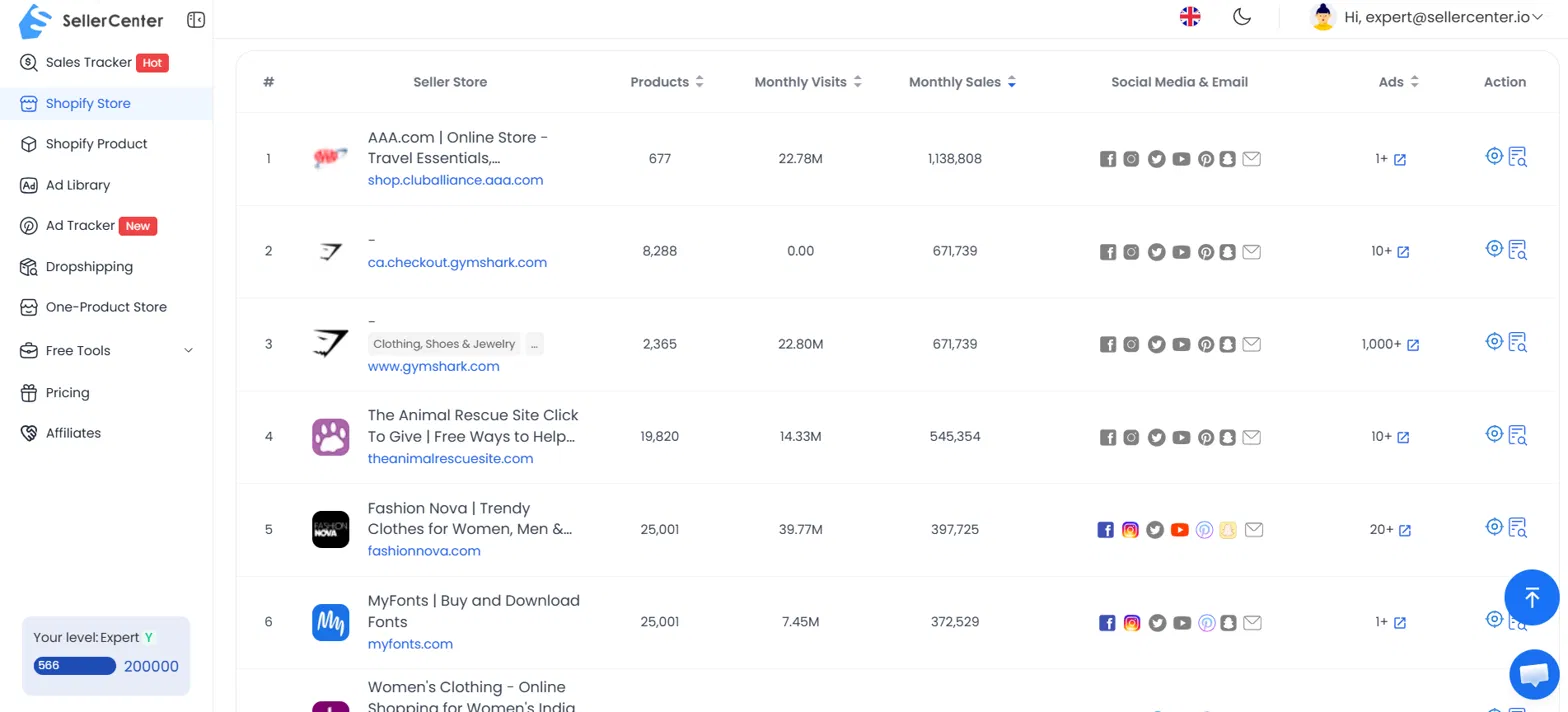
The third is to use the Shopify research tool SellerCenter. Its Shopify Store feature covers what SellerCenter describes as 2.48M+ active Shopify stores, letting you search for stores selling similar products by entering relevant product keywords. You can also track competitors’ estimated sales performance to identify stores worth analyzing more closely.
Your competitors’ products show what they believe customers will buy, so analyze four things: their best sellers, their pricing and offers, their product page conversion elements, and the gaps in their range. Together these tell you where demand is concentrated and where it is underserved.
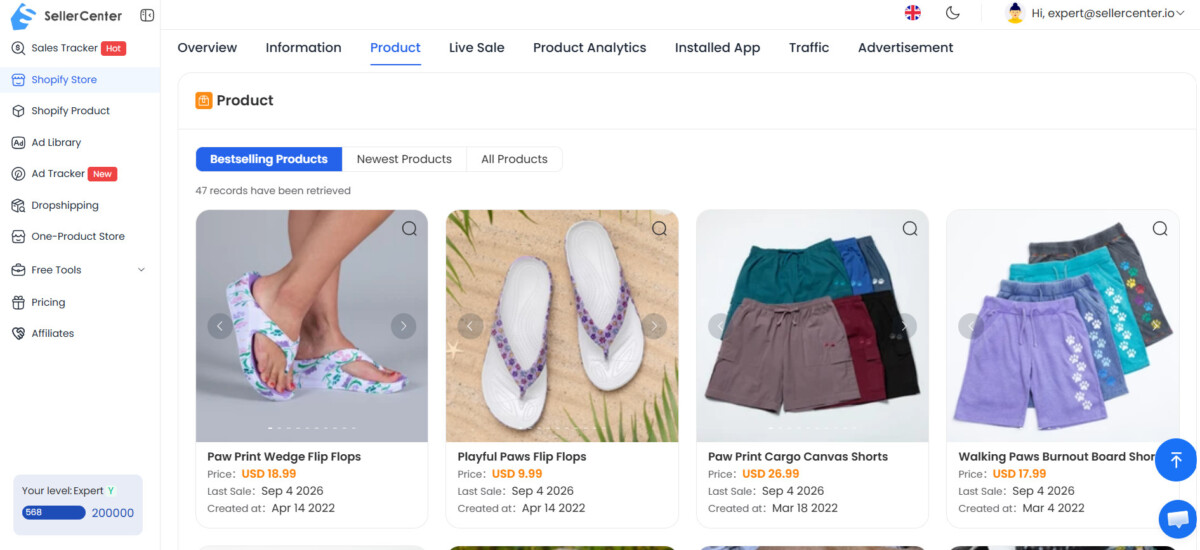
Start by looking for products labeled Best Seller or Most Popular, items featured prominently on the homepage, and products with high review counts. Identifying competitors’ best-selling products helps you understand where actual customer demand is concentrated. Also pay attention to new product launches. If a competitor introduces multiple products within the same category in a short period, it may indicate where they see growth potential.
A simpler way to gather this information is with SellerCenter. Search for a competitor in the SellerCenter Shopify Store Database, open the store details page, and you can quickly see its best-selling products, newly launched products, and product update frequency. This makes it easier to identify product trends without manually reviewing the entire store.
Compare prices for similar products, but don’t stop at the sticker price. Look at the offer structure around each product: bundles and quantity discounts, subscription options, free shipping thresholds, and first-order discounts or incentives. This shows how competitors position their products and encourage customers to spend more. It can also reveal room to compete through better value, premium features, or different bundles. If competitors cluster around one free shipping threshold, that number is a useful reference point when you set your own free shipping offer against your margins and average order value.
Spend real time on competitor product pages as if you were a customer. Note the number and quality of images and videos, where trust badges sit, how customer reviews are displayed, which variant options are offered, whether there is a size guide, and how clearly shipping and return policies are explained. Then add an item to your cart and watch what happens at checkout: upsell offers, subscription suggestions, gift add-ons. Each visible feature is a conversion lever you can test in your own store, one at a time. Going further and buying from a competitor once, then following their emails and packaging, is one of the simple ways to track ecommerce competitors that no tool replaces.
Once you’ve compared several competitors, look for gaps in their product ranges. You may find products or variations that few competitors offer, customer needs that aren’t being addressed, or pricing and bundle options that are largely overlooked. These gaps can become opportunities to differentiate your range, create new offers, or target customer segments competitors aren’t serving well.
A competitor’s store website shows how they structure the shopping experience and which tools run behind it, so focus on two things: the Shopify theme and the app stack. Both are easy to identify and both are easy to over-copy.
Look at the store’s layout, navigation, product pages, and mobile experience. Comparing themes across several successful competitors can help you identify common design patterns and features worth considering for your own store. Instead of manually checking the source code, use SellerCenter’s Free Shopify Theme Detector to quickly identify the Shopify theme behind any Shopify store.
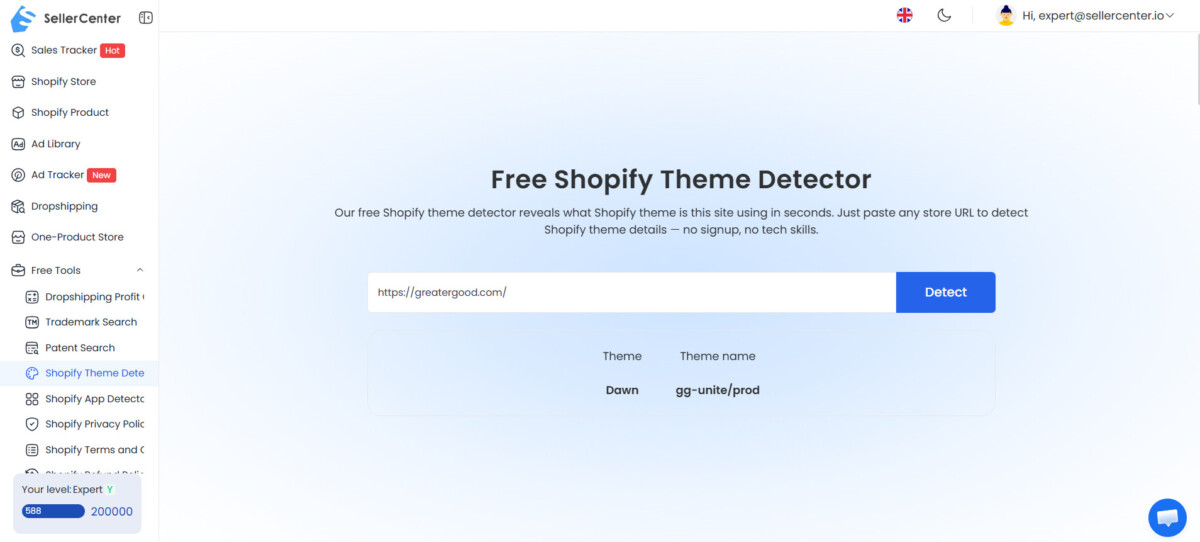
Keep in mind that a theme name tells you less than the customizations on top of it. Two stores on the same free theme, such as Dawn in the screenshot above, can look and convert very differently, so study what a competitor changed rather than switching themes to match.
A competitor’s app stack shows how they handle reviews and social proof for building trust, upselling and cross-selling for order value, email and marketing for acquisition and retention, customer support for the shopping experience, and analytics and conversion tools for measurement. Pay particular attention to app categories that appear repeatedly among your top competitors. If several rely on similar types of apps, those functions may matter for competing in your niche. An underused function, on the other hand, may reveal an opportunity.
Instead of manually inspecting source code, you can use SellerCenter’s Free Shopify App Detector to quickly check which Shopify apps a competitor’s store is using. General technology lookup tools such as BuiltWith do a similar job across platforms.
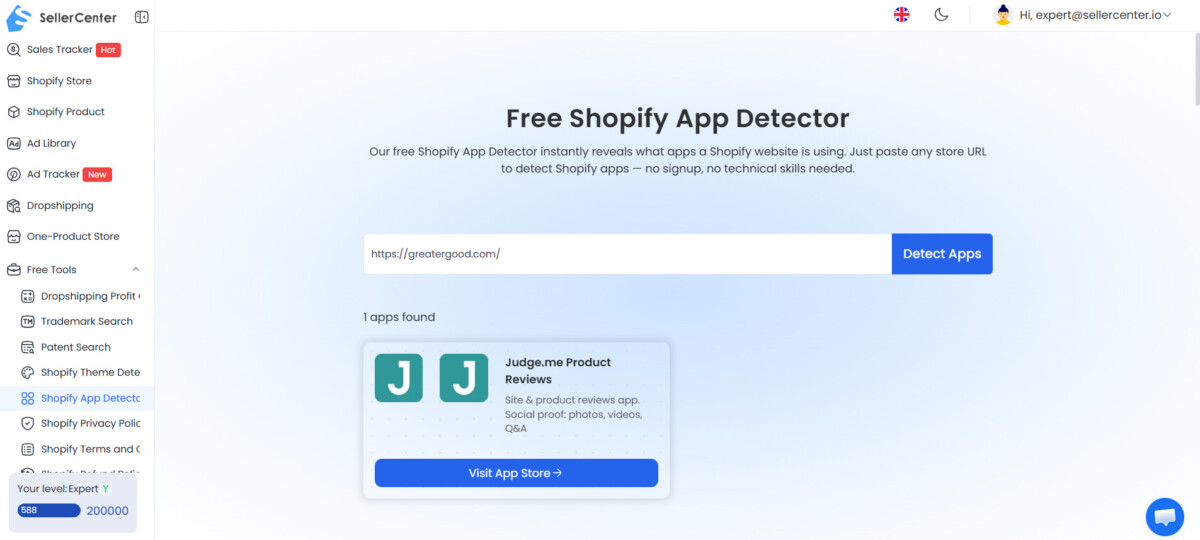
This is where stage matters most. A $20M brand can run a long list of apps with a team to manage them; a $300K store that copies that stack usually ends up with slower pages, overlapping subscriptions, and no one watching half the tools. Match the category, not the count: if every competitor runs a reviews app and you don’t, that is a gap; if they run four upsell apps, that is not a target. Our stage by stage guide to the Shopify tech stack shows which categories earn their place at each revenue level.
Where a competitor’s traffic comes from is usually more useful than how much traffic they get, because the channel mix reveals their acquisition strategy. A store relying heavily on organic search has a very different strategy from one that depends mainly on paid social or email.
Compare the traffic mix across several competitors and look for recurring patterns. The goal isn’t just to identify the most popular channel, but to find patterns and gaps. If competitors consistently rely on one channel while largely overlooking another, that underused channel may be worth investigating.
SellerCenter can simplify this research by showing estimated traffic trends, visitor locations, and traffic source distribution for Shopify stores. Search for a competitor, open its store details, and compare these metrics to understand how its traffic is changing, where its visitors come from, and which channels contribute most to its traffic.
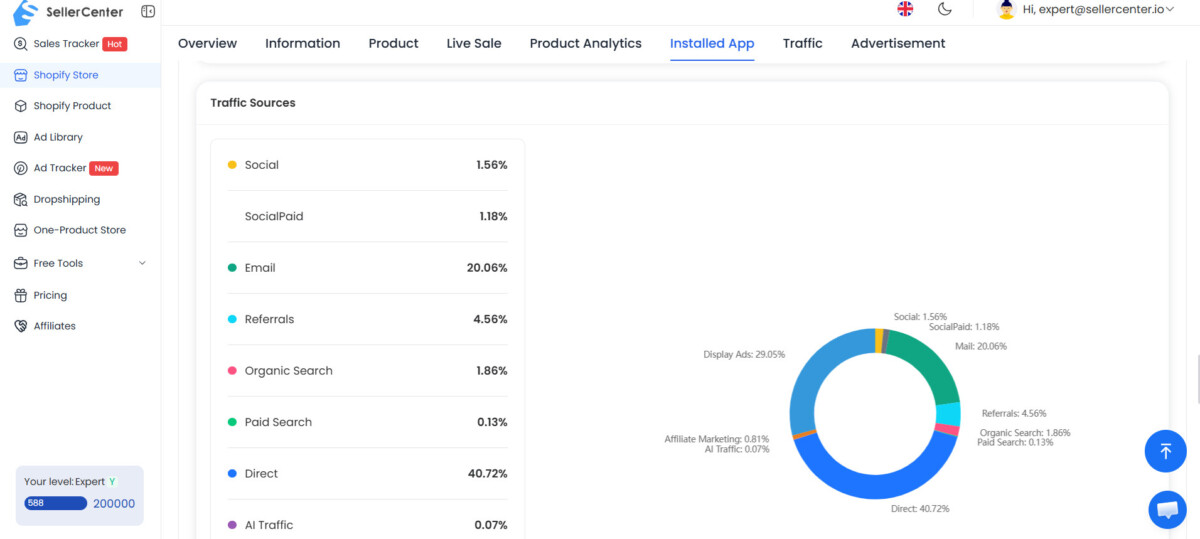
Every third-party traffic tool, from SellerCenter to Similarweb, works from modeled data rather than the store’s own analytics; Similarweb, for example, explains how it extrapolates traffic from panel and partner signals. That makes these numbers strong for comparing competitors against each other and weaker as absolute figures. Read the mix and the trend, check that the same brand isn’t counted twice under a checkout or regional domain, and be wary of any single number that looks too precise.
Competitor SEO analysis shows the keywords competitors rank for, the pages that bring them traffic, and the content you are missing, which makes it one of the best sources of long-term traffic ideas for a Shopify store. SEO compounds, so the gaps you find here keep paying off after the work is done.
Enter a competitor’s domain into Ahrefs Site Explorer or Semrush Organic Research and export their top organic keywords. Then focus on three areas. First, look for high-volume keywords they rank for that you don’t target yet, especially long-tail commercial terms containing words like “best,” “buy,” “review,” or “vs.”
Second, identify keywords where your own pages rank in positions 11 to 30 but haven’t reached the first page. These can be relatively quick wins because search demand is already proven and your content is close. Pull this list from your own Google Search Console performance report, which shows your real positions rather than an estimate.
Third, look for keywords where competitors have thin, outdated, or poorly structured content. These gaps let you create a stronger page and capture more search traffic. Don’t overlook content gaps, either. If several competitors in your niche publish detailed comparison articles while you don’t cover the topic at all, that’s a clear gap you can address.
Competitor ad and content research shows which platforms competitors pay to reach customers on, which products and messages they push, and how they keep audiences engaged. The aim is to learn from proven approaches, not to copy campaigns.
Identify which platforms competitors actively use, such as Meta, TikTok, YouTube, and Google Ads. Look for patterns across multiple competitors to understand which channels are commonly used in your niche. A brand running ads continuously for months is giving you a stronger signal than one that ran a campaign for a week.
Study the ads competitors run and pay attention to the products being promoted, the creative formats, the promotional angles, the offers and calls to action, and the customer pain points the ads speak to. These elements reveal which products and messages competitors believe are most effective at attracting customers.
Review competitors’ social media and content to understand how they engage their audience. Compare their content formats, popular topics, posting frequency, and engagement, and look for UGC and influencer campaigns that generate strong audience interaction. The goal is not to copy their campaigns, but to identify proven approaches and potential opportunities for your own marketing strategy.
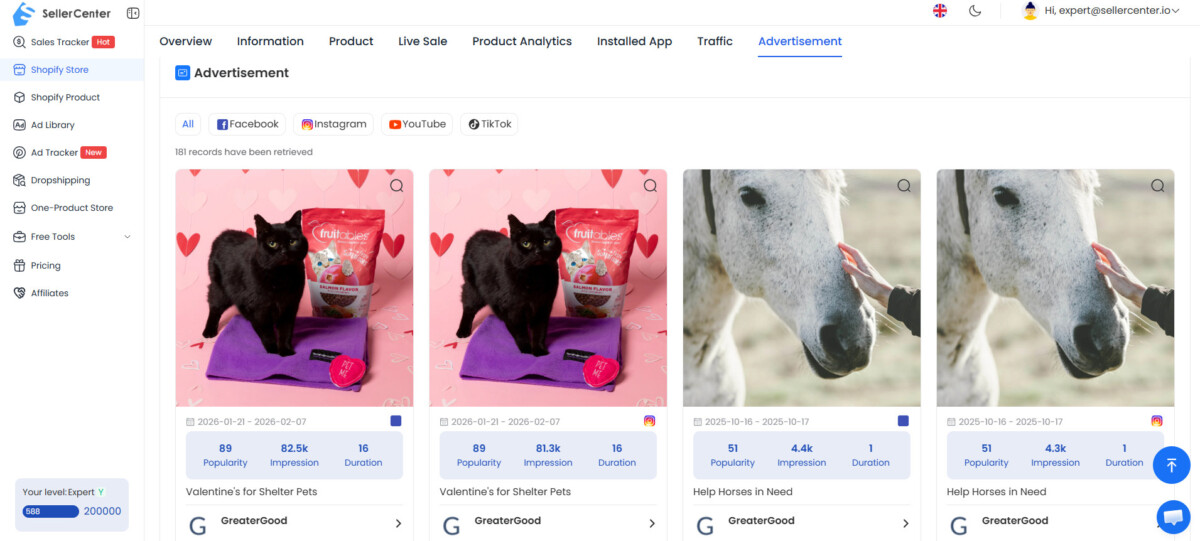
SellerCenter can simplify competitor ad research by showing which platforms a store advertises on, advertising performance data, and the ad creatives being used. You don’t need to search through different ad libraries separately, as SellerCenter brings this information together in one place. This makes it easier to compare competitors’ advertising strategies.
Competitor insights become growth opportunities only after you test each one against three questions: is there evidence of demand, does it fit your business, and can you improve on it. Copying what competitors do without that filter usually means arriving late with a weaker version.
Start with demand. Look for signals such as long-running ads, high review counts, strong product visibility, or repeated seasonal campaigns. Then ask whether it fits your business, considering your target audience, positioning, products, and available budget. Finally, ask whether you can improve or differentiate it. A competitor’s strategy can be a starting point, but your execution should give customers a clear reason to choose you.
Then look for gaps across your top three to five competitors. These might include an underused traffic channel, missing product variations, limited content coverage, weak promotional offers, or an overlooked customer segment. Prioritize the gaps that fit your business and have clear potential, then test them rather than assuming they will work.
Stage changes which gaps are worth chasing. Under $500K a year, the best gaps are usually on the product page and in the offer, because they need no new channel. Between $500K and $2M a year, the common mistake is adding a new channel, a new product line, and a new app at the same time because three competitors did; pick the one gap with the clearest demand signal and finish it first.
Prioritize by sorting each opportunity into a quick win or a strategic project based on its expected impact and required resources, then test one major change at a time so you know what caused the result. This turns a research document into a working plan.
Quick wins can usually be implemented within one to two weeks. Examples include improving product page copy, adding trust badges, installing a reviews app, testing a new free shipping threshold, and refining email capture incentives.
Strategic projects typically require 30 to 90 days of planning and execution. These may include launching a new product line based on demand signals, building a content cluster around an untapped keyword group, restructuring your pricing model, or introducing a subscription offering.
Test one major change at a time so you can clearly attribute the results. Give each test at least two to four weeks before evaluating it, longer if your store gets limited traffic, and keep a simple change log of what you tested and what you learned. Over time, those results become a playbook for future decisions. Before installing anything new as a quick win, check whether an app you already pay for covers it; a regular Shopify tech stack audit keeps competitor-inspired additions from turning into app bloat.
For Shopify competitor analysis, you need tools that cover store listings, sales estimates, traffic, SEO, and advertising. SellerCenter brings most of these together, letting you analyze competitor products, estimated sales, traffic sources, Shopify themes and apps, advertising platforms, and ad creatives in one place. Free sources fill much of the rest: the Meta Ad Library, TikTok Creative Center, and Google Ads Transparency Center for ads, and Google Search Console for your own rankings. For keyword research on competitor domains, add an SEO tool such as Ahrefs or Semrush.
A monthly check on competitor ad creative and new products is enough for most niches. Run a deeper quarterly review of tech stacks, traffic sources, and SEO rankings, since those change more slowly. If you operate in a fast-moving category like supplements, beauty, or electronics, weekly price checks may be warranted. Keep each review short and focused on what changed since the last one, so the habit stays sustainable and the findings feed straight into your test list rather than piling up in a spreadsheet.
Five to ten competitors is the sweet spot for most Shopify stores. Three to five direct competitors and two to three indirect ones give you enough patterns to learn from without overwhelming your analysis. Tracking 20 or more stores tends to produce data overload with very little extra insight, because the same patterns repeat. If your list grows, cut the stores that are far above or below your own stage, since their choices are the least likely to transfer to your business this year.
You can see most of a competitor’s front-end apps, such as email capture, reviews, chat, upsells, analytics, and tracking pixels, because they load scripts on the storefront. Backend apps for inventory, fulfillment, and finance do not load publicly and cannot be seen from outside. App and theme detectors read those storefront scripts for you. Treat the result as a partial picture of the stack, and focus on which app categories keep appearing across competitors rather than the exact app names.
Competitor sales and traffic figures from third-party tools are modeled estimates, not the store’s real analytics, so they are better for comparison than for exact numbers. Tools build them from signals such as panel data, partner data, public storefront activity, and product updates. Use them to rank competitors against each other and to spot trends over time. Before acting on a single figure, sanity check it against other signals like review counts, ad activity, and catalog size, and watch for the same brand appearing under more than one domain.
Shopify competitor analysis is an ongoing process, not a one-time audit: you keep tracking what competitors sell, how they price and promote it, where their traffic comes from, and how their stores are built. The key is to turn those insights into clear opportunities, prioritize them by impact and effort, and test them one at a time.
SellerCenter can simplify this process by bringing Shopify store, product, traffic, and advertising data together in one place. Instead of manually researching competitors across multiple sources, you can quickly identify useful insights and turn them into actionable ideas for your own store. The goal isn’t to collect more data, but to use competitor insights to make better decisions faster, at the pace your stage can support.




