


Some of the most popular Shopify merchants have lost thousands of dollars, customers, and sales as a result of neglecting security. Thankfully, we’ve put together a list of the top security apps for your Shopify store so you can prevent this from happening to you.
If you’re an ecommerce manager or you own an enterprise-level brand, it’s extremely important to consider the security of your online store and your customers. The risks of neglecting security could be detrimental to your business as well as your customers. If the security of your online store isn’t your number one priority, it should be.
When it comes to customer security, Shopify protects merchants and shoppers by making each store automatically PCI compliant. Individual store security is a different story. Both Shopify and you, the merchant, share the responsibility of protecting your store. Shopify secures the software infrastructure and disaster recovery of the entire platform. Shopify merchants are responsible for password security, third-party apps, and backups of your store data.
Read more: Is Shopify Secure?
According to Hosting Tribunal, about 87% of merchants have an average of 6 third-party apps installed. Some apps put merchants at risk of theft, data breaches, and content losses if the third-party app is hacked. If you need a quick brief on how third-party apps can infiltrate your stores, check out our exploration into ecommerce app permissions and how to determine if an app is safe in the first place.
In fact, the worst is pretty bad.
In 2015, Gymshark, a merchant selling sports and fitness clothes, estimated a loss of over $143,000 after their Magento site went down on Black Friday. Before that, SweetLegs, a legging company who was previously hosted on WooCommerce, faced similar losses in 2014, when they too lost six figures’ worth of sales during a Black Friday data breach.
Before moving to Shopify Plus, International Military Antiques (IMA) was hacked, and their customers’ data was targeted and scraped. They spent thousands just to get the site back to a minimum level of security, but their customers’ data was already compromised.
A variety of Shopify security apps have been developed to prevent these scenarios from happening to you and your customers.
Shopify security apps are a must-have for merchants, but these apps can also help agencies keep their customers’ data (and their own stores) safe.
Let’s explore the top security apps to help you boost sales, loyalty, and keep your products and your customers’ data safe.

Rewind Backups protects Shopify store owners from catastrophe. While Shopify backs up data, there’s no way to retrieve content once it’s deleted. When merchants are transferring platforms, working with new vendors, sharing passwords with new employees and working through site sprints, small errors could cause merchants to lose UPCs, order history, on-site content and all site’s data.
Read More: Is Shopify Backed Up?
Rewind Backups captures order history, descriptions, pictures, and even SEO tagging and it makes all site data retrievable. Merchants can update content without worrying about losing key content.
KEY FEATURES
PRICING
BEST FOR
Any Shopify merchant whose team shifts frequently, who needs to update orders multiple times a year, and who shifts content throughout the season.
Trusted by customers like Gymshark, Pampers, Charmin, OVO, MVMT, and Paul Mitchell, Rewind Backups goes beyond just Shopify. Rewind supports backups for QuickBooks Online, Mailchimp, and Klaviyo – with more platforms to come!
Backups give merchants the confidence to invite multiple users to work on their store, quickly change their content and push new changes live.
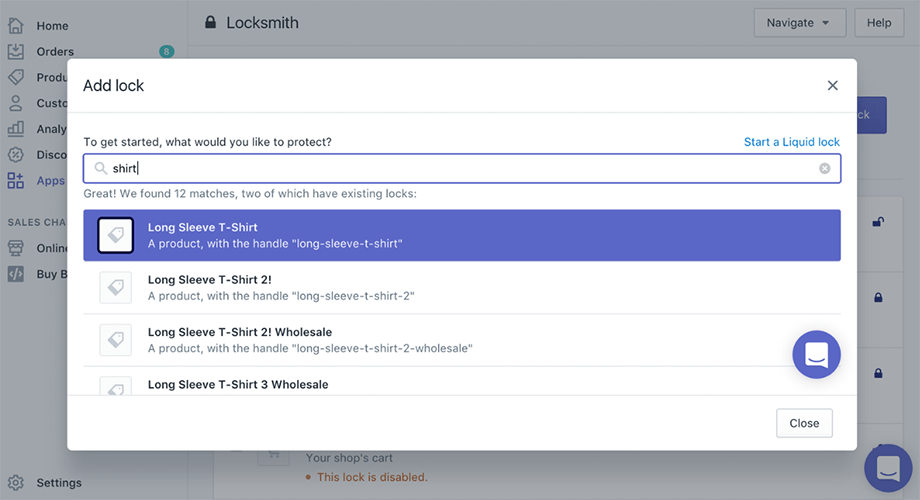
Locksmith by Lightward is a Shopify app that offers storefront security so merchants can get creative with how they protect their stores.
Locksmith allows merchants to lock products behind links that only certain customers can view. For example, merchants like Refined Wears, JavaMania and Surf ‘relik use Locksmith to hide wholesale pricing from retail customers, hide livestreams behind email signups, or support customer-specific URLS to create links that only certain customers can see.
Key Features
Pricing
Best For
This is perfect for merchants who only sell specific goods to people in certain parts of the world, for merchants who want to share early launches with a small subgroup of customers, and for merchants who want to protect specific content from certain public segments.
Merchants without coding experience who want to hide certain types of data from specific subgroups will love this app.

McAfee SECURE is one of the most well-known brands in the security industry, and they’re now supporting Shopify merchants with their trusted security. McAfee SECURE supports trust between merchants and shoppers by automatically scanning stores for data breaches, malware, and malicious activity. McAfee Secure displays safety checkmarks so customers can learn about the safety of each page.
Shoppers will feel more secure when they recognize the popular McAfee trust mark displayed on an online store, and customers who do not normally shop online will be more likely to make credit card purchases when they see the McAfee trust mark displayed.
Read more: How well-known brands use the McAfee SECURE service
Companies like Dollar Tree, Build-a-Bear Workshop, and Foot Locker use McAfee SECURE to scan for viruses and increase customer loyalty by sharing with their customers that they’re free of malware and viruses, and their site is safe to browse and purchase from.
Key Features
Pricing
Best For
Merchants who want to increase the trust of their site. Some of the world’s biggest brands use McAfee Secure to let their customers know that their site is safe and their data is protected.

With the recent GDPR rollout, (which requires companies to give EU citizens more insight into when and how their data is being used), many non-compliant merchants are losing customers or blocking access to EU countries altogether. According to the new EU GDPR law, merchants and websites have to get consent in order to gather information about their visitors. With this free Shopify app, merchants can stay compliant by providing a cookie compliance bar directed at EU customers.
Key Features
Pricing
Best For
All merchants, no matter the size, who sell products to EU customers. Merchants are using the free app to stay compliant and on-brand without having to implement additional code.
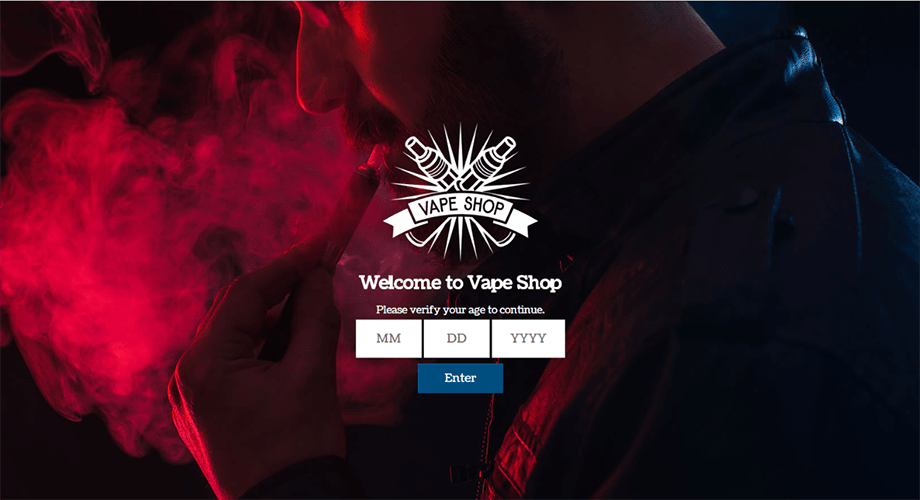
While there is no law requiring websites to verify the age of visitors before allowing access, Age Check allows merchants selling adult products to deter underage youth from supporting their products. With Age Check, merchants who sell age-restricted items like tobacco and alcohol can restrict access to customers who aren’t of age by requiring visitors to enter their date of birth or respond to a yes/no question about their age before they’re allowed into the site.
Incorporating an age check increases trust on sites selling adult content, so merchants can restrict underage viewers from entering the site.
Key Features
Price
Best For
All Shopify merchants who sell age-restricted products like tobacco or alcohol. Vape shops, websites selling spirits and alcohol, and merchants selling cannabis products use Age Check.

Merchants work hard to create a site that reflects their brand, and most store owners would be surprised to hear that their content, images and text can easily be lifted from their site and placed onto any third-party website with a few clicks.
Depending on where the data is placed, third-party websites, scammers, and other companies can use duplicated content to sell their own products, increase their search rankings, and decrease the trust of your company. CommonPanda, for example, had their entire site copied in the past; logos, copy, and all.
With Cozy AntiTheft, merchants can restrict content access so their images and content can’t be downloaded.
Read more: How to protect your Shopify store using Cozy AntiTheft
Key Features
Pricing
Best For
All merchants who want to protect their site content.
The security of data is critical no matter who you’re serving, what type of product you’re working with, or what apps you’re installing. Just as retailers have insurance to protect their physical store, you need insurance to protect your online store. We recommend using at least 3 of the above security apps.
By taking the precautions to run a secure online store, you’ll protect your reputation, data, and content. Not only that, but you will notice an increase in sales, save your business time, resources, and money.
Already using some of the apps listed? Let us know in the comments which security apps are your favourite.
This article was originally published by our friends at Rewind.




