CGI replaces the product shoot when a catalog has many variants, because a 3D model turns every new color, angle and crop into a render instead of a new shoot; for a single product, a photographer is usually cheaper.
The first product costs more as a render than as a photograph. The fiftieth costs almost nothing extra, and that gap is the whole decision.
Every growing store reaches a point where photography is the slowest part of adding a product. That is where CGI for product ads in e-commerce earns its place: not on the first product, where it is usually more expensive than a photographer, but on the fiftieth, where the marginal cost of another image approaches zero.
This guide is for merchants whose catalogs have outgrown the studio calendar. It covers the catalog math that decides the question, the products photography cannot reach, the two ways CGI goes wrong, and a pilot that limits the downside to a single product family. Smaller stores will find a clear signal for when to keep the photographer.
Product photography stops scaling because every new variant restarts the same cycle of samples, studio time and scheduling. At twenty products, photography is a manageable line item. At two hundred, across multiple colorways, with seasonal refreshes and a marketplace that wants its own aspect ratios, it becomes a permanent operational drag.
The drag comes from the sequence, not the camera. Samples have to ship to a studio, shoots have to be scheduled, and the images come back only after editing and approval. Then a supplier adds a colorway, a season changes or a marketplace updates its crop rules, and the sequence starts again. The work never finishes because the catalog never stops changing.
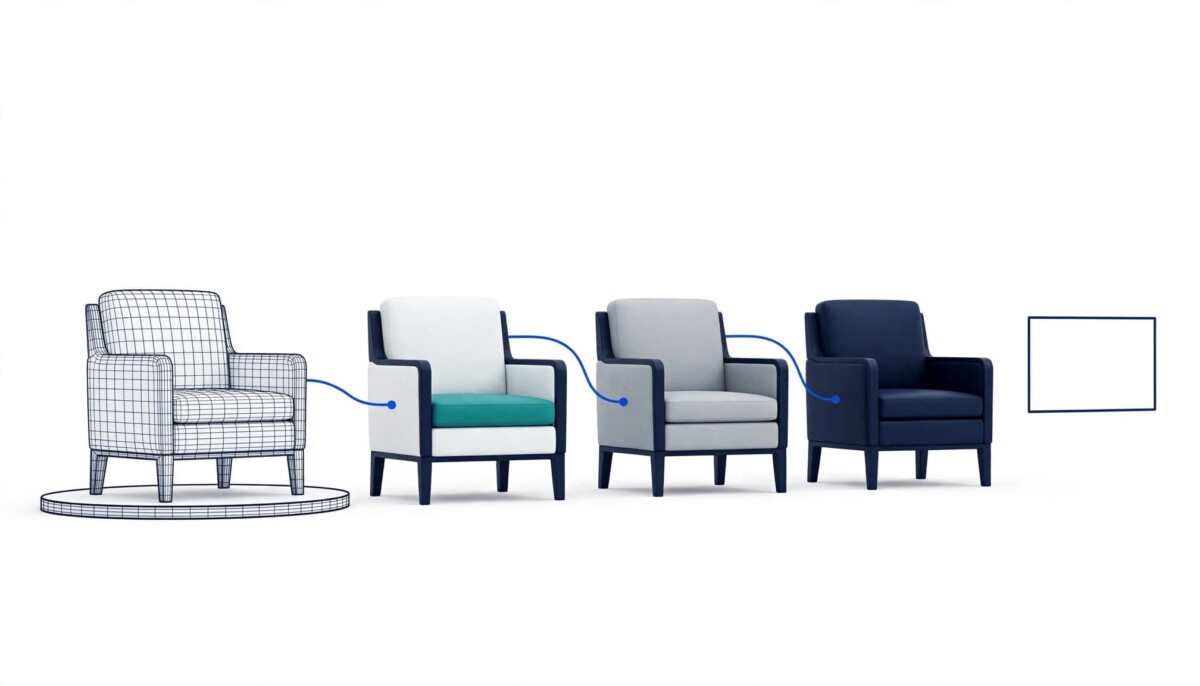
The alternative is to stop capturing products and start building them. Once a SKU exists as a 3D model, producing imagery becomes a software task. A new color, a new angle, a new background and a new crop are each a render, and renders do not need a sample, a studio or a calendar slot. Fastlane’s overview of how 3D rendering is used in ecommerce covers the wider set of uses, from product visualization to augmented reality, if you want the background first.
Count the images one product needs, then compare what each additional image costs under photography and under rendering; rendering wins once variants multiply. The count is easier than it sounds.
Illustrative example, not drawn from a specific store: a product comes in six colorways, and each colorway needs five angles, one lifestyle shot and three marketplace crops. That is nine images per colorway and 54 images for one SKU, before anyone asks for a seasonal refresh.
Photographed, every colorway is a separate setup with a separate physical sample, so this one SKU means six setups and six samples shipped to a studio. Modeled once, the colorways are material swaps. The five angles are camera positions in the same scene. The crops are export settings, and the lifestyle shot is one more scene in the same file.
The first product is the expensive one, because the model, the materials and the scene all have to be built before the first image exists. By the fiftieth product, much of that setup is already in place, and the marginal cost of one more image approaches zero.
The decision rule follows from the arithmetic. A single product with one colorway and three angles is a job for a photographer. A product with six colorways, a lifestyle scene and marketplace crops is where a model starts to pay back, and every extra colorway moves the break even point earlier.
Yes, a product that is still in tooling can be rendered from the CAD files the factory is already working from, so pre-orders, crowdfunding campaigns and seasonal launches do not have to wait for manufacturing. This is the second advantage of rendering, and it has nothing to do with cost.
You cannot photograph a product that does not exist yet, and these campaigns need imagery before it does. One limit applies: a render built from design files shows design intent, so check it against the first production sample once one exists, using the color and material comparison covered below.
The same logic applies to configurable products. If a customer can choose a frame, a finish and a fabric, the number of possible combinations quickly exceeds anything you could reasonably photograph. Rendering on demand from a single model is the practical way to cover the full combination space without a warehouse of samples. Fastlane’s look at 360 product views for furniture stores shows how this plays out in a category where frames, finishes and fabrics multiply.
The model can also outlive the campaign. Shopify’s product media documentation lists GLB and USDZ as the accepted 3D file types, with files up to 500 MB, and says that 3D models and augmented reality on product pages can increase a customer’s confidence in a product. That makes the files you receive a contract question: ask whether the model can be delivered in those formats, not only as finished images.
CGI for product images goes wrong in two ways: surfaces that look subtly fake, and colors that do not match the physical product.
The first is materials. Photoreal rendering lives or dies on how surfaces behave: how light scatters through frosted plastic, how a woven fabric catches a highlight, how anodized aluminum differs from painted steel. A studio that treats all of these as generic shaders will produce images that look subtly wrong, and a shopper choosing on texture or finish has nothing else to go on. When you review a studio’s samples, ask for close crops of your hardest material, not the easy hero shot.
The second is consistency with reality. If the render shows a richer color than the product has, the gap tends to show up in returns. Supply physical samples and real color values, and insist on a comparison against a photograph of the actual item before the catalog goes live. Accuracy is not an aesthetic preference here; it is a commercial control. After launch, tag returns that mention color or appearance, so a render can be corrected if it is the cause.
Marketplaces add their own rules. An Amazon staff post in the seller forums states that images must accurately represent the product, and that a main image must show only the product on a white background, with the product filling at least 85 percent of the image. The post does not say whether renders are accepted either way, so confirm the current policy for every channel before you convert a listing.
For the photographic side of the same problem, Fastlane’s ecommerce photography tips cover lighting and background choices that keep colors honest. The same test applies to a render: would a shopper who received the product say the picture was fair?
Pilot CGI on one product family that is representative of your materials and that you expect to sell for at least a year, instead of converting the whole catalog. A pilot turns a large commitment into a small, measurable one.
Build it properly, with source files in your ownership. In practice, the contract should name the 3D model, the scene files and the material definitions as deliverables, not only the finished images, so a future variant does not mean paying to re-create the model from scratch.
Then run those images against your existing photography on the same traffic, with one share of visitors seeing the rendered set and the rest seeing the photographed set, so seasonality and ad mix affect both equally. Decide before you start what result would make you stop, such as returns rising because of color, and fix that problem before adding more products.
Measure three things: conversion rate, return rate and the production time for the next variant. If the next variant takes an afternoon instead of two weeks, the model can justify itself on production time alone, as long as conversion and returns hold steady. If it does not, you have learned that for the price of one product family rather than the whole store.
Keep the photographer while the catalog is small and stable, price a pilot once variants multiply, and treat the 3D models as a catalog asset once every season triggers another round of shoots.
At around twenty products with few variants, keep shooting. Photography is a manageable line item at that size, and the setup work for a model rarely earns itself back on a handful of images per product.
From roughly fifty products, especially ones with several colorways or finishes, price a pilot. This is the range where the catalog math above starts to favor rendering, because each added variant costs a render instead of a shoot.
At two hundred products and beyond, with seasonal refreshes and marketplace crops, the models become infrastructure. Owning the source files matters most here, because every future variant, crop and channel depends on them.
Rendering does not have to replace every shoot. Fastlane’s guide to deciding what to shoot and what to generate before peak season makes the case for keeping real photography where authenticity sells the product, such as packaging and real people, and producing the variants another way. The same split logic applies to CGI.
CGI becomes cheaper than a product photoshoot once a catalog has enough variants that each new image is a render instead of a new shoot. The first product is usually more expensive as CGI than as a photograph, because the model, materials and scene must be built first. By the fiftieth product, the marginal cost of another image approaches zero, while photography still needs a sample, a studio and a calendar slot for each new colorway. Count the images one product needs, multiply by your colorways and channels, and compare the cost of each additional image under both methods before you commit.
CGI product images can match the real product’s colors when the studio works from physical samples and real color values, and you compare the render against a photograph of the actual item before launch. A render that shows a richer color than the product has will tend to appear in your return data. Ask the studio to deliver color critical products first, check them against the sample, and tag returns that mention color or appearance after launch so you can trace any gap back to the image.
You can create product images before manufacturing is complete by rendering from the CAD files the factory is already working from. This suits pre-orders, crowdfunding campaigns and seasonal launches, where imagery is needed while the product is still in tooling. Once the first production sample exists, compare it with the render and correct any differences in color, material or finish, because a render built from design files shows the intent rather than the finished item. The same model can then be reused for every colorway and angle you add later.
Marketplace rules differ by channel and category, so check the current image policy for each one before you convert a listing. An Amazon staff post in the seller forums states that all images must accurately represent the product and that a main image must show only the product on a white background, with the product filling at least 85 percent of the image. That post does not say whether renders are accepted, so confirm it with the marketplace, and keep photographed images ready for any channel where the main image rules are strict or unclear.
Test CGI on one product family that represents your materials and that you expect to sell for at least a year, then run the rendered images against your existing photography on the same traffic. Measure conversion rate, return rate and the production time for the next variant. Make sure your contract names the 3D model and scene files as deliverables, so you own what you paid for. If the pilot disappoints, you have learned that for the price of one product family rather than the whole store.