The cheapest AI ad tool on the pricing page can be the most expensive one per ad you actually launch.
Most Shopify merchants shopping for an AI ad generator compare feature lists, and the feature list is the least useful page on any vendor’s site. What you are really buying is a system that turns your product catalog into enough on-brand creative to keep Meta and TikTok campaigns profitable, and the only honest test of that is your own SKUs, your own margins and a fixed trial window.
This guide comes from the team at Larven, which builds an AI ad generator for Shopify, so read it with that in mind. The framework works on any tool in the category, theirs included: define the jobs the tool has to do, run a bounded trial on your own products, score it on cost per usable ad and contribution margin, and walk away from anything that trips the red flags below.
It is written for stores already spending on paid social, roughly $5K a month in ad spend and up. If you are below that, read the four jobs and the red flags, then skip to the stage section near the end before you pay for anything.
An AI ad generator for a Shopify store needs to do four jobs: produce enough creative volume to outrun fatigue, generate on-brand output from your own store data, run structured tests, and report results by margin rather than ROAS alone. Strip away the marketing and almost every AI ad tool is selling some combination of those four, so score each tool out of 10 on all of them and you will make a better decision than any feature matrix allows.
Volume against fatigue. The tool produces enough fresh variants each week that your best performing ad is never the only thing holding up the account.
On-brand output from your store data. It pulls real products, real photography and real brand rules, not a stock template approximation of your category.
Structured testing. It changes one variable at a time and tells you which variable moved the result.
Margin-aware reporting. It shows what a campaign earned after cost of goods, shipping and discounts, not just a return on ad spend figure.
The weighting changes with your stage. A store doing around $20K a month in revenue mostly needs jobs one and two, because volume and brand consistency are the bottleneck. A brand spending $150K a month on paid media lives or dies on jobs three and four, because creative output is already there and the problem is knowing what to scale.
Decide which job matters most for your stage before you take a demo. The tool that wins a generic feature comparison is rarely the tool that wins on your weighted scorecard, and a vendor demo will naturally lead with whichever job its product does best.
An AI ad generator earns its subscription on volume only if it can produce roughly four to eight genuinely new concepts a month for your account, because every winning ad decays. You find a hook that works, spend scales behind it, the same people see it again and again, and the click through rate slides while cost per acquisition climbs. Nothing about the ad changed. The audience just got tired of it.
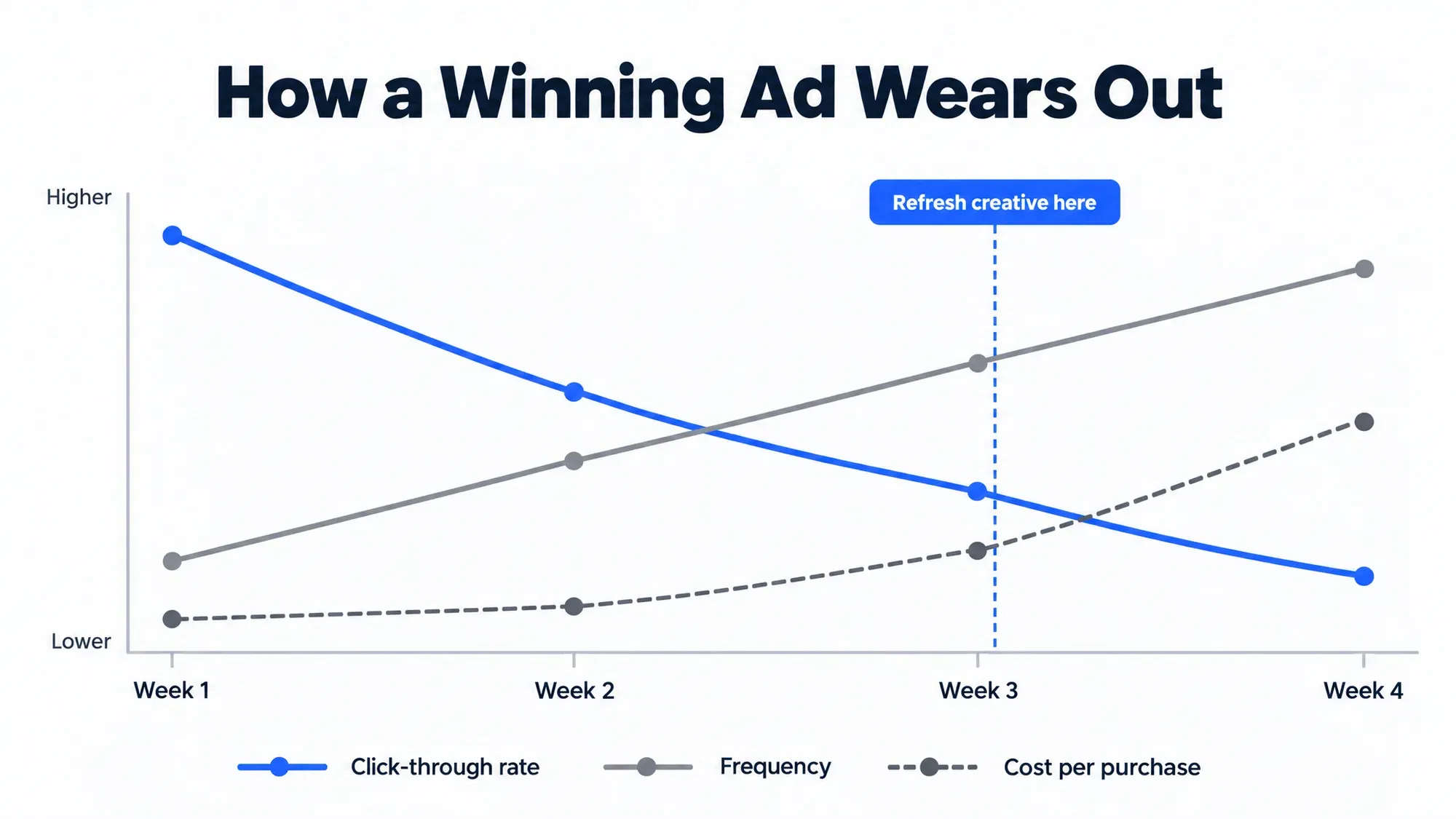
Meta flags this for you. Its help article on creative fatigue recommendations in Ads Manager explains that when an audience has seen the same creative too many times, the ad shows a Creative limited or Creative fatigue status in the Delivery column. Do not wait for the label. Watch frequency at the ad set level, CTR against its own seven day rolling average, and cost per result. A common media buyer rule of thumb, not a Meta threshold, is that once frequency on a cold traffic ad set passes roughly 2.5 to 3 and CTR has dropped meaningfully from its launch week, that creative is on borrowed time. The fix is new creative, not a bid adjustment.
How much new creative? Work backwards from how many ads you need live. If you want three to five concepts running per campaign and each lasts three to four weeks before fatigue, you need roughly four to eight new concepts a month, plus variants of the ones that are working. That is the floor a tool has to clear to be worth paying for.
Ask every vendor the same question: how many net new concepts, not exports or resized copies, can this produce for one SKU in a week? Then verify the answer in the trial, because a concept count on a sales call and a concept count on your catalog are different numbers.
On-brand output means the tool ingests specific inputs from your business and conditions its creative on them; anything less is a template with your logo pasted on. It is the most abused phrase in this category, so test it directly. Four input layers matter, in rough order of impact.
Product catalog. Live titles, descriptions, variants, prices and inventory status pulled from Shopify, so an ad never promotes a sold out variant or a stale price.
Product imagery and video. Your real photography and any UGC footage you own, not a generic lifestyle model holding a generic bottle.
Brand guidelines. Fonts, palette, tone of voice, and the claims you are and are not allowed to make.
Past winning ads. Historical creative with its performance attached, so the system can learn which angles already worked for your audience.

The catalog layer is where tools differ most. Many generators start from a pasted product URL, which works for a first draft, as Fastlane’s explainer on how AI ad generators turn product pages into video ads walks through. A pasted link is a snapshot, though. A live catalog connection keeps prices and variants in sync after the ad ships.
Run this checklist during the demo, on your store rather than theirs. Connect the Shopify store live and generate from a real SKU you choose on the call. Ask for an ad on an awkward format, such as a bundle or a subscription. Check that the price and variant name in the output match the catalog exactly. Upload your brand guideline PDF and ask for a second pass that respects it. Then show the output to someone on your team who has never seen the tool and ask whether it looks like your brand.
Structured testing means the tool holds everything constant except one variable, so each round tells you something reusable about your customer instead of crowning one lucky file. There is a wide gap between a tool that generates fifty ads and a tool that runs an experiment. The first gives you volume. The second gives you knowledge you can use next quarter.
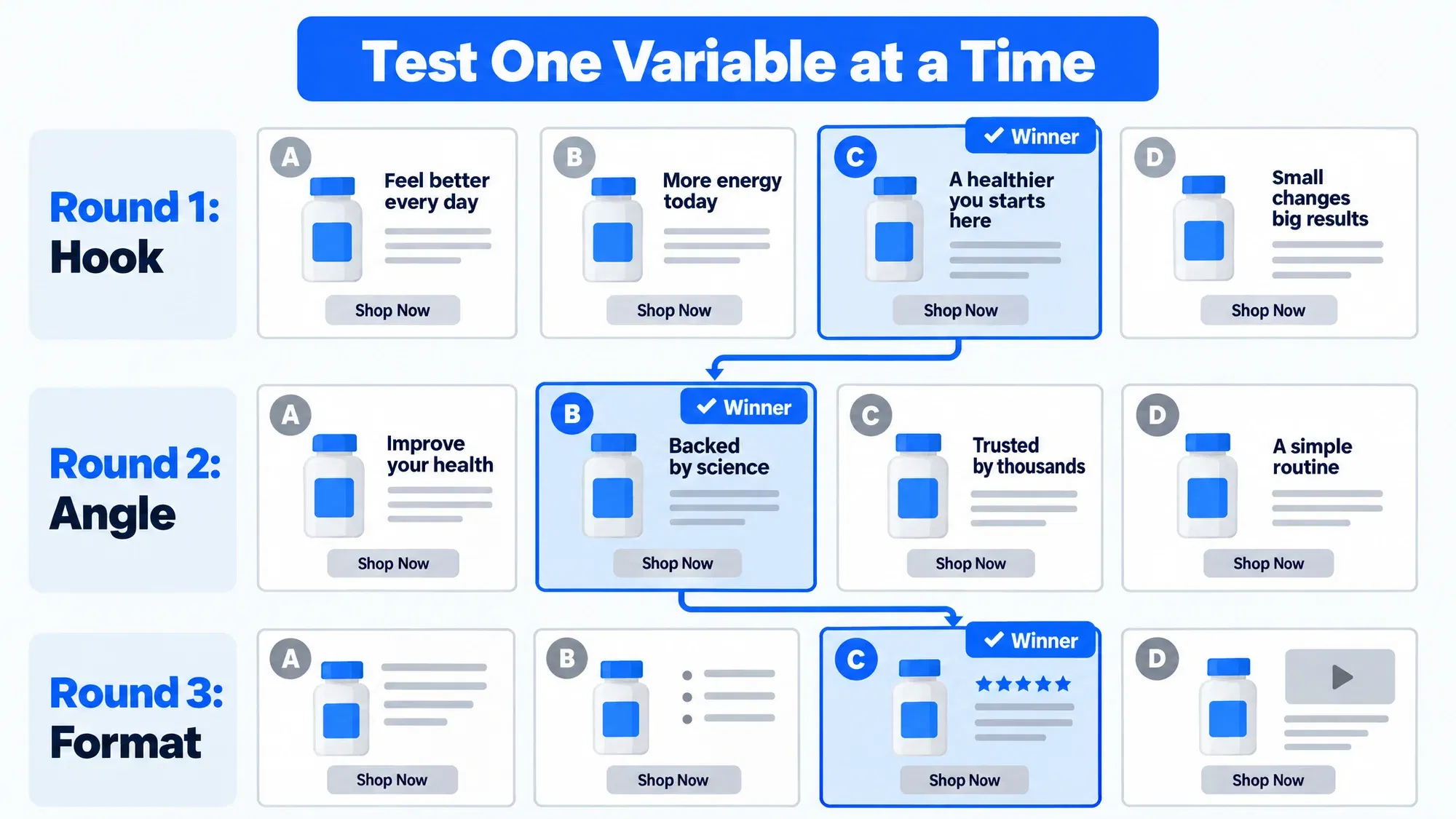
In practice that means same product, same offer, same format, same audience, and only the hook changes. Next round, lock the winning hook and vary the angle. Then vary the format. When a tool changes the hook, visual style, voiceover and aspect ratio all at once and one variant wins, you have learned exactly one thing: that specific file performed.
Unstructured output costs money too. You end up paying Meta to find a winner by brute force, with budget split across variants that differ in ways you never meant to test. Meta’s own guide to the learning phase says an ad set usually exits learning after about 50 results in the week after its last significant edit, and that significant edits restart learning. Spread thin across random variants, each ad set gathers fewer results, the signal thins out, and you spend more to reach the same conclusion.
Four questions are worth asking a vendor. Can I define the variable under test, or does the system decide? Does reporting attribute results to the variable, or only to the ad ID? Can I lock a winning element and iterate on the next layer? Does it recommend pausing losers automatically, and on what threshold? A platform built around testing should be able to show you the test log, not just the ad library. If the only evidence of testing is a folder of exported files, assume the testing is happening by accident.
Read every campaign by contribution margin, because return on ad spend is a revenue ratio that knows nothing about product cost, shipping, or the 20% code a customer applied at checkout. A 3x ROAS campaign on a discounted, low margin SKU can lose money on every order while looking like your best performer in the dashboard.
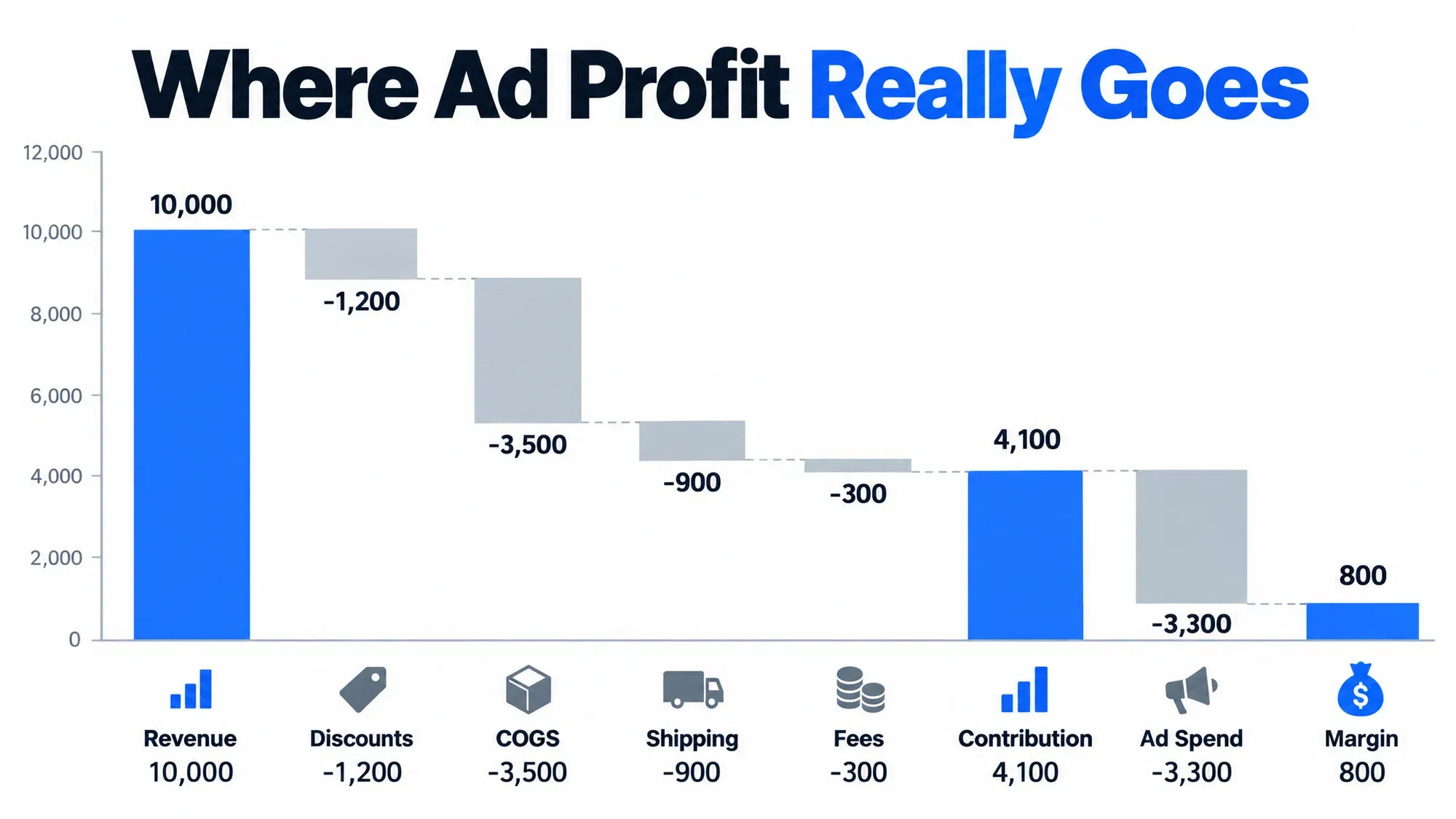
Here is the calculation you need per campaign, as an illustrative example:
That campaign reports a ROAS just above 3 and still clears only $800, or 8% of revenue. Let COGS and discounts together rise by eight points of revenue and it breaks even; any more and it loses money. That is how a store scales spend confidently into a loss. eCommerce Fastlane’s guide to revenue optimization beyond ads makes the same case for judging every channel on contribution margin and repeat purchase rather than first click ROAS.
So insist that any tool you buy, or your own reporting layer, can carry these fields: COGS per variant, discount applied per order, shipping and fulfillment cost, payment fees, returns rate, and blended customer acquisition cost across all channels. Blended CAC matters because platform reported conversions and Shopify orders will never fully agree. If a vendor cannot ingest COGS, it cannot tell you whether to scale. It can only tell you what happened, which you already knew.
Trial an AI ad generator for two weeks on one or two SKUs with real sales history, a hard budget cap, and kill and scale thresholds written before launch. A trial run on a demo store, on a brand new product, or without a stopping rule tells you nothing, so treat it like any paid media test, with the same discipline.
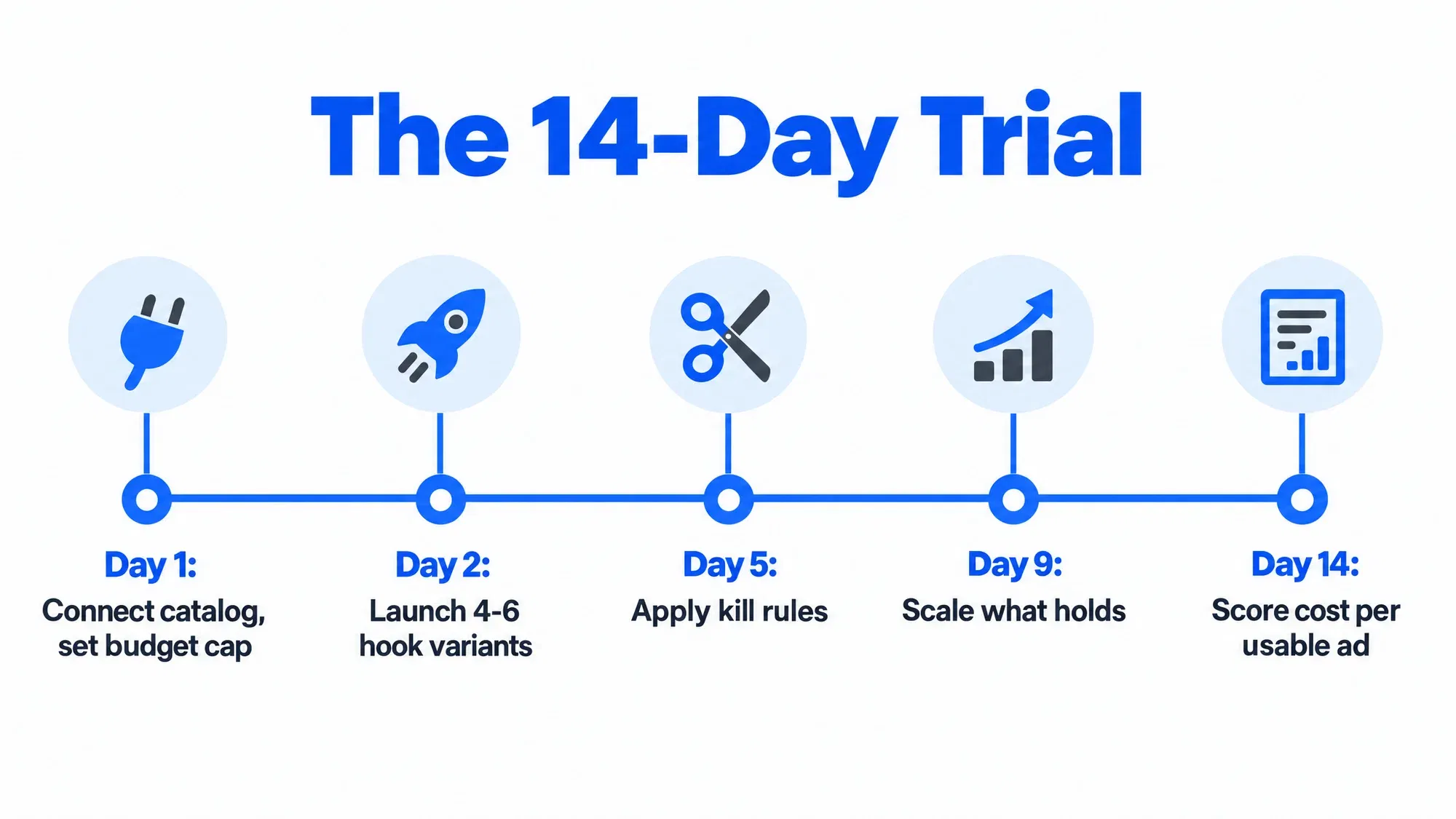
This protocol fits in 14 days:
Two weeks will not give you statistical certainty on conversion rate. It will give you a clear read on output quality, review burden, catalog accuracy and whether the testing structure produces anything you can act on, which is what you need to decide at this stage.
Do not sign anything until the trial is scored. A vendor that pushes for a contract before you have launched a single ad is telling you how confident it is in the output.
Cost per usable ad is what you spend, in subscription and review time, to get one creative that passes brand review and actually goes live, and it is the only fair way to compare AI ad tools. Pricing pages quote a monthly fee and a credit count. Neither is the cost that matters.
The formula: cost per usable ad equals the monthly subscription plus the cost of editing and review time, divided by the number of ads approved and launched that month. Value your team’s time honestly. If your creative lead costs $50 an hour fully loaded, use that number, because time spent fixing AI output is a real cost that never appears on an invoice.
Here is an illustrative comparison of two hypothetical tools, valuing review time at $50 an hour:
In this example the $49 tool costs about four times more per usable ad, and its eight launchable creatives fall at the bottom of the four to eight concept floor from Job 1, with nothing left over for variants. The sticker price was the least informative number on the page. Fastlane’s guide to choosing an AI image generator for a Shopify store runs the same cost per usable image test on static visuals, and the logic transfers directly.
Run the same math across your real options. Manual production with a freelance editor usually costs more per finished ad, with the highest quality and the slowest turnaround. Generic AI template tools sit low on subscription and high on review time. Integrated platforms aim to cut the review time side of the equation, which only pays off if the approval rate holds up on your own catalog. Verify it in the trial rather than taking it on trust, whichever vendor is making the claim.
Seven red flags reliably predict a cancelled AI ad tool subscription three months in: no real Shopify catalog connection, a single format, an annual contract before a trial, no margin fields, stock-looking output, test reporting by ad ID only, and turnaround measured in days. Any one of them is a conversation. Three of them is a no.
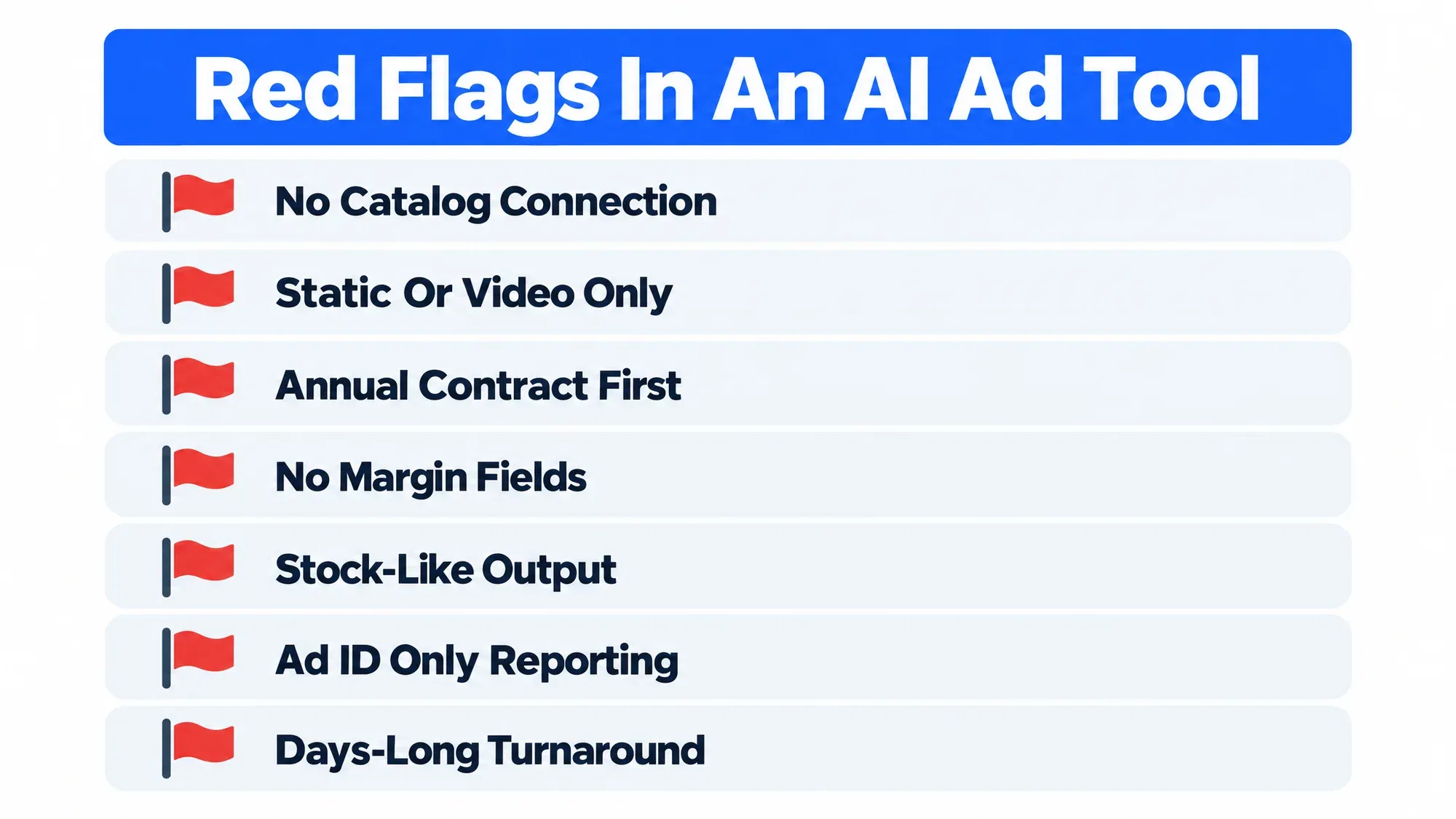
No real Shopify catalog connection. URL scraping or manual CSV upload means prices, variants and stock status drift out of sync.
Static only, or video only. You need both, because Meta’s delivery works best with varied creative and TikTok needs native feeling video.
An annual contract demanded before a trial. A tool confident in its approval rate lets you prove it on one SKU first.
No COGS or margin fields anywhere in reporting. Without them, you cannot safely scale.
Output that feels like stock. If three stores in your category would be happy with the same asset, it is not on-brand.
Test reporting by ad ID only. No variable attribution means no transferable learning.
Turnaround measured in days. If a refresh cycle takes a week, you will always be behind fatigue.
A fair word on the alternative: manual production still wins in specific cases, such as founder led storytelling, a complex technical product, or creative that is itself the differentiator. There, a good freelance editor and real customer footage will outperform any generator. Many brands run both, using AI for testing volume and iteration and people for hero assets and brand films.
The right AI ad tool for a Shopify store depends mostly on monthly ad spend and who does the work: DIY tools under about $5K a month, point tools or an entry level platform from $5K to $50K, and an integrated platform with margin reporting above $50K.
Under $5K a month. Build in Canva or CapCut, add an occasional freelancer, and use free Shopify app plans for quick static and UGC style variants. The Shopify App Store has options with free plans that create Meta, Instagram, Google and TikTok creative, including UGC style AI video ads (see a Shopify App Store AI ads app listing), which is a reasonable way to test the category before paying anything. For copy, Shopify’s built-in Shopify Magic for product descriptions is already in your admin. Do not buy testing infrastructure you cannot feed.
$5K to $50K a month. Point tools for specific formats (video generators, UGC style tools, design tools) or an entry level integrated platform fit here. Fastlane’s comparison of AI video generators for ads by format and stage is a useful map of the point tool options. The risk is sprawl: three subscriptions that do not talk to each other create more review work, not less.
$50K and up. An integrated platform that connects catalog, creative generation, structured testing and margin reporting in one place earns its cost here. Options range from agency style managed services to self-serve software; Larven, this guide’s contributor, is one of the self-serve platforms in this tier. Judge any of them on the four jobs and the cost per usable ad math, not the positioning, and insist on COGS-aware reporting and a real trial before an annual commitment.
Whatever you pick, re-score it after 90 days. Creative fatigue is permanent, your catalog changes, and the tool that fit at $20K a month in spend often does not fit at $80K.
Yes, several AI tools generate video ads from a Shopify product URL by pulling the images, title and description from the page. The output is only as good as your product photography, so strong images matter more than the tool. A pasted link is also weaker than a live catalog connection, because prices and variants can drift out of sync after the ad ships. Many of these tools can produce UGC style video too, which needs only your product images or short clips and no studio. Those ads work best for simple, visual products and still benefit from real customer footage mixed in, so they do not feel synthetic.
There is no single best free AI ad generator for Shopify, but the Shopify App Store lists apps with free plans that create ad creative for Meta, Instagram, Google and TikTok. Free tiers are good for judging output style and learning what kind of creative your audience responds to. They rarely include structured testing, variable level reporting or margin data, which become the bottleneck once spend grows past a few thousand dollars a month. Start free, log how many generated ads you would actually launch, and move to a paid plan only when that number shows the tool would save you real review time.
Most AI ad generators connect to Meta and Google Ads through the platforms’ official APIs, pushing creative into campaigns and reading back performance data. The important question is whether the integration is one way publishing or two way. Reading results back is what makes automatic pausing of losers and variable level test attribution possible. Some tools also auto-publish to TikTok and other channels. Before you switch on auto-publishing anywhere, set a human review step and a kill threshold, because unattended posting can push off-brand creative or inaccurate pricing live without anyone noticing until customers do.
No, AI-generated ads do not inherently perform better than manually created ones. AI wins on volume and speed, which matters because creative fatigue forces a constant refresh, while human-made assets usually win on storytelling and on explaining complex products. Most stores do best with a mix: AI for testing volume and iteration, and people for hero assets and brand films. Judge both on the same two numbers, cost per usable ad and contribution margin, rather than on how impressive the first draft looks. If an AI tool cannot beat your manual process on those numbers during a capped trial, it is not the right tool yet.
AI ad creation tools for a small Shopify store range from free entry plans to paid subscriptions, with mid tier and platform options running higher. Sticker prices are a poor guide, though. Divide the subscription plus the cost of your review and editing time by the number of ads you actually approved and launched that month. That cost per usable ad is the figure that reflects real cost, and a cheap tool with a low approval rate can work out several times more expensive than a pricier one. Run the calculation during a two week trial before committing to any annual plan.
Shopify includes built-in AI features, under the Shopify Magic name, for generating product descriptions and marketing copy inside the admin. They are useful for drafting product page and email text quickly and in a consistent tone. They are not a full ad creative system, though. For multi-variant ad creative, structured testing across hooks and formats, and margin-aware reporting, most merchants still add a dedicated app or platform. A sensible order is to use the built-in copy tools first, then add an ad tool only when creative volume, not copywriting, is what limits your campaigns.